













How many pips can the market move against you before a stop out? You can work it out without a calculator tool.
Take account balance minus (required margin x stop out level) and divide by the value of one pip. With JPY 100,000, 1:1000 leverage, 1 lot of USD/JPY and a 20% level, that is about 97 pips.
Below are the steps, quick reference tables and the levels of 10 brokers including HFM and Exness, each with its check date (as of 30 October 2026). Plug in your own numbers and the answer follows.
Summary: the stop out distance is balance minus margin x level
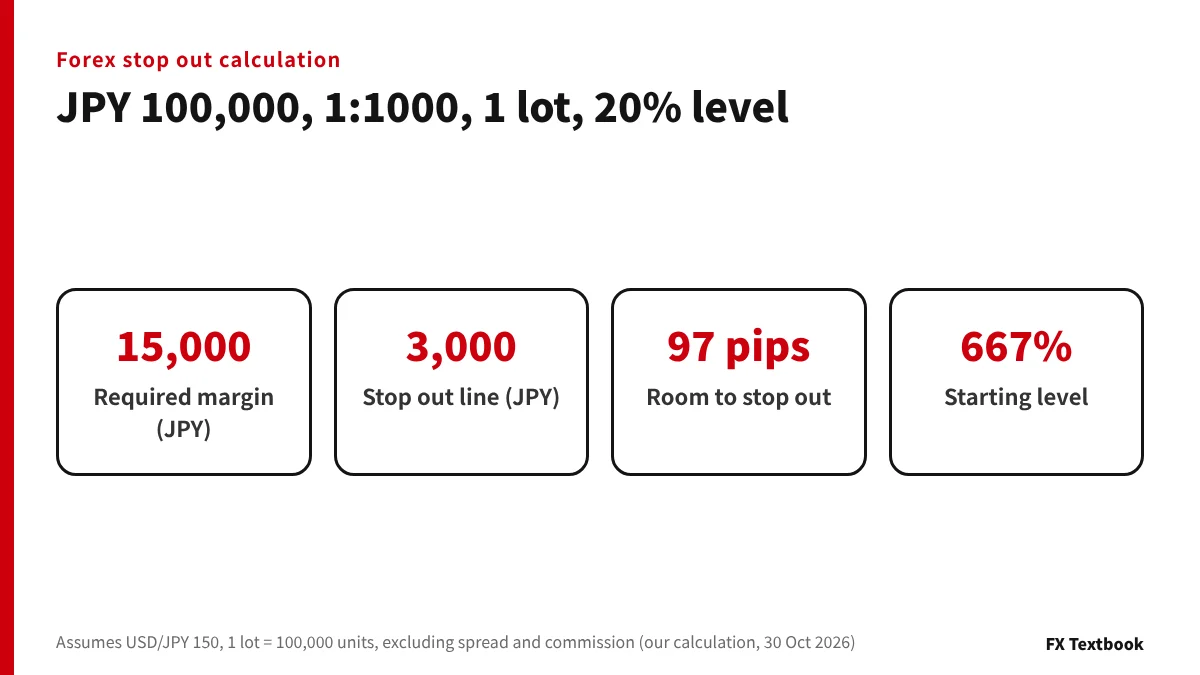
- Required margin = lots x 100,000 units x rate / leverage
- Stop out line = required margin x stop out level
- Loss you can absorb = account balance - stop out line
- Pips you can absorb = loss you can absorb / value of one pip
- Lot size moves the distance far more than leverage does
| Broker (account, leverage) | To warning or notice | To stop out (SO) |
|---|---|---|
| HFM (PREMIUM, 1:2000) | MC 50%: 96.25 pips | SO 20%: 98.5 pips |
| Axi (MT4/MT5, 1:1000) | Notice at 100%: 85 pips | SO 20%: 97 pips |
| Exness (Standard, 1:2000) | MC 60%: 95.5 pips | SO 0%: 100 pips |
Across the three brokers the distance to a stop out is 97 to 100 pips, only 3 pips apart. The bigger differences are where the warning comes and how much is left after the close. Axi tops out at 1:1000, so its required margin is larger than at the two 1:2000 brokers.
If prices jump, positions can be closed at a worse price than the stop out level. Forex and CFD trading can lose some or all of the money you deposit.
Stop out formula: four steps to the pips you can absorb
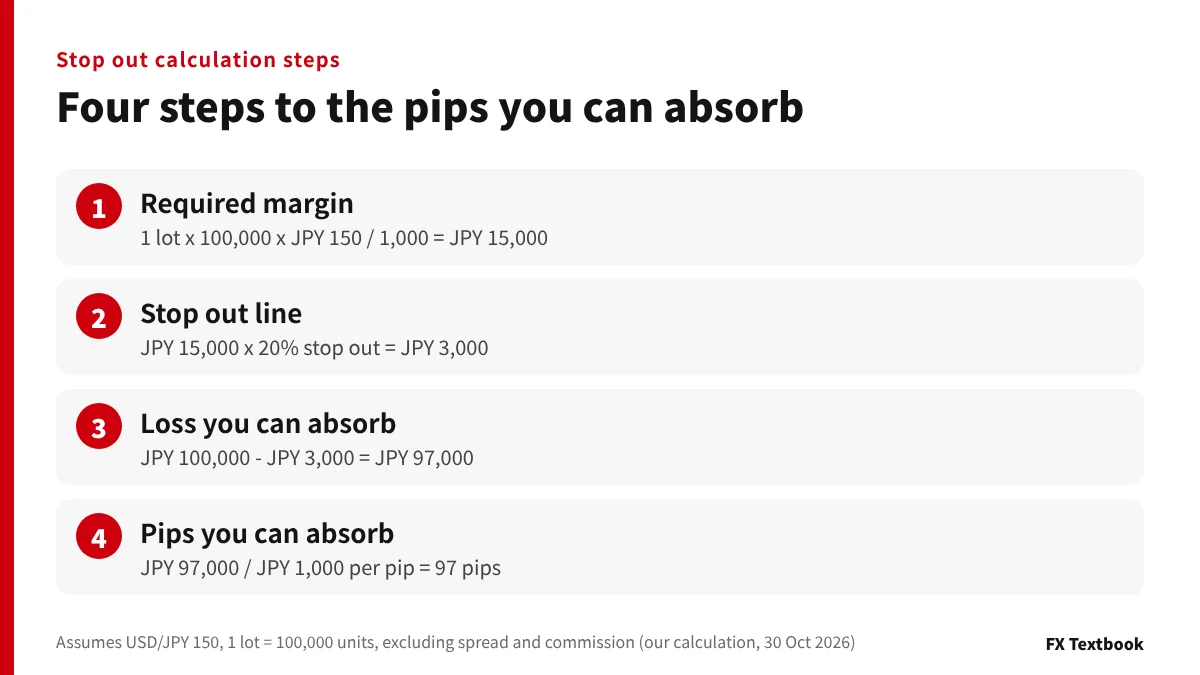
You need five numbers: account balance, leverage, lot size, price and the stop out level. All of them appear in the trading platform or on the broker's account page.
- 01Work out required margin
1 lot x 100,000 units x JPY 150 / 1,000 = JPY 15,000. This is the money held in the account while the position is open.
- 02Work out the stop out line
JPY 15,000 x 20% = JPY 3,000. Positions are closed once equity (balance plus floating profit or loss) falls to this amount.
- 03Work out the loss you can absorb
JPY 100,000 - JPY 3,000 = JPY 97,000. A stop out happens when the floating loss reaches this amount.
- 04Convert it to pips
On USD/JPY one pip on 1 lot is JPY 1,000. JPY 97,000 / JPY 1,000 = 97 pips.
The starting margin level is JPY 100,000 / JPY 15,000 x 100, about 667%. A stop out comes when it falls to 20%.
The required margin formula matches the MetaQuotes help page: lots x contract size / leverage. Its example gives EUR 1,000 for 1 lot of EURUSD at 1:100.
Subtract spread and commission first
A new position starts with a floating loss equal to the spread. With a 1.4 pip spread, the real room is 97 - 1.4 = 95.6 pips. On accounts with commission, convert the round-turn charge to yen and take it off the loss you can absorb first.
Pips, lots and required margin: formulas and a leverage reference table →
Quick reference: pips to stop out by balance and lot size
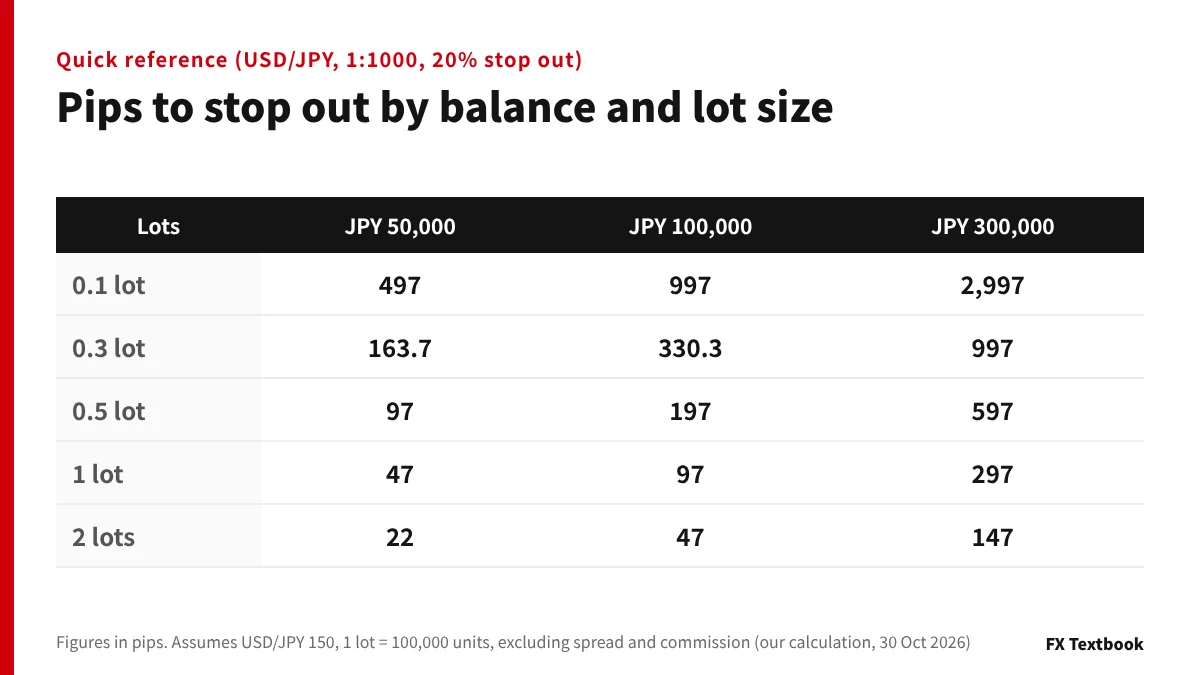
Each figure is how far the price can move against you before a stop out, in pips.
| Lots | JPY 50,000 | JPY 100,000 | JPY 300,000 |
|---|---|---|---|
| 0.1 lot | 497 pips | 997 pips | 2,997 pips |
| 0.3 lot | 163.7 pips | 330.3 pips | 997 pips |
| 0.5 lot | 97 pips | 197 pips | 597 pips |
| 1 lot | 47 pips | 97 pips | 297 pips |
| 2 lots | 22 pips | 47 pips | 147 pips |
With JPY 50,000 and 1 lot, a 47 pip (JPY 0.47) move closes the position. With the same balance and 0.1 lot, the room is 497 pips.
JPY 50,000 with 0.5 lot and JPY 100,000 with 1 lot both give 97 pips. What sets the distance is the ratio of balance to lot size.
At 160, required margin on 1 lot becomes JPY 16,000.
How leverage and the stop out level change the distance
Higher leverage is often said to protect you from a stop out. Compared in numbers, the difference is small.
| Leverage | 0.1 lot | 1 lot |
|---|---|---|
| 1:2000 | 998.5 pips | 98.5 pips |
| 1:1000 | 997 pips | 97 pips |
| 1:500 | 994 pips | 94 pips |
| 1:100 | 970 pips | Cannot open |
Between 1:2000 and 1:500 the gap is only 4.5 pips even on 1 lot. At 1:100, 1 lot needs JPY 150,000 of margin, so a JPY 100,000 account cannot open it.
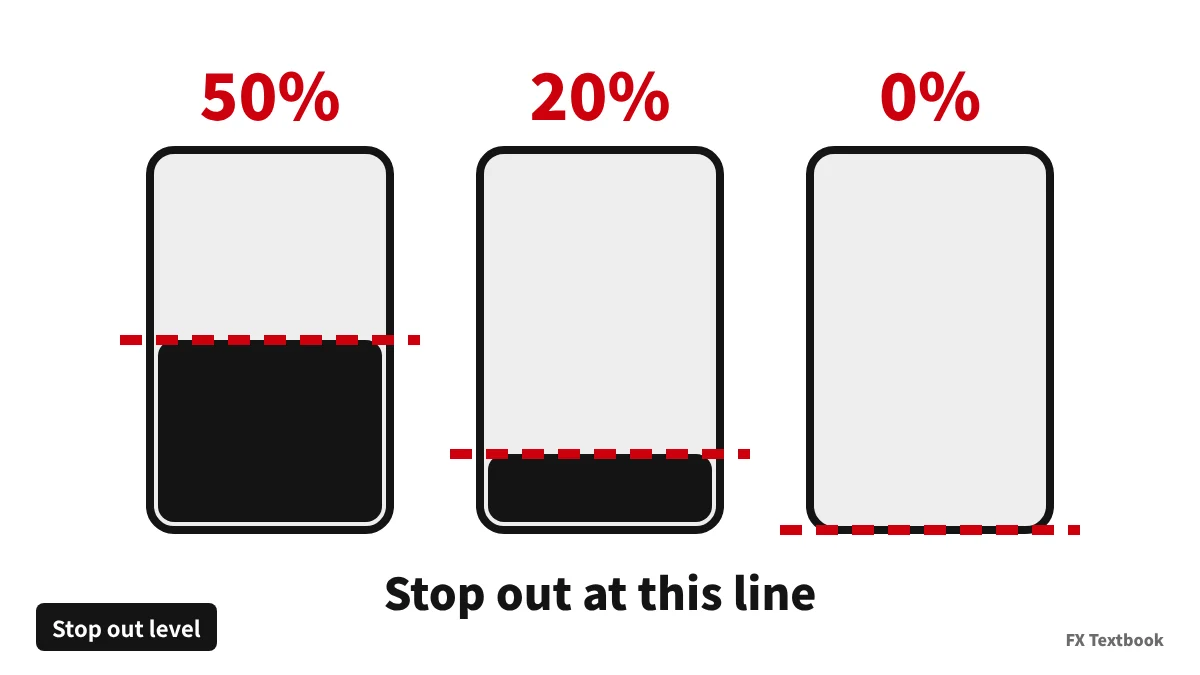
A lower level gives more room but leaves less money
| Lots | To 50% | To 20% | To 0% |
|---|---|---|---|
| 0.1 lot | 992.5 pips | 997 pips | 1,000 pips |
| 0.5 lot | 192.5 pips | 197 pips | 200 pips |
| 1 lot | 92.5 pips | 97 pips | 100 pips |
| 2 lots | 42.5 pips | 47 pips | 50 pips |
| Left at stop out (1 lot) | JPY 7,500 | JPY 3,000 | JPY 0 |
One pip on 1 lot is JPY 1,000 at any leverage. Lot size decides how large the loss is. A 0% account gives more room but leaves almost nothing in the account after a stop out.
Zero cut explained: what happens if a stop out is too late and the balance goes negative →
Compared with Japanese domestic forex: the 25x leverage cap
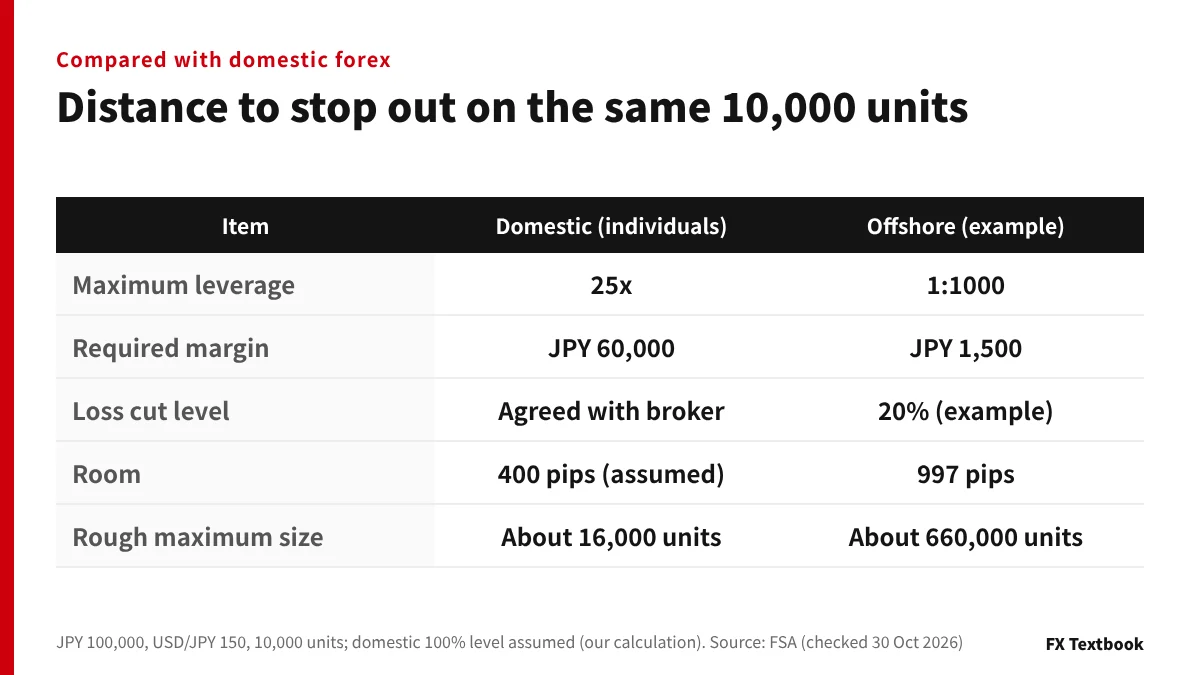
Domestic Japanese brokers must collect at least 4% of the trade value as margin from individuals. The Financial Services Agency explains that this equals leverage of 25x or less.
| Item | Domestic (individuals) | Offshore (example) |
|---|---|---|
| Maximum leverage | 25x | 1:1000 |
| Margin for 10,000 units | JPY 60,000 | JPY 1,500 |
| Loss cut level | Agreed with the broker | 20% (example) |
| Room | 400 pips (100% level assumed) | 997 pips |
| Rough maximum order size | About 16,000 units | About 660,000 units |
On the same 10,000 units, the smaller margin at an offshore broker puts the stop out further away. Assuming a 50% domestic level, the room is 700 pips.
At 1:1000, a JPY 100,000 account can open about 660,000 units. Unless you keep the lot size down yourself, the room shrinks fast.
The Financial Services Agency says brokers set loss cut rules to stop losses growing. The level is agreed with the broker, and in sharp moves losses can exceed the margin deposited.
Finding the stop out price for buy and sell positions
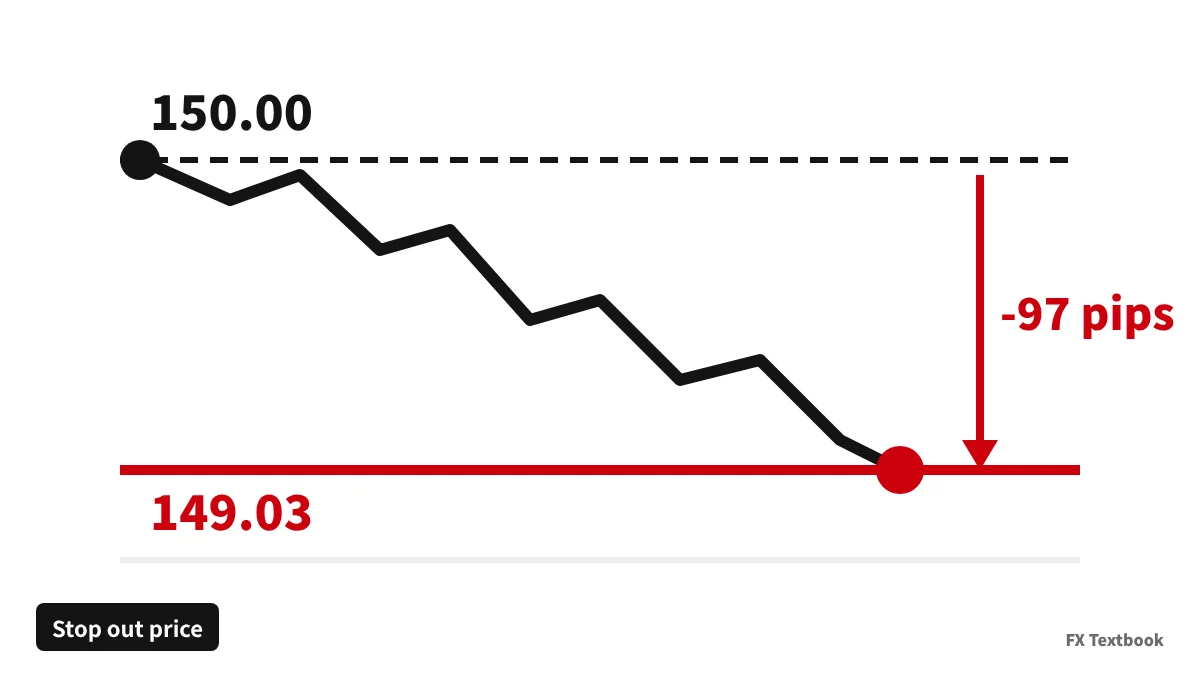
- Buy: entry price - pips you can absorb x 0.01
- Sell: entry price + pips you can absorb x 0.01
- EUR/USD and similar: one pip is 0.0001, applied the same way
| Order | Room | Stop out price |
|---|---|---|
| Buy 1 lot USD/JPY at 150.00 | 97 pips | 149.03 |
| Sell 1 lot USD/JPY at 150.00 | 97 pips | 150.97 |
| Buy 1 lot EUR/USD at 1.1000 | 64.5 pips | About 1.0936 |
A buy position is valued at the bid price. When the spread widens the bid falls, so the stop out line can be reached before your calculated price.
If prices move a lot over the weekend, Monday can open beyond your stop out price. Treat the calculated price as a guide to roughly where positions are closed.
Stop out calculation for USD-quoted pairs and gold
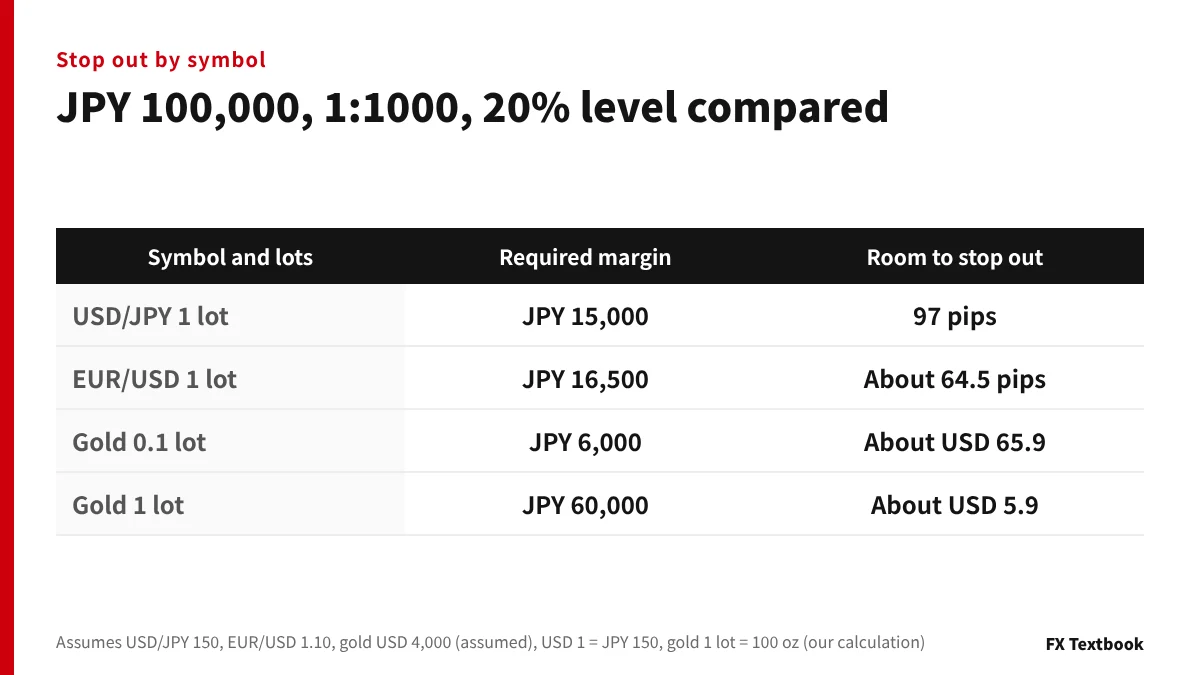
For pairs where the right-hand currency is not the yen, such as EUR/USD, there is one extra step: converting dollars to yen.
| Item | EUR/USD 1 lot (1.10) |
|---|---|
| Trade value | USD 110,000 = JPY 16.5 million |
| Required margin (1:1000) | JPY 16,500 |
| Stop out line (20%) | JPY 3,300 |
| Loss you can absorb | JPY 96,700 |
| Value of one pip | USD 10 = JPY 1,500 |
| Room | About 64.5 pips |
Because one pip is worth JPY 1,500, the room is 64.5 pips, shorter than the 97 pips on USD/JPY. The yen value of the loss also shifts when USD/JPY moves.
Work gold out in dollars moved, not pips
One pip on gold is USD 0.1 at some brokers and USD 1 at others. To avoid mixing them up, calculate in dollars moved.
| Lots | Required margin | Move you can absorb |
|---|---|---|
| 0.01 lot (1 oz) | JPY 600 | About USD 665.9 |
| 0.1 lot (10 oz) | JPY 6,000 | About USD 65.9 |
| 1 lot (100 oz) | JPY 60,000 | About USD 5.9 |
On 1 lot, a fall of about USD 5.9 is enough for a stop out.
The table assumes 1 lot = 100 oz at 1:1000. At XMTrading, GOLD is 1000x and the 24-hour GOLD24-7 is 250x (checked 29 October 2026).
Margin call and stop out levels by broker: HFM, Axi, Exness and more
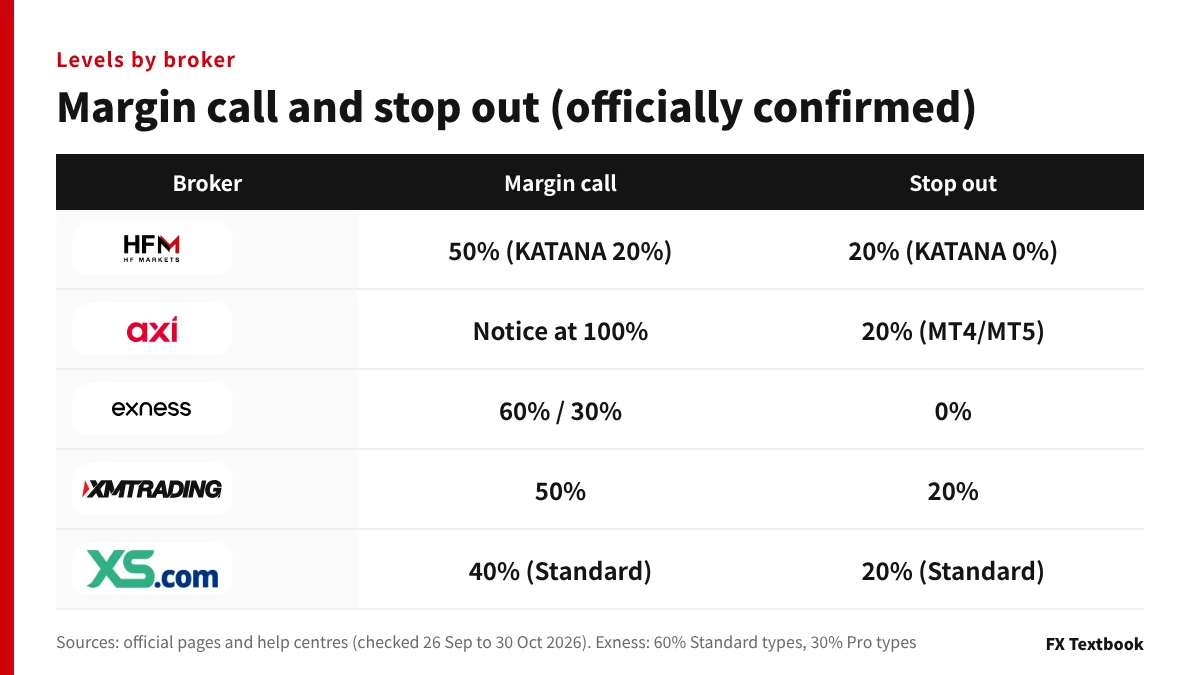
| Broker | Margin call | Stop out | Checked |
|---|---|---|---|
| HFM | 50% (KATANA 20%) | 20% (KATANA 0%) | 26 Sep 2026 |
| Axi | Notice at 100% | 20% (MT4/MT5) / 50% (Axi Trading Platform) | 30 Oct 2026 |
| Exness | 60% (Standard types) / 30% (Pro types) | 0% (all 5 accounts) | 30 Oct 2026 |
| XMTrading | 50% | 20% (4 accounts) | 29 Oct 2026 |
| XS | 40% (Standard) | 20% (Standard) | 30 Oct 2026 |
| AXIORY | 50% (Max 30%) | 20% (Max 0%) | 17 Oct 2026 |
| Monaxa | 50% (labelled loss cut) | 20% | 2 Sep 2026 |
| INFINOX | 50% (varies by account group) | 20% (same) | 30 Oct 2026 |
| Vantage Trading | 30% (Premium) | 0% (Premium) | 15 Sep 2026 |
| DecodeFX | Not published | Not published | 17 Oct 2026 |
Axi's help centre says it sends a margin call notice when the margin level falls below 100%. It does not guarantee that the notice arrives.
Positions are liquidated at 20% on MT4 and MT5 accounts and at 50% on the Axi Trading Platform (help centre, checked 30 October 2026). The product schedule effective 6 October 2026 also sets a 20% liquidation level for Standard, Premium and Elite accounts.
At Exness, clients registered with the Kenya or Jordan entities have a 20% stop out, and shares can be raised to 100%. Monaxa bonus accounts use 30%.
When account type and leverage limits change the result
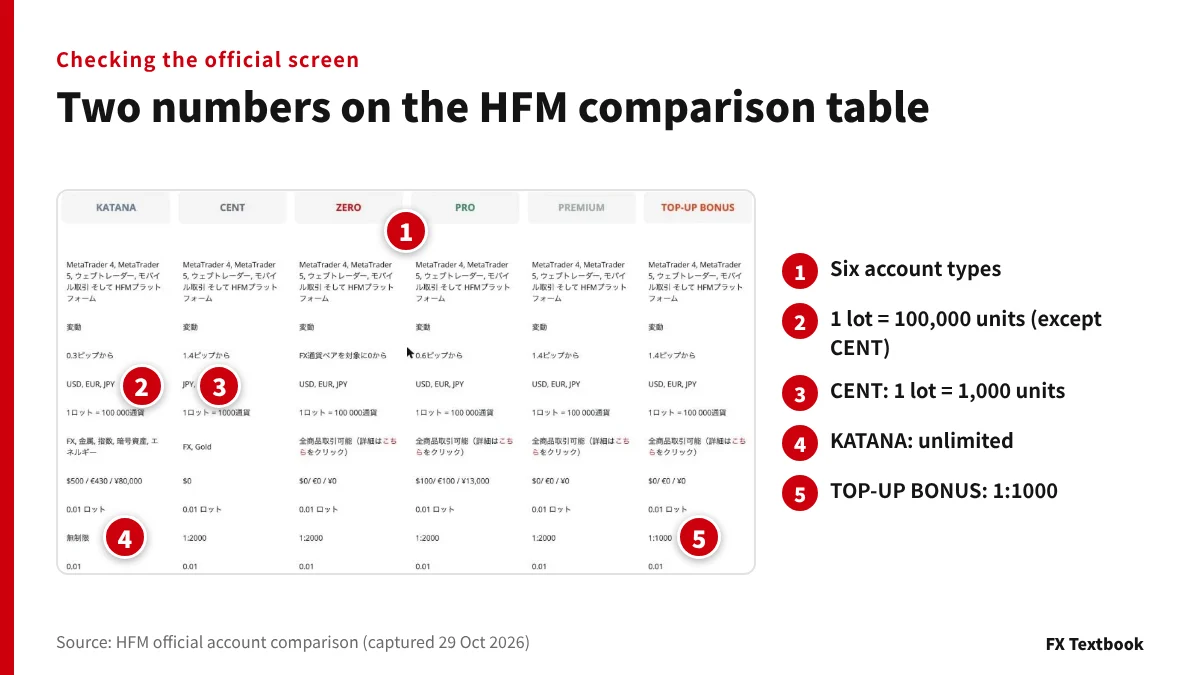
Before calculating, check the units per lot and the maximum leverage of your account. On the HFM comparison table both appear on a single row each.
- Units per lot: 100,000 on the five accounts other than CENT, 1,000 on CENT
- Maximum leverage: unlimited on KATANA, 1:1000 on TOP-UP BONUS, 1:2000 on the other four
- On CENT, one pip of USD/JPY per lot is JPY 10, one hundredth of a standard lot
Put JPY 10,000 into an HFM CENT account and hold 1 lot (1,000 units) at 1:2000: required margin is JPY 75. With a 20% stop out, the room is 998.5 pips.
When leverage drops automatically
| Broker | Trigger | After the drop |
|---|---|---|
| Exness | Equity of USD 30,000 or more | 1:1000 (1:500 from USD 100,000) |
| Exness | Orders opened 15 min before to 90 sec after key news | 1:200 on forex |
| XMTrading | Total equity above USD 40,000 | 1:500 (then 1:200 and 1:100) |
| AXIORY | Equity across all accounts above JPY 300,000 | Max account loses 1:2000 |
Open 1 lot at Exness between 15 minutes before and 90 seconds after key news and, at 1:200, required margin is JPY 75,000. The 0% stop out still gives 100 pips, but the 60% margin call arrives after 55 pips.
If you add orders before news, recalculate at the reduced leverage.
Hedged and multiple positions: calculate on the net lots
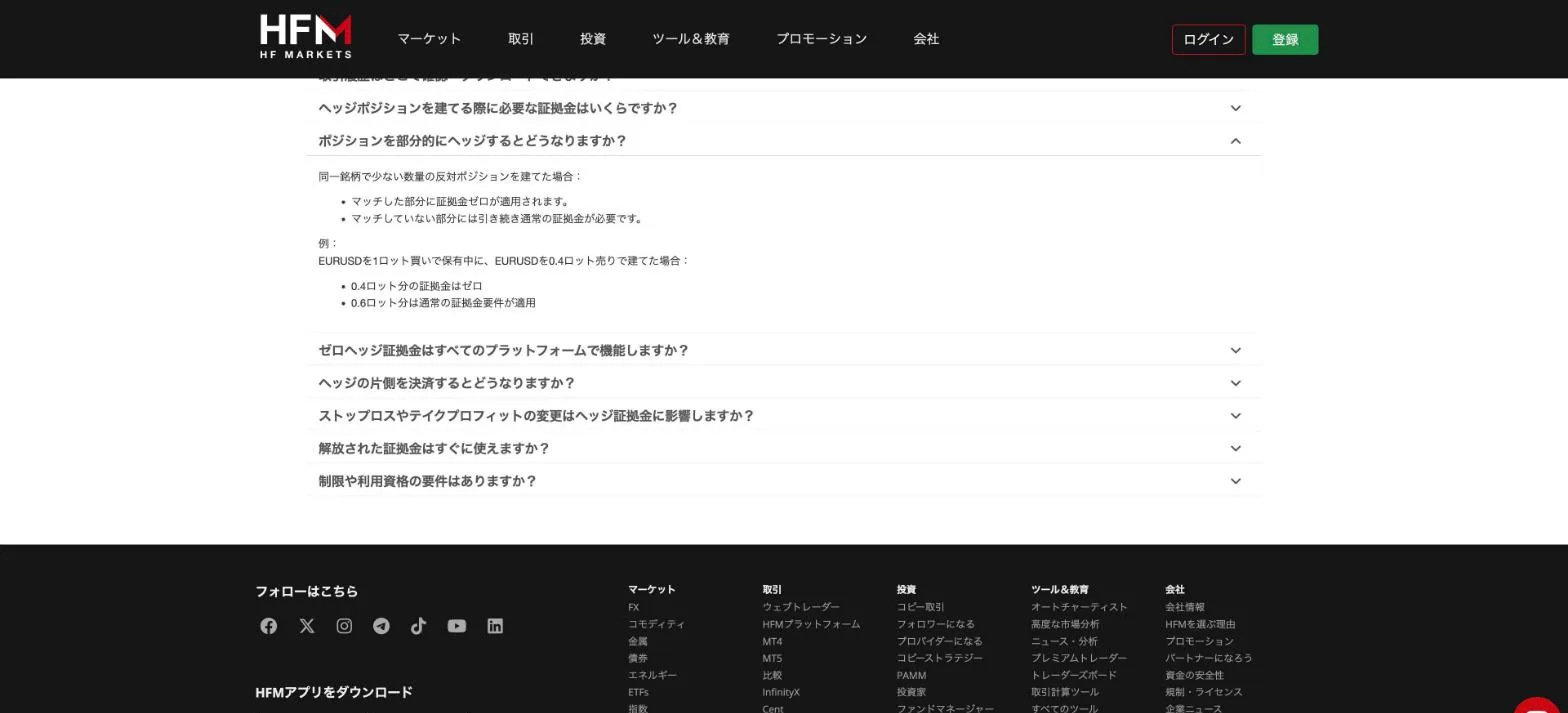
Holding a buy and a sell on the same symbol changes the margin. HFM's FAQ says the margin on the matched volume is zero.
- Fully hedged: margin on the matched volume is zero (HFM)
- Partly hedged: normal margin applies to the unmatched volume
- One side closed: the rest returns to normal margin at once
- Exness also sets margin on fully balanced hedges at 0%
| Item | USD/JPY buy 1 lot + sell 0.4 lot |
|---|---|
| Net lots | 0.6 lot (buy) |
| Required margin (1:1000) | JPY 9,000 |
| Stop out line (20%) | JPY 1,800 |
| Value of one pip | JPY 600 |
| Room | About 163.7 pips |
With several pairs open, add up all required margin and floating profit or loss to get the margin level. MT5 shows the total on screen.
Spread and swap apply to both sides while hedged. Many brokers prohibit hedging across accounts or with another broker.
Prohibited trading at offshore brokers: where hedging is allowed and where it is banned →
Stop out calculation on accounts with bonus credit
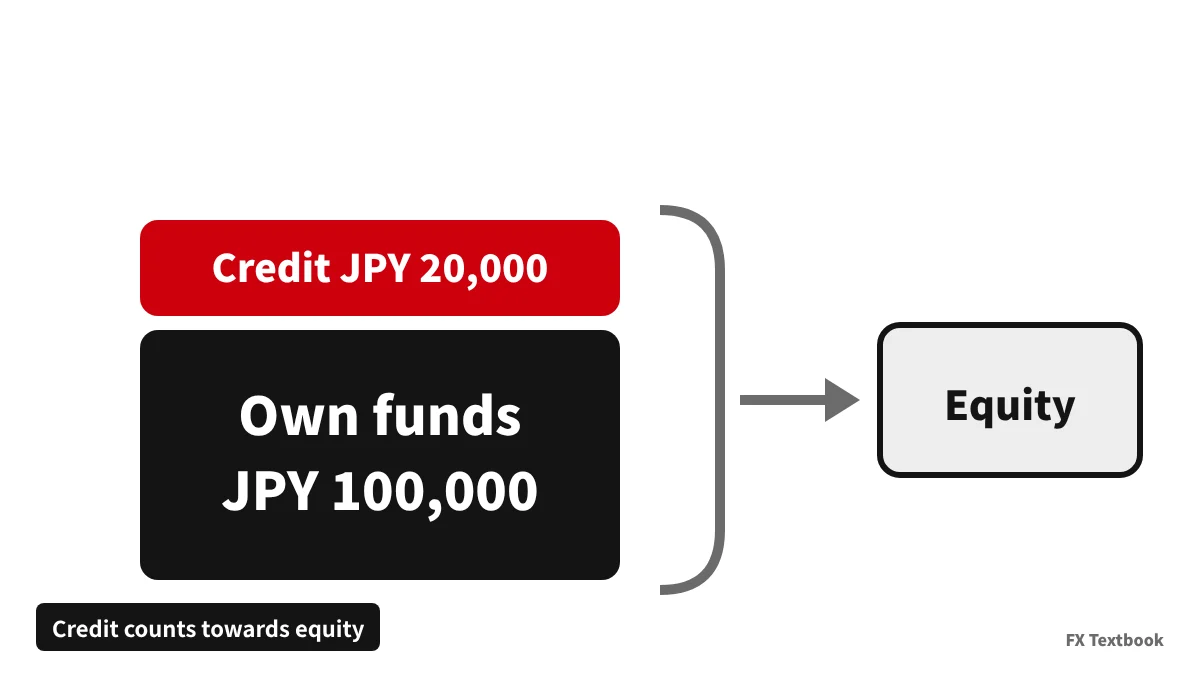
The MT5 help page defines equity as balance + credit - commission +/- floating profit or loss. Where credit is included, the margin level shows higher by that amount.
| Case | Equity | Room |
|---|---|---|
| JPY 100,000 own funds only | JPY 100,000 | 97 pips |
| JPY 100,000 + JPY 20,000 credit | JPY 120,000 | 117 pips |
Whether credit absorbs losses depends on the bonus type. Check the terms to see which of these applies.
- Cushion type: credit keeps absorbing losses after your own funds run out
- Withdrawn type: credit is removed once the cash balance goes negative
- Noted type: INFINOX notes that credit does not prevent a stop out
If credit disappears through a withdrawal or an internal transfer, the margin level drops sharply. Plan on the 97 pips that your own funds give you.
Bonus cushion explained: how credit enters the margin level, with worked numbers →
Checking it on screen: the MT5 Trade tab shows the margin level
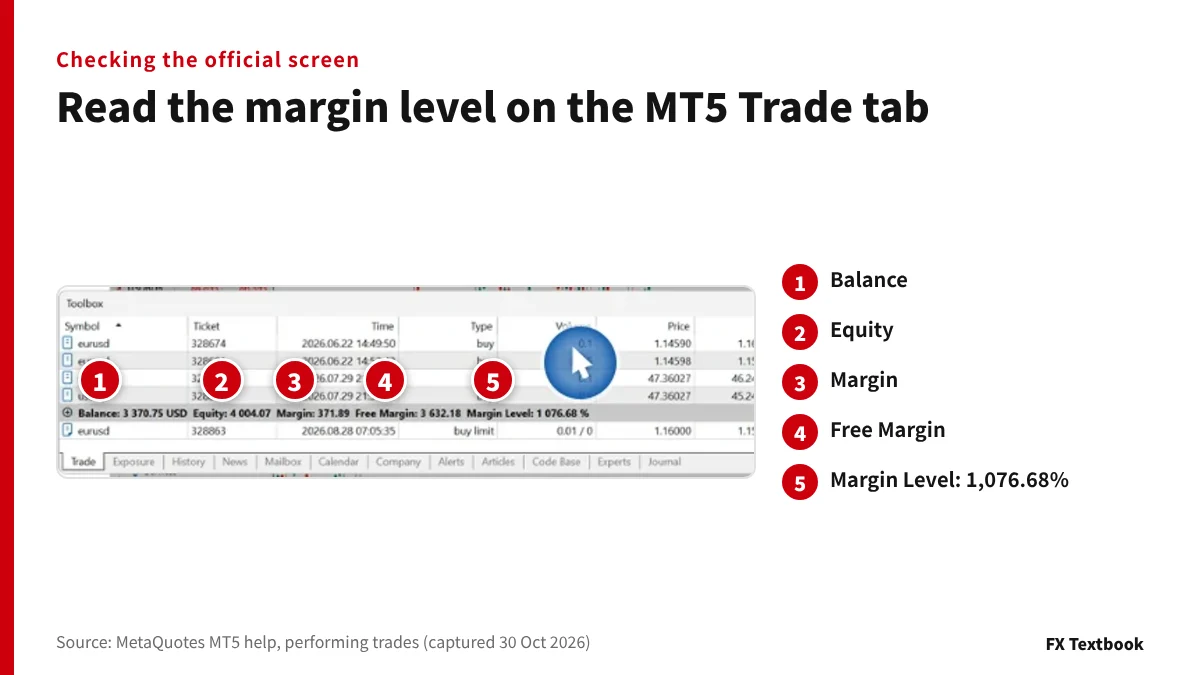
You can check your numbers on the Trade tab of the MT5 Toolbox. Below the list of positions, the account status appears on one line.
| Marker and label | Meaning | Help page example |
|---|---|---|
| 1 Balance | Balance including closed results | USD 3,370.75 |
| 2 Equity | Balance + credit +/- floating P/L | USD 4,004.07 |
| 3 Margin | Amount needed to hold positions | USD 371.89 |
| 4 Free Margin | Equity - margin | USD 3,632.18 |
| 5 Margin Level | Equity / margin x 100 | 1,076.68% |
Checking the official example, 4,004.07 / 371.89 x 100 = 1,076.68%, which matches the screen.
- 01Open the Trade tab
If the Toolbox is hidden, open it from the View menu.
- 02Read the margin level at 5
Compare it with the broker's margin call and stop out levels.
- 03Use 3 and 2 to get the room
2 minus 3 x level is the loss you can absorb. Divide by the value of one pip.
The account status line turns red when the account is in margin call or stop out (MT5 help).
Our view: stop it with a stop loss before a stop out
To move the stop out further away, cut the lot size rather than raise leverage. A 0% account (Exness, HFM KATANA) gives the most room but leaves nothing at stop out. To keep a balance, use a 20% account and set a stop loss first.
At brokers that do not list a level on their official pages, such as DecodeFX, confirm your account's level in the platform or with support before you calculate.
A stop out is the last resort, just before the account runs out of money. To stop at an amount you choose, place a stop loss when you open the order.
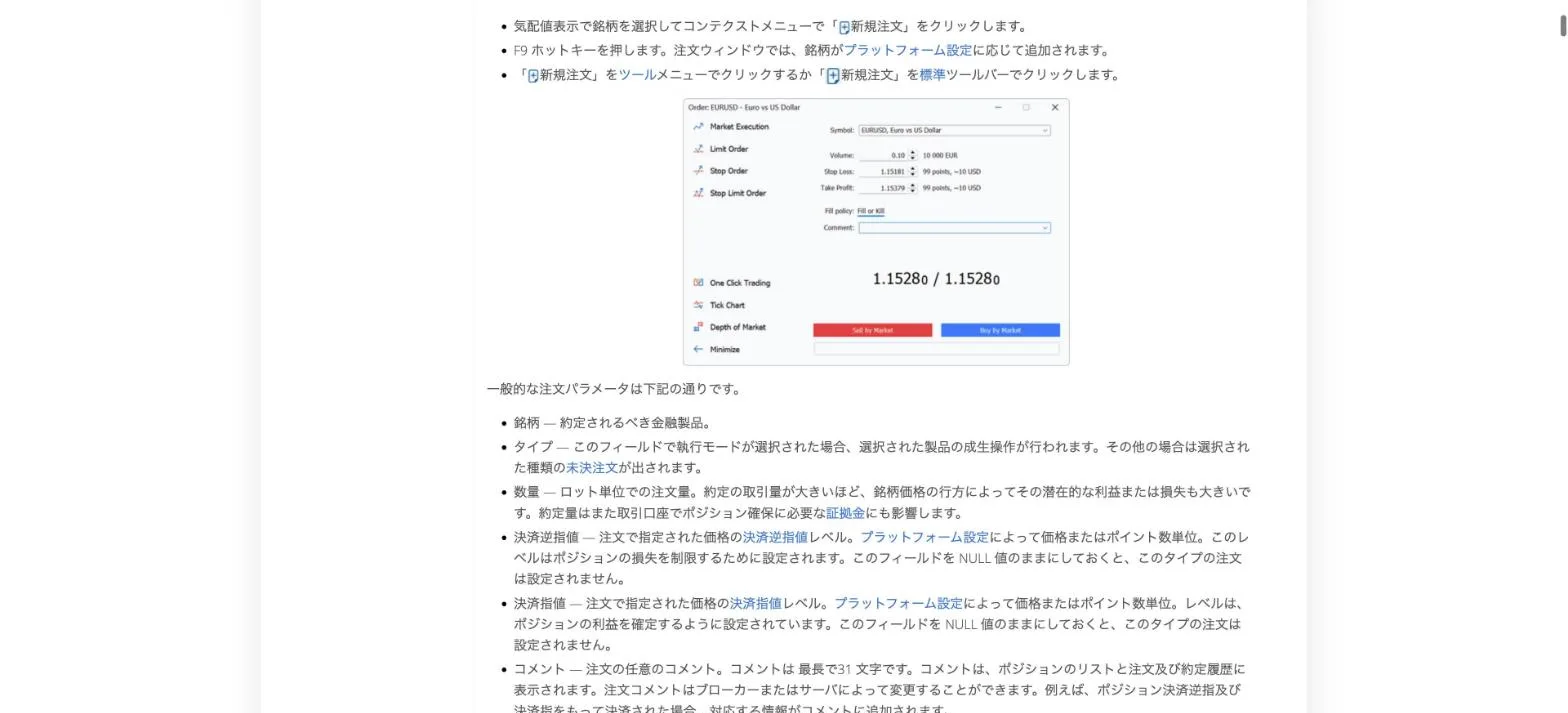
The MT5 order window has fields for volume, stop loss and take profit. In the help page screen, a 0.10 lot stop loss shows as 99 points, about USD 10.
- 01Decide how much one trade may lose
Example: JPY 2,000 of a JPY 100,000 balance. The ratio is only an example and differs by person.
- 02Decide the stop distance
Example: 20 pips on USD/JPY, placed where the chart suggests.
- 03Work back to the lot size
JPY 2,000 / 20 pips = JPY 100 per pip, which is 0.1 lot on USD/JPY.
- 04Check the stop out is far away
At 0.1 lot a JPY 100,000 account has 997 pips, far beyond the 20 pip stop.
- If the margin level falls, reduce the lot size by closing part of it
- Adding funds only buys time; continued losses bring you back
Forex money management: sizing lots from the loss per trade →
Frequently asked questions
Q. How do I calculate a forex stop out?
A. Multiply required margin (lots x 100,000 units x price / leverage) by the stop out level to get the stop out line. Take that line from your balance and divide by the value of one pip to get pips.
Q. With JPY 100,000, 1:1000 leverage and 1 lot, how many pips before a stop out?
A. On USD/JPY at 150 with a 20% stop out, about 97 pips. Positions close once equity falls to 20% of the JPY 15,000 margin, which is JPY 3,000. With a 1.4 pip spread the real room is 95.6 pips.
Q. What margin level is safe?
A. There is no fixed safe number. The basic rule is to cut lot size or place a stop loss before you approach the broker's margin call level (50% at HFM). In sharp moves the margin level can drop very quickly.
Q. Which offshore forex brokers have a 0% stop out?
A. By our checks, all five Exness accounts, HFM KATANA, the AXIORY Max account and the Vantage Trading Premium account use 0% (checked September to October 2026). At 0% positions stay open until equity is almost zero, leaving little in the account.
Q. Does lower leverage make a stop out less likely?
A. Not for the same lot size. Lower leverage raises required margin, so on paper the stop out comes slightly sooner. With JPY 100,000 and 1 lot, 1:1000 gives 97 pips and 1:500 gives 94 pips. To get more room, cut the lot size.
Q. Is a bonus counted in the stop out calculation?
A. MT5 equity includes credit, so the margin level shows higher. Whether credit absorbs losses depends on the bonus type. Size your trades on your own funds, excluding credit.
Q. Can my account go negative after a stop out?
A. If closing cannot keep up with a sharp move, the balance can go negative. Many offshore brokers use a zero cut that resets a negative balance to zero, but conditions differ by terms. You can still lose the money you deposited.
Sources and conditions
- Financial Services Agency of Japan: retail forex trading (4% margin and loss cut rules, checked 30 October 2026) →
- MetaQuotes MT5 help: performing trades (equity and margin level definitions, checked 30 October 2026) →
- MetaQuotes MT5 help: margin calculation for retail forex and futures (checked 30 October 2026) →
- HFM official: account comparison (captured 29 October 2026; levels checked 26 September 2026) →
- HFM official: FAQ on hedge margin (checked 30 October 2026) →
- Axi help centre: what is a margin call? (checked 30 October 2026) →
- Axi help centre: what is the margin stop out (liquidation) level? (checked 30 October 2026) →
- AxiTrader LLC: MT4 and MT5 product schedule (effective 6 October 2026, checked 30 October 2026) →
- Exness help centre: margin call and stop out levels by account type (checked 30 October 2026) →
- Exness help centre: Higher Margin Requirements (HMR) (checked 29 October 2026) →
- Exness help centre: Leverage (checked 29 October 2026) →
- XMTrading official: trading conditions (checked 29 October 2026) →
- XS official: Standard account (checked 30 October 2026) →
- AXIORY official: zero cut, margin call and loss cut (checked 17 October 2026) →
- Monaxa official: account types (checked 2 September 2026) →
- INFINOX official: FAQ on margins and swaps (checked 30 October 2026) →
- Vantage Trading official: Premium account (checked 15 September 2026) →
FX Textbook is an independent information site, not a broker or provider of personal investment advice. Forex and CFDs involve risk. You may lose some or all of your invested capital. No trading result is guaranteed.
NEXT STEP
Use your stop out distance to choose an HFM account.
HFM sets a 50% margin call and 20% stop out (KATANA 20% and 0%). Compare leverage and minimum deposit across its six accounts.
Brokers covered in this column
Account types, trading conditions and current offers are on each broker page.