













Is Exness a scam, or is it as good as its reputation suggests? Many people cannot tell from reviews alone.
The reputation breaks down into five checkable facts: the company, how client money is held, trading conditions, withdrawals and support. On the sign-up screen we captured on 29 October 2026, the contracting entity was Exness (SC) Ltd (Seychelles FSA, SD025). Stop out is 0% on every account.
By the end you will know which common claims the official sources support, and what to check before you deposit.
In short: five facts explain the Exness reputation
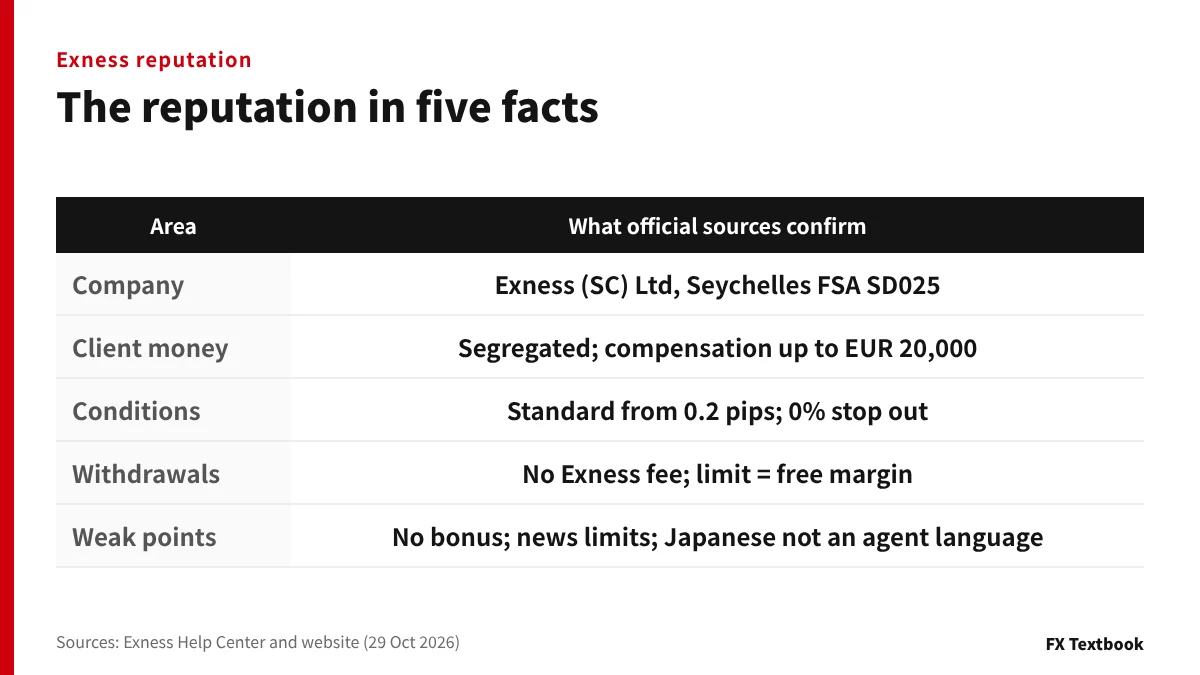
- Company: the sign-up screen names Exness (SC) Ltd, licensed by the Seychelles FSA (SD025)
- Money: client funds are held apart from company funds; there is no government-backed compensation
- Conditions: Standard from 0.2 pips with no commission; stop out is 0% on all accounts
- Withdrawals: no Exness fee; the limit is your free margin; a name mismatch blocks payment
- Weak points: no bonus (official FAQ), lower leverage around news, Japanese not on the list of support-agent languages
| Area | What official sources confirm | What to watch |
|---|---|---|
| Company and regulation | Exness (SC) Ltd, Seychelles FSA SD025, registration number 8423606-1 | Licences held by other group entities do not cover your account |
| Client money | Omnibus accounts separate from company funds; compensation fund up to EUR 20,000 per client | Trading losses and broker insolvency are not covered |
| Trading conditions | Five accounts, up to 1:2000 (unlimited if eligible), 0% stop out | Almost nothing is left in the account at stop out |
| Withdrawals | No Exness fee, no daily limit on requests, over 98% processed automatically | Breaking the name, card refund or verification rules stops a payout |
| Support | 24/7; the Help Center lists seven agent languages, including English and Chinese | Japanese is not among the seven; Help Center articles exist in Japanese |
Trading FX and CFDs can cost you some or all of the money you deposit. Figures shown in your Personal Area (PA) after registration take priority.
Exness company details: operator, licence and address
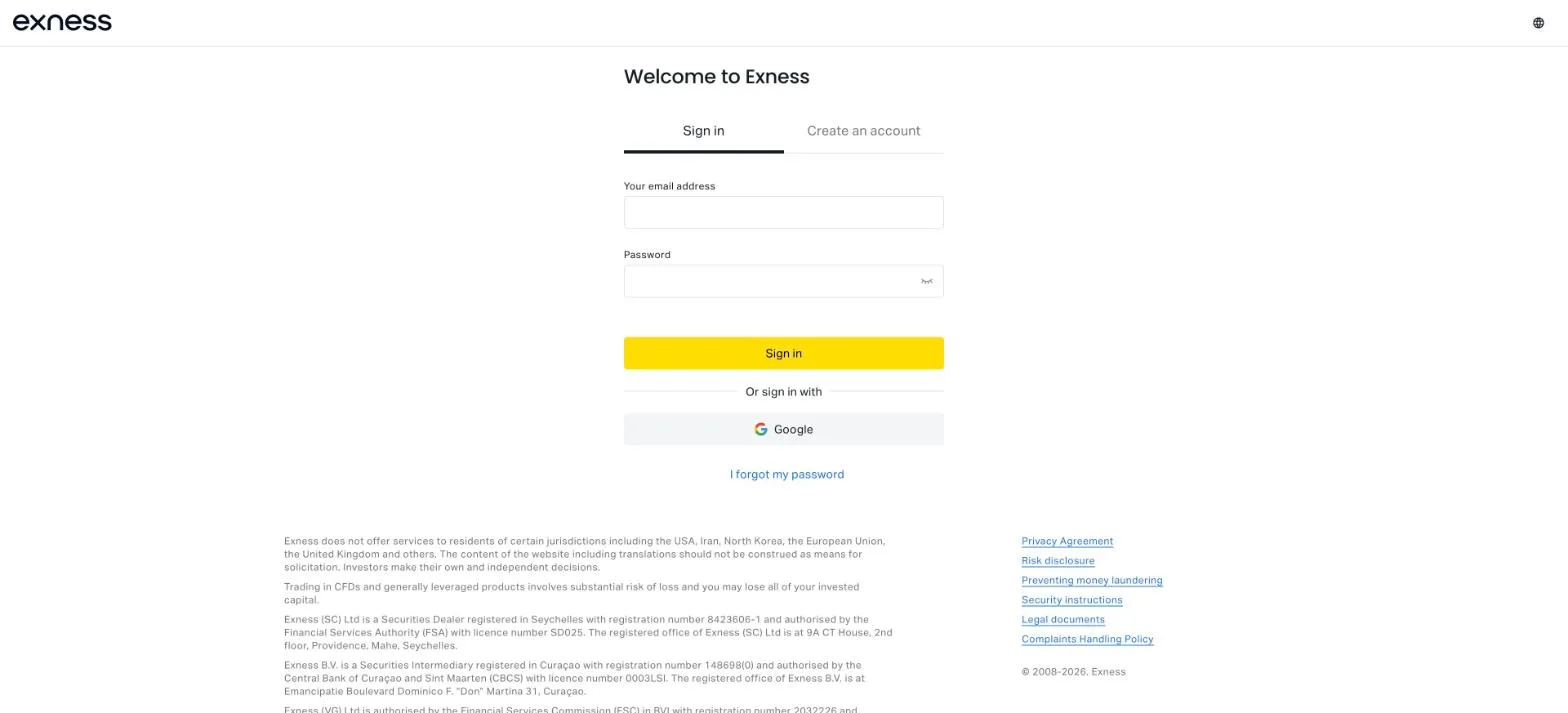
Exness offers only CFDs on forex, commodities, crypto and more. Its Help Center says it is not a securities broker that routes orders to exchanges.
| Item | Details |
|---|---|
| Brand | Exness. The official website shows "© 2008-2026" |
| Entity on the sign-up screen | Exness (SC) Ltd (screen captured 29 October 2026) |
| Entity type and registration | Securities Dealer registered in Seychelles, number 8423606-1 |
| Licence | Seychelles Financial Services Authority (FSA), SD025 |
| Registered office | 9A CT House, 2nd floor, Providence, Mahe, Seychelles |
| Products | More than 200 CFDs (forex, commodities, crypto, stocks, indices) |
| Account types | Standard Cent, Standard, Pro, Raw Spread, Zero |
| Platforms | MT4, MT5, Exness Terminal (web), Exness Trade (app) |
| Support | 24 hours a day, 7 days a week (languages in the support section) |
Other entities in the group
| Entity | Jurisdiction and licence (as stated) |
|---|---|
| Exness (SC) Ltd | Seychelles; registration 8423606-1; FSA licence SD025 |
| Exness B.V. | Curaçao; registration 148698(0); CBCS licence 0003LSI |
| Exness (VG) Ltd | FSC of the British Virgin Islands |
| Forexite Ltd. | FSC of Belize |
| Exness (MU) Ltd | Investment Dealer, Mauritius |
Each entity holds its own licence, even under the same Exness name. Regulation that applies to another entity does not extend to your account.
| Contracting entity | Max leverage | Stop out | Stop Out Protection |
|---|---|---|---|
| Exness (SC) Ltd and others | 1:2000 (unlimited if eligible) | 0% | May be available |
| Exness (KE) Limited (Kenya) | 1:400 | 20% | Not available |
| Exness (JO) Limited (Jordan) | Not stated in the Help Center | 20% | Not available |
Your contracting entity appears on the sign-up screen and in the footer of your Personal Area. The legal documents sit on the right of the same footer.
The website says Exness does not serve residents of the USA, Iran, North Korea, the European Union, the United Kingdom and others. It does not state whether residents of Japan are accepted (checked October 2026).
Common Exness reviews checked against official sources
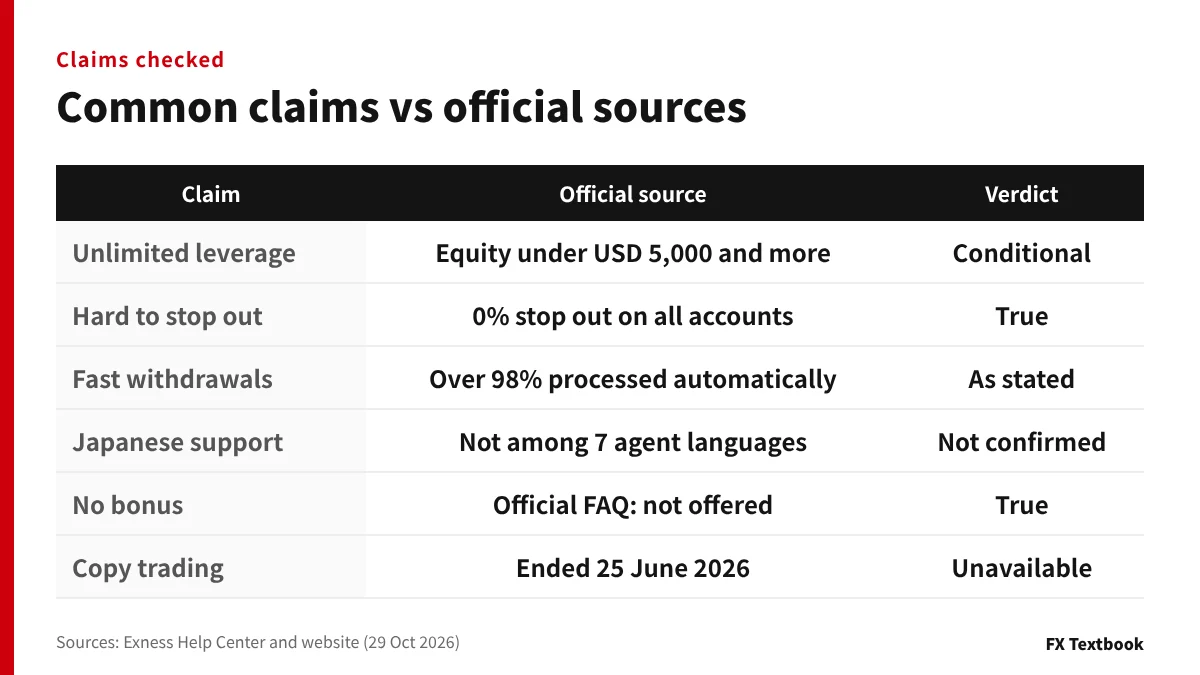
This article does not treat social media or review-site posts as fact. We took each common claim and checked it against what the Help Center says.
| Common claim | What official sources say | Verdict |
|---|---|---|
| Leverage is unlimited | Requires equity under USD 5,000 and at least 10 closed orders totalling 5 lots | True, with conditions |
| Spreads are tight | Standard from 0.2 pips; Raw Spread and Zero from 0.0 pips plus commission | Minimums as stated |
| Hard to get stopped out | Stop out is 0% on all accounts (except at some entities) | True (but losses run deeper) |
| Withdrawals are fast | The website says over 98% of withdrawals are processed automatically | As stated officially |
| No swap fees | Covers major pairs, gold, oil and more; heavy overnight holding can remove it | True, with conditions |
| Japanese support is available | Japanese is not among the seven agent languages; the home page's "14 languages" are not listed | Not confirmed |
| No bonus | The official FAQ says no welcome or deposit bonus is offered | True |
| Strict limits around news | Orders 15 minutes before to 90 seconds after high-impact news get forex leverage capped at 1:200 | True |
| You can start with copy trading | All existing strategies and investments ended on 25 June 2026 | No longer available |
| Free VPS | Only for clients who meet balance and volume criteria | True, with conditions |
| No trust protection | Described as segregated omnibus accounts; no trust arrangement is mentioned | As stated officially |
| No corporate accounts | The Help Center does not describe corporate account conditions | Not confirmed |
| No deposit or withdrawal fees | Exness charges none; payment providers or banks may charge their own | True |
Claims marked "with conditions" stop being true once you fall outside the conditions.
Why opinions on Exness differ
- Leverage and stop out conditions change with the contracting entity
- Many features apply only if you qualify: unlimited leverage, swap-free, VPS
- Stop Out Protection is decided by a model and differs from client to client
Pros and cons based on the facts
| Pros | Cons |
|---|---|
| Standard from 0.2 pips with no commission | No welcome or deposit bonus |
| 0% stop out leaves more room before a close-out | Almost nothing is left when it triggers |
| Major pairs and gold are swap-free | Leverage drops around news and weekends |
| Negative balances reset to 0 automatically | Japanese is not on the support-agent language list |
| Rules and conditions are public on the Help Center | Copy trading ended on 25 June 2026 |
Is Exness a scam? Why people ask and what can be confirmed
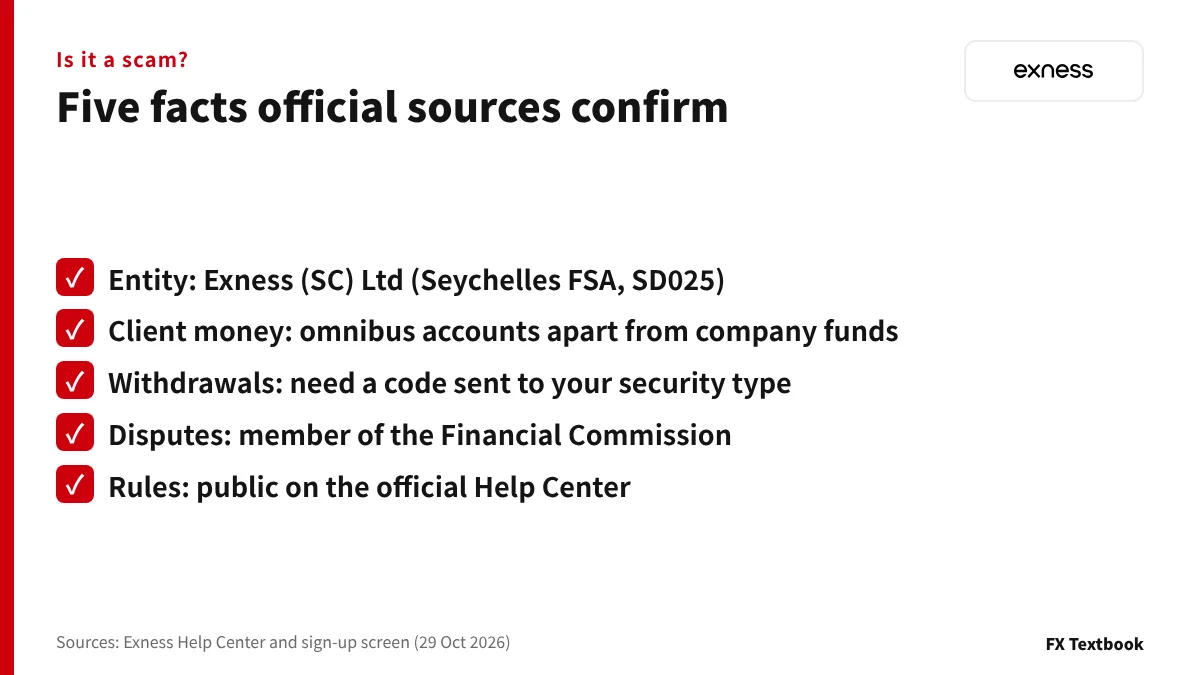
Searches for "Exness scam" usually come from three separate issues.
- Exness is not registered as a financial instruments business in Japan
- From Japan, much of the official website can only be read after logging in
- Scammers pose as Exness staff or support (the Help Center warns about this)
| What to check | What official sources confirm |
|---|---|
| Registration and licence | Exness (SC) Ltd holds Seychelles FSA licence SD025 |
| Client money | Held in omnibus accounts separate from company funds and reconciled regularly |
| Withdrawal approval | Withdrawals need a code sent to your registered security type |
| External dispute resolution | Exness joined the Financial Commission on its own initiative |
| Public information | Account conditions and rules can be read on the Help Center (get.exness.help) |
That is as far as official sources go. Whether a particular withdrawal dispute happened cannot be judged from posts alone.
Impersonation scams are a separate problem from how Exness itself operates. The section on fake sites explains how to tell them apart.
In April 2023 Japan's FSA listed Nymstar Limited, using the service name Exness, as an operator conducting financial instruments business without registration. It records the lack of the registration required in Japan; it is not a finding of fraud. The listed entity differs from Exness (SC) Ltd on the sign-up screen.
Is your money protected? Segregation, compensation and negative balance
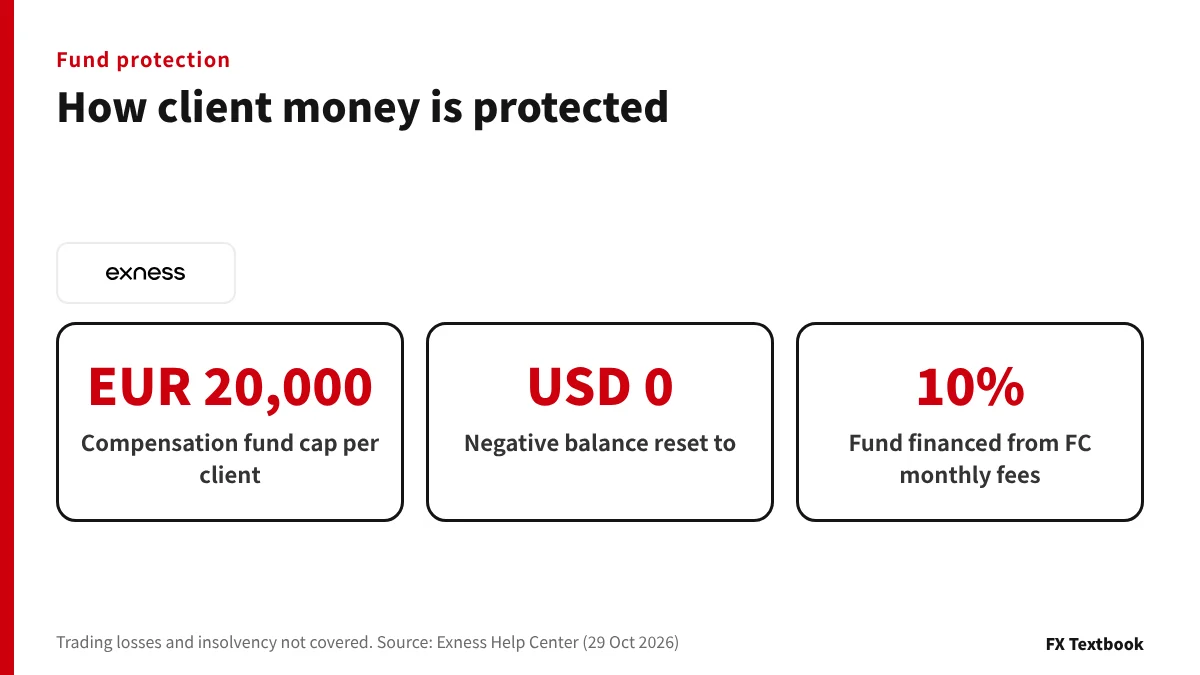
Exness says client funds are held in omnibus accounts separate from its own money. The custodians are regulated institutions, and funds are spread across several where possible.
| Safeguard | Official description | Not covered |
|---|---|---|
| Segregation | Client money is not used for company expenses or obligations | No trust arrangement is mentioned |
| Compensation fund | Up to EUR 20,000 per client if Exness refuses a Financial Commission ruling | Trading losses; broker insolvency |
| Negative balance protection | A negative balance after stop out is reset to 0 automatically | Losing the money you deposited |
| Government scheme | None available, as the Help Center states | - |
| Company risk management | Exness says it keeps liquidity and extra reserves and is audited regularly | No figures or audit results are published |
※ FX Textbook's broker data lists zero cut as "check the conditions". The Help Center says negative balances are reset to 0 automatically.
The compensation fund is financed with 10% of the monthly fees the Financial Commission collects. It pays out only on rulings the Commission has issued.
If Exness became insolvent or went bankrupt, the Help Center says applicable laws and regulatory procedures would be enforced to protect clients.
In the official example, a USD 100 account that loses USD 150 shows minus USD 50, which is reset to 0. The reset appears as "D-null" in the trading history.
A deposit made before the reset can be absorbed by the negative balance. Exness recommends waiting until "D-null" appears.
Withdrawal refusal rumours: the official rules explain most cases
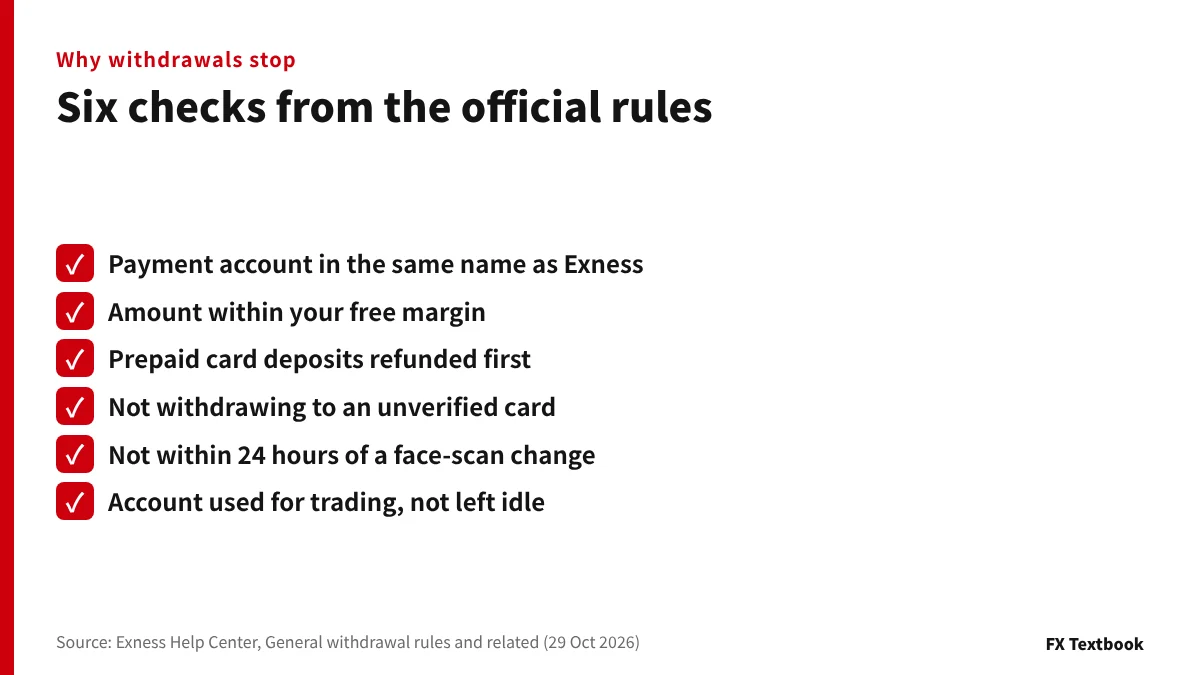
Most stories of blocked withdrawals match a rule in the official withdrawal policy. Because the rules are public, you can check yourself against them before you request a payout.
| Cause | Official rule | How to avoid it |
|---|---|---|
| Name mismatch | No withdrawal if the payment account name differs from your Exness name | Use only accounts in your own name |
| Unverified card | A withdrawal to an unverified card with no prior deposit is rejected | Verify the card first |
| Amount too large | The most you can withdraw at once equals your free margin | Reduce positions before requesting |
| Card deposit refund | Prepaid card deposits must be refunded in full before any profit | Complete the refund first |
| Security type change | Changing it by face scan blocks withdrawals from all accounts for 24 hours | Do not plan a withdrawal right after a change |
| Inactive account | Withdrawals from accounts with no trading may be investigated, cancelled or charged | Use deposited funds for trading |
| Payment method limits | Each method has a minimum and maximum; methods depend on region and verification | Check what your Personal Area shows |
There is no limit on the number of withdrawals per day. Processing time differs by method and is shown in your Personal Area.
- 01Open the withdrawal section
Go to Withdrawal in the Personal Area and choose one of the available payment methods.
- 02Enter the amount and account
Fill in the amount and the trading account, then confirm if the details are correct.
- 03Approve with a code
Approve the withdrawal with the code sent to your registered security type.
What to check when a withdrawal has not arrived
- Open Transaction History in the Personal Area and filter for withdrawals
- Open the withdrawal to see how it is being processed
- Compare the average and maximum processing times shown
- If the maximum has passed, use "Get support" to send a request
Exness withdrawals: processing time, fees and why a withdrawal fails
Account types, spreads and fees: what "tight spreads" means
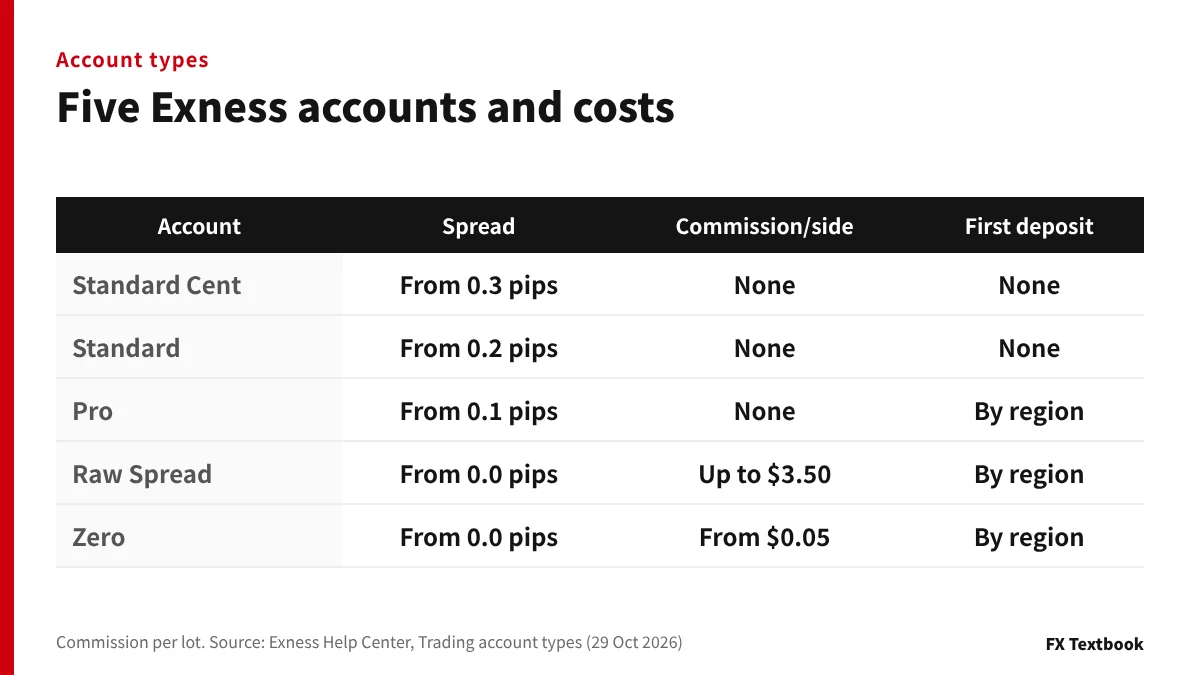
Exness has five account types. In the official account table, the first-deposit requirement is "No" for the two Standard accounts and "Yes, region based" for the three professional accounts.
| Account | Spread | Commission (per lot) | First-deposit rule |
|---|---|---|---|
| Standard Cent | From 0.3 pips | None | None |
| Standard | From 0.2 pips | None | None |
| Pro | From 0.1 pips | None | Yes (by region) |
| Raw Spread | From 0.0 pips | Up to USD 3.50 per side | Yes (by region) |
| Zero | From 0.0 pips | From USD 0.05 per side | Yes (by region) |
※ The Help Center gives a minimum first deposit of USD 200 for professional accounts, subject to regional requirements, and its deposit rules say Standard accounts also have a regional minimum. FX Textbook's broker data lists every account as "by region".
Only Raw Spread and Zero charge commission. It is calculated on both directions and charged when you open the order.
- Start with little money: Standard Cent (trades in cent lots)
- Trade without commission: Standard or Pro
- Track cost as 0.0-pip spreads plus commission: Raw Spread or Zero
- Use instant execution: Pro (see below)
Execution types and requotes
Instant execution is available only on the Pro account. If the price moves, you receive a requote asking you to accept the new price.
The other accounts use market execution. Orders fill at the price when processed, so fast markets can cause slippage from the price on screen.
Account and payment costs
| Cost | How Exness handles it |
|---|---|
| Opening an account | Free |
| Spread | Charged on every account; dynamic spreads that move with the market |
| Swap | Charged on instruments outside swap-free status when held overnight |
| Deposits and withdrawals | No Exness fee; payment providers or banks may charge their own |
| Currency conversion | May apply if you deposit in a currency other than the account currency |
| Unused accounts | Real MT4 and MT5 accounts may be archived after 3 days without activity; the money stays and restoring is free |
Worked example: minimum round-trip cost for 1 lot
| Account | Calculation | Minimum round trip |
|---|---|---|
| Standard | 0.2 pips x USD 10 | From USD 2 |
| Pro | 0.1 pips x USD 10 | From USD 1 |
| Zero | 0.0 pips + from USD 0.05 per side x 2 | From USD 0.10 |
| Raw Spread | 0.0 pips + up to USD 3.50 per side x 2 | Commission up to USD 7 |
The minimum spreads are listed values not tied to one instrument. Real spreads widen, and Zero commission also rises on some instruments.
We found no monthly fee for simply holding an account in the Help Center articles we checked (October 2026).
Exness account types compared: Standard, Pro, Raw Spread and Zero
Instruments and platforms: 200+ CFDs, MT4 and MT5
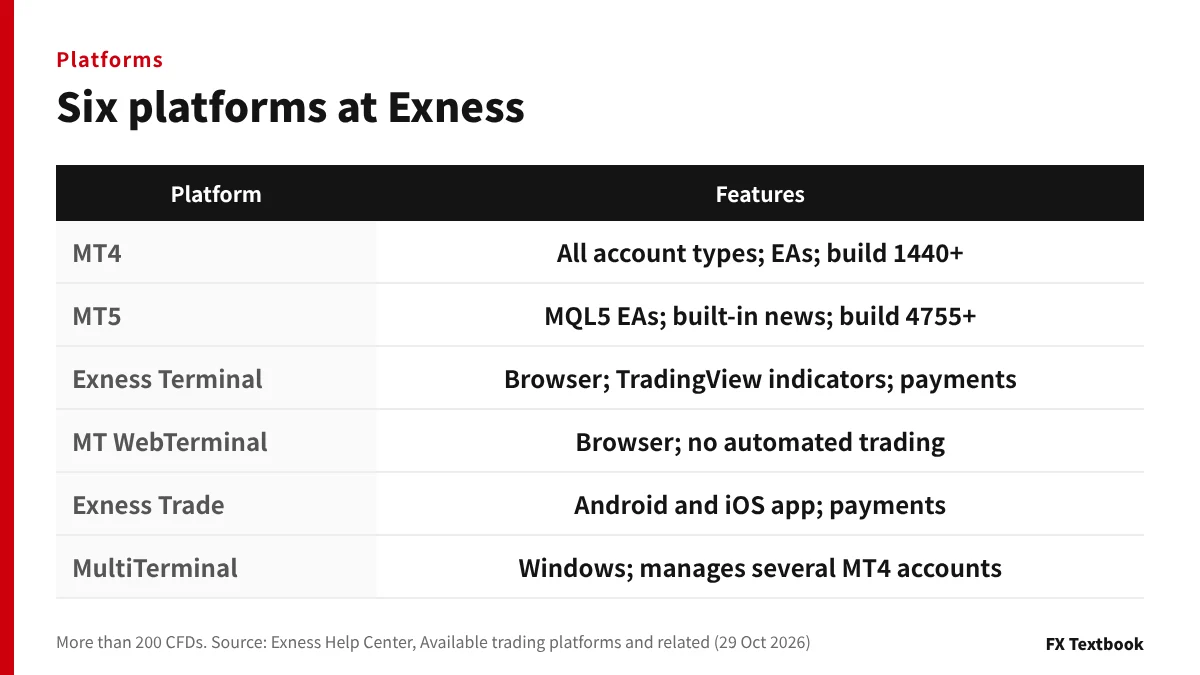
Everything you trade at Exness is a CFD based on the spot price. There is no expiry, but positions held overnight may incur a swap.
| Product | Details |
|---|---|
| Forex | Major, minor and exotic currency pairs |
| Commodities | Metals and energies |
| Crypto | Bitcoin, Ethereum and more; 24/7 except breaks and maintenance |
| Indices | US Tech 100, S&P and others |
| Stocks | CFDs on international shares such as AAPL and AMZN |
| Platform | Features |
|---|---|
| MT4 | Available on every account type; supports EAs; build 1440 or later required |
| MT5 | MQL5 Expert Advisors and built-in economic news; build 4755 or later required |
| Exness Terminal | Browser-based; TradingView indicators, deposits and withdrawals, live chat |
| MT WebTerminal | Browser-based; no automated trading or multi-chart view |
| Exness Trade | Android and iOS app; deposits, withdrawals, transfers and economic news features |
| MultiTerminal | Windows; manages several MT4 accounts together |
Since 1 July 2025, older MT4 and MT5 versions cannot connect to Exness servers. If you cannot log in, check your build number first.
In some regions MT5 accounts cannot be used in Exness Terminal. There you trade on the MetaTrader 5 desktop or mobile app.
Trading hours (UTC) and the 1 November change
| Instrument and point | During US DST (to 31 October 2026) | After DST (from 1 November 2026) |
|---|---|---|
| Forex opens | Sunday 21:05 | Sunday 22:05 |
| Forex closes | Friday 20:59 | Friday 21:59 |
| Gold (XAUUSD) opens | Sunday 22:05 | Sunday 23:05 |
| Gold daily break (Mon to Thu) | 20:58 to about 22:00 | 21:58 to about 23:00 |
| Gold closes | Friday 20:58 | Friday 21:58 |
US daylight saving time ends on 1 November 2026, so forex and gold hours move one hour later in UTC. After the gold daily break there is about a minute and a half when you can only close positions.
0% stop out and unlimited leverage, checked with numbers
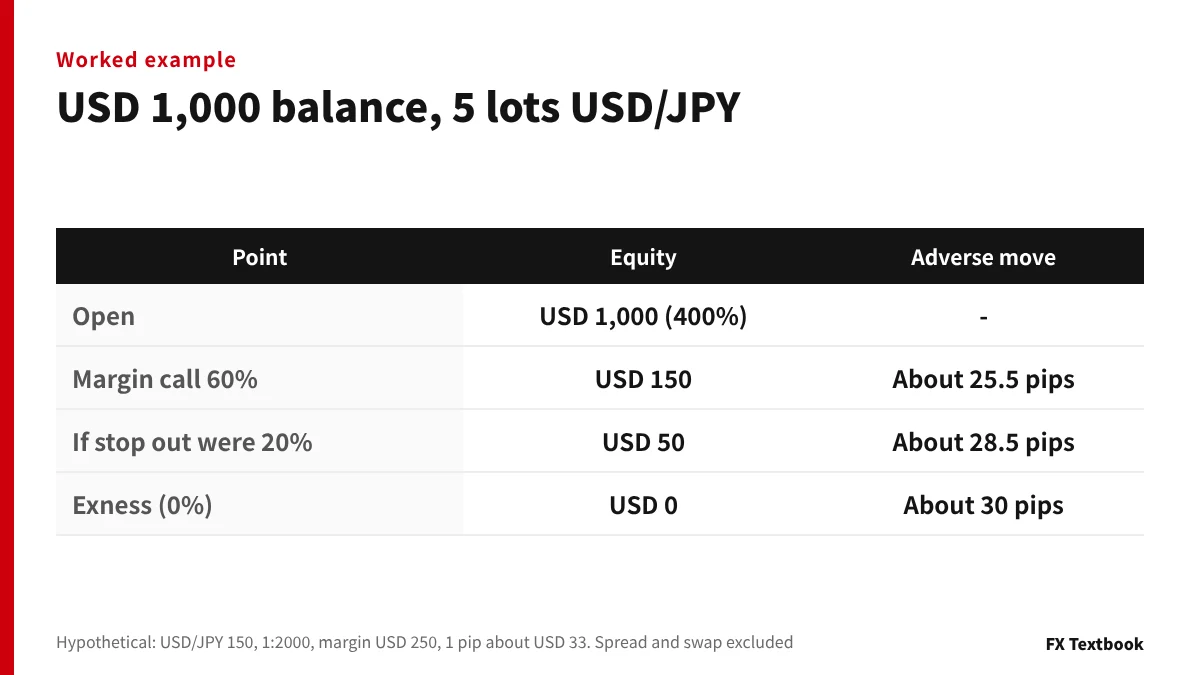
A stop out closes positions automatically when your margin level falls to a set point. Exness sets it at 0% on every account.
| Account or condition | Margin call | Stop out |
|---|---|---|
| Standard Cent, Standard | 60% | 0% |
| Pro, Raw Spread, Zero | 30% | 0% |
| Stocks (higher market risk) | - | May be raised to 100% |
| Some countries and entities | - | 0% may not apply (see the company table) |
Worked example: USD 1,000 balance, 5 lots of USD/JPY
| Point | Equity | Approximate adverse move |
|---|---|---|
| Opening the trade | USD 1,000 (margin level 400%) | - |
| Margin call (60%) | USD 150 | About 25.5 pips |
| If stop out were 20% | USD 50 | About 28.5 pips |
| Exness stop out (0%) | USD 0 | About 30 pips |
At 5 lots, each pip is worth about USD 33. A move of about 30 pips against you wipes out almost the whole balance.
A 0% stop out does not mean smaller losses. Set your own stop-loss orders.
Stop Out Protection conditions
| Item | Official description |
|---|---|
| What it does | Delays a stop out when spreads widen, and sometimes avoids it altogether |
| Who gets it | Decided by a model that assesses trading conditions and activity; not always available to everyone |
| When it is not available | Clients of some entities (see the company table); possibly accounts set to unlimited leverage |
| Spreads | Dynamic spreads, which Exness says are never widened artificially to trigger stop outs |
Maximum leverage by equity
| Equity | Maximum leverage |
|---|---|
| USD 0 to 4,999.99 | 1:2000 (unlimited if eligible) |
| USD 5,000 to 29,999.99 | 1:2000 |
| USD 30,000 to 99,999.99 | 1:1000 |
| USD 100,000 and above | 1:500 |
Unlimited leverage can be selected only on accounts with equity under USD 5,000. Across all real accounts you must have closed at least 10 orders totalling 5 lots or more.
- Change leverage from the three-dot menu on the account in your Personal Area, from 1:2 to unlimited
- Leverage cannot be switched off
- Once equity reaches a higher band, the leverage applied is lower than your setting
- Demo accounts can select unlimited at any time, but it only applies at equity of USD 4,999.99 or less
Major and minor forex pairs and a few others, all commodities except XAUUSD247, and four crypto instruments (English Help Center, updated 22 October). The Japanese version limits metals to gold and silver.
Exness leverage: conditions for unlimited and when it is restricted
The downside: lower leverage around news and weekends
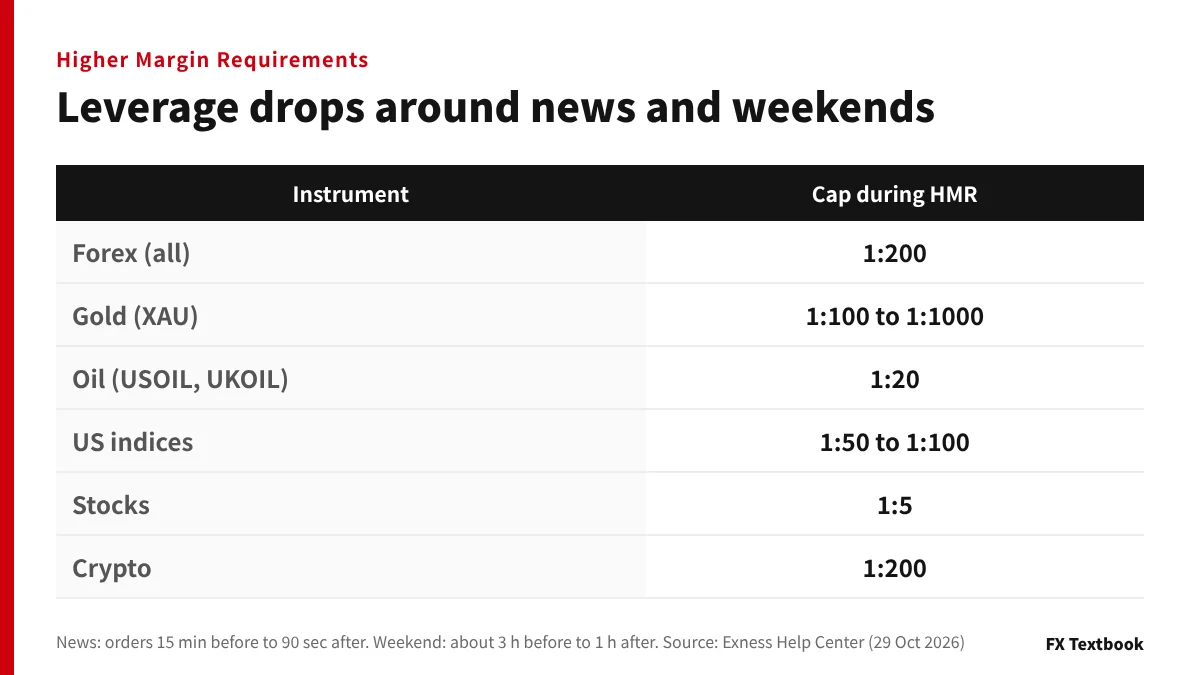
Exness lowers leverage at set times. It calls these periods Higher Margin Requirements (HMR).
| Situation | When HMR applies |
|---|---|
| High-impact economic news | Orders opened from 15 minutes before to 90 seconds after the release |
| Weekend close | About 3 hours before the close to 1 hour after reopening (not BTC or ETH) |
| Daily close | Varies by instrument; gold and silver from 30 minutes before close to about 10 minutes after opening |
| Daily close (JP225) | About 1 hour 30 minutes before close to 1 hour 40 minutes after opening |
| Daily close (stocks) | 20 minutes before close to 15 minutes after opening |
| Public holidays | Before and after the market closure |
| Instrument | Leverage during HMR |
|---|---|
| Forex (all) | 1:200 |
| Gold (XAU) | 1:100 to 1:1000 |
| Silver (XAG) | 1:50 to 1:200 |
| Oil (USOIL, UKOIL) | 1:20 |
| US indices (US30, USTEC, US500) | 1:50 to 1:100 |
| Stocks | 1:5 |
| Crypto | 1:200 |
Worked example: 1 lot of USD/JPY 10 minutes before news
| Situation | Leverage | Margin required |
|---|---|---|
| Normal hours | 1:2000 | USD 50 |
| 15 minutes before to 90 seconds after (HMR) | 1:200 | USD 500 |
The same 1 lot needs ten times the margin during HMR. Without enough free margin, you may not be able to close one side of a hedge.
When HMR ends, margin is recalculated automatically from your equity and leverage setting. Depending on your trading, HMR may not apply at all.
HMR periods are shown in the economic calendar and on charts in Exness Terminal and Exness Trade.
Bonuses, copy trading and the loyalty program today
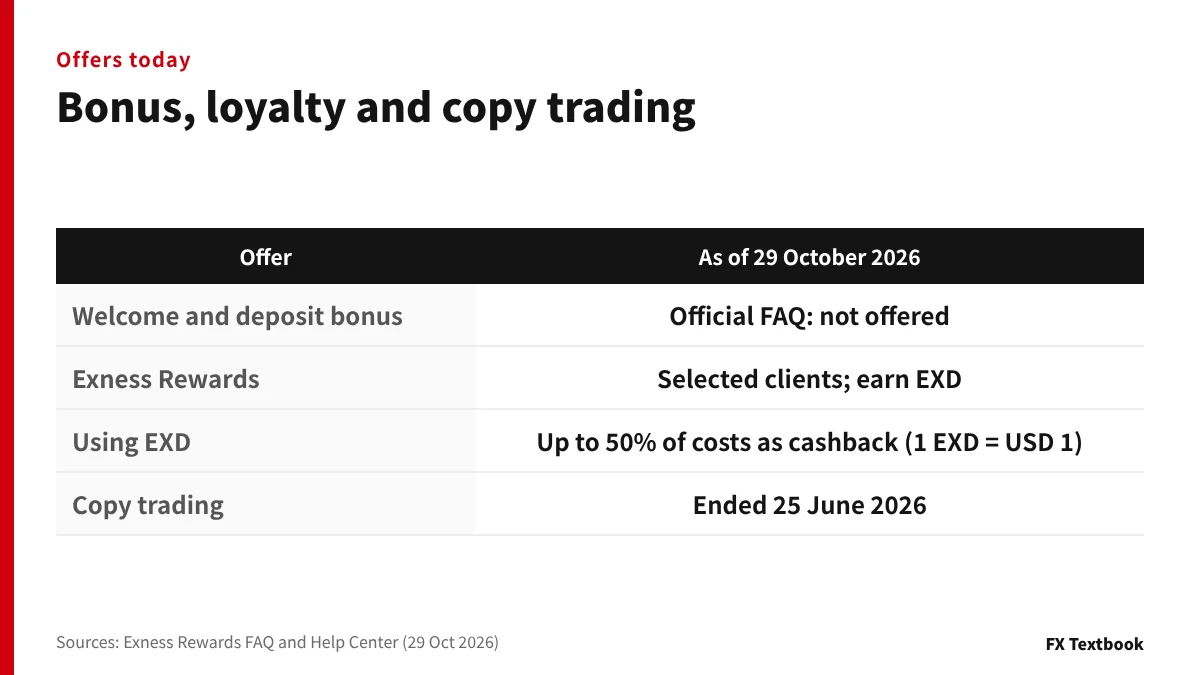
The official Exness FAQ says it does not offer a welcome bonus or a deposit bonus. What it has instead is a loyalty program for selected clients.
| Offer | Current status |
|---|---|
| Welcome and deposit bonus | The official FAQ says they are not offered |
| Exness Rewards (loyalty program) | Selected clients only; trading earns EXD |
| Using EXD | On later trades, up to 50% of trading costs turn into cashback (1 EXD = USD 1) |
| Copy trading | No new strategies or investments; existing ones ended on 25 June 2026 |
| Tier criteria | No fixed lot or volume requirement; based on the EXD earned in 30 days |
Exness Rewards tiers are evaluated daily. To keep a tier, you must earn the same amount of EXD needed to reach it within each 30-day period. Miss it and you drop one tier at a time. The 30-day period starts on the day you join and is individual to you.
Copy trading history and the investment wallet are still visible in the Copy Trading tab of the Personal Area.
Swap-free, free VPS and Expert Advisor conditions
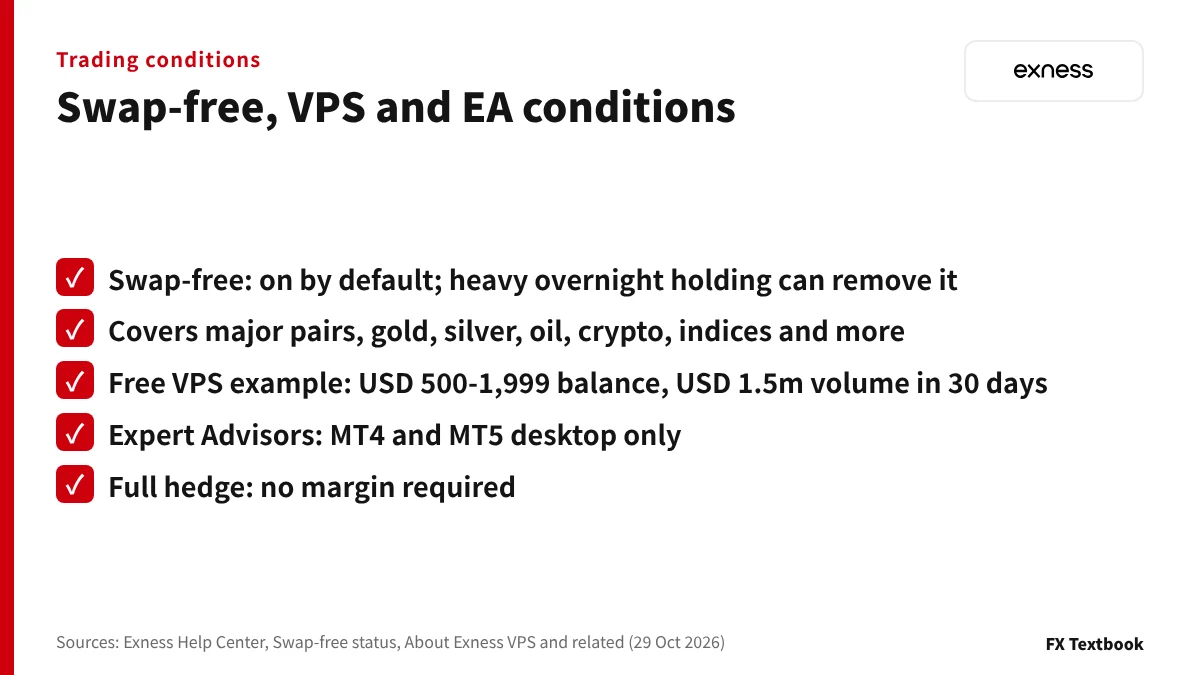
Swap-free status is switched on for every account by default. On eligible instruments, holding a position overnight does not incur a swap.
| Group | Swap-free instruments |
|---|---|
| Major pairs | AUDUSD, EURUSD, GBPUSD, NZDUSD, USDCAD, USDCHF, USDJPY, DXY |
| Minor pairs | 21 pairs, including GBPJPY, EURJPY and AUDJPY |
| Exotics | USDZAR, USDTHB |
| Commodities | XAUUSD, XAUAUD, XAUEUR, XAGUSD, XPTUSD, USOIL, UKOIL |
| Crypto and indices | All |
| Not covered | Other metals, energies and currency pairs, and stocks |
If you trade mainly outside trading hours and carry many orders overnight, swap-free status may be removed. The Personal Area notifies you if that happens.
Check whether an instrument is swap-free in the contract specifications, opened from the question mark at the top right of the Personal Area. Swap-free status for Islamic countries is handled separately.
Free VPS and Expert Advisors
Free VPS eligibility depends on balance and trading volume. The Help Center example is a balance of USD 500 to 1,999 and USD 1.5 million of volume within 30 days.
For USD/JPY that equals 7.5 round-turn lots. If you miss the criteria for 30 days in a row, the VPS stops and its data is deleted.
- Expert Advisors run only on the MT4 and MT5 desktop terminals, not mobile or web
- An MT4 Expert Advisor does not run on MT5, and the reverse is also true
- A full hedge (same instrument, same volume, opposite sides) needs no margin
- We found no Help Center article setting rules on scalping (checked October 2026)
| Free VPS item | Official description |
|---|---|
| Applying | From Exness benefits, then Virtual Private Server, in the Personal Area |
| Getting started | Log in and trade from the VPS within 5 days of it being issued |
| Keeping it | Trade from the VPS at least once every 30 days; demo trades do not count |
Is there Japanese support? Languages and official channels
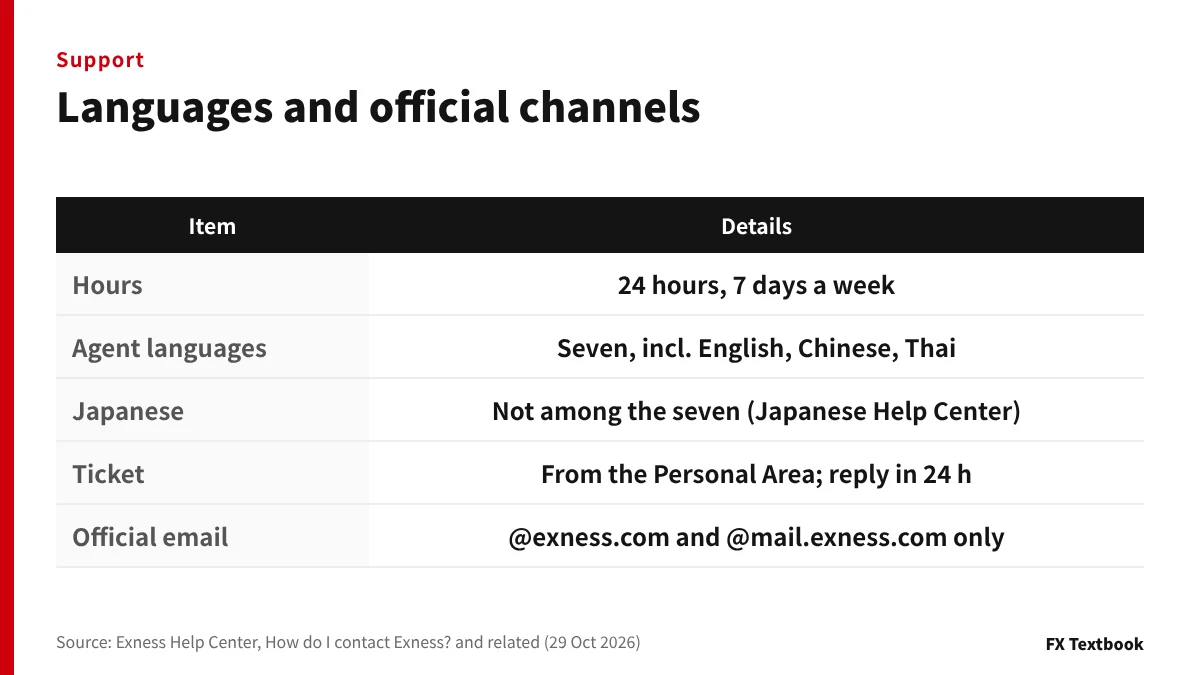
The Help Center article "How do I contact Exness?" says support specialists are available 24 hours a day, 7 days a week. It lists English, Chinese, Thai, Vietnamese, Arabic, Hindi and Urdu.
Japanese is not among those seven. The Help Center does have a Japanese version, so articles can be read in Japanese. The home page says 24/7 support in 14 languages but does not list them.
| Channel | Details |
|---|---|
| Ticket | Submit from the support hub in your Personal Area; reply within 24 hours |
| Live chat | Chat with a support specialist |
| Phone | Only the numbers listed in the support section of your Personal Area |
| Only addresses ending in @exness.com or @mail.exness.com | |
| MetaTrader | Messages in the internal mailbox of MT4 or MT5 |
Official sources do not confirm whether you can contact support in Japanese. Be ready to write in English.
How to spot fake sites and impersonation scams
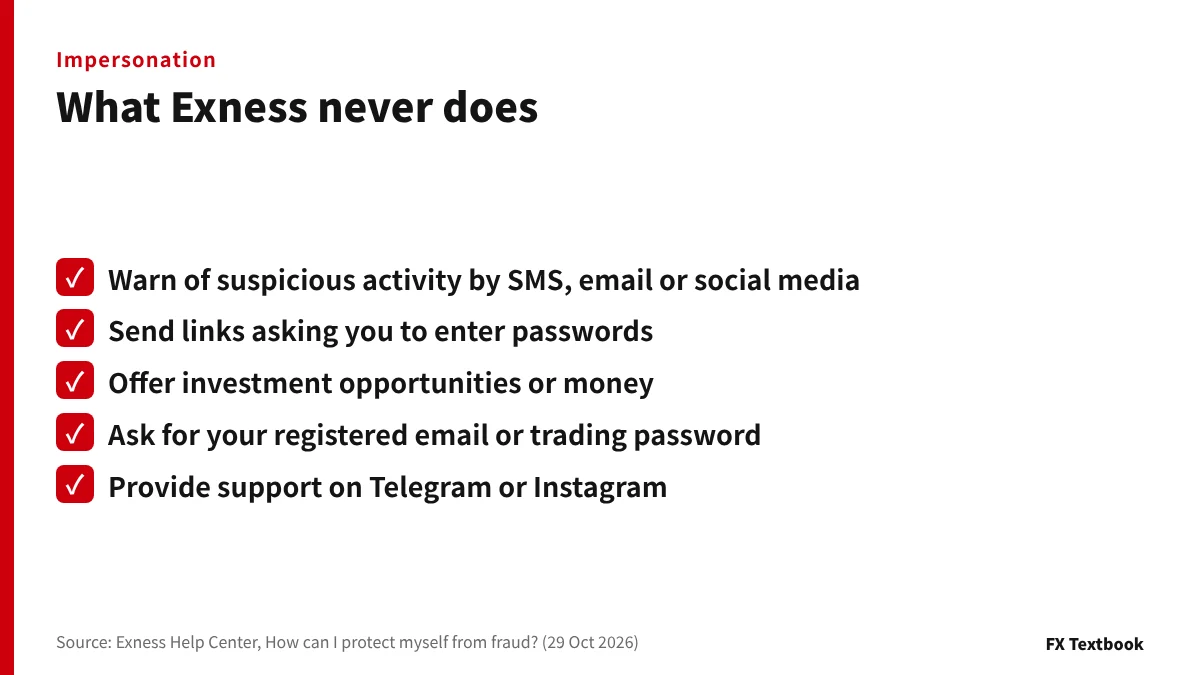
The Help Center itself warns that scammers pose as Exness staff to get personal details or money. They even use the Exness logo and slogans to look genuine.
| What Exness says it never does | If you receive it |
|---|---|
| Tell you by SMS, email or social media that your account shows suspicious activity | Do not reply; block the number or address |
| Send a link asking for passwords or other sensitive details | Do not open the link |
| Offer investment opportunities or money | Ignore it and delete the message |
| Ask for your registered email or trading password | Do not answer; contact support |
| Provide support on Telegram, Instagram, TikTok, WeChat and similar apps | Contact Exness again through an official channel |
- Log in at my.exness.com and read help at get.exness.help
- Never send money to a stranger's bank account or wallet
- Refuse any offer to open an account on your behalf
- Install apps only from official app stores or the official website
- In some regions Telegram or WhatsApp deliver verification codes only
If you have shared a verification code, change your Personal Area and trading passwords at once. Then change your email password and log out of other devices.
A code you did not request means someone has started an action. Do not enter or share it, and open a ticket in the support hub.
Verification (KYC) documents and deposit rules
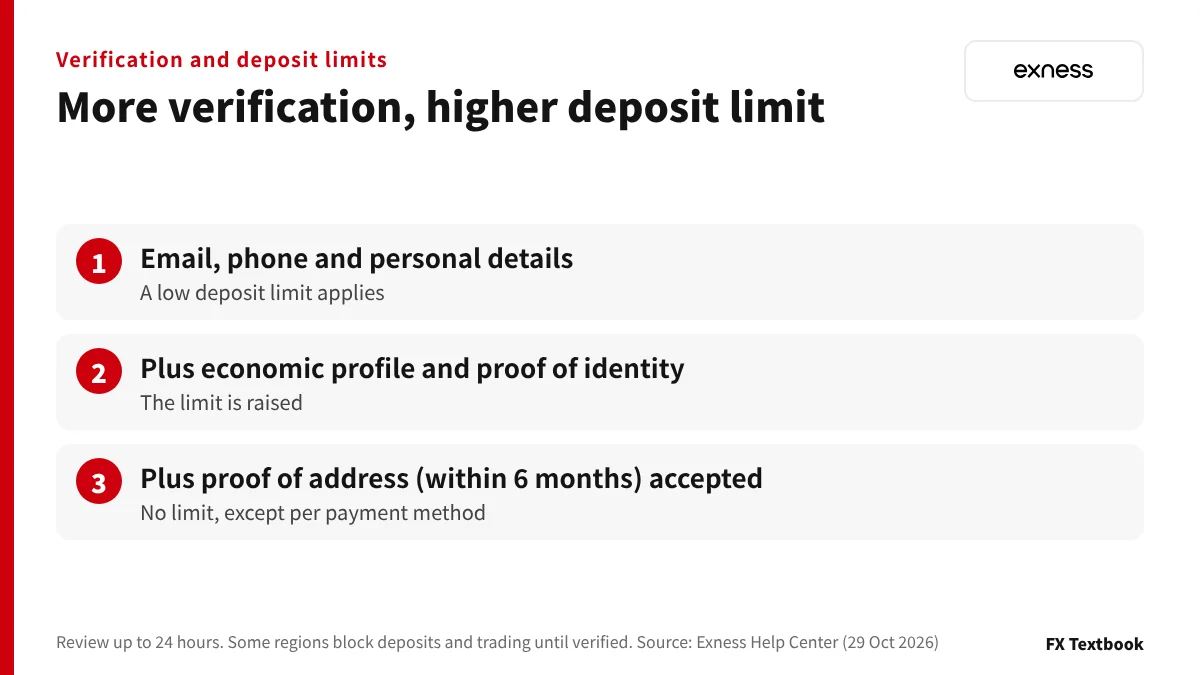
Exness limits how much you can deposit until verification is complete. In some regions you cannot deposit or trade at all until then.
| Verification stage | Deposit limit |
|---|---|
| Email, phone and personal details registered | A low limit applies |
| Plus economic profile and proof of identity | The limit is raised |
| Plus proof of address accepted | No limit (except per payment method) |
| Document | Main requirements |
|---|---|
| Proof of identity (POI) | Passport, national ID card, driving licence and similar; age 18 or over; valid for at least 3 months from upload |
| Proof of address (POA) | Utility bill, bank statement, local tax document and similar; issued within the last 6 months |
| For both | All four corners visible; both sides if more than one page; up to 50 MB; jpg, bmp, png or pdf |
| Review time | Up to 24 hours; if there is no update after that, contact the support hub |
The Help Center says submitted documents are checked by a specialist team bound by a non-disclosure agreement (NDA).
Even if it shows your address, a proof of identity is not accepted as proof of address. Some regions allow one document for both, as shown in the Personal Area steps.
Deposit rules
- Deposits can be started 24 hours a day, 7 days a week
- Third-party payments are not allowed; use accounts in your own name
- Withdraw in the same currency you deposited
- Start every payment from inside the Personal Area
- A trading account's currency cannot be changed after opening
Your first deposit must meet the higher of the account minimum and the payment method minimum. In the official example, an account minimum of USD 200 and a method minimum of USD 10 means at least USD 200.
After that, each deposit only needs to meet the payment method minimum.
Five checks before you open an account and deposit
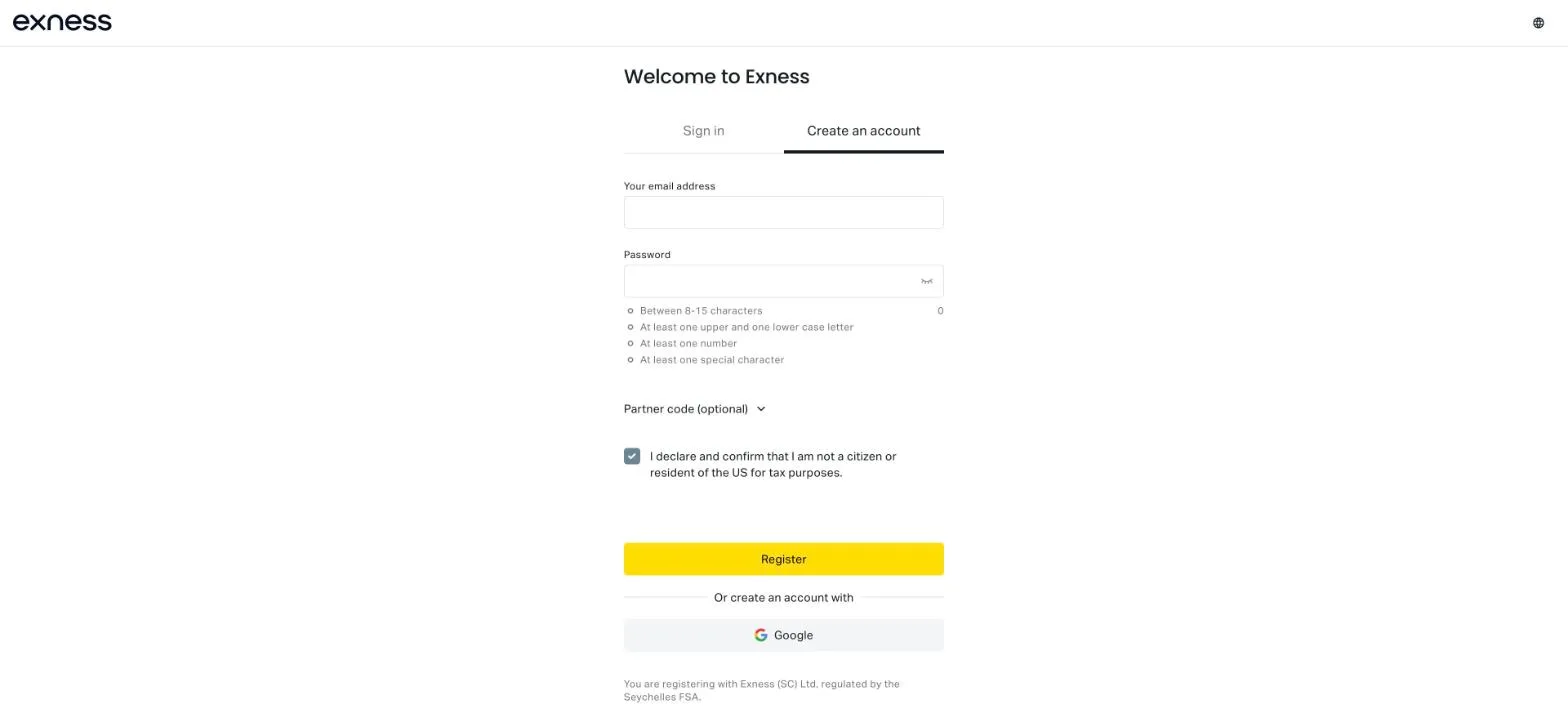
- 01Check the entity on the sign-up screen
The line "You are registering with" below the form names your contracting entity. The password needs 8 to 15 characters with upper and lower case letters, a number and a special character.
- 02Complete verification
Submit the two documents from the previous section and wait for the confirmation email. Once your proof of address is accepted, the deposit limit is lifted.
- 03Save the legal documents
Open the client agreement and risk disclosure from the Personal Area footer and save them before depositing.
- 04Test with a small amount
Deposit a small amount first and confirm you can withdraw in the same currency. Add more only after that.
- 05Decide your stop-loss and trade size
Assume a 0% stop out and size trades with money you could lose without affecting your daily life.
The partner code field is optional. Registering creates one real and one demo Standard MT5 account automatically.
Where to check on official screens
| What to check | Where to look |
|---|---|
| Your contracting entity | Text below the sign-up form and the footer of the Personal Area |
| Client agreement and risk disclosure | Legal documents on the right of the Personal Area footer |
| Negative balance protection and swap-free status | Exness benefits, then Trading conditions, in the Personal Area |
| First-deposit requirement | Open account in the Personal Area, shown per account type |
| Payment methods, fees and processing times | Deposit and Withdrawal tabs in the Personal Area |
| Commission and swaps per instrument | Question mark at the top right of the Personal Area, then Contract specifications |
| Devices logged in | Settings, then Security settings (log out other devices) |
Demo accounts and account limits
| Item | Details |
|---|---|
| Demo accounts | Available for every account type except Standard Cent; you can set any balance |
| Account limit (non-Cent) | Per account type, up to 100 each of MT4 and MT5 real and demo accounts |
| Account limit (Cent) | Up to 10 MT4 and 20 MT5 real accounts |
| Total per Personal Area | Up to 1,630 accounts |
How to open an Exness account: registration, documents and review time
Who Exness suits and who it does not
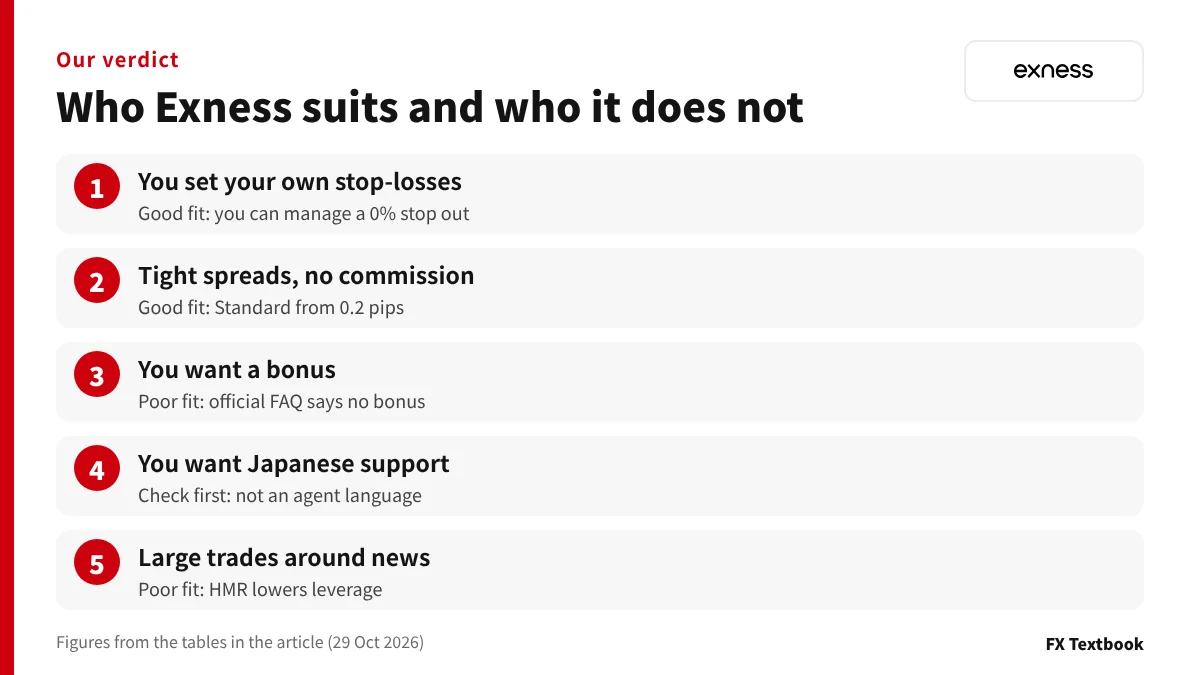
| If you are someone who | Fit with Exness |
|---|---|
| Places stop-losses and manages risk yourself | Good fit: 0% stop out |
| Wants tight spreads with no commission | Good fit: Standard from 0.2 pips |
| Wants to run an EA on a VPS around the clock | Conditional: free VPS has criteria |
| Wants a bonus to boost trading funds | Poor fit: official FAQ says no bonus |
| Wants support in Japanese | Check first: Japanese is not on the agent language list |
| Trades large size around news releases | Poor fit: HMR lowers leverage |
| Wants copy trading | Poor fit: ended on 25 June 2026 |
If you want tight spreads without commission and place your own stop-losses, start with the Exness Standard or Pro account. If you want a bonus or a stop out level you can plan around, look at other brokers first. If you need support in Japanese, check the support languages before registering.
What to compare when a condition does not fit
| Condition Exness does not meet | Example brokers listed on FX Textbook |
|---|---|
| You want a bonus | HFM Top-Up 20% deposit bonus (total cap USD 5,000); XS JPY 5,000 welcome bonus and JPY 10,000 first-deposit bonus |
| You want a stop out level to plan around | HFM publishes a 20% stop out (0% on KATANA) |
| You want support in Japanese | FX Textbook's broker data lists a Japanese desk at HFM and XS |
Frequently asked questions
Q. Is Exness a scam?
A. We found nothing in the official sources we checked that points to fraud. The sign-up screen names Exness (SC) Ltd (Seychelles FSA, SD025), and client money is held apart from company funds. However, Exness is not registered in Japan, so Japanese legal protection does not apply. Social media approaches claiming to be Exness are not an official channel.
Q. Which country is Exness based in?
A. On the sign-up screen captured on 29 October 2026, the contracting entity was Exness (SC) Ltd of Seychelles (registration 8423606-1). The group also has entities in Curaçao, the British Virgin Islands, Belize and Mauritius. Check your own entity in the Personal Area footer.
Q. Can I use Exness from Japan?
A. The official website does not state whether residents of Japan are accepted. In April 2023 Japan's FSA listed Nymstar Limited, using the service name Exness, as an unregistered operator. Protection under Japan's Financial Instruments and Exchange Act does not apply.
Q. Does Exness refuse withdrawals?
A. Under the official rules, you cannot withdraw to an account in another name, and withdrawals to unverified cards are rejected. Prepaid card deposits are refunded before profits. The most you can withdraw at once equals your free margin, and withdrawals are blocked for 24 hours after changing your security type by face scan.
Q. Is the 0% stop out at Exness dangerous?
A. Positions are not force-closed until the margin level reaches 0%. You can hold floating losses longer, but almost nothing is left when the stop out triggers. With USD 1,000 and 5 lots of USD/JPY, a move of about 30 pips wipes out almost the whole balance.
Q. Does Exness offer support in Japanese?
A. The Help Center lists seven support-agent languages, including English, Chinese and Thai; Japanese is not one of them. The Help Center has a Japanese version, so articles can be read in Japanese. The home page's "14 languages" are not listed, so official sources do not confirm Japanese-language support.
Q. Does Exness offer a bonus?
A. The official FAQ says Exness does not offer a welcome bonus or a deposit bonus. The Exness Rewards loyalty program is open to selected clients only. EXD earned there can turn up to 50% of trading costs into cashback.
Q. What are the downsides of Exness?
A. There is no bonus, and leverage is lowered around news releases and weekends. During HMR, forex leverage is capped at 1:200. Japanese is not on the support-agent language list, and copy trading ended on 25 June 2026.
Sources and conditions
- Exness Help Center: About Exness (checked 29 October 2026) →
- Exness Help Center: Is Exness regulated? (checked 29 October 2026) →
- Exness Help Center: Services offered by Exness (checked 29 October 2026) →
- Exness Help Center: Is my money secure in an Exness trading account? (checked 29 October 2026) →
- Exness Help Center: Compensation fund (checked 29 October 2026) →
- Exness Help Center: Negative Balance Protection (checked 29 October 2026) →
- Exness Help Center: General withdrawal rules (checked 29 October 2026) →
- Exness Help Center: Prepaid cards (checked 29 October 2026) →
- Exness Help Center: Security types (checked 29 October 2026) →
- Exness Help Center: Trading account types (checked 29 October 2026) →
- Exness Help Center: Available order and execution types (checked 29 October 2026) →
- Exness Help Center: Margin call and stop out levels by account type (checked 29 October 2026) →
- Exness Help Center: Leverage (checked 29 October 2026) →
- Exness Help Center: Unlimited leverage (checked 29 October 2026) →
- Exness Help Center: Higher Margin Requirements (HMR) (checked 29 October 2026) →
- Exness Help Center: Exness Rewards (checked 29 October 2026) →
- Exness Help Center: PA: Copy Trading (checked 29 October 2026) →
- Exness Help Center: Swap-free status (checked 29 October 2026) →
- Exness Help Center: About Exness VPS (checked 29 October 2026) →
- Exness Help Center: Using Expert Advisors (EA) (checked 29 October 2026) →
- Exness Help Center: How do I contact Exness? (checked 29 October 2026) →
- Exness Help Center: Official communication channels (checked 29 October 2026) →
- Exness Help Center: How can I protect myself from fraud? (checked 29 October 2026) →
- Exness Help Center: How to verify your Exness account (checked 29 October 2026) →
- Exness Help Center: Real and demo accounts (checked 29 October 2026) →
- Exness official Exness Rewards page (FAQ, checked 29 October 2026) →
- Exness official sign-in page (entity details in the footer, captured 29 October 2026) →
- Japan FSA: list of unregistered operators of financial instruments business (Japanese) →
- Exness on FX Textbook →
- Advertising disclosure and risk warning →
FX Textbook is an independent information site, not a broker or provider of personal investment advice. Forex and CFDs involve risk. You may lose some or all of your invested capital. No trading result is guaranteed.
NEXT STEP
Checked the facts? Compare the Exness account conditions.
The broker page covers the five accounts, spreads and commission, the 0% stop out and how to open an account.
Brokers covered in this column
Account types, trading conditions and current offers are on each broker page.