














You know cutting losses matters, yet you cannot decide how many pips to allow. So you hold a losing trade and wait for the price to come back.
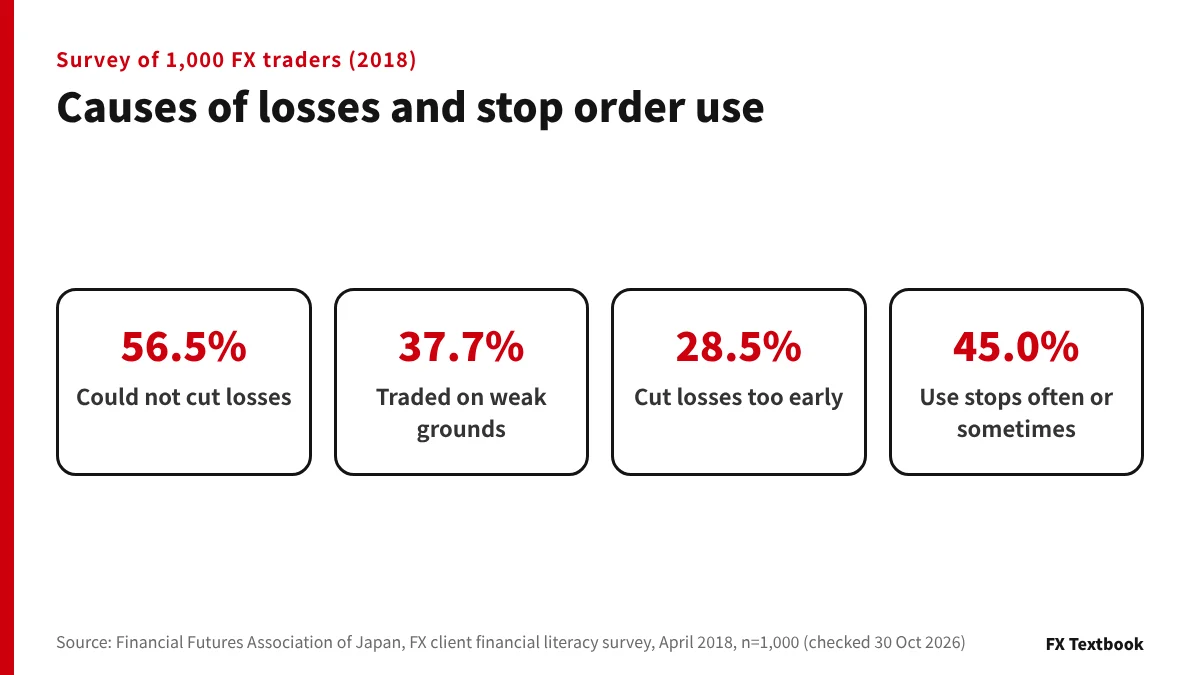
The fix is to decide first how much you can lose on one trade, then work out the stop distance and lot size from that amount. In a survey published in 2018 by the Financial Futures Association of Japan, the top reason for losses was not cutting losses (56.5%).
By the end you can place a stop loss in MT4/MT5 and write your own stop-loss rules on one page.
Summary: set the amount, the distance, the lot, then the stop
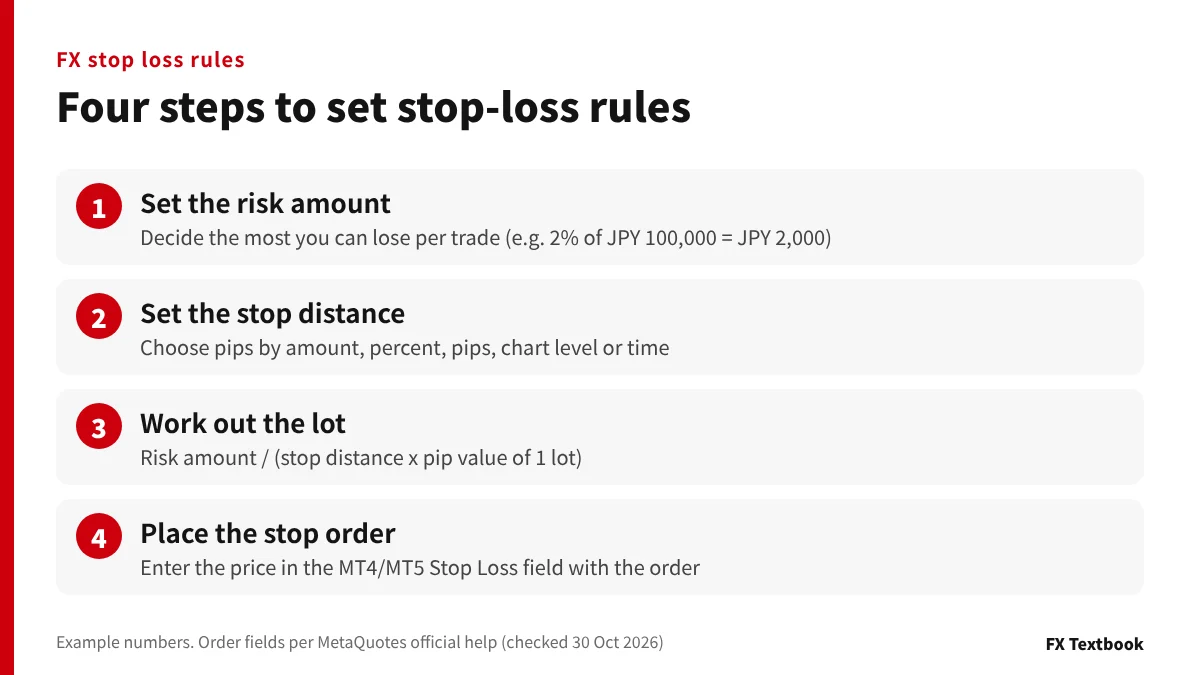
- Decide the most you can lose on one trade, based on your balance
- Set the stop distance in pips by amount, percentage, pips, chart level or time
- Lot size = risk amount / (stop distance x pip value of 1 lot)
- Enter the stop price in the Stop Loss field when you place the order
- Zero cut and stop out do not replace a stop loss
This article covers how to set the stop distance and place the order. It does not cover when to buy or sell.
What is a stop loss? The top cause of losses is not cutting them
A stop loss closes a losing position and turns the floating loss into a realised one.
A floating loss is not final until you close the trade, but nothing says the price will come back. While you hold it, the required margin stays locked and leaves less room for new trades. If the loss keeps growing, it ends in a stop out, a forced close by the broker.
| Survey item | Share |
|---|---|
| Cause of loss: could not cut losses | 56.5% |
| Cause of loss: traded on weak grounds | 37.7% |
| Cause of loss: cut losses too early | 28.5% |
| Uses stop orders often or sometimes | 45.0% |
| Uses OCO orders often or sometimes | 34.8% |
※ Causes allowed multiple answers. Respondents were current and former FX traders in Japan in their 20s to 70s, not only offshore broker clients.
When stop losses come too late
- While the loss is small, you expect a quick rebound and wait
- The bigger the loss, the harder it feels to accept it
- After placing the order, you move the stop further away
As the table shows, 28.5% said they cut losses too early, so both late and early exits appear as causes. A rule set before the trade takes the in-the-moment call out of both.
Why offshore FX still needs stop losses: zero cut vs stop out
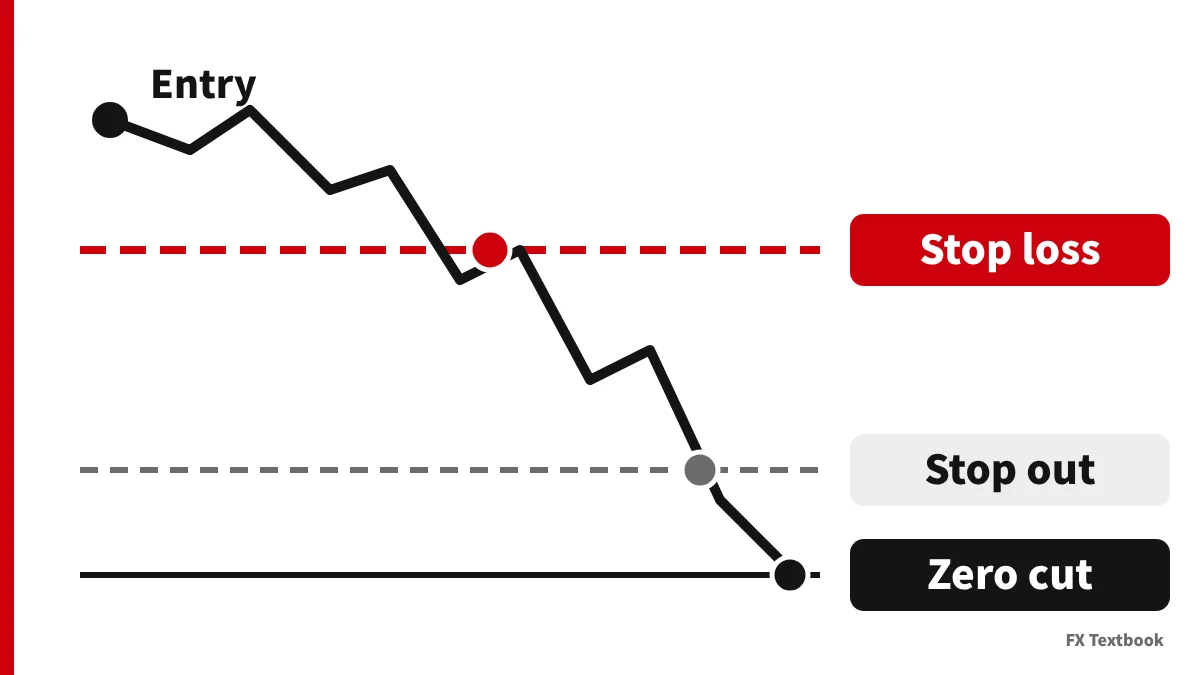
Most offshore brokers offer a zero cut, also called negative balance protection. If your balance goes below zero, the broker absorbs the shortfall and does not ask you to pay it.
A zero cut only works after the balance turns negative. Money lost before that point does not come back.
| Mechanism | Who decides | When it works |
|---|---|---|
| Stop loss (stop order) | You | When the price hits your level |
| Stop out | Broker | When margin level falls below the broker threshold |
| Zero cut | Broker | When the balance goes below zero |
How far the account falls without a stop
Take USD/JPY at 150 yen, leverage 1:1000 and a JPY 100,000 balance with one lot open (hypothetical). The required margin is JPY 15,000.
| How the trade closes | Adverse move | Loss | Left in account |
|---|---|---|---|
| Stop loss at 20 pips | 20 pips | JPY 20,000 | JPY 80,000 |
| Stop out at 20% | About 97 pips | About JPY 97,000 | About JPY 3,000 |
| Stop out at 0% | About 100 pips | About JPY 100,000 | Almost zero |
※ Stop-out levels: HFM 20% (KATANA 0%), AXIORY 20% (Max 0%), Monaxa 20%, Exness 0%. Exness was checked in its help centre on 30 October 2026; the others are from our verified data.
Some brokers need a request before the zero cut applies. DecodeFX says in its FAQ that you must apply each time the account goes negative.
What is zero cut? How it differs from margin calls and when it does not apply
Offshore FX stop-out calculation and stop-out levels by broker
Five ways to set a stop: amount, percent, pips, level, time
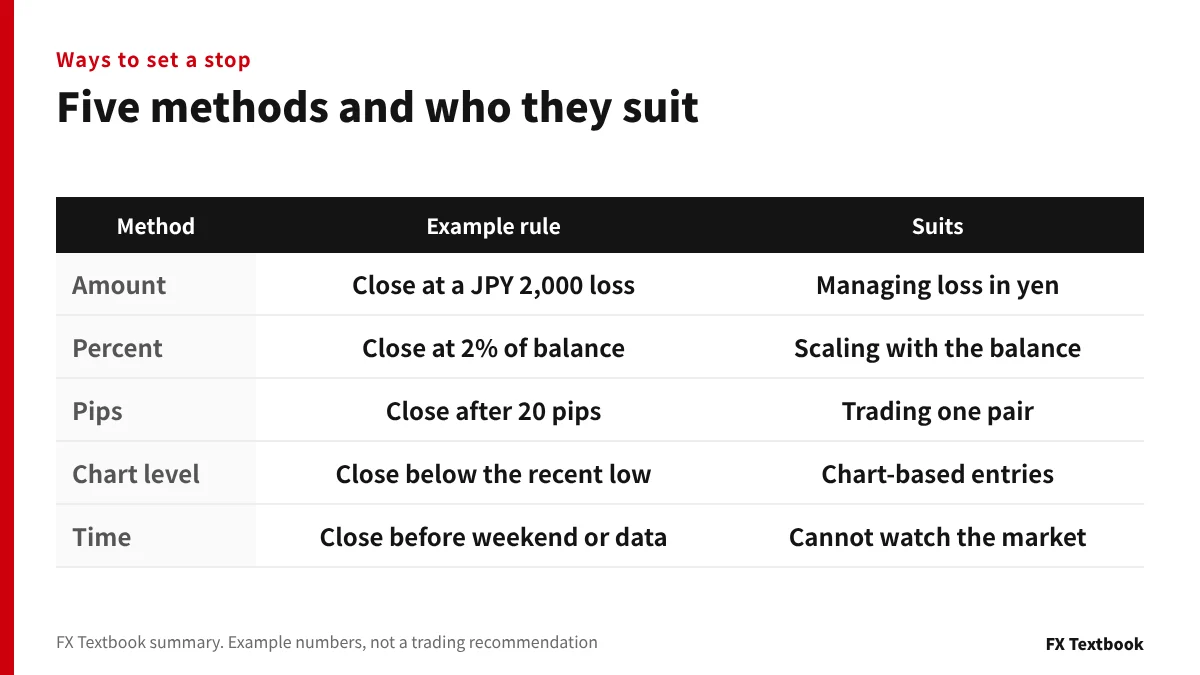
The table lists five methods. Whichever you choose, keep the same rule on every trade.
| Method | Example rule | Watch out |
|---|---|---|
| Amount | Close at a JPY 2,000 loss | Changing the lot changes the distance |
| Percent | Close at 2% of balance | A smaller balance means a smaller limit |
| Pips | Close after 20 pips against you | Pip value differs by pair |
| Chart level | Close below the recent low | Size the lot to the distance |
| Time | Close before the weekend or a data release | No loss limit until that time |
Whatever the method, convert it to the money you could lose. A 20 pip stop costs JPY 20,000 on 1 lot and JPY 2,000 on 0.1 lot.
With chart levels, too, measure the distance to the level first, then choose a lot that keeps the loss within your limit. How to draw levels depends on the strategy, so we do not cover it.
A time rule cannot work alone. There is no loss limit until the time comes, so pair it with a stop order.
Combining two methods
- Set the distance by chart level and cap it by amount (30 pips to the level, JPY 2,000 cap: 0.06 lot)
- Place a pip-based stop and close by time before the weekend
- Use a percentage and stop trading for the month below a set balance
The idea of risking no more than 1 to 2% of the balance per trade is often quoted. It is not a recommended figure, so set the share yourself based on your money and living costs.
FX money management: set the loss first and work back to the lot
Quick tables to size the lot from your risk (USD/JPY, EUR/USD)
On USD/JPY, 1 pip on 1 lot (100,000 units) is JPY 1,000. The table below uses risk amount / (stop distance x JPY 1,000).
| Risk amount | 20 pips | 30 pips | 50 pips |
|---|---|---|---|
| JPY 1,000 | 0.05 lot | 0.03 lot | 0.02 lot |
| JPY 2,000 | 0.1 lot | 0.06 lot | 0.04 lot |
| JPY 3,000 | 0.15 lot | 0.1 lot | 0.06 lot |
| JPY 5,000 | 0.25 lot | 0.16 lot | 0.1 lot |
For pairs quoted in USD, such as EUR/USD, the yen value of a pip moves with the exchange rate. One pip on 1 lot is USD 10, which is JPY 1,500 when USD/JPY is 150.
| Risk amount | 20 pips | 30 pips | 50 pips |
|---|---|---|---|
| JPY 1,000 | 0.03 lot | 0.02 lot | 0.01 lot |
| JPY 2,000 | 0.06 lot | 0.04 lot | 0.02 lot |
| JPY 5,000 | 0.16 lot | 0.11 lot | 0.06 lot |
Cent accounts use a smaller lot
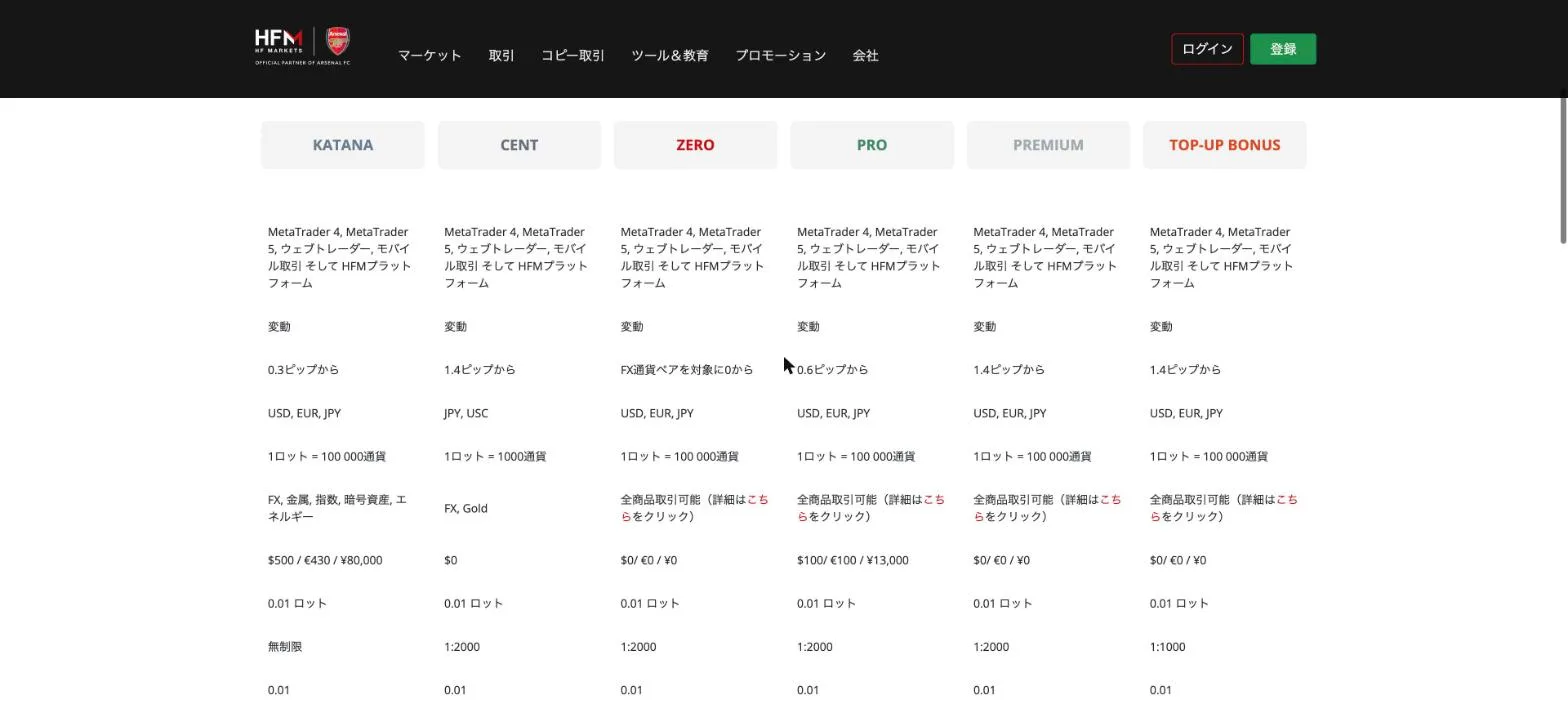
HFM's account comparison table lists 1 lot = 1,000 units for the Cent account. On USD/JPY, 1 pip on 1 lot is then JPY 10.
With a JPY 1,000 risk and a 50 pip stop, a standard account allows 0.02 lot and a Cent account allows 2 lots. Check contract size and minimum lot in the symbol specification.
MT4's official help says a buy position's stop is checked against the Bid. If you buy at the Ask and place the stop 20 pips below, a 1.4 pip spread means the stop is hit once the Bid falls 18.6 pips.
How to place a stop loss in MT4/MT5
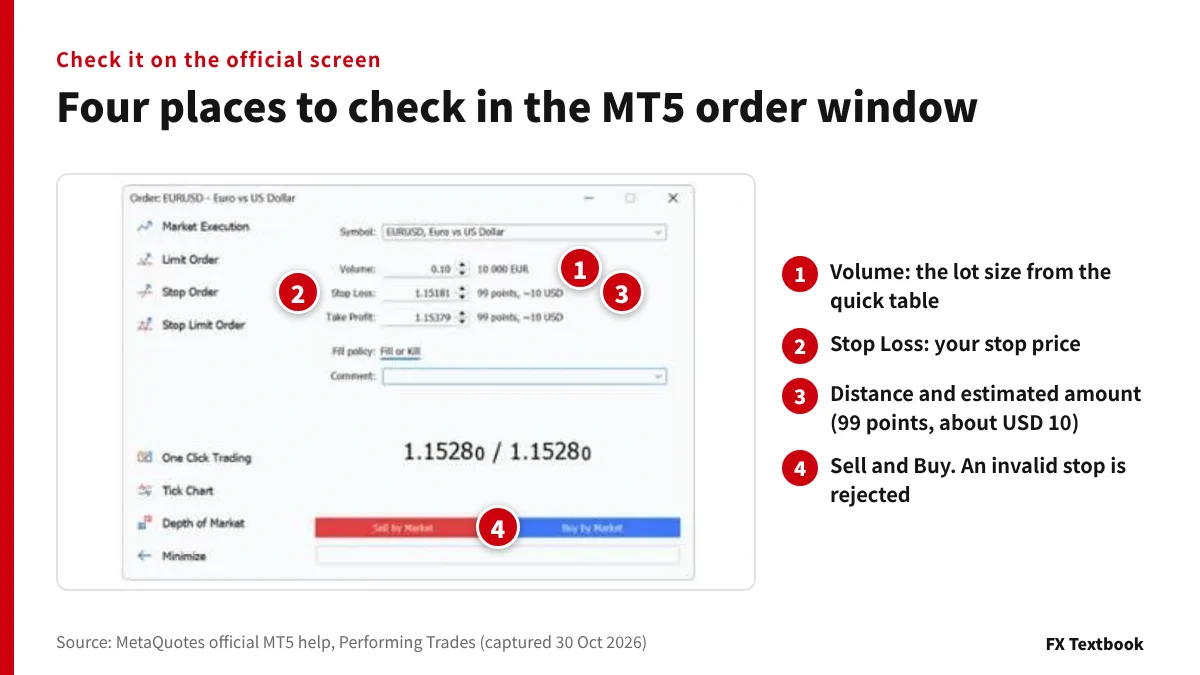
The MT5 new order window has Stop Loss and Take Profit fields (official help).
- 01Open the new order window
Right-click the symbol in Market Watch and choose New Order. The F9 key also works.
- 02Enter the volume
Type the lot size from the quick table into the Volume field.
- 03Enter the stop loss price
Type your stop price. A platform setting lets you enter points instead of a price.
- 04Check the distance and amount
The window shows the distance from the current price and an estimated amount. Compare it with your risk limit.
- 05Click Sell or Buy
If the stop price is invalid, a warning appears and the order is not accepted.
The example in the official help shows EURUSD 0.10 lot with 99 points, about USD 10. With five decimal places, 10 points equal 1 pip, so this is 9.9 pips.
Adding or moving a stop after you open a trade
Once a position is open, choose Modify or Delete on the Trade tab to set the stop again. If the setting is on, you can also drag the line on the chart.
| Item | Stop loss | Trailing stop |
|---|---|---|
| Where it runs | Broker server | Your MT4/MT5 |
| When MT4/MT5 is closed | Keeps working | Stops (the last stop level stays) |
| How it moves | You change it | Follows the price only as profit grows |
MT4's official help says the same. If your computer is off for part of the day, use a stop loss rather than a trailing stop.
Differences in MT4
In MT4, a stop loss is attached to a market or pending order (official help). MT4 has four pending order types, and a stop attached to one passes to the position automatically once it fills.
The minimum distance, called the stop level, differs by broker and symbol. MT5's official help says it is set in the symbol specification.
Limit, stop and OCO orders, and how to place them in MT4/MT5
Three cases where the loss exceeds your stop
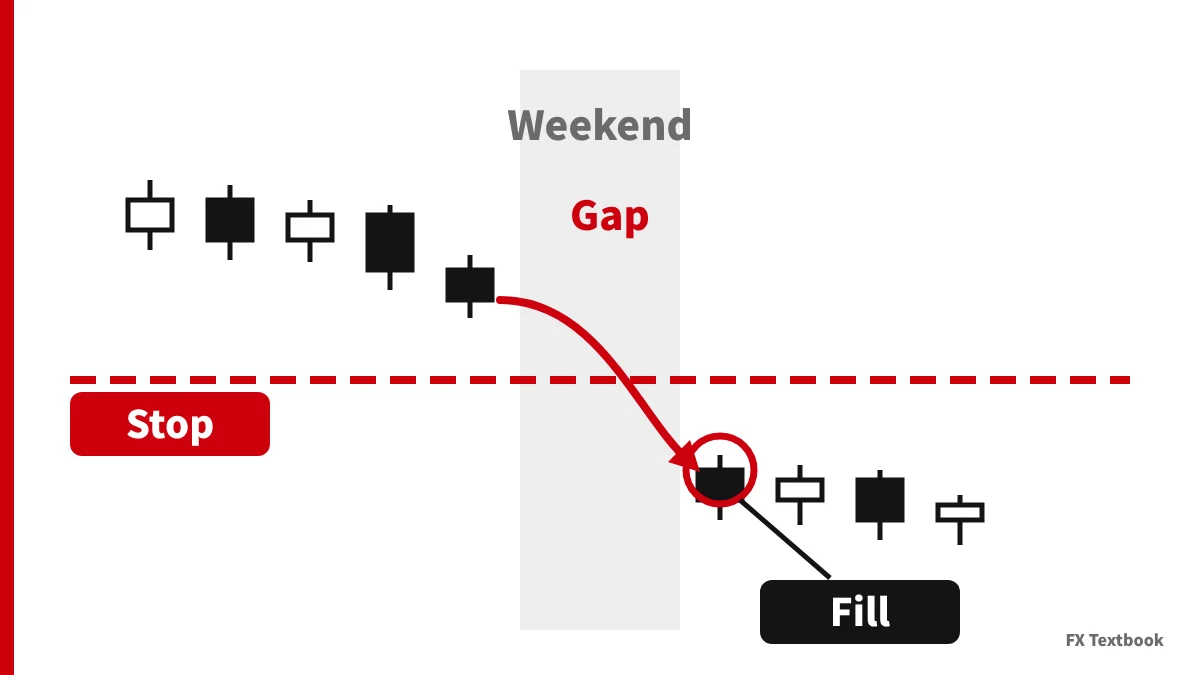
A stop order does not promise a fill at your price. In fast markets it can fill away from the level you set.
| Case | What happens | What to write in your rules |
|---|---|---|
| Monday gap | The market opens away from Friday's close and jumps over the stop | Whether you hold over the weekend |
| Economic data release | The price jumps and the spread widens | Whether you open trades around releases |
| Moment with no fill | In MT5 the order is not deleted and triggers again on the next price | A cap if the loss exceeds your limit |
With a zero cut, a negative balance after a gap is not charged to you. Any loss beyond what your stop was meant to cap still comes out of your account.
Stop losses on bonus accounts: size risk from your own money
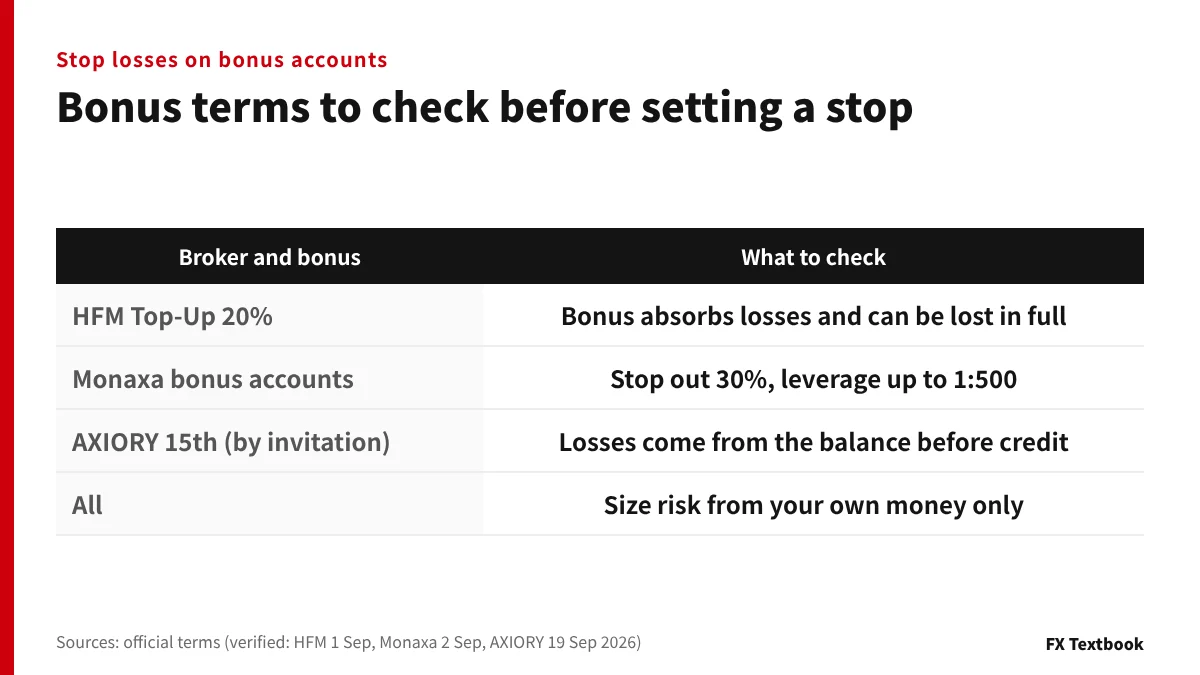
Where deposit bonus credit counts as margin, the stop out looks further away. The loss on one trade still depends on the lot and the stop distance.
| Broker and bonus | Terms that affect stop losses |
|---|---|
| HFM Top-Up Bonus account, 20% deposit bonus | Absorbs losses and can be lost in full. Stop-out losses are not compensated |
| Monaxa bonus accounts (30% and USD 50) | Stop out rises from the usual 20% to 30%, leverage up to 1:500. Reaching stop out removes all or part of the bonus |
| AXIORY 15th anniversary starter pack (by invitation) | Losses come from the balance before the credit. On a zero cut the remaining credit covers the shortfall |
Say you deposit JPY 100,000 and receive a JPY 20,000 bonus at HFM's 20%. With a 2% risk, the base is JPY 100,000, not 120,000, so the limit is JPY 2,000.
Counting on the bonus instead of a stop can wipe out both your own money and the bonus.
Rules to avoid death by small stops, averaging down and hedging
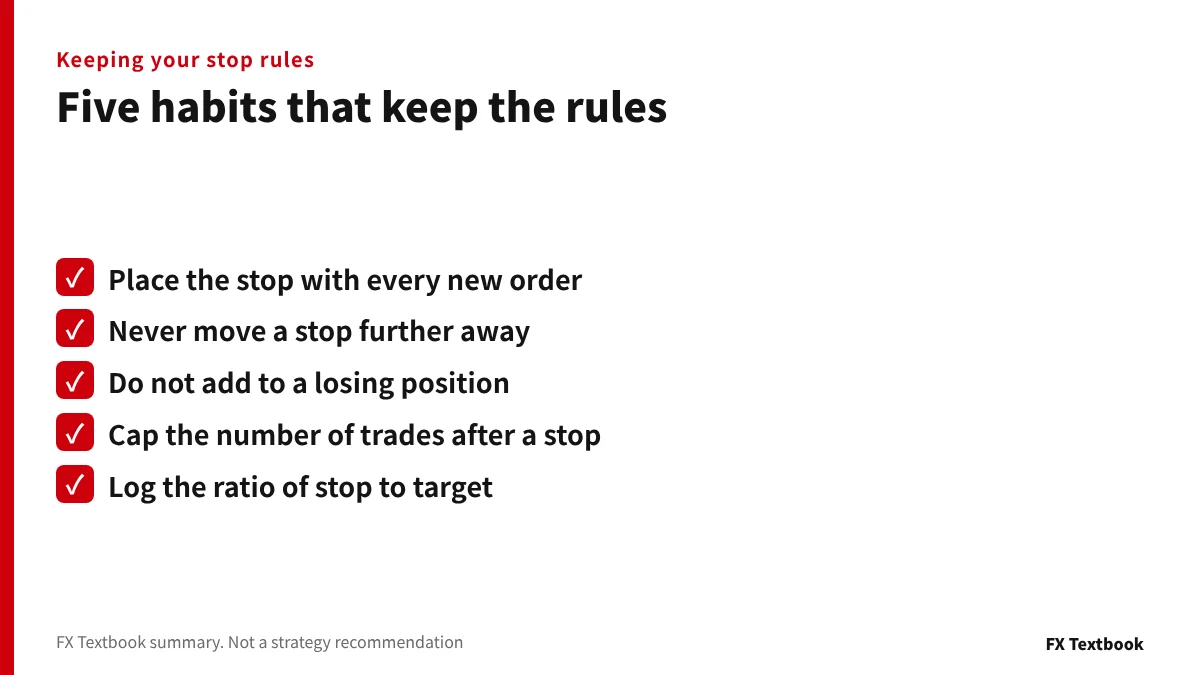
Judge small stops by the ratio of stop to target
Death by small stops means repeated small losses that drain the account. Whether stops are too tight shows in the ratio to your profit target, not in a single trade.
| Stop distance | Profit target | Break-even win rate |
|---|---|---|
| 20 pips | 10 pips | 66.7% |
| 20 pips | 20 pips | 50.0% |
| 20 pips | 40 pips | 33.3% |
These figures are break-even points, not win rates anyone can achieve. Compare them with the win rate in your own trade log.
Averaging down and hedging tend to delay the stop
Averaging down means adding to a losing position in the same direction. The lot grows, so the same adverse move costs more.
Hedging means holding a buy and a sell on the same symbol. HFM's bonus terms say the bonus is removed if hedging across internal or external accounts is suspected.
What to do after a stop is hit
- Log whether the stop followed your rules or was an exception
- Do not raise the lot to win it back the same day
- Save rule changes for your monthly review
A sample stop-loss rule sheet and our conclusion
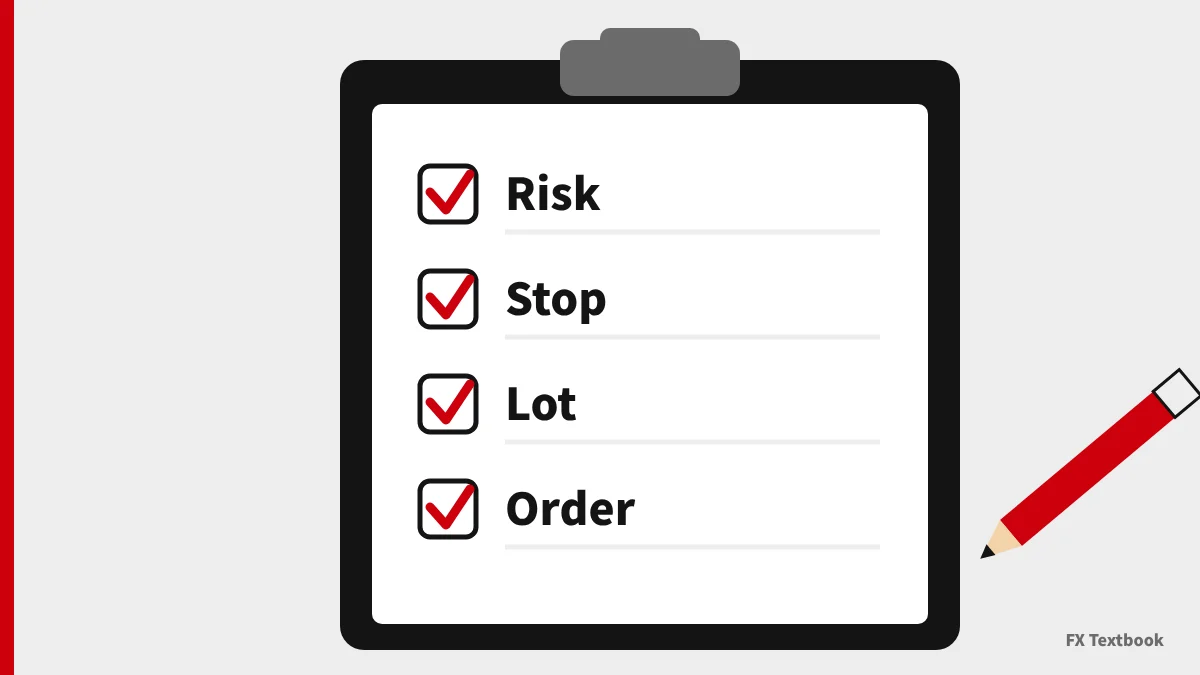
Before you trade, write these six items on one sheet.
| Item | Example (hypothetical) |
|---|---|
| Balance | JPY 100,000 (bonus excluded) |
| Risk per trade | JPY 2,000 (2% of balance) |
| How the stop is set | Below the recent low, 30 pips at most |
| Lot size | 2,000 / (30 x 1,000) = 0.06 lot |
| When the stop is placed | With the new order |
| Exceptions | No new trades before the weekend or data releases |
Once a month, compare your trade log with the sheet. The number of times you moved a stop further away tells you whether you keep the rules.
If you cannot watch the market all the time, place the stop with every order. If you manage risk in yen, set stops by amount or percentage; if you trade from charts, set them by chart level. Either way, size the lot to fit your risk limit. On bonus accounts, calculate the limit from your own money only.
Frequently asked questions
Q. How many pips should an FX stop loss be?
A. There is no figure that fits everyone. Divide your risk amount by the pip value of your lot to get the maximum distance. For example, USD/JPY 0.1 lot with a JPY 2,000 limit gives 20 pips.
Q. What percentage of my balance should I risk?
A. Risking 1 to 2% of the balance per trade is often quoted. It is only an example. At 2% of JPY 100,000 the limit is JPY 2,000, and you size the lot from that.
Q. With a zero cut, do I still need a stop loss?
A. Yes. A zero cut only covers a negative balance. Money lost before the stop out does not come back, and on a 0% stop-out account you lose almost everything.
Q. Will my stop always close at the price I set?
A. No. On Monday gaps or data releases the price can jump over the stop and fill further away. In MT5, a stop that cannot be filled triggers again on the next price.
Q. Does a stop loss work when MT4/MT5 is closed?
A. Yes. MetaQuotes' official help says stops run on the broker's server. Trailing stops run in the terminal, so they stop when MT4/MT5 is closed.
Q. What can I do if I cannot bring myself to cut losses?
A. Place the stop with the new order and decide never to move it further away. Write your risk amount, stop distance, lot and exceptions on one sheet and review it monthly.
Q. Do I need a stop loss on a bonus account?
A. Yes. HFM's terms say the bonus also absorbs losses and can be lost in full. Calculate your risk limit from your own money, without the bonus.
Sources and conditions
- Financial Futures Association of Japan: survey on financial literacy of FX clients, summary (April 2018, checked 30 October 2026) →
- MetaQuotes official MT5 help: Performing Trades (checked 30 October 2026) →
- MetaQuotes official MT5 help: General Concepts, order types and trailing stop (checked 30 October 2026) →
- MetaQuotes official MT4 help: Order Types (checked 30 October 2026) →
- MetaQuotes official MT4 help: Trailing Stop (checked 30 October 2026) →
- HFM official: account type comparison (captured 29 October 2026) →
- HFM official: bonus offerings, Top-Up Bonus account 20% (checked 1 September 2026) →
- Exness official help: margin call and stop out levels by account type (checked 30 October 2026) →
- Monaxa official: account types (checked 2 September 2026) →
- Monaxa official: bonus (checked 2 September 2026) →
- AXIORY official: 15th anniversary starter pack terms (checked 19 September 2026) →
- Advertising, affiliate relationships and risk disclosure →
FX Textbook is an independent information site, not a broker or provider of personal investment advice. Forex and CFDs involve risk. You may lose some or all of your invested capital. No trading result is guaranteed.
NEXT STEP
Rules set? Compare stop-out levels by account.
Maximum leverage, stop-out levels and zero cut terms for each listed broker, side by side.
Brokers covered in this column
Account types, trading conditions and current offers are on each broker page.