














What is HFM's maximum leverage, and where does the stop out happen?
Maximum leverage is unlimited on KATANA, 1:2000 on Cent, Zero, Pro and Premium, and 1:1000 on Top-Up Bonus (Japan display, checked 29 October 2026).
The stop out is a 20% margin level on every account except KATANA, which is 0% (checked 26 September 2026). With hypothetical numbers, we also calculate how far price can move against you.
Summary: 1:2000 maximum leverage and a 20% stop out (KATANA 0%)
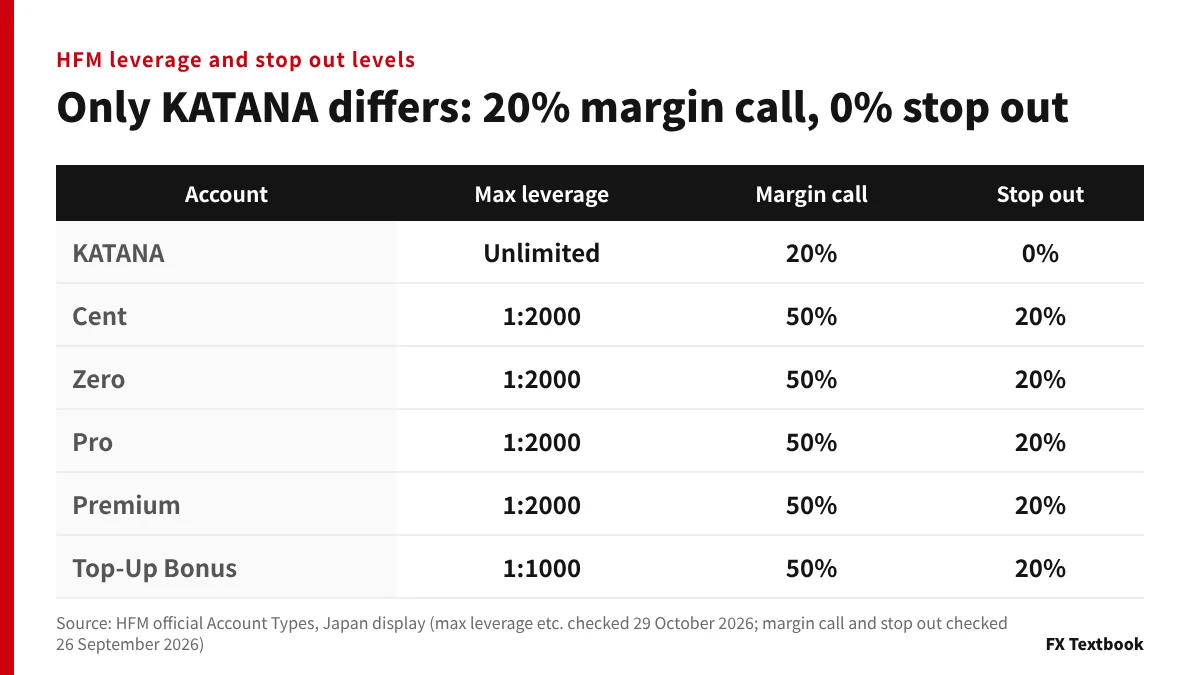
- Maximum leverage: unlimited on KATANA, 1:2000 on Cent, Zero, Pro and Premium, 1:1000 on Top-Up Bonus
- Margin call: 20% on KATANA, 50% on the other five accounts
- Stop out: 0% on KATANA, 20% on the other five accounts
- Margin level: equity divided by required margin, times 100 (MT5 definition)
- Zero-cut: a negative balance is reset to zero (official wording)
- Not confirmed: figures that change by balance or around news (not on the official Japanese pages)
Higher leverage lets you trade larger positions with less money. Losses also grow faster and can exceed your funds within a short time.
We checked maximum leverage on 29 October 2026, and the margin call and stop out on 26 September 2026, on HFM's official Japan display.
Maximum leverage by account: unlimited on KATANA, 1:1000 on Top-Up Bonus
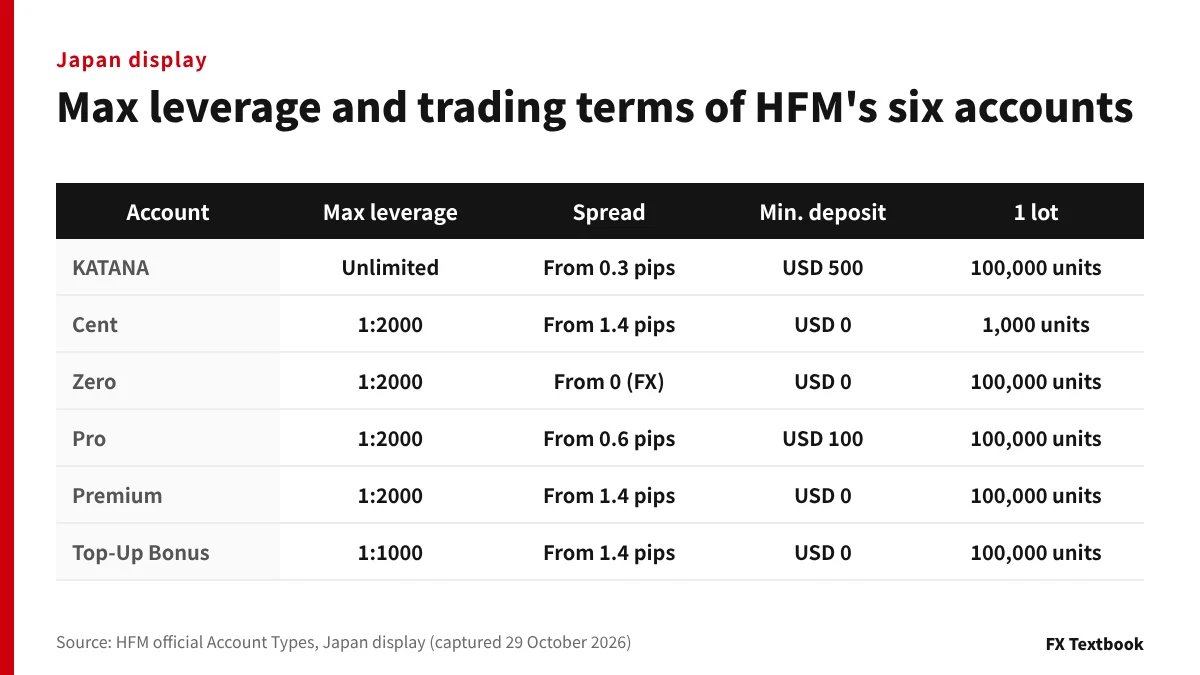
Maximum leverage is set by the account type. On the Japan display, KATANA is unlimited, Cent, Zero, Pro and Premium are 1:2000, and Top-Up Bonus is 1:1000.
| Account | Max leverage | 1 lot | Min. deposit |
|---|---|---|---|
| KATANA | Unlimited | 100,000 units | USD 500 |
| Cent | 1:2000 | 1,000 units | USD 0 |
| Zero | 1:2000 | 100,000 units | USD 0 |
| Pro | 1:2000 | 100,000 units | USD 100 |
| Premium | 1:2000 | 100,000 units | USD 0 |
| Top-Up Bonus | 1:1000 | 100,000 units | USD 0 |
※ Source: HFM official Account Types, Japan display (captured 29 October 2026). The minimum deposit is an account condition, separate from each payment method's minimum
Differences besides leverage
- KATANA: no trading commission and swap-free. Trades FX, metals, indices, crypto and energies
- Cent: 1 lot is 1,000 units. Account currencies are JPY and USC. Trades FX and Gold
- Zero: FX spreads from 0. No minimum deposit
- Pro: spreads from 0.6 pips. Minimum deposit USD 100
- Premium: spreads from 1.4 pips. No minimum deposit
- Top-Up Bonus: the account for the deposit bonus. Maximum leverage 1:1000
If you pick an account by leverage alone, you can miss lot limits and trading costs. We compare the account types in a separate column.
This article uses only the display opened from Japan. We did not include overseas values that differ. After you open an account, confirm on the screen after you log in.
Compare HFM's account types (spreads, commission, minimum deposit) →
Checking the official page: read the last row of the account table
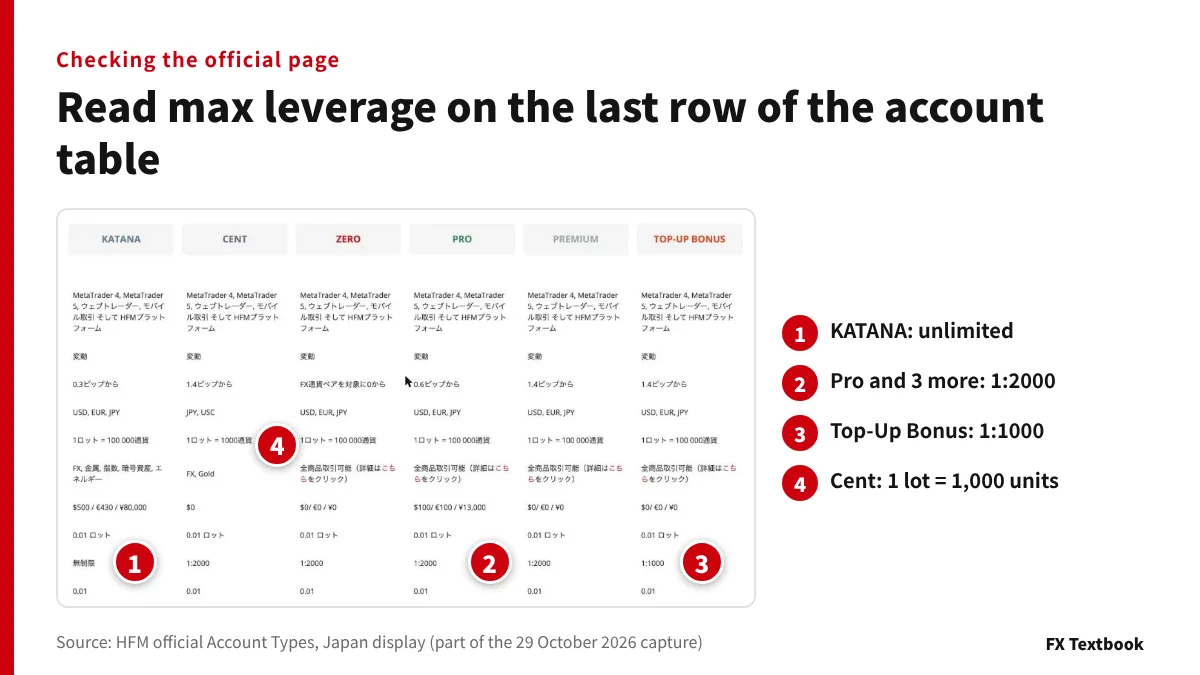
You can check maximum leverage in the table on HFM's official Account Types page. Open it from Japan and read the last row.
- 01Open the Account Types page
Show the six-account comparison table on the Japan display
- 02Read maximum leverage in the last row
KATANA is unlimited, Top-Up Bonus is 1:1000
- 03Check the units per lot
Only Cent is 1,000 units. The rest are 100,000
- 04Check the minimum deposit
KATANA is USD 500, Pro is USD 100
This table has no margin call or stop out rows. We confirmed those two from each account's detail page (26 September 2026).
The site footer states the site is not intended for Japanese residents. It lists supportjp@hfm.com for enquiries (checked 29 October 2026).
HFM's screens can show different values depending on where you connect from. If you notice a difference, prefer the Japan display and the screen after you log in.
The margin level formula: a warning at 50%, a stop out at 20%
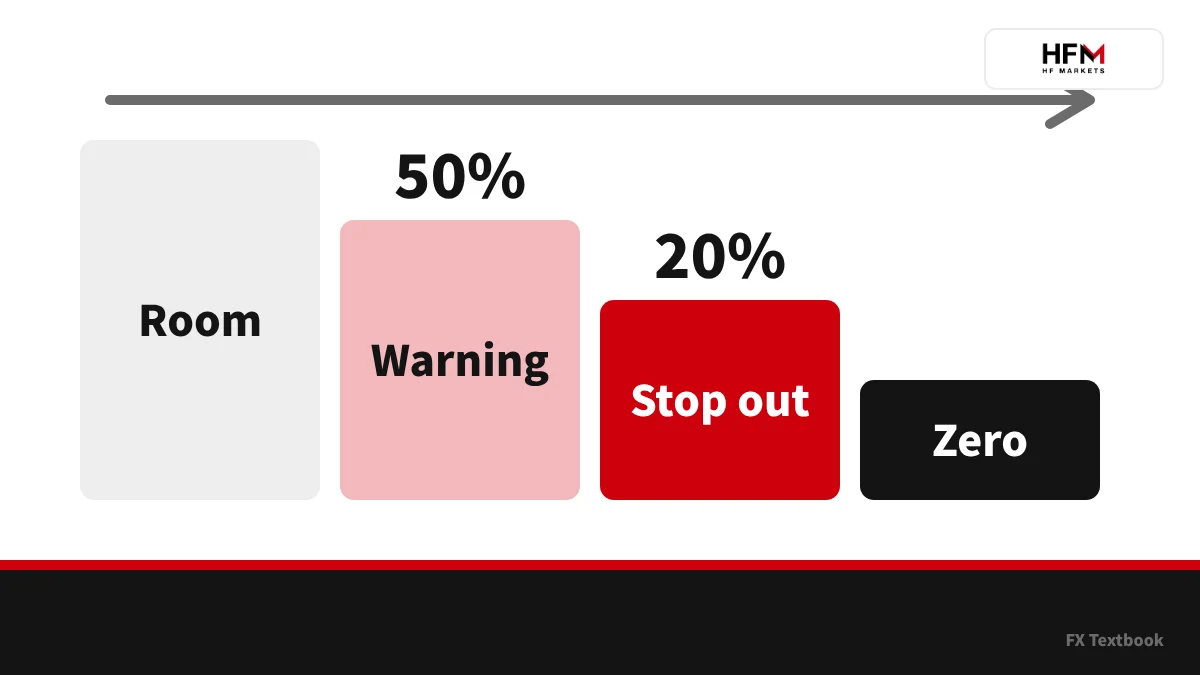
The loss-cut level is set by the margin level. In MT5's help, the margin level is equity divided by margin, times 100 (checked 8 November 2026).
Required margin for FX is lots times contract size, divided by leverage. The margin MT5 shows is the result of that formula.
| Level | Name | What happens |
|---|---|---|
| Above 50% | Normal | You can place orders and keep trading |
| 50% or less | Margin call | A warning level. The account status line turns red |
| 20% or less | Stop out | Positions are closed by force |
※ Source: HFM official Account Types (checked 26 September 2026) and MetaQuotes MetaTrader 5 help (checked 8 November 2026)
In MT5's normal mode (FIFO off), a stop out closes the position with the largest loss first. This is stated in the MetaQuotes help.
KATANA has a 20% margin call and a 0% stop out. Forced closing does not happen until a lower level than on the other five accounts.
Worked example: how far can you go with JPY 100,000?
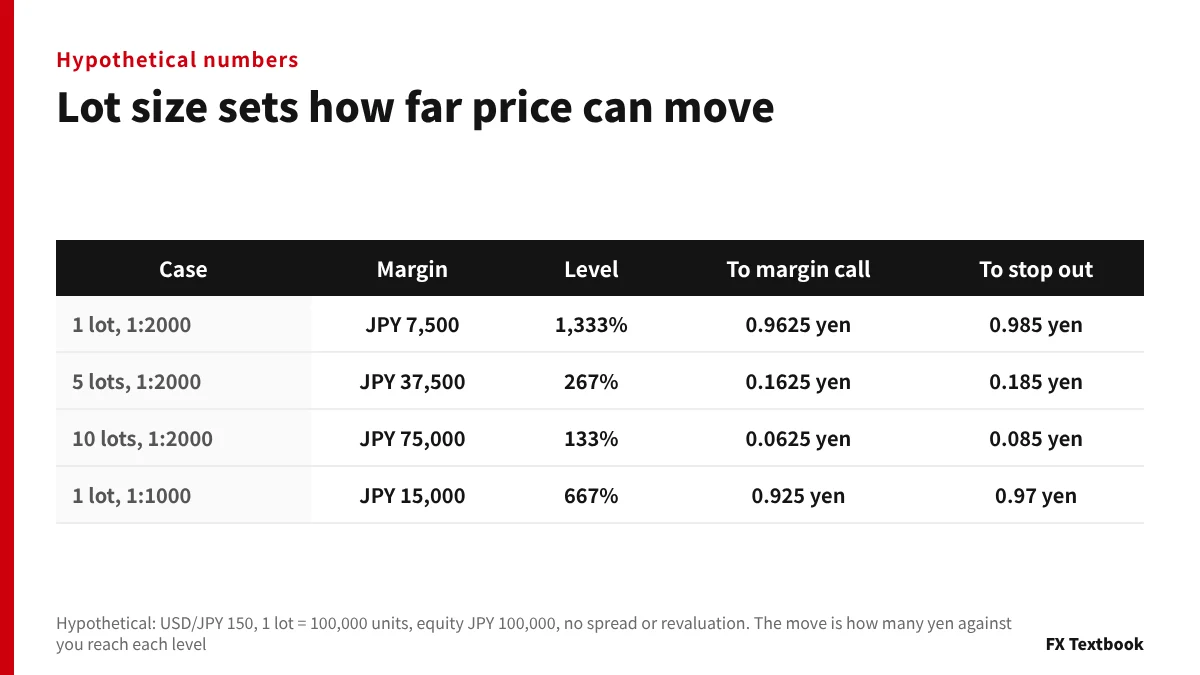
Every number from here is hypothetical. We assume USD/JPY at 150, 1 lot as 100,000 units and equity of JPY 100,000. We ignore spread, swap and margin changes from revaluation.
First we compare the required margin per lot at 1:2000 and 1:1000.
| Lots | 1:2000 | 1:1000 |
|---|---|---|
| 1 lot (100,000 units) | JPY 7,500 | JPY 15,000 |
| 0.1 lot (10,000 units) | JPY 750 | JPY 1,500 |
| 0.01 lot (1,000 units) | JPY 75 | JPY 150 |
※ Formula: lots x 100,000 units x 150 yen / leverage. 1 lot is 100,000 x 150 / 2000 = JPY 7,500. Cent's 1 lot (1,000 units) is JPY 75 at 1:2000
Next we vary the lot size on JPY 100,000 of equity. We calculate how far price can move against you until the margin level falls to 50% and 20%.
| Lots | Required margin | Level right after entry | Move to margin call | Move to stop out |
|---|---|---|---|---|
| 1 | JPY 7,500 | About 1,333% | 0.9625 yen (loss JPY 96,250) | 0.985 yen (loss JPY 98,500) |
| 5 | JPY 37,500 | About 267% | 0.1625 yen (loss JPY 81,250) | 0.185 yen (loss JPY 92,500) |
| 10 | JPY 75,000 | About 133% | 0.0625 yen (loss JPY 62,500) | 0.085 yen (loss JPY 85,000) |
※ Hypothetical. The margin call is the loss until equity reaches 50% of required margin, the stop out 20%. At 1 lot, a 1 yen move is JPY 100,000
At the same 1:2000, 1 lot survives a 0.985 yen move against you. At 10 lots, a 0.085 yen move triggers the stop out.
In real trading, the spread costs a little from the start. Your room is smaller than the values calculated here.
At 1:1000
Holding 1 lot at 1:1000 needs JPY 15,000 of margin. The margin call comes after 0.925 yen and the stop out after 0.97 yen against you.
At 5 lots the margin is JPY 75,000: 0.125 yen to the margin call and 0.17 yen to the stop out. 10 lots would need JPY 150,000, which JPY 100,000 of equity cannot hold.
Look at effective leverage
The multiple you actually use sets how fast losses grow, not the maximum. Divide the position value by your equity.
- 1 lot: JPY 15 million / JPY 100,000 = 150x effective
- 5 lots: JPY 75 million / JPY 100,000 = 750x effective
- 10 lots: JPY 150 million / JPY 100,000 = 1,500x effective
- The margin level hits 100% at about 13.3 lots (hypothetical)
Even with a 1:2000 maximum, you do not need to hold 10 lots on JPY 100,000. Work the lot size back from the move to the stop out.
Calculating pips, lots and required margin (with a pair-by-pair table) →
The KATANA account: unlimited leverage and a 0% stop out
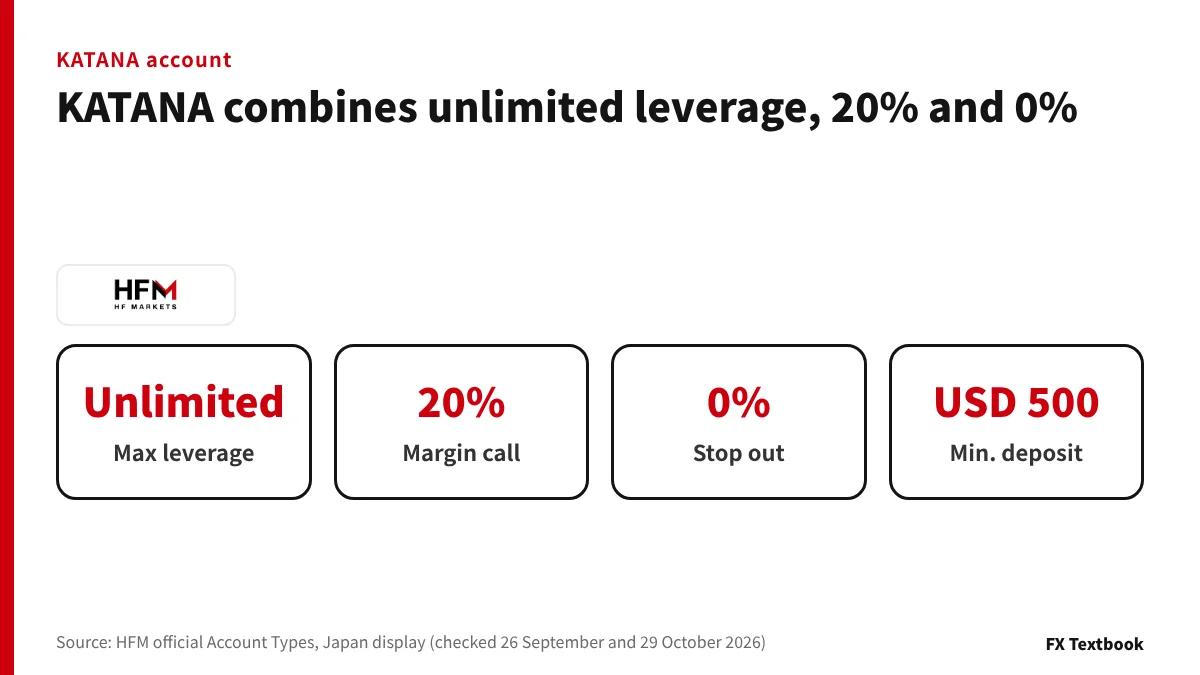
KATANA has unlimited maximum leverage, a 20% margin call and a 0% stop out. The minimum deposit is USD 500, with no trading commission and swap-free (checked 26 September 2026).
A 0% stop out means forced closing does not happen until equity nears zero. The other five accounts are closed at 20%.
| Lots | Stop out at 20% | Stop out at 0% |
|---|---|---|
| 1 lot | 0.985 yen against you | 1 yen against you |
| 10 lots | 0.085 yen against you | 0.1 yen against you |
※ Hypothetical: USD/JPY 150, equity JPY 100,000, required margin assumed at JPY 7,500 per lot. The official Japanese pages do not say whether KATANA's margin is the same
With the same required margin, the difference is 20% of that margin. At 1 lot that is JPY 1,500, or a 0.015 yen move.
KATANA's 20% margin call equals the other accounts' stop out. The warning appears where the other accounts are closed by force.
The official Japanese pages do not say how required margin is calculated under unlimited leverage. After opening an account, check the MT5 symbol specification.
On an account that closes later, the range of a negative balance after a sharp move can in theory be wider. Read this together with the zero-cut section below.
When leverage changes: what we confirmed and how to check
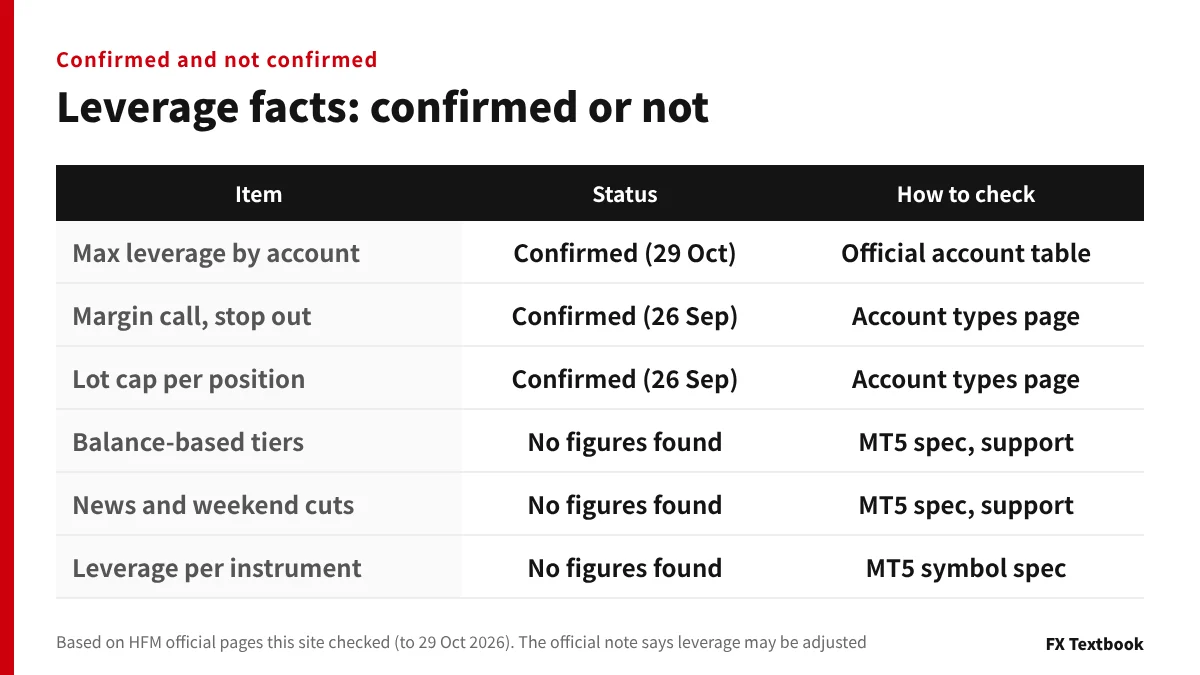
HFM's Account Types page carries a note: leverage may be adjusted, and the terms have the details. It also says availability may differ by region (checked 26 September 2026).
Some other sites publish figures for balance-based cuts, limits around news and weekend changes. We could not find those figures on the official Japanese HFM pages this site has checked. So we do not repeat them.
Check the MT5 symbol specification
- 01Right-click a symbol in Market Watch
Open the context menu
- 02Open Specification
The conditions set by the broker are listed
- 03Read the margin items
Initial, maintenance and hedged margin are shown
- 04Check the calculation mode
If it is Dynamic, the rate changes by volume or value
According to the MetaQuotes help, the margin shown is a reference value computed at the price when you open the window. In Dynamic mode, extra rates apply depending on position volume or value (checked 8 November 2026).
Lot limits (official)
| Item | Standard accounts | Cent account |
|---|---|---|
| Limit per position | 60 lots | 1,000 cent lots (10 standard lots) |
| Limit per account | Not listed | 6,000 cent lots |
| Maximum positions | 500 | 300 |
※ Source: HFM official Account Types, Japan display (checked 26 September 2026). 1,000 cent lots equal 10 standard lots. No per-account cap for standard accounts appears in what we checked
When you need exact figures, ask HFM support. The contact listed in the official site footer is supportjp@hfm.com.
Zero-cut versus stop out: when the balance turns negative
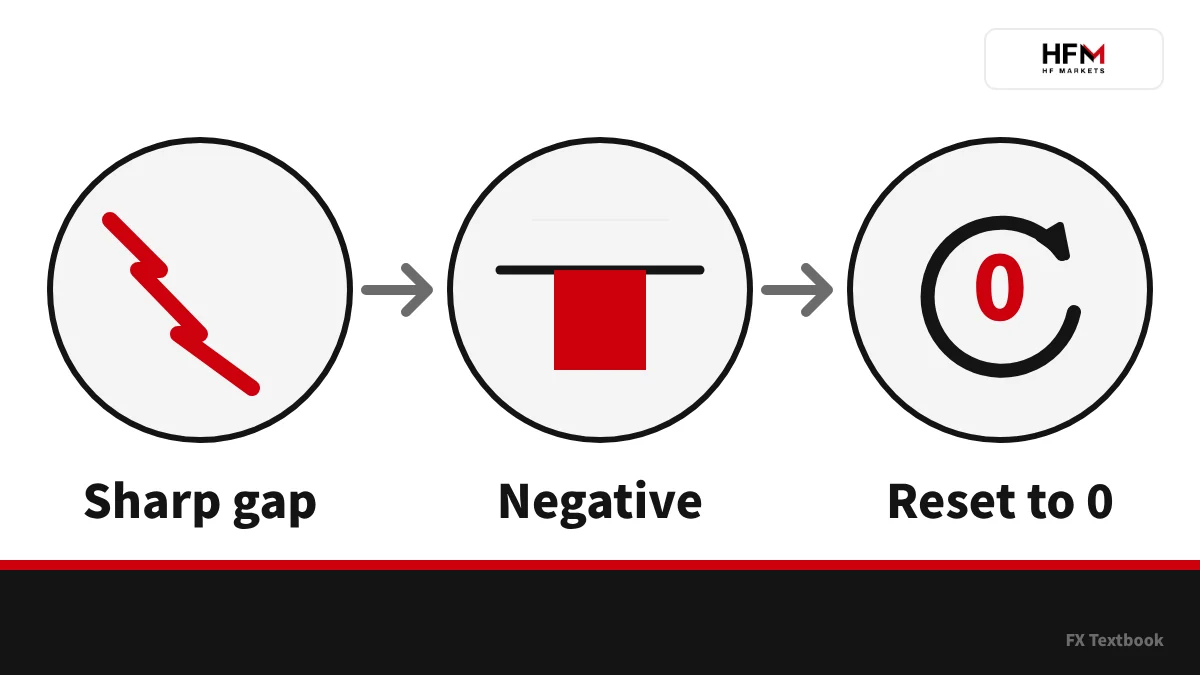
A stop out force-closes positions when the margin level falls. Zero-cut resets the balance to zero when closing came too late and the balance went negative.
HFM's Security of Funds page lists negative balance protection: a negative balance is automatically reset to zero (checked 29 October 2026). The same page also mentions segregated funds and USD 5 million of insurance.
| Situation | Figure |
|---|---|
| Equity | JPY 100,000 |
| Position | 1 lot long USD/JPY |
| A 1.5 yen gap down | Loss of JPY 150,000 |
| Balance | Minus JPY 50,000 |
| After zero-cut | Back to JPY 0 |
※ Hypothetical. It happens when a gap after news or the weekend jumps past the stop out level
In this example, price jumps before the 20% stop out is reached. Forced closing only fixes the loss and cannot stop it from growing.
Zero-cut only resets the negative amount to zero, and the funds you lost do not come back. Even with zero-cut, you can lose the money you deposited. The conditions and exceptions are set by HFM's terms.
How bonus accounts are treated
The Top-Up Bonus can be used as margin. Losses from a stop out are not compensated, and the whole bonus can be lost. Hedging is also prohibited on the bonus account.
What is zero-cut? How it works on overseas forex and when it applies →
Zero hedge margin: what happens to margin when you hedge
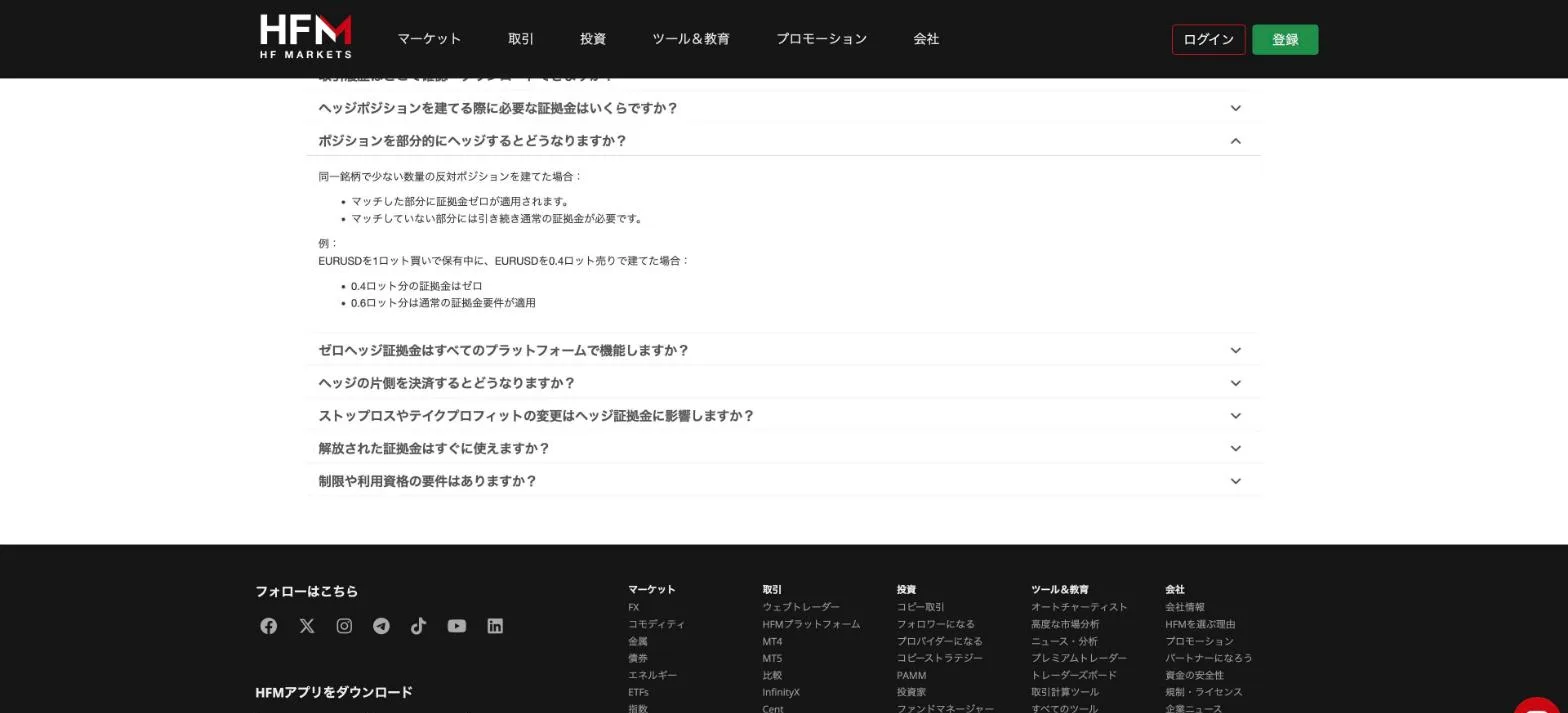
Holding a buy and a sell on the same symbol changes the margin. HFM's FAQ says the margin on the matched volume is zero (checked 30 October 2026).
- Full hedge: same symbol and volume, so the matched volume carries zero margin
- Partial hedge: zero only on the matched part. The rest keeps normal margin
- Platforms covered: WebTrader, the HFM app, MT4 and MT5
- Closing one side: the remaining position returns to normal margin at once
- Changing SL or TP: no effect on margin
- Freed margin: usable immediately
| Approach | Margin |
|---|---|
| Zero hedge margin (HFM's FAQ) | JPY 4,500 (the remaining 0.6 lot) |
| Without zero hedge margin, an example (MT5's description) | JPY 7,500 (the larger side, 1 lot) |
※ Hypothetical. We applied this article's assumptions (USD/JPY 150, 1:2000) to the quantities in HFM's FAQ example (1 lot long, 0.4 lot short). MT5's usual approach keeps total margin at the position's margin when the opposite order is no larger than the position
Margin gets lighter only when you hedge the same symbol within the same account. Hedging across separate accounts is not covered by this mechanism.
The bonus terms prohibit hedging both inside and outside the bonus account. Lighter margin and what the terms allow are separate questions.
Prohibited trading on overseas forex (hedging, account freezes, differences by broker) →
Compared with other brokers: maximum leverage and stop out levels
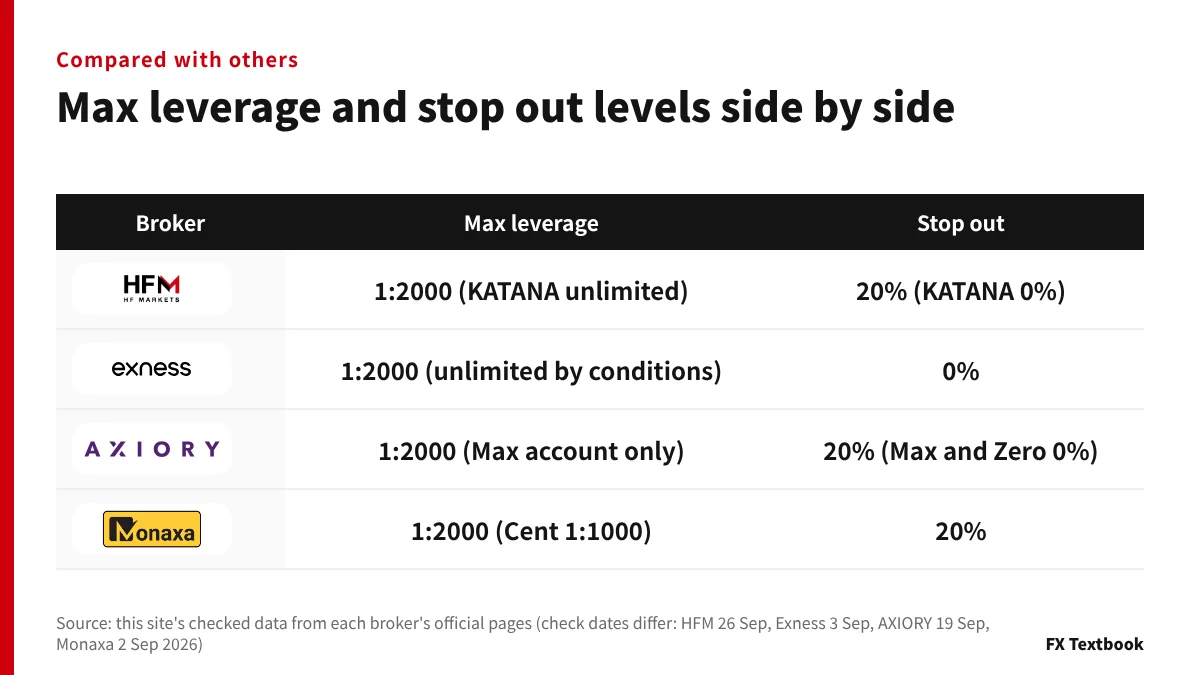
Several brokers offer 1:2000 as their maximum. The differences are in how unlimited leverage is handled and in the stop out level.
| Broker | Max leverage | Stop out | Date checked by this site |
|---|---|---|---|
| HFM | 1:2000 (KATANA unlimited) | 20% (KATANA 0%) | 26 September 2026 |
| Exness | 1:2000 (unlimited by conditions) | 0% | 3 September 2026 |
| AXIORY | 1:2000 (Max account only, others 1:1000) | 20% (Max and Zero accounts 0%) | 19 September 2026 |
| Monaxa | 1:2000 (Cent 1:1000) | 20% (margin call 50%) | 2 September 2026 |
※ Source: this site's checked data. Names differ (stop out, loss cut), and the base formula or scope may not be the same
Accounts with a 0% stop out are KATANA at HFM and the Max and Zero accounts at AXIORY. Exness lists its stop out as 0% (per this site's checked data).
When comparing, look at the margin level of the account you will use rather than the maximum leverage figure. Check dates differ by broker in this table, so confirm each broker's latest display before opening an account.
Compare Exness and HFM (leverage, stop out, deposits and withdrawals) →
Our verdict: choose leverage by margin level, not by the maximum
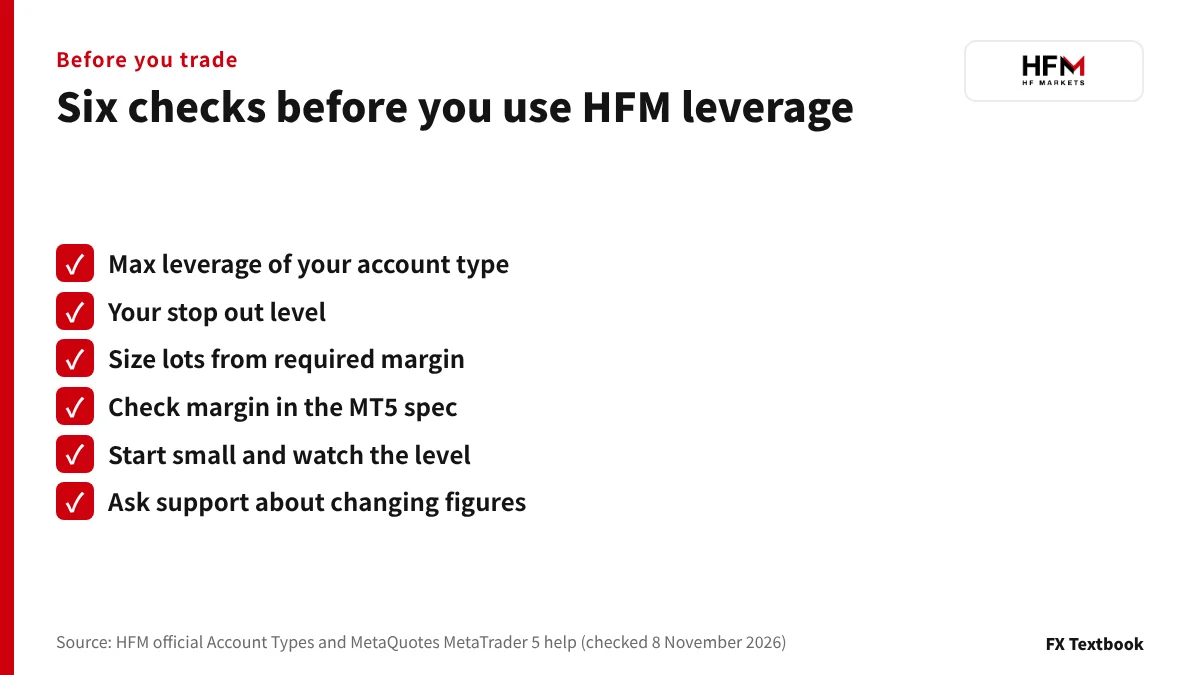
HFM's maximum leverage depends on the account, and the stop out is 20% (KATANA 0%). What matters is not the maximum but how far the margin level falls with the lots you hold. Work your lot size back from required margin and the move to the stop out.
Reading confirmed figures apart from unconfirmed ones makes mistakes less likely.
- If you want to start small: Cent's 1 lot is 1,000 units and its required margin is small
- If you want to test your room: run the calculation with different lot sizes on the same funds first
- If you want to use a bonus: Top-Up Bonus is 1:1000 and losses are not compensated
- If you are considering KATANA: check what 0% means and how margin is calculated in the MT5 specification
Frequently asked questions
Q. What is HFM's maximum leverage?
A. On the Japan display, KATANA is unlimited, Cent, Zero, Pro and Premium are 1:2000, and Top-Up Bonus is 1:1000 (checked 29 October 2026). It differs by account, and an official note says it may be adjusted.
Q. What is HFM's stop out level?
A. The stop out is 0% on KATANA and 20% on the other five accounts. The margin call is 20% on KATANA and 50% on the other five (checked 26 September 2026).
Q. What does KATANA's 0% stop out mean?
A. It means forced closing does not happen until equity nears zero. The other accounts close at 20%. After a sharp move, the range of a negative balance can in theory be wider.
Q. Can I change my leverage at HFM?
A. We found no change procedure on the official Japanese pages this site has checked. After opening an account, ask HFM support (supportjp@hfm.com) or check the screen after you log in.
Q. How is HFM's required margin calculated?
A. For FX it is lots times contract size, divided by leverage. For example, hypothetically, USD/JPY at 150, 1 lot and 1:2000 needs JPY 7,500. The MT5 symbol specification shows the actual margin.
Q. Does HFM have zero-cut?
A. Yes. The official Security of Funds page lists negative balance protection: a balance that turns negative is automatically reset to zero (checked 29 October 2026).
Q. What happens to margin when I hedge?
A. In HFM's FAQ, the margin on the matched volume becomes zero for the same symbol in the same account. Bonus terms may prohibit hedging, so check the terms first.
Q. What are the leverage and stop out on the Top-Up Bonus account?
A. Maximum leverage is 1:1000 and the stop out is 20%. The bonus can be used as margin, but losses from a stop out are not compensated and the whole bonus can be lost.
Sources and conditions
- HFM official: Account Types, Japanese (Japan display, checked 29 October 2026) →
- HFM official: Help Centre FAQs, Japanese (zero hedge margin, checked 30 October 2026) →
- HFM official: Security of Funds, Japanese (checked 29 October 2026) →
- MetaQuotes: MetaTrader 5 help, Forex margin calculation (checked 8 November 2026) →
- MetaQuotes: MetaTrader 5 help, Market Watch and symbol specification (checked 8 November 2026) →
- MetaQuotes: MetaTrader 5 help, account status and stop out (checked 8 November 2026) →
- Advertising, affiliate relationships and risk disclosure →
FX Textbook is an independent information site, not a broker or provider of personal investment advice. Forex and CFDs involve risk. You may lose some or all of your invested capital. No trading result is guaranteed.
NEXT STEP
Checked leverage and stop out levels? Compare the account types' terms next.
Spreads, minimum deposits and current promotions by account are all in one place on our broker page.
Brokers covered in this column
Account types, trading conditions and current offers are on each broker page.