













Searching for an Axi bonus brings up no deposit bonuses and welcome bonuses.
In what this site could check, we found no account opening (no deposit) bonus or deposit bonus that Japan residents can use now (checked 8 November 2026). JP25Axi, the 25% cushion bonus, ended at the end of October, and the live AXI100 bonus does not list Japan among its eligible countries.
This article sets out how joining works, why a bonus fails to show up, and what to compare when there is no bonus. By the end you will know what to check on your own account.
In short: no Axi bonus that Japan residents can use now was found
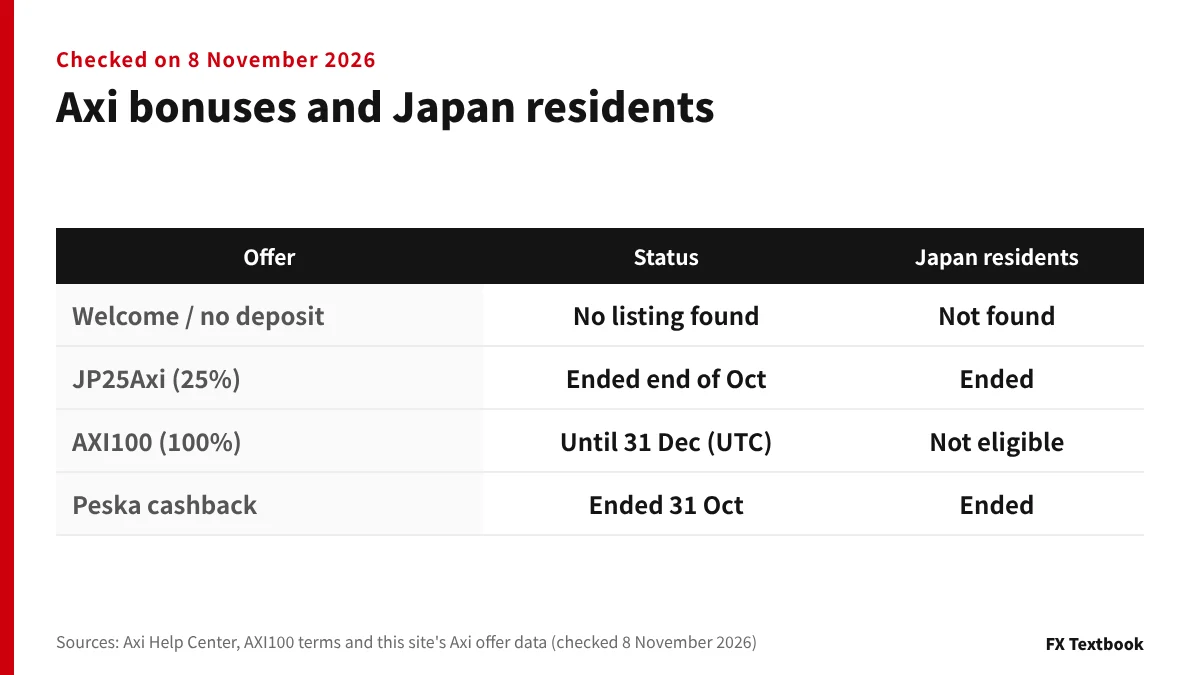
- No account opening (no deposit) bonus was found in what we checked
- JP25Axi (25% of the first deposit, up to $500) ended at the end of October 2026
- The live AXI100 (100% of deposits) does not list Japan among its eligible countries
- To join, apply the promo code in the portal before you deposit
"Not found" does not mean "does not exist". The next chapters show where we looked.
Offers change. Current status is reflected in the Axi bonus and campaign hub.
Axi bonus and campaign hub (live and past offers) →
Axi is an advertising partner of this site and we receive referral commission. This article organises official information. It does not guarantee that a bonus will be credited or that you will profit.
How joining works: apply the promo code before you deposit
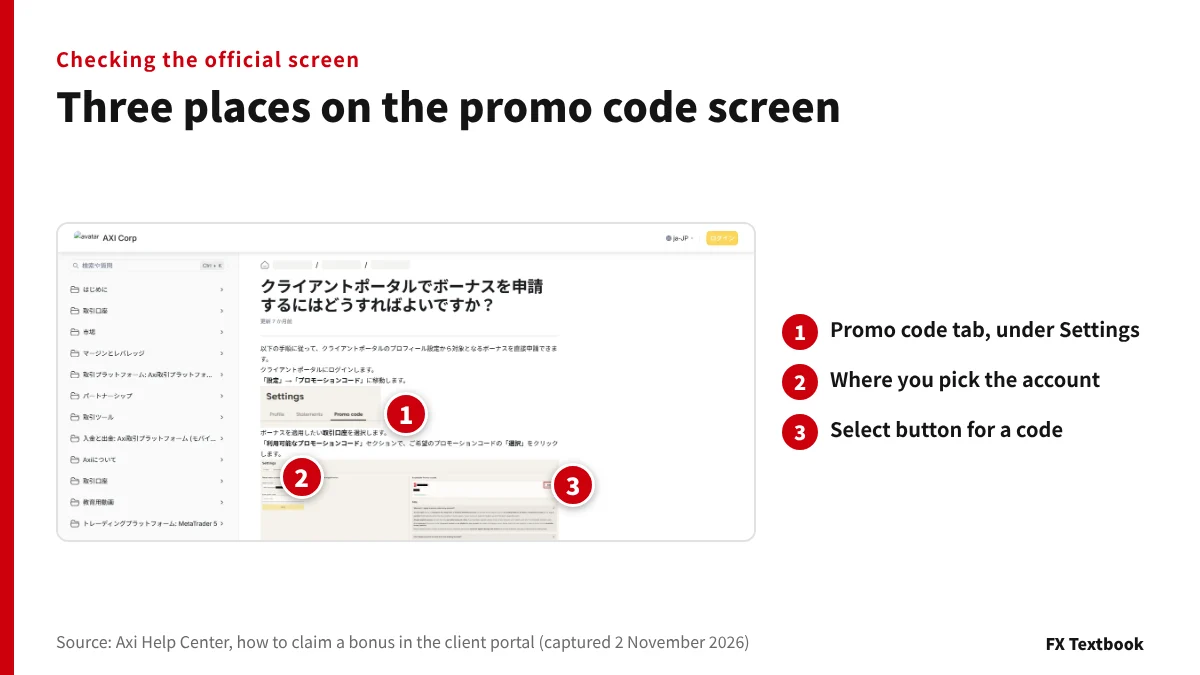
An Axi bonus is not added just because you deposit. You select the code for the offer in the portal, press Apply, and deposit afterwards (Axi Help Center).
- 01Log in to the portal
Use the email address and password you registered with.
- 02Open Settings, then Promo Codes
The terms PDF says Rewards, then Promo Code. Follow what your screen shows.
- 03Choose a trading account
Only active accounts can be selected.
- 04Press Select on the code, then Apply
Axi recommends picking from the list rather than typing the code.
- 05Go to the funds page and deposit
Make the qualifying deposit after you apply.
The terms and expiry of an applied code appear under Active Promo Codes.
| Term | Meaning |
|---|---|
| Promo code | A code that registers you for an offer. Each offer has its own code |
| Trading credit | A bonus added to the account that cannot be withdrawn. It counts toward equity |
| Cushion | Credit acting to cover losses. It varies by offer, and AXI100 has none |
| Cashback | A reward paid in cash after conditions are met. Some offers do not appear in the portal's code list |
| Internal transfer | Moving funds between your own accounts. Treated like a withdrawal in bonus offers |
Where to enter codes and how errors are handled is covered in a separate column.
Why a bonus does not show up: deposit order and eligible accounts
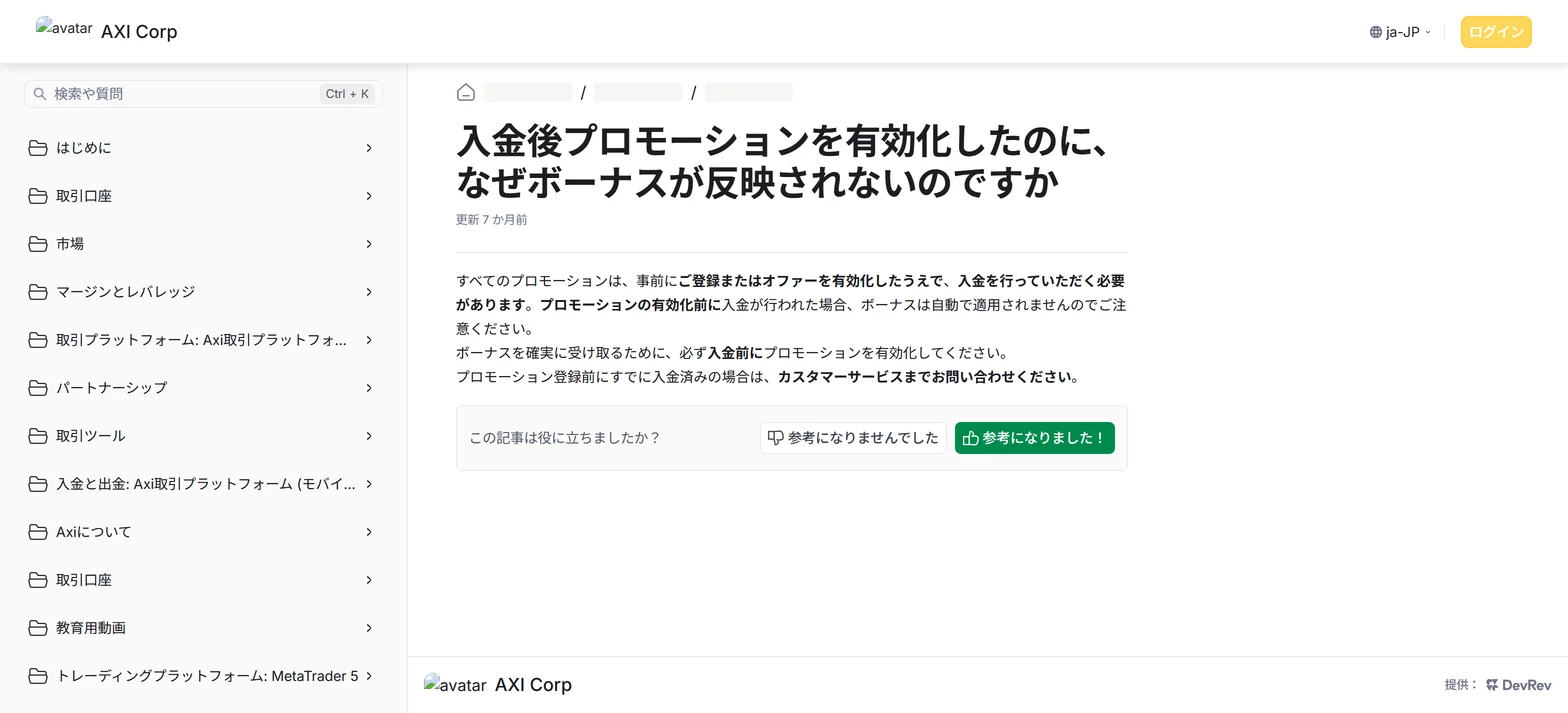
The first cause the Help Center gives is deposit order. A deposit made before activation is not applied automatically.
| Cause | What the Help Center says |
|---|---|
| Deposit order | A deposit before activation is not applied automatically. If you already deposited, contact customer service |
| Active offers | Only one offer can be active at a time. Wait for the current one to finish |
| Eligible account | Active MT4 or MT5 accounts qualify. Demo accounts, Axi Select and the Axi Trading Platform do not |
| Region | Some bonuses are offered only in certain countries or regions |
| Code problem | A wrong, expired or used code, or an ineligible account, gives an error. Wait about an hour and retry |
| Manual offers | Cashback and special offers may not show in the portal. Ask customer service |
If it still does not appear, work through the steps below. The AXI100 terms give success@axi.com as the contact for the promotion.
- 01Note the dates and account
Write down the day you applied the code, the day you deposited and the trading account number.
- 02Tell support
Even if you deposited before applying, the Help Center points you to customer service.
- 03Reread the offer's terms
Check countries, deposit requirement and dates in the terms of the code you applied.
Why a forex bonus is not credited: causes and a checking order →
Does Axi have a no deposit or welcome bonus? What we checked and how to check
We checked the bonus section of the Axi Help Center, the AXI100 terms PDF and this site's Axi offer data. None of them lists a no deposit bonus for Japan residents (8 November 2026).
According to the Help Center, offers reach you three ways: the Promo Code section of the portal, an email to eligible clients, and WhatsApp.
| Where | What you learn |
|---|---|
| Portal Promo Code section | The codes you can select. They are filtered by region, account type and platform |
| Terms of each offer | Eligible countries, deposit requirement and dates. Readable after you apply the code |
| Email and WhatsApp | Notices to eligible clients. Manually applied offers arrive here |
- 01Open an account and log in to the portal
The account opening steps are in a separate column.
- 02Open the Promo Code section and choose an account
The offers listed change with the account you pick.
- 03Read the Available Promo Codes list
Offers not listed are announced by email or WhatsApp.
- 04Opt in to updates from Axi
The Help Center recommends opting in so you do not miss new offers.
Where a site presents a no deposit bonus that the Help Center, the terms or this site's checked data cannot confirm, we have not written it here.
Forex account opening bonuses: brokers with no deposit bonuses compared →
What is a forex welcome bonus? No deposit vs deposit types →
Live now: AXI100, and Japan is not on the country list
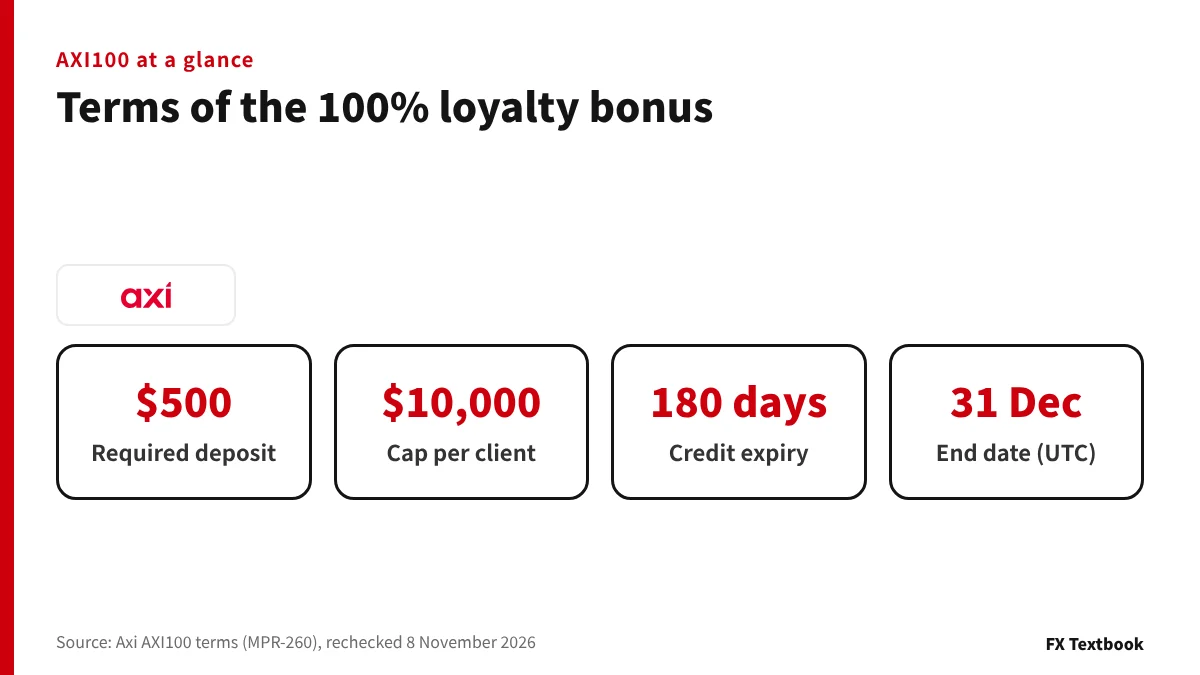
AXI100 adds trading credit equal to each deposit of $500 or more. It runs from 00:00 on 1 October to 23:59 on 31 December 2026 UTC, which is 9:00 on 1 October to 8:59 on 1 January 2027 in Japan.
Japan is not on the terms' list of eligible countries. We reopened the terms PDF on 8 November 2026 and found the same content.
| Item | Details |
|---|---|
| Rate and cap | 100% of each qualifying deposit, up to $10,000 per client in total |
| Required deposit | $500 (or the equivalent). Internal transfers do not count as deposits |
| Eligible countries (examples) | Italy, France, Switzerland, Spain, Belgium, Hungary, Canada, Monaco, and countries in Latin America and the Caribbean |
| Excluded by the terms | Australia, New Zealand, the United Kingdom, the EU, the United States, Vietnam, Pakistan, China and India |
| Ineligible entrants | Axi Select participants. Demo accounts are also excluded |
| Entries | One registration per client. Credit is added on each qualifying deposit |
| Deposit | Credit added |
|---|---|
| $250, once | None (a single deposit is below the $500 requirement) |
| $500, once | $500 |
| $5,000, once | $5,000 |
| $12,000, once | $10,000 (the cap) |
The terms list the EU as excluded, yet name Italy, France, Spain, Belgium and Hungary as eligible. Residents of those countries should ask Axi before joining.
AXI100 terms, eligible countries and how to claim (offer page) →
What no cushion means: a worked example of credit that does not cover losses
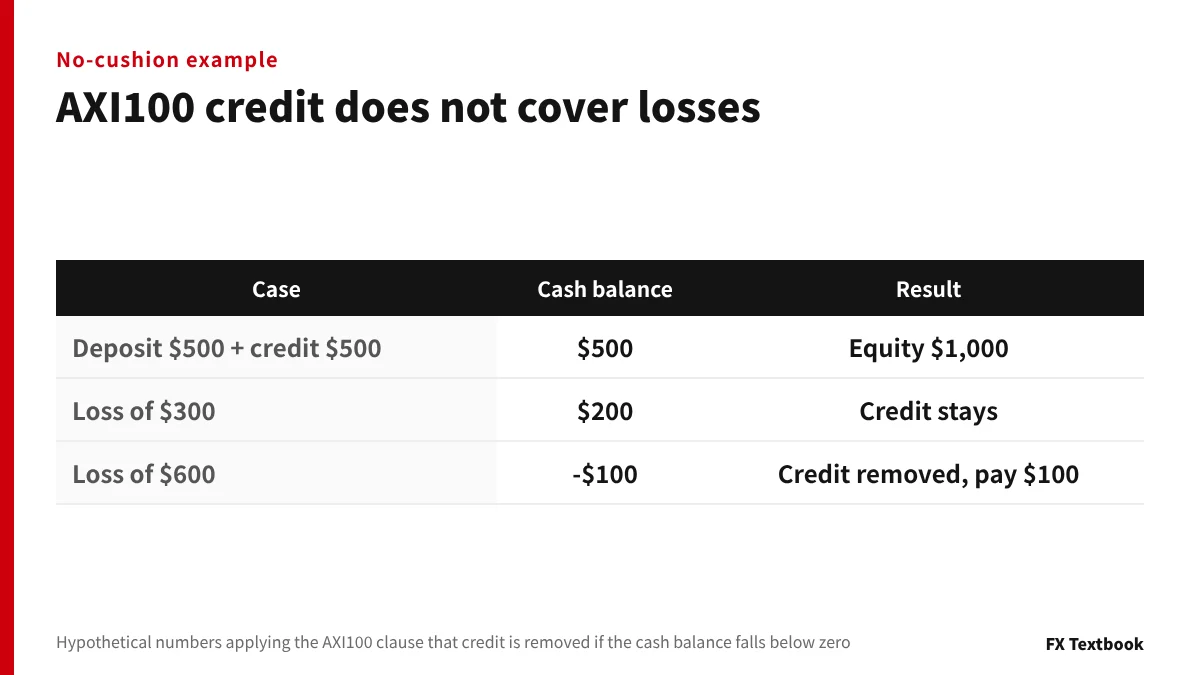
The AXI100 terms state that the credit does not offset trading losses. If the cash balance falls below zero, the credit is removed and you pay the negative amount yourself.
| Case | Cash balance and equity | Credit |
|---|---|---|
| Just after credit (deposit $500 + credit $500) | Cash $500, equity $1,000 | Present |
| Loss of $300 | Cash $200, equity $700 | Present |
| Loss of $600 | Cash -$100, equity $400 (before removal) | Removed; pay -$100 |
With credit you can open larger trades on the same deposit. The terms say credit has the effect of increasing your leverage.
- Withdrawing before the end removes the credit (internal transfers count as withdrawals)
- If equity falls below the credit balance, the credit is removed and open trades are closed
- Credit is removed 180 days after it is added. A new deposit and trade adds it back
What is a cushion feature? How bonuses count in margin level, with example numbers →
Ended offers on record: JP25Axi, the Amazon gift card and Peska
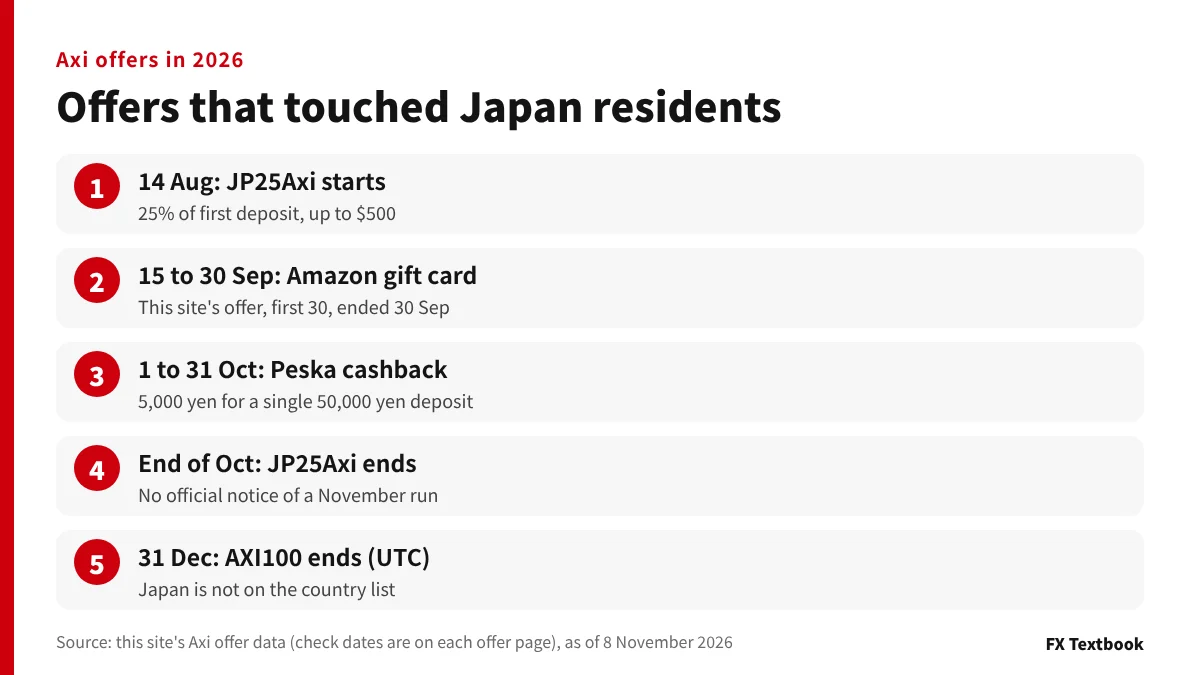
JP25Axi was an offer for Japan residents that added 25% of the first deposit as trading credit. This site's listing ended on 31 October 2026. We have not found an official notice of a November run.
| Item | Details |
|---|---|
| Period | 9:00 on 14 August to the end of October 2026 (JST) |
| Rate and cap | 25% of the first deposit in the period. Up to $500 per client |
| Required deposit | $125 |
| Eligibility | Axi clients resident in Japan (new or existing). Axi Select participants are excluded |
| How to join | Apply JP25Axi in the portal, deposit, and trade at least once in the period |
| Withdrawal and transfers | Credit cannot be withdrawn. A withdrawal or internal transfer before the end cancels it |
Examples: a $125 deposit gave $31.25, and a $3,000 deposit gave $500. 25% would be $750, but the $500 cap applied.
| Item | JP25Axi | AXI100 |
|---|---|---|
| Rate | 25% of the first deposit | 100% of each deposit |
| Deposits counted | Only the first deposit in the period | Every deposit meeting the requirement |
| Cap | $500 | $10,000 in total |
| Required deposit | $125 | $500 |
| Cushion | Named a "25% cushion" bonus | None |
| Eligible | Japan residents | Countries on the terms' list (Japan is not on it) |
| Status | Ended at the end of October 2026 | Until 31 December (UTC) |
| Offer | Period and details |
|---|---|
| Axi x Kaiteki Amazon gift card | 15 to 30 September 2026. A new account plus one closed trade of 0.01 lot or more earned an Amazon gift card worth 5,000 yen. First 30 winners (run by this site) |
| Axi x Peska cashback | 1 to 31 October 2026. A single deposit of 50,000 yen or more via Peska plus one trade earned 5,000 yen |
With no bonus, compare account types, spreads and commission
A bonus changes by period, while an account's trading costs apply to every trade. Comparing the account's terms first lasts longer than waiting for a bonus.
| Account | Trading cost (EUR/USD) | First deposit |
|---|---|---|
| Standard | From 0.7 pips, no commission | No set minimum (payment-method minimums only) |
| Premium | From 0.0 pips, $4.5 round trip per lot | $500 (no minimum afterwards) |
| Elite | From 0.0 pips, $3.5 round trip per lot | $25,000 (contact support) |
If the minimum spread were available, the cost of 1 lot of EUR/USD would differ across the three accounts as below. One pip is $10 per lot. Spreads vary and the minimum is not always available.
| Account | Calculation | Cost |
|---|---|---|
| Standard | 0.7 pips x $10 | $7.0 |
| Premium | 0.0 pips x $10 + $4.5 | $4.5 |
| Elite | 0.0 pips x $10 + $3.5 | $3.5 |
- If you want to start small, check Standard, which has no set first deposit
- If you trade at the minimum spread with commission, check Premium (first deposit $500)
- If you hold a large balance and want low commission, ask support about Elite (first deposit $25,000)
- If you want the Axi app, note that only Standard supports it
- Axi lists MT4, MT5, the Axi Trading app and copy trading as tools
- The maximum leverage is listed as 1:1000. Check the sign-up screen and latest terms for the conditions that apply
Standard sets only per-method minimums for deposits: 30 USD for crypto, 5 USD for Neteller, and 10 USD for Skrill and PayPal. For Peska and Global Money Transfer, check the portal's display.
Axi Select is a capital allocation programme, not a bonus. Its participants are excluded from AXI100 and JP25Axi.
How to open an Axi account: 8 steps, documents and the verification deadline →
Editors' conclusion: check the account terms before the bonus
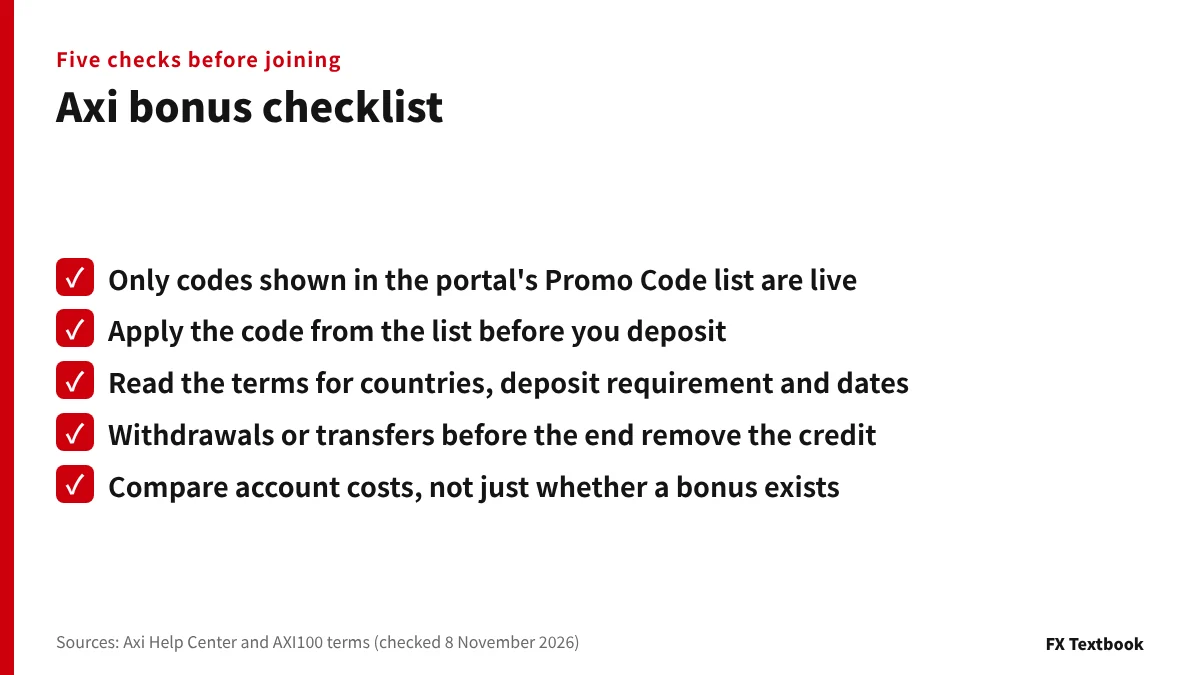
If you are looking for a no deposit bonus, open the portal's Promo Code section after you open an account and check Axi's emails and WhatsApp notices too. A Japan resident who sees AXI100 and wants to join is not eligible, because Japan is not on the terms' country list. If trading cost matters most, compare the account types rather than waiting for a bonus.
Trading carries costs such as spreads and the possibility of losses beyond your capital. AXI100 credit does not cover losses, so trade only with money you can spare.
Frequently asked questions
Q. Does Axi have a no deposit or welcome bonus?
A. In what this site could check, we found no account opening (no deposit) bonus for Japan residents (checked 8 November 2026). We do not say none exists. Check the portal's Promo Code section and Axi's emails and WhatsApp notices for offers shown on your own account.
Q. How do I claim an Axi deposit bonus?
A. In the portal, open Settings, then Promo Codes, choose the trading account, press Select on the code and Apply. Deposit after that. A deposit made before you apply is not added automatically.
Q. When did JP25Axi end?
A. This site's listing ended on 31 October 2026. It was a 25% cushion deposit bonus for Japan residents. We have not found an official notice that it continued in November.
Q. Can I join AXI100 from Japan?
A. No. Japan is not on the terms' list of eligible countries (the PDF was rechecked on 8 November 2026). Eligible residents include Italy, France, Switzerland, Canada and Latin America.
Q. Can I withdraw an Axi bonus?
A. The credit itself cannot be withdrawn. Withdrawing before the end removes it, and internal transfers count as withdrawals. Read the terms of the offer before you withdraw.
Q. Why does my Axi bonus not appear?
A. The Help Center lists six causes: you deposited before activating, another offer is active, an ineligible account, your region, a code problem, or a manually applied offer. Note the apply and deposit dates and contact support.
Q. Can I use several Axi bonuses at once?
A. Only one offer can be active at a time. Apply for the next after the current one ends. Some terms also credit only the first eligible account if you register several accounts.
Q. Where can I see Axi promo codes?
A. Choose an account in the portal's Promo Code section and the codes you can use are listed. Only offers matching your account type, platform and region are shown. Manually applied offers arrive by email or WhatsApp.
Sources and conditions
- Axi official: AXI100 Schedule to Terms & Conditions (MPR-260, checked 8 November 2026) →
- Axi Help Center: How to claim a bonus in the client portal (Japanese) →
- Axi Help Center: Why a bonus does not appear after you deposit (Japanese) →
- Axi Help Center: Why a bonus cannot be applied to an account (Japanese) →
- Axi Help Center: Promo code errors (Japanese) →
- Axi Help Center: Where to see current promotions (Japanese) →
- Axi Help Center: Why some promotions do not show (Japanese) →
- Axi Help Center: Withdrawing a bonus and credit removal (Japanese) →
- Axi Help Center: Withdrawing before a promotion ends (Japanese) →
- Axi Help Center: Terms of bonus promotions (Japanese) →
- Axi official: trading accounts page (Japanese) →
- Axi account types and trading conditions (this site, based on information from Axi) →
- JP25Axi offer page (this site) →
- Advertising, affiliate relationships and risk disclosure →
FX Textbook is an independent information site, not a broker or provider of personal investment advice. Forex and CFDs involve risk. You may lose some or all of your invested capital. No trading result is guaranteed.
NEXT STEP
Checked the bonus terms? Compare Axi's account conditions next.
Spreads, commission and first deposits for Standard, Premium and Elite, current bonuses and the account opening steps are on the broker page.
Brokers covered in this column
Account types, trading conditions and current offers are on each broker page.