












An Axi promo code is not a discount coupon.
It is the code you use in the client portal to enrol in a promotion such as a bonus. Discount codes and no-deposit codes do not appear in the Axi help articles and terms PDF checked on 2 November 2026.
This article covers where to enter a code, the order of code and deposit, and how to fix errors, with screens from the official help.
Axi promo code: it is not a discount coupon
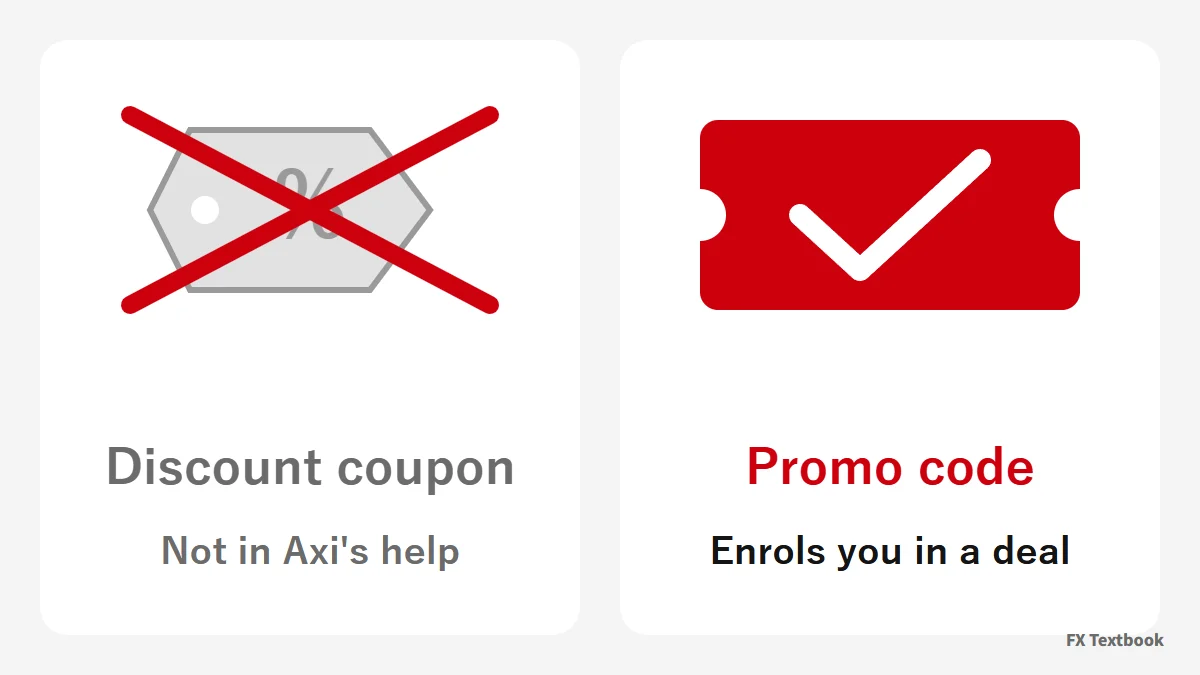
- A promo code enrols you in a promotion such as a bonus
- You enter it in the client portal after logging in
- Axi's help and terms describe no discount code
- Apply the code before you deposit, not after
- As of 2 Nov 2026, no code for Japan residents is confirmed
| Common belief | What Axi's material says |
|---|---|
| There is a discount coupon code | No discount code in the help or terms. A code enrols you in a promotion |
| Entering a code adds the bonus by itself | A deposit is required. A bonus is not applied automatically if you deposit before activating it |
| You can get it without depositing | The promotions we confirmed require a minimum deposit: $500 for AXI100, $125 for JP25Axi |
| The bonus can be withdrawn | Trading credit cannot be withdrawn. Withdrawing before expiry deletes it |
| You can run several promotions at once | Only one promotion can be active at a time |
| Anyone can use a code | Country and account type decide eligibility. Some promotions exclude Japan residents |
Some pages claim to hand out an Axi coupon. Axi's help pages have no description of a code that cuts a price or turns into cash (checked 2 November 2026).
Trading credit does not offset trading losses (Axi Help Center). FX and CFD trading can lose part or all of your funds.
Axi promo code vs referral code (promocode=)
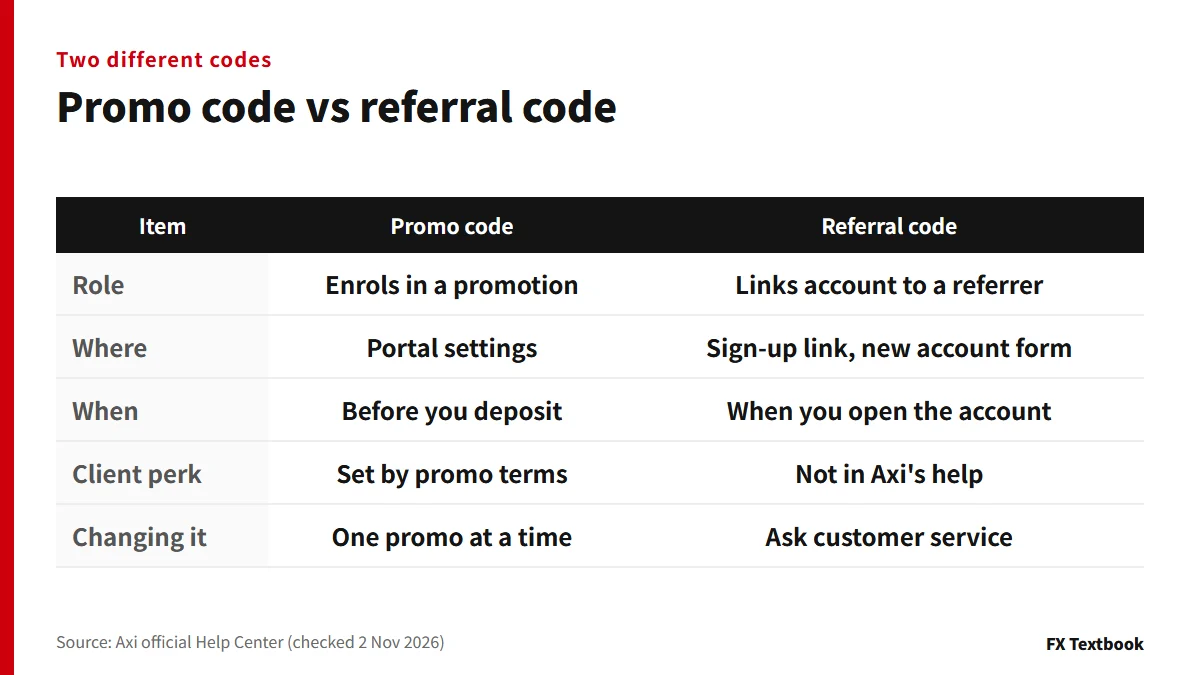
Axi has two similar-sounding codes. One is the promo code you enter in the portal. The other is a referral code that links an account to a referrer.
The account-opening links on this site also end in promocode=. The spelling matches the bonus promo code.
| Item | Promo code | Referral code |
|---|---|---|
| Where | Portal Settings, then Promo code | Sign-up link, or the new account form field Do you have a partner? |
| Role | Enrols you in a promotion | Links the account to an introducing broker (IB) |
| Changing it | Only one promotion active at a time | Linked per account; ask customer service to change it (where possible) |
The help article describes a field for an IB or partner code. It is explained as a separate feature from bonus promo codes.
If you already hold an account through a referrer, new accounts link to the same referrer automatically unless you pick another. Accounts with no link can also be tagged later.
- 01Open the new account request in the portal
Answer Yes to the question Do you have a partner?
- 02Enter the IB or partner code
Type in the code you received from the referrer.
- 03Enter the account type, currency and leverage
Write in the reason box that you want the account linked.
- 04Press Request new account
Processing can take 1 to 2 business days.
If an account is not linked, email success@axi.com or send a request through the Help Center form (checked 2 November 2026). Our account-opening column covers the sign-up steps.
Where to enter an Axi promo code: official screens
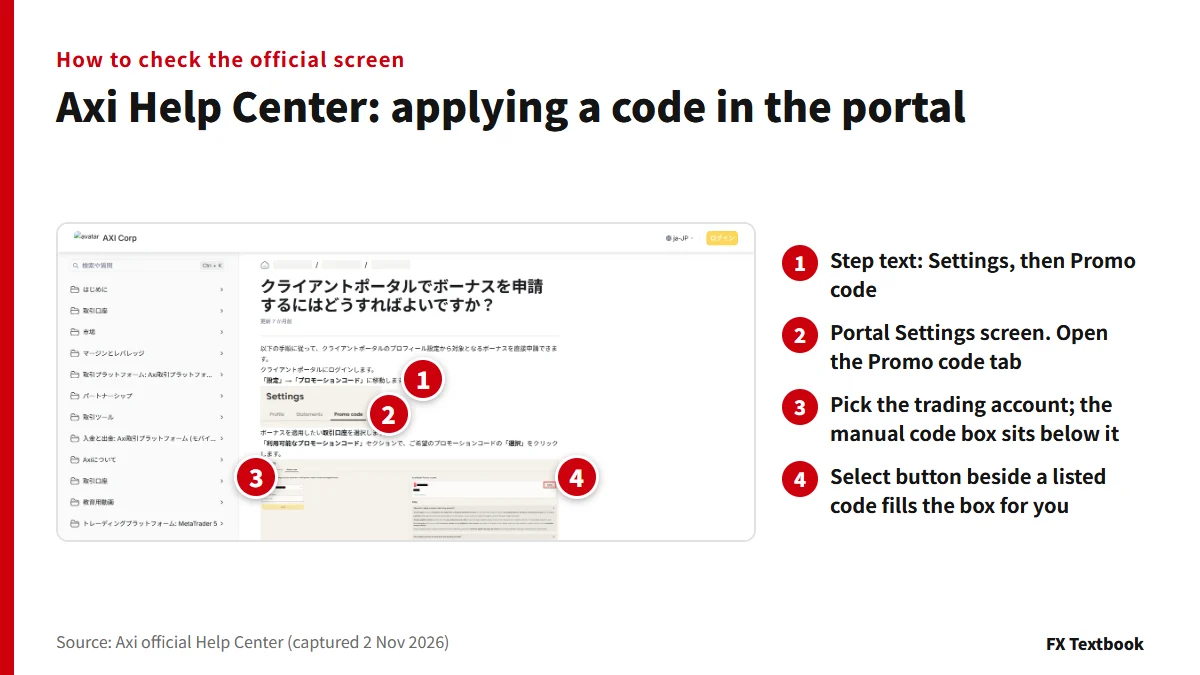
You enter the code in Settings in the client portal after logging in. The official help article gives seven steps.
- 01Log in to the portal
If a promotion applies to you, the main screen shows a notice. Click Check Now (AXI100 terms).
- 02Open Settings, then Promo code
The terms PDF calls it Rewards, then Promo Code. Screen names change with updates, so use whichever you find.
- 03Pick a trading account
Only active live accounts can be selected.
- 04Press Select under Available promo codes
The code fills in by itself. The help article recommends selecting over typing.
- 05Press Apply
A confirmation pop-up means the code is registered.
- 06Go to the funds page and make a qualifying deposit
Each promotion has its own minimum deposit.
- 07Check Active promo codes
It shows the code, its terms, the account and the expiry date.
The list shows only promotions that fit your account type, platform and country. A promotion missing from the list is either not open to your account or applied manually.
On 2 November 2026 the article with these steps was marked as updated about seven months ago. Screen names can change.
From opening an account to the bonus credit
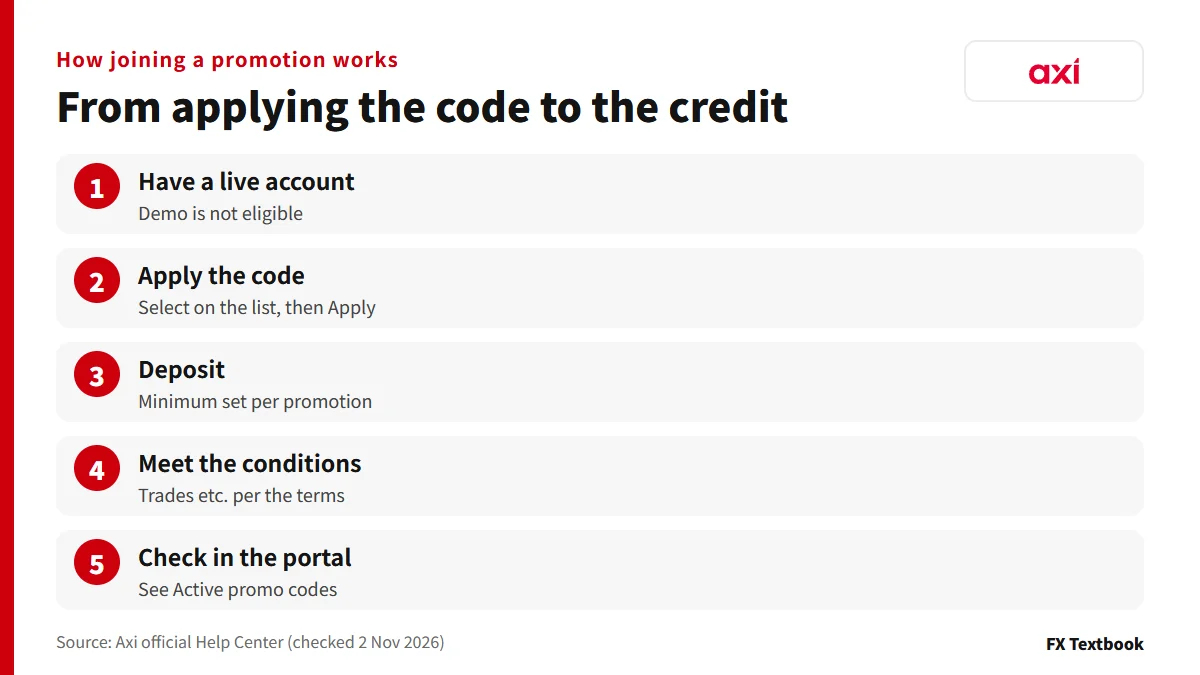
If you get the order wrong, your deposit does not count toward the promotion. A demo account is not eligible, so use a live account.
| Item | JP25Axi (treated as ended) | AXI100 |
|---|---|---|
| Apply the code | Required. A deposit before applying does not qualify | Required. Press Apply in the portal |
| Deposit | First deposit of $125 or more | $500 or more, on each qualifying deposit |
| Trading | At least one trade in the period | No trade count is stated in the terms |
| Eligible | Clients resident in Japan | Japan is not on the country list |
A cushion-type credit counts toward margin, which sets it apart from ordinary bonuses. A separate guide has sample calculations.
What is a cushion bonus: how credit counts toward margin, with sample numbers
Axi promo codes you can use now (2 November 2026)
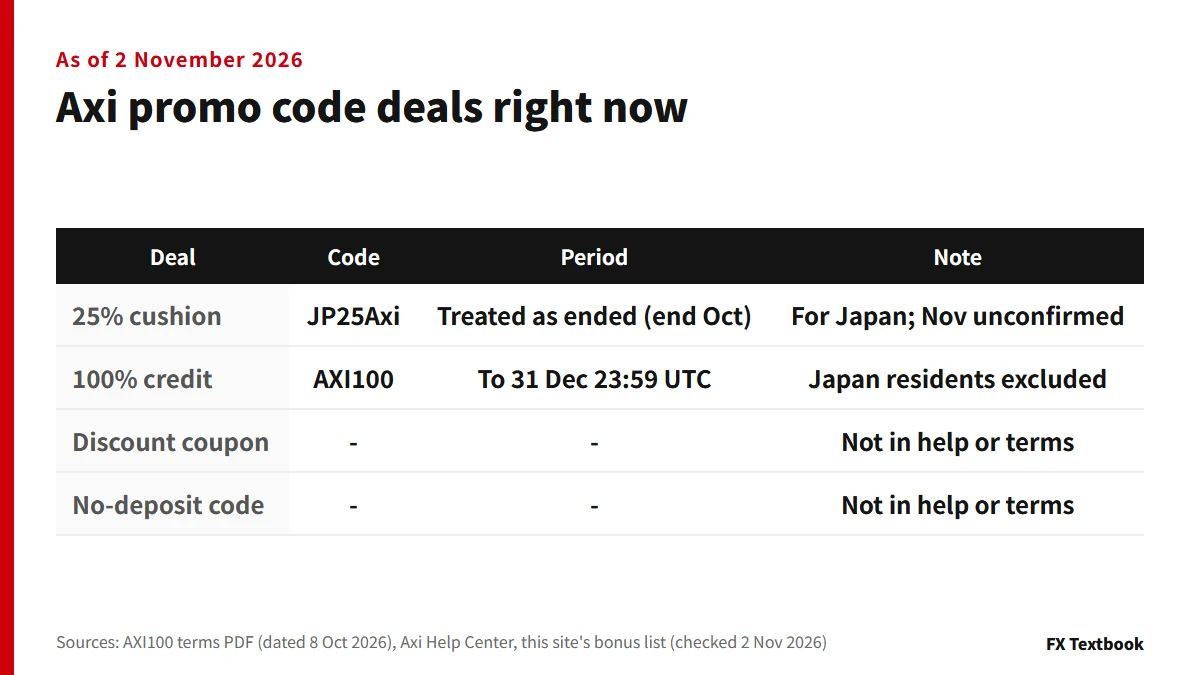
AXI100 is a 100% trading credit running from 1 October to 31 December 2026 (UTC).
Japan is not on the terms' list of eligible countries. This site treats Japan residents as not eligible.
JP25Axi was a 25% cushion bonus for Japan residents. This site lists it only to 31 October, and an extension into November is not confirmed. We treat it as ended; its terms stay in the article linked below.
| Item | AXI100 (terms PDF) |
|---|---|
| Period | 1 Oct 2026 00:00 to 31 Dec 2026 23:59 (UTC) |
| Minimum deposit and cap | $500. 100% of the deposit is added, up to $10,000 per client |
| Excluded | Axi Select participants. Japan is not on the eligible-country list |
- Cashback and special promotions may not appear in the portal list
- Those are applied manually through a landing page (Axi Help Center)
- New promotions are sent to eligible clients by email or WhatsApp
Axi deposit bonus: JP25Axi and AXI100 terms and how to claim
Axi promo code error: causes and fixes
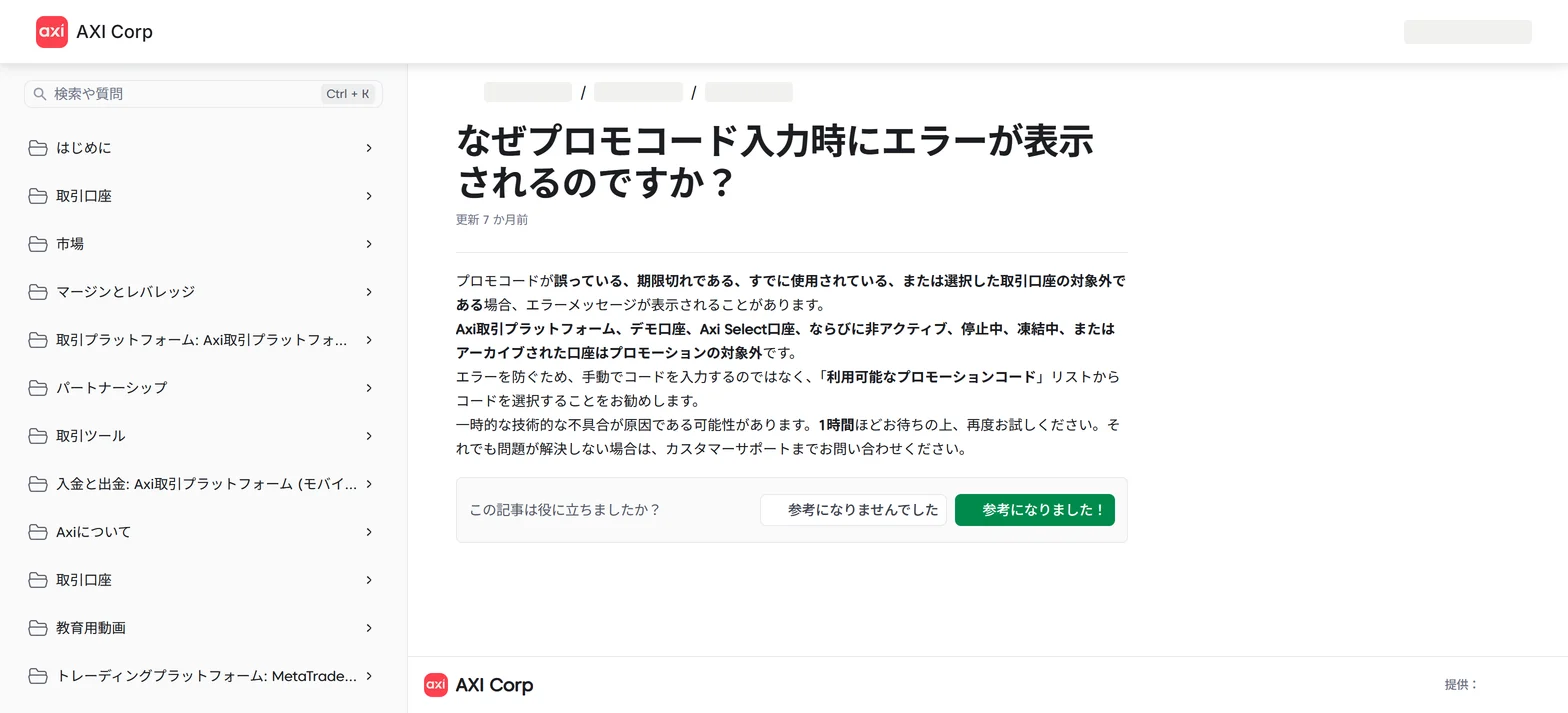
An error comes from either the code or the account. Axi's help recommends selecting from the list instead of typing.
| Cause | Fix |
|---|---|
| Wrong, expired or already used code | Re-enter it with Select on the list |
| Account not eligible | Demo, Axi Select, inactive, suspended, frozen or archived accounts cannot be used. Pick an active live account |
| Axi Trading Platform account | Not eligible. Pick an MT4 or MT5 account |
| Temporary glitch | Wait about 1 hour and retry. If it persists, contact support |
- 1. Stop typing and re-enter the code with Select on the list
- 2. Check the account is an active live account
- 3. Wait about 1 hour and try again
- 4. If it still fails, contact customer support
Deposit order: apply the code first, deposit after
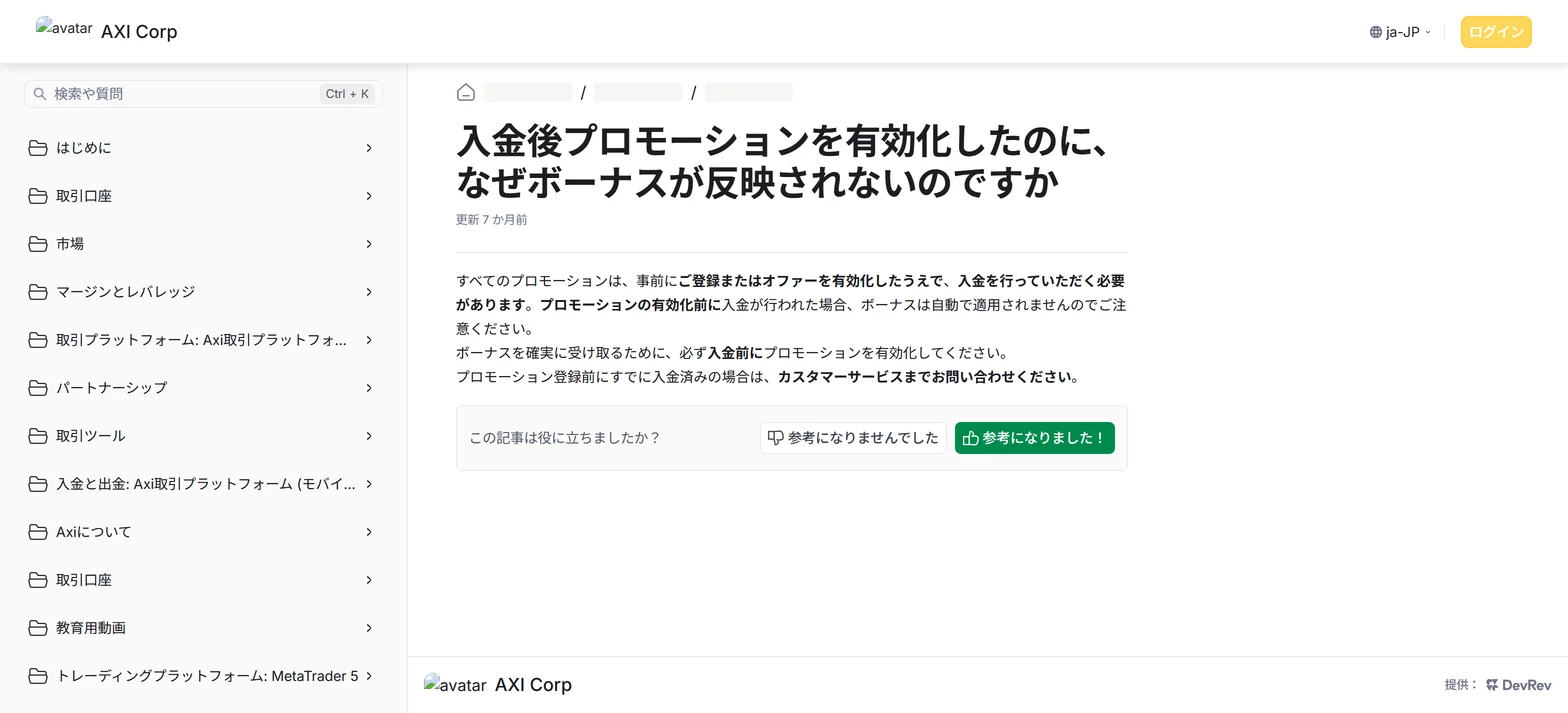
When a bonus does not appear, check the order first. The help article says a bonus is not applied automatically if you deposit before activating the promotion.
- 1. Pick the account and apply the code
- 2. See the confirmation, then deposit
- 3. Meet the promotion's conditions, such as a trade
| Order | Result |
|---|---|
| Apply the code, then deposit | Eligible if you meet the conditions |
| Deposit, then apply the code | The bonus is not applied automatically (Axi Help Center) |
| You notice the code was not applied after depositing | Contact customer service (Axi Help Center) |
| JP25Axi (October) | A deposit before applying the code does not qualify (this site's check) |
Five reasons an Axi welcome bonus will not apply
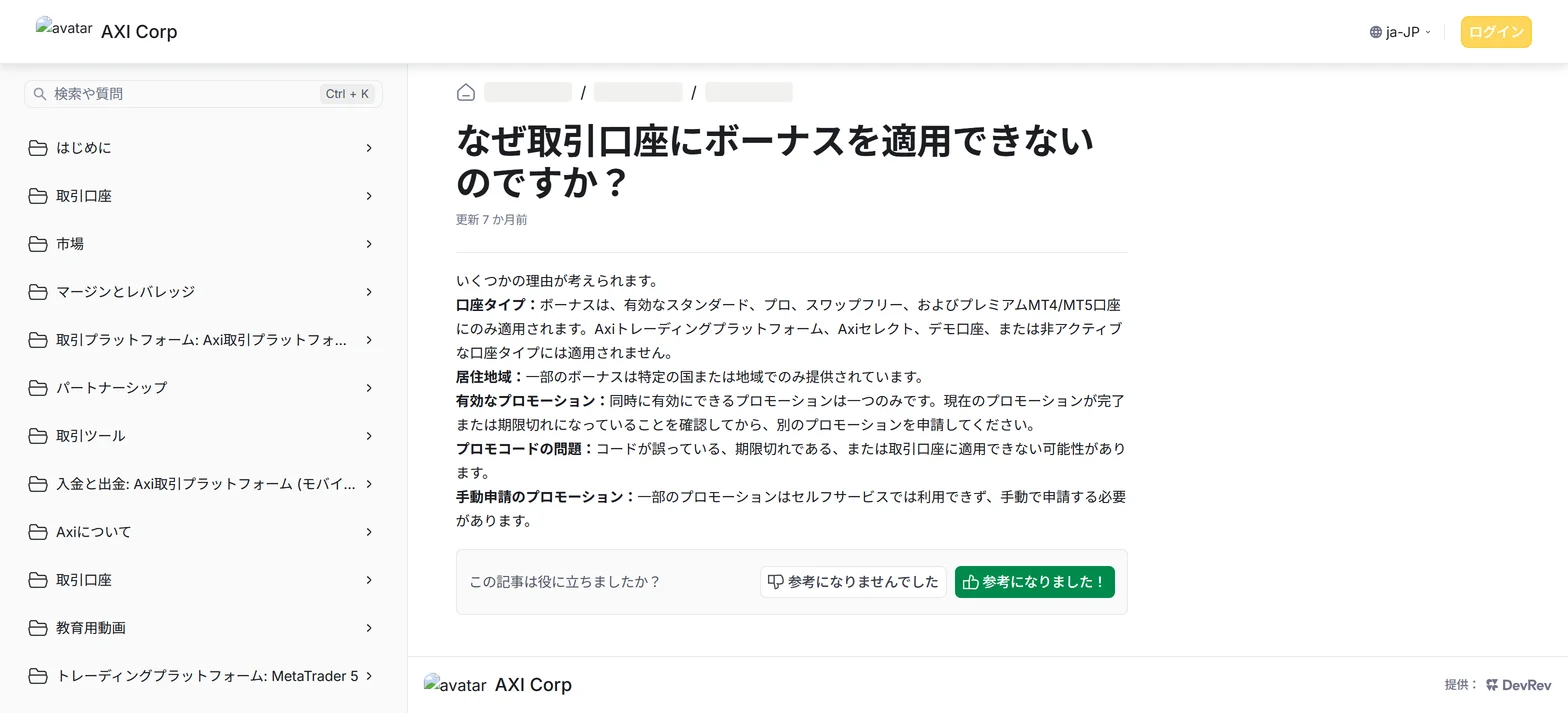
| Reason | What the help says |
|---|---|
| Account type | Only active Standard, Pro, Swap-free and Premium MT4 or MT5 accounts. Not Axi Trading Platform, Axi Select or demo |
| Country | Some bonuses are offered only in certain countries or regions |
| Active promotion | Only one at a time. Check the current one is finished or expired first |
| Code problem | The code can be wrong, expired or not valid for the account |
| Manual application | Some promotions cannot be applied through self-service |
Axi's help names Standard, Pro, Swap-free and Premium accounts. This site's account table lists Standard, Premium and Elite. The help cannot confirm how Pro maps to Premium or whether Elite qualifies. Check the terms and the portal list.
You can fix the account choice and the promotion switch yourself. You cannot change your country, so check the eligible countries in the terms first.
Withdrawals and transfers remove trading credit
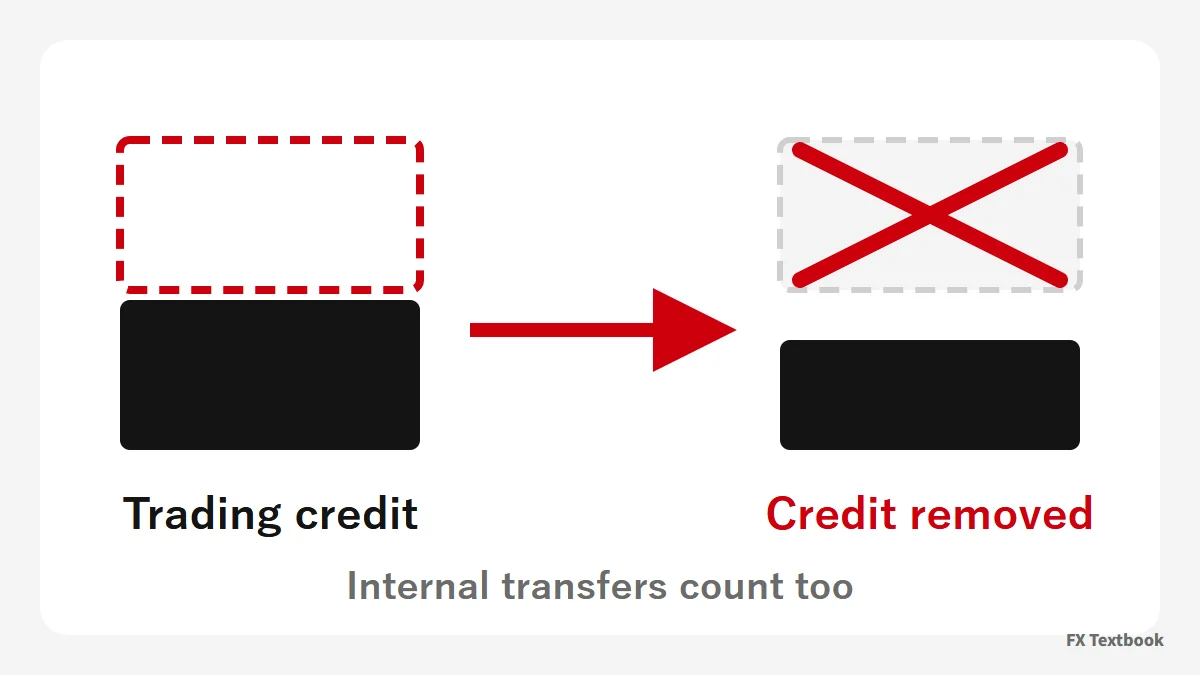
An Axi bonus is trading credit, not cash. You cannot withdraw it, and withdrawing before expiry deletes the credit.
| Situation | What happens |
|---|---|
| You withdraw before expiry | The trading credit is deleted |
| You transfer between accounts | Treated as a withdrawal; the credit is deleted |
| Equity falls below the credit balance | The credit is removed and open positions are closed |
| The cash balance goes negative | The credit is removed and you owe the negative amount |
| 180 days pass on AXI100 | The credit is removed (terms) |
For example, say an account holds $500 of credit and equity drops below $500. The credit is taken back, and open positions may be closed.
Under the AXI100 terms, the credit is counted in equity and drawdown calculations. With settings such as proportional by balance, it also enters trade-size calculations and can raise your exposure.
How withdrawals are treated depends on the promotion's own terms (Axi Help Center). AXI100 terms say credit removed by a withdrawal returns after you redeposit and trade.
Our view and a pre-use checklist
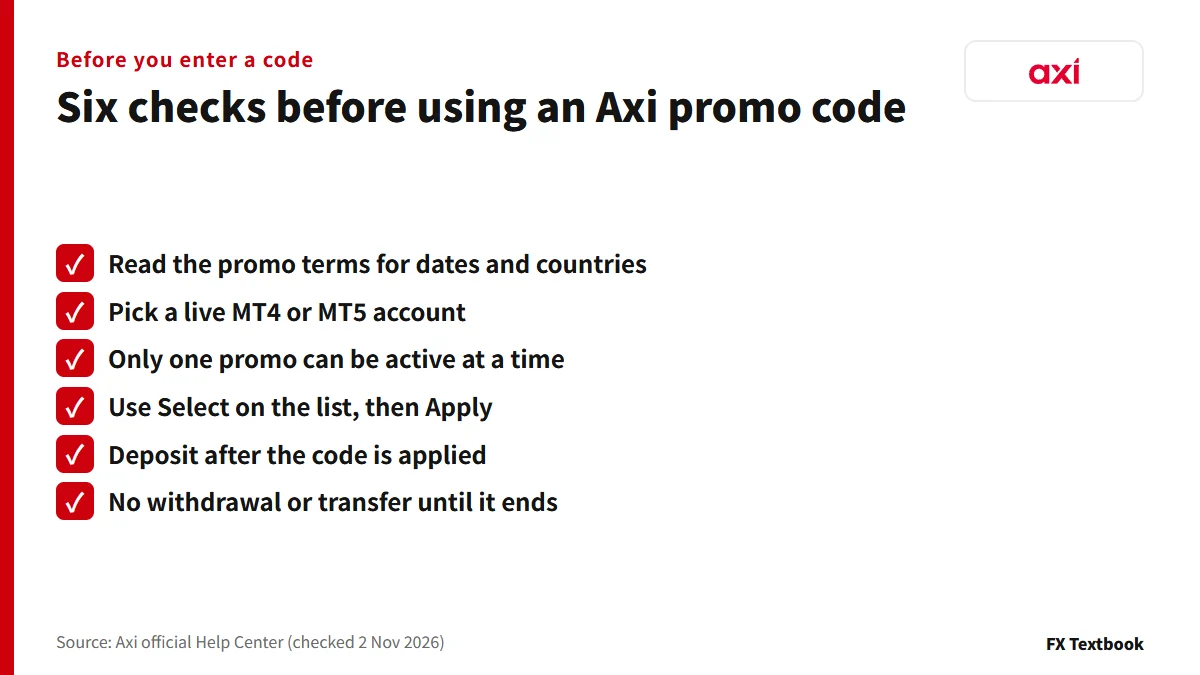
If you live in Japan and are looking for a code, use only what appears under Available promo codes in the portal. If nothing appears, no promotion is open to you now. A discount coupon cannot be confirmed in Axi's official material.
- Opening through a referral link: promocode= is part of the sign-up link. It is separate from promotion codes, which you pick in the portal after the account exists
- Seeing an error: stop typing, choose an active live account and use Select
- Deposited too early: contact customer service with the deposit date and account
- Curious about AXI100: Japan residents are not eligible. Check the countries in the terms PDF
- Nothing in the list: check your country, account type and the promotion's end date. Contact customer service about manually applied promotions
- Received a code by message: new promotions go to eligible clients by email or WhatsApp. Check that the same code appears in the portal list
| Issue | Who to contact |
|---|---|
| Errors, ineligible account, deposit order | Customer support (Help Center form) |
| Manually applied promotions | Customer service, through the promotion's landing page |
| Linking to a referrer | success@axi.com or the Help Center's Partner tagging request |
| Checking a promotion's terms | The contact in the terms PDF: success@axi.com |
Frequently asked questions
Q. Where do I enter an Axi promo code?
A. In the client portal after logging in. The help article says Settings, then Promo code: pick the trading account, press Select on the list and then Apply. Do this before you deposit (checked 2 November 2026).
Q. Is there an Axi coupon code?
A. Axi's help pages and current terms describe no discount coupon. A promo code enrols you in a promotion; it is not used to cut a price.
Q. Does Axi have a no-deposit welcome bonus code?
A. Every promotion in Axi's help and in the AXI100 terms we checked requires a deposit. A no-deposit code is not confirmed in official material.
Q. Can I still use JP25Axi in November?
A. This site lists it only to 31 October. An extension into November is not confirmed, so we cannot say it works. Check whether it appears in the portal list.
Q. Is the promocode= in a referral link the same as a promo code?
A. Axi's help describes IB tagging and promotion codes as separate features. Promotion codes are chosen from the list in the portal.
Q. I get an error when I enter the code. What now?
A. Stop typing and use Select on the list. Make sure the account is not a demo, Axi Select, inactive or frozen account. If it persists, wait about 1 hour and then contact support.
Q. Is it too late to apply a code after depositing?
A. Axi's help says a bonus is not applied automatically if you deposit before activating the promotion. If you already deposited, contact customer service.
Q. Can I use AXI100 from Japan?
A. Japan is not on the terms' list of eligible countries, and this site treats Japan residents as not eligible. The period runs to 31 December 2026 23:59 UTC.
Sources and conditions
- Axi Help Center: How do I claim a bonus in the client portal? (checked 2 November 2026) →
- Axi Help Center: Why does an error appear when I enter a promo code? →
- Axi Help Center: Why can't I apply a bonus to my trading account? →
- Axi Help Center: Why was my bonus not credited after I deposited? →
- Axi Help Center: Where can I see current Axi promotions? →
- Axi Help Center: Why are some promotions not shown? →
- Axi Help Center: Can I withdraw a bonus? →
- Axi Help Center: How to link or tag an account to an IB →
- Axi Help Center: Check your referral link and referral code →
- Axi terms PDF: Schedule to Terms & Conditions, AXI100 (dated 8 October 2026) →
- Axi broker details and account types (this site) →
- Advertising disclosure and risk warning →
FX Textbook is an independent information site, not a broker or provider of personal investment advice. Forex and CFDs involve risk. You may lose some or all of your invested capital. No trading result is guaranteed.
NEXT STEP
Before using a code, see Axi's account terms.
Account types, platforms and current offers are on the broker page. Check each promotion's terms in the portal before you use it.
Brokers covered in this column
Account types, trading conditions and current offers are on each broker page.