
Many people stall at the referral code box on the MEXC sign-up screen. It is not clear whether the code is needed, or whether a forgotten code can be added later.
MEXC's official help treats the referral code as optional. If you forget it, you can link a referrer yourself within 30 days of signing up.
Our MEXC referral code is 4AUvY. We checked the sign-up screen and official help on 4 November 2026 and set out where to enter it, the conditions for adding it later, and the deadlines of the offers running now.
Short answer: the MEXC referral code is optional, and entering it at sign-up is the safe route (ours is 4AUvY)
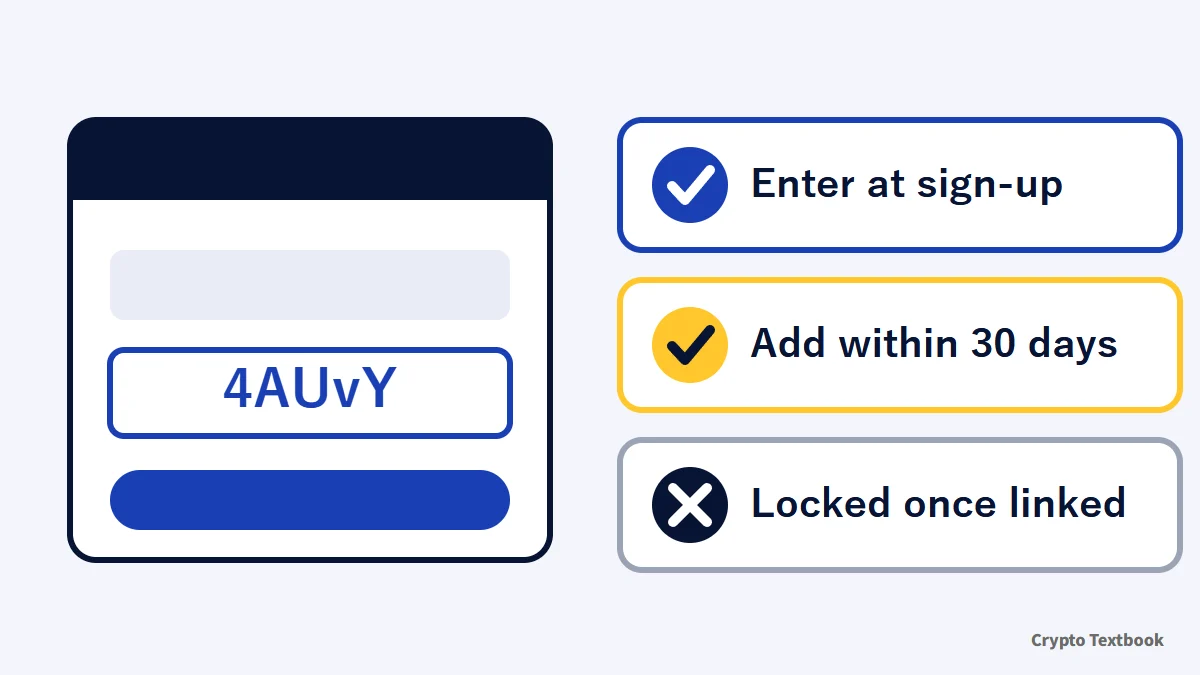
- The referral code is optional; you can sign up for MEXC with the box empty (the screen marks it optional)
- Our referral code is 4AUvY. Opening our referral link starts the sign-up screen with the code already filled in
- If you forget it, you can add it within 30 days of signing up through the help centre's self-service linking
- A self-service link cannot be changed later, and it does not take effect if the referrer signed up after you
- On 4 November, two new-user events were running: the Trading Carnival and Daily Check-in (deadlines below)
MEXC futures use leverage, so a price move can trigger forced liquidation and you can lose all or part of the funds you deposited. Avoid raising your trading volume to match the size of a reward.
What is a MEXC referral code? What the official help says, and how it differs from a discount code
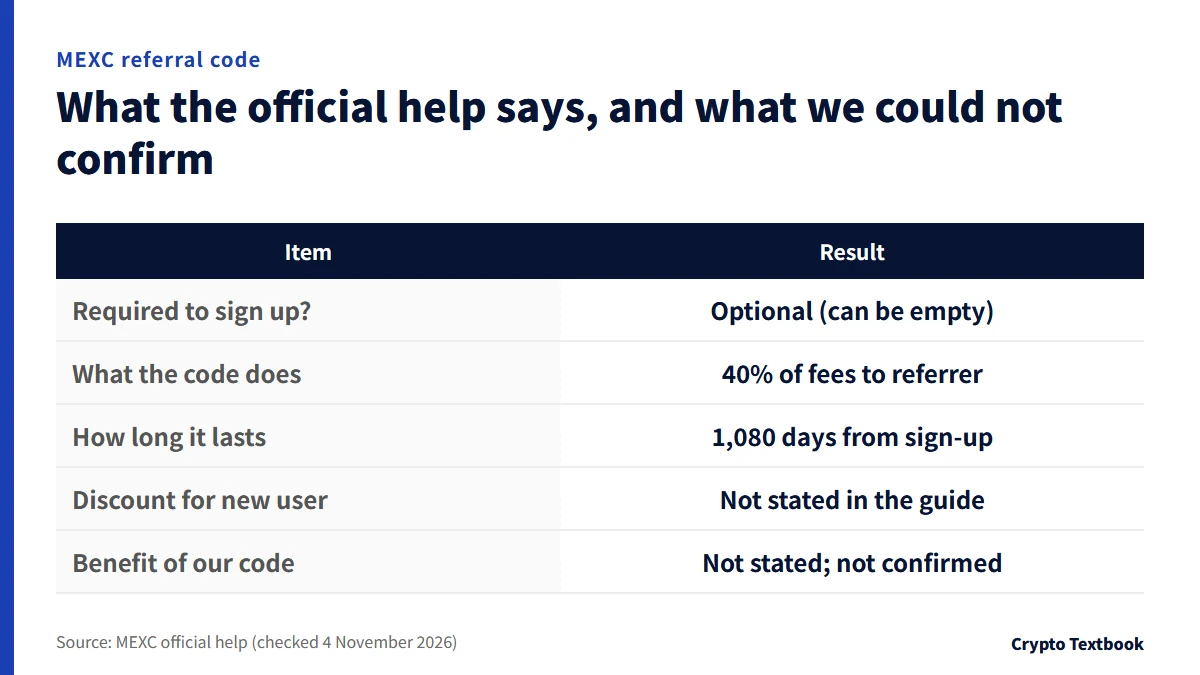
A referral code is a code a MEXC user shares to bring in a friend. When the friend signs up and trades, the referrer receives 40% of the friend's trading fees as cashback (for standard users, per the official referral guide).
The cashback period runs for 1,080 days from the day the friend signs up (540 days in some regions). The cashback goes to the referrer. The official referral guide does not say that the person signing up automatically pays lower fees.
| Item | Result |
|---|---|
| Required to sign up? | No. Optional; you can leave it empty |
| What the code does | Cashback for the referrer (40% of fees, standard users) |
| How long it lasts | 1,080 days from the friend's sign-up (540 in some regions) |
| Fees for the new user | No discount is stated in the official referral guide |
| Benefit of our code | Not stated in the official help; not confirmed |
| Is it a discount code? | The official explanation does not describe one |
If you invite friends with your own code (the official referral program)
- On the web, open the person icon at the top right, choose Invite Friends, then copy the code under Invite & Earn Cashback
- If you send the referral link, the code is filled in automatically on the friend's sign-up screen
- Cashback arrives in the same token the friend paid fees in: spot around 1:00 and futures around 10:00 the next day (Japan time)
- Applying to the affiliate program raises the cashback rate to a maximum of 70% (official)
Referral codes differ by referrer. A search returns many different codes, and which one you enter is your choice. Because a self-service link cannot be changed, compare the codes before you type.
How to sign up for MEXC (open an account): the same flow on web and app
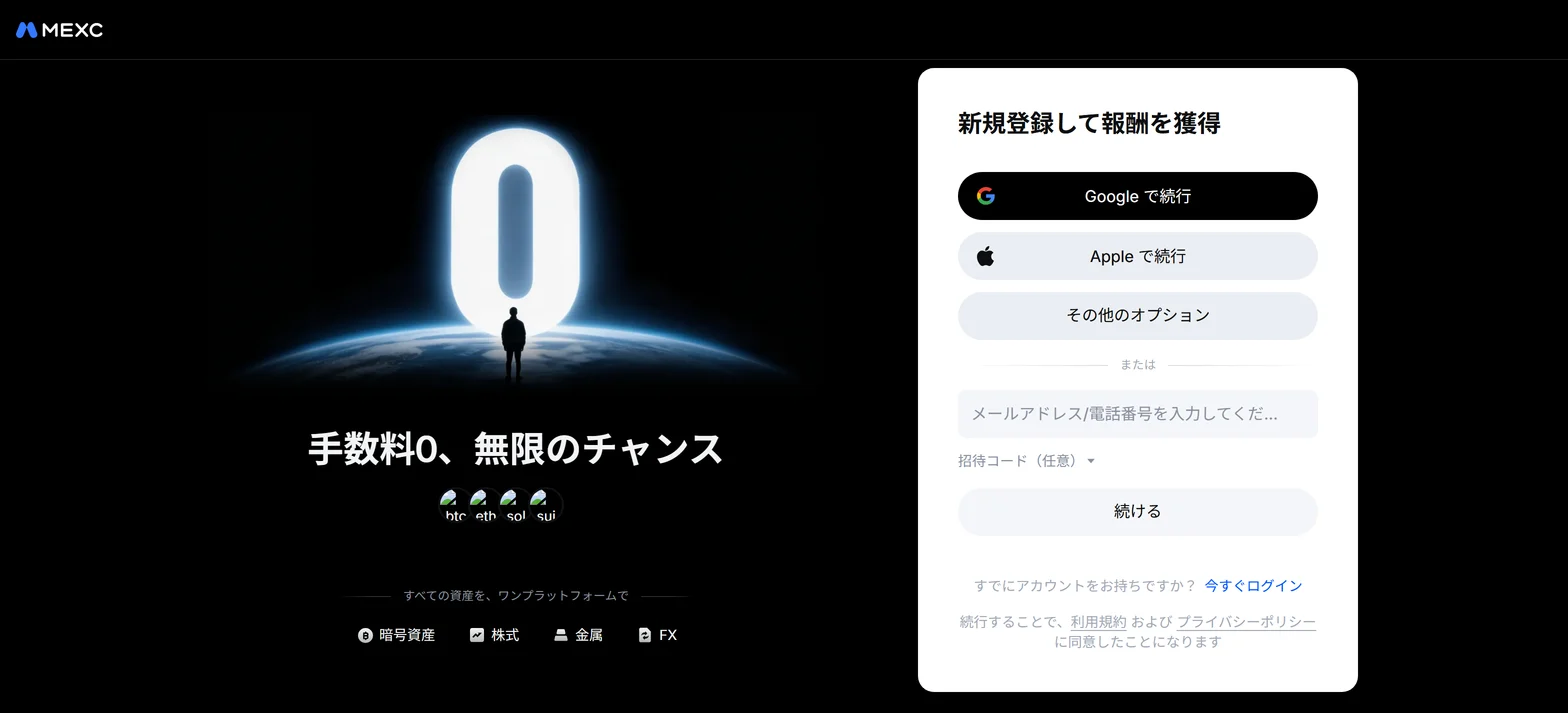
You can sign up with an email address, a phone number, Google or Apple. The official help also describes MetaMask and Telegram.
Signing up on the web
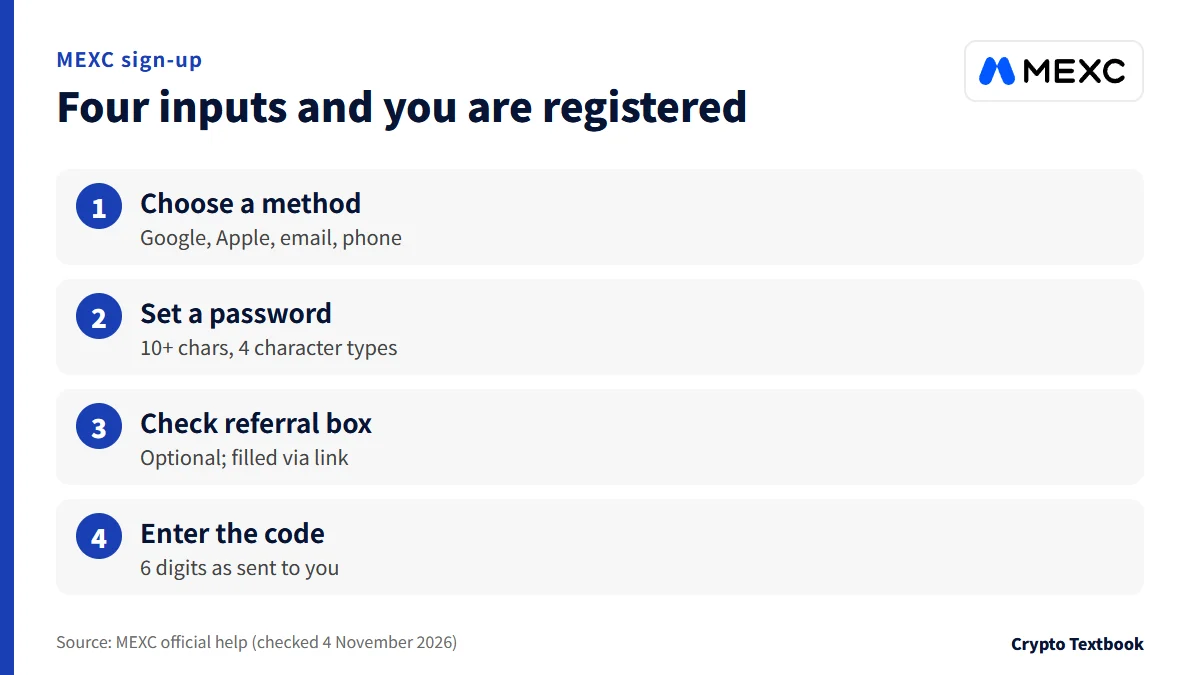
- 01Open the sign-up page
Press our referral link, or Sign Up on the official MEXC site.
- 02Choose how to sign up
Pick Continue with Google, Continue with Apple, More Options, or enter an email address or phone number.
- 03Set a password if you use email or phone
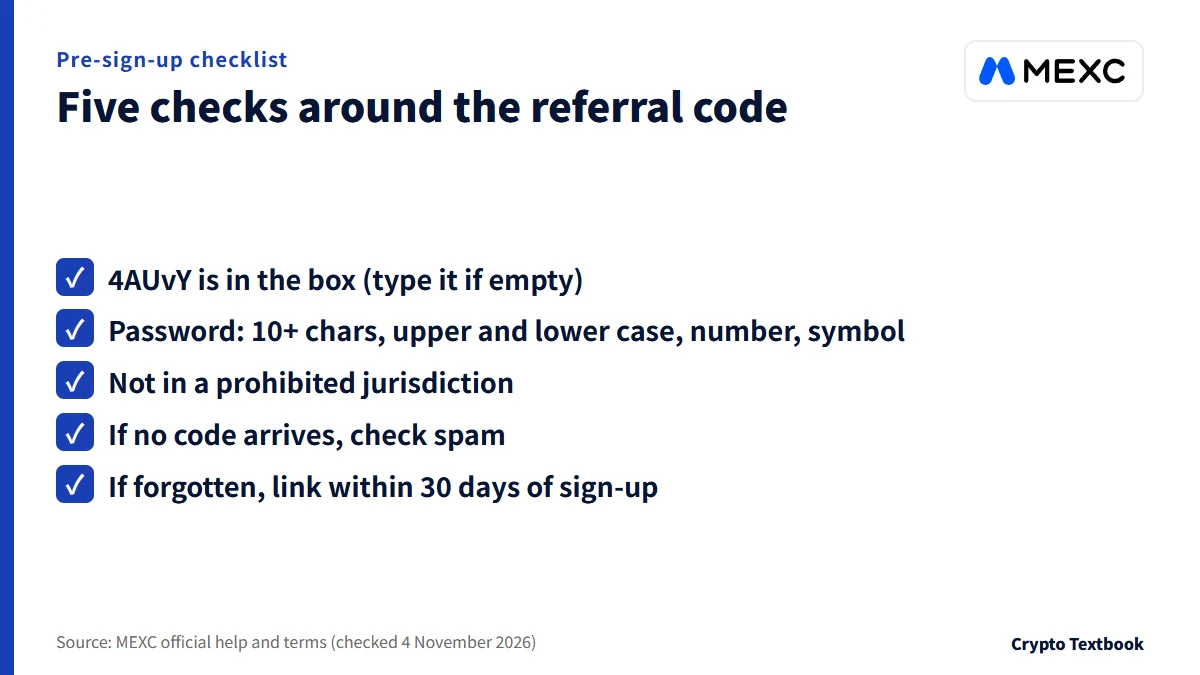
The password must be at least 10 characters and include upper- and lower-case letters, numbers and symbols.
- 04Check the referral code box
The code is optional. If you opened our link, the code is already in the box.
- 05Pass the puzzle check and enter the 6-digit code
Drag the slider to verify, enter the 6-digit code you received and press Confirm to finish.
Open the MEXC sign-up page (our referral link) →
Signing up in the mobile app
- Open the app. For a new user, the first login is the sign-up itself (the steps are the same on iOS and Android)
- Enter your email address and password, then tap Sign Up
- If you have a referral code, tap the arrow and enter it in the box
- Tap Get Code, enter the email verification code you received and tap Submit
Check your inbox, spam folder and trash folder. If it is not there, resend it from the link on the screen for not receiving the code.
Where sign-up usually stalls: missing codes, phone numbers, app versus web, and two-factor authentication
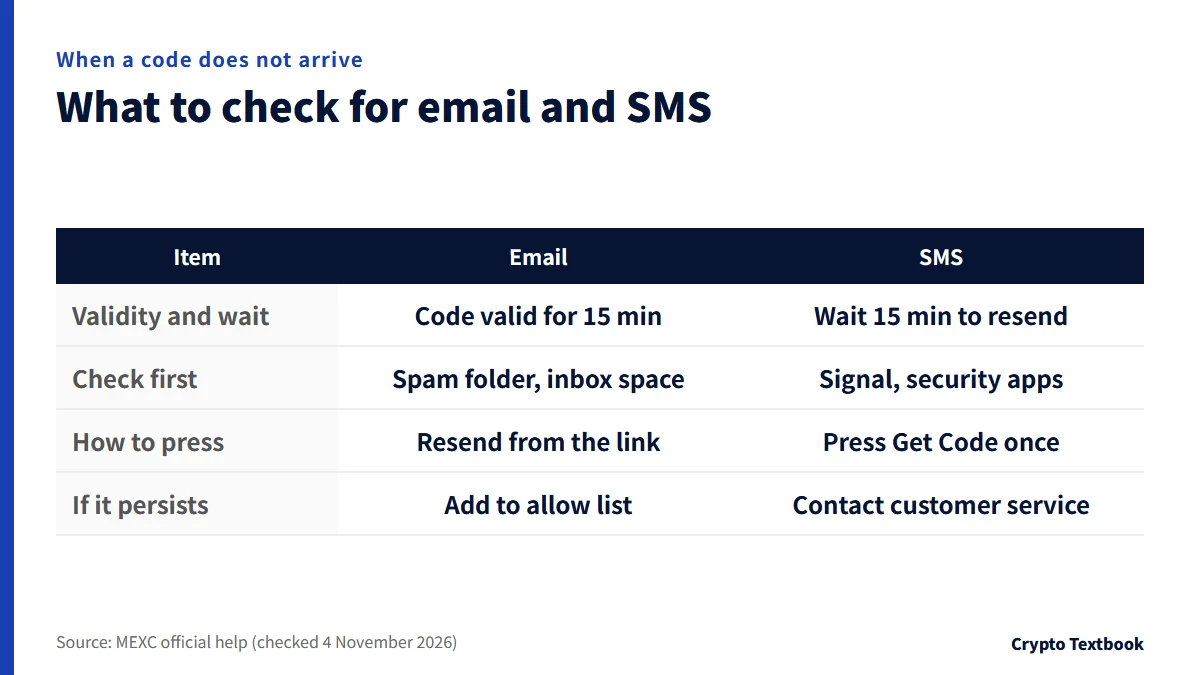
Most stalls during sign-up come from the verification code. Here are the causes and fixes the official help lists, split into email and SMS (checked 4 November 2026).
When the email code does not arrive
- The code is valid for 15 minutes
- Check on the security page that the registered email address is correct
- Look in the spam folder and other folders. A full inbox cannot receive mail
- The help recommends mainstream providers such as Gmail or Outlook. Company work email may block outside mail
- Add MEXC's domains (mexc.com, mexc.link, mexc.cg, mexc.ci, mexc.sg) to an allow list, then wait about 10 minutes before requesting the code again
- Signing up with Apple ID's Hide My Email can delay delivery
When the SMS code does not arrive
- Press Get Code only once. Repeated presses in a short time can stop delivery; wait at least 15 minutes before asking again
- Check whether a security app on the phone blocks SMS, and turn the feature off temporarily before trying again
- Weak signal or no coverage prevents delivery. Try from a place with good reception
- Also check the phone balance, free storage and the spam folder
- If it still does not arrive, MEXC's SMS sender may be blocked. The help points to online customer service
Messages about phone numbers and email
If you see "already registered", that phone number or email address is linked to another MEXC account. One account can link one number and one email (official FAQ).
The official help we checked (the sign-up steps and the FAQ) does not explain how to choose the country code. Follow what the sign-up screen shows.
App versus web
| Item | Web | App |
|---|---|---|
| Entry point | Sign Up button | The first login is the sign-up itself |
| Referral code | Tick the referral code box and enter it | Tap the arrow and enter it |
| Password | 10+ characters with upper and lower case, numbers, symbols | Same requirement |
| Puzzle check | A slider check is part of the steps | Not mentioned in the steps |
| Entering the code | Enter the 6-digit code and press Confirm | Enter the email code and press Submit |
Two-factor authentication after sign-up
The official explanation describes two-factor authentication that links at least two of phone number, email address and Google Authenticator. Official materials word this as both "required" and "recommended", so check the current requirement on your account's security settings screen.
- Google Authenticator codes change every 30 seconds. If you get an error, check for mixed-up accounts, the app and the time setting on your device
- Changing or removing the phone number, email or Google Authenticator limits withdrawals for 24 hours
Where to enter the MEXC referral code: the box on the sign-up screen and our code (4AUvY)
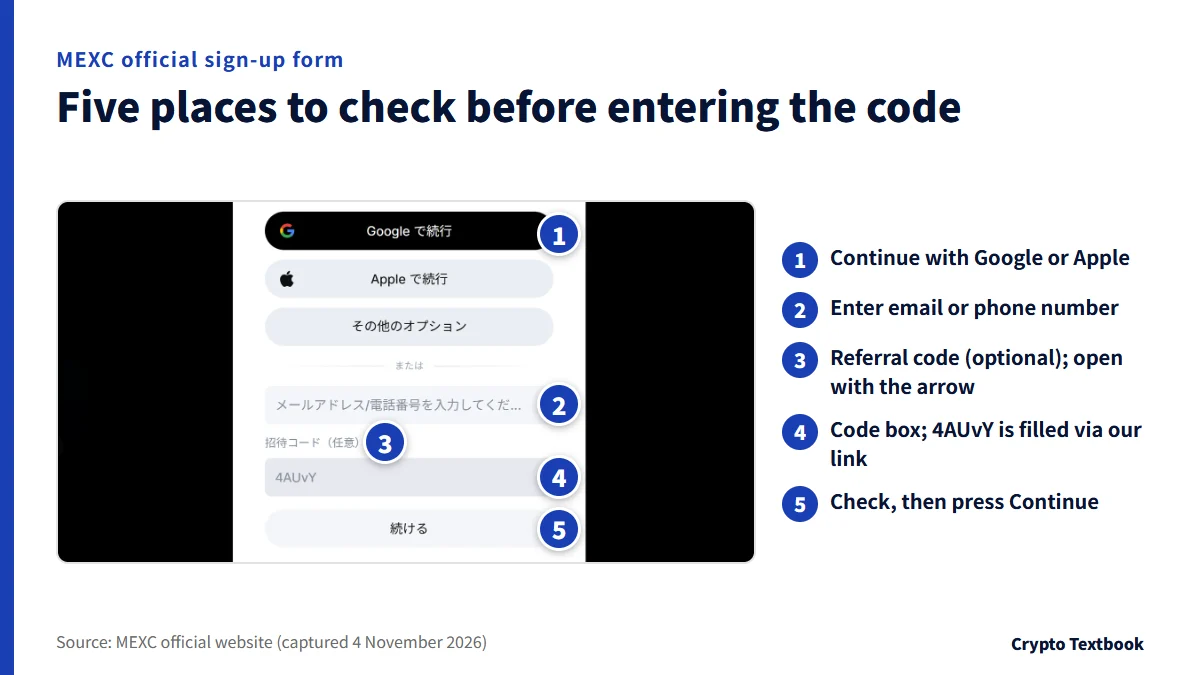
The box sits under the email address or phone number field. On the 4 November 2026 screen it is labelled as the optional referral code, and you open it with the arrow on the right.
Our referral code is 4AUvY. Opening our referral link shows the sign-up screen (mexc.com/invite/register) with the code already in the box (checked 4 November).
- The code is 4AUvY (capital U, lower-case v, capital Y)
- If you came through the link, it is filled in automatically; if the box is empty, type it yourself
- If you continue with Google or Apple, check the code box on the same screen first
The captured screen states no conditions for rewards tied to a code. The invite page background shows an amount, but we could not confirm the terms for receiving it.
If you forgot the MEXC referral code: add it within 30 days with self-service linking
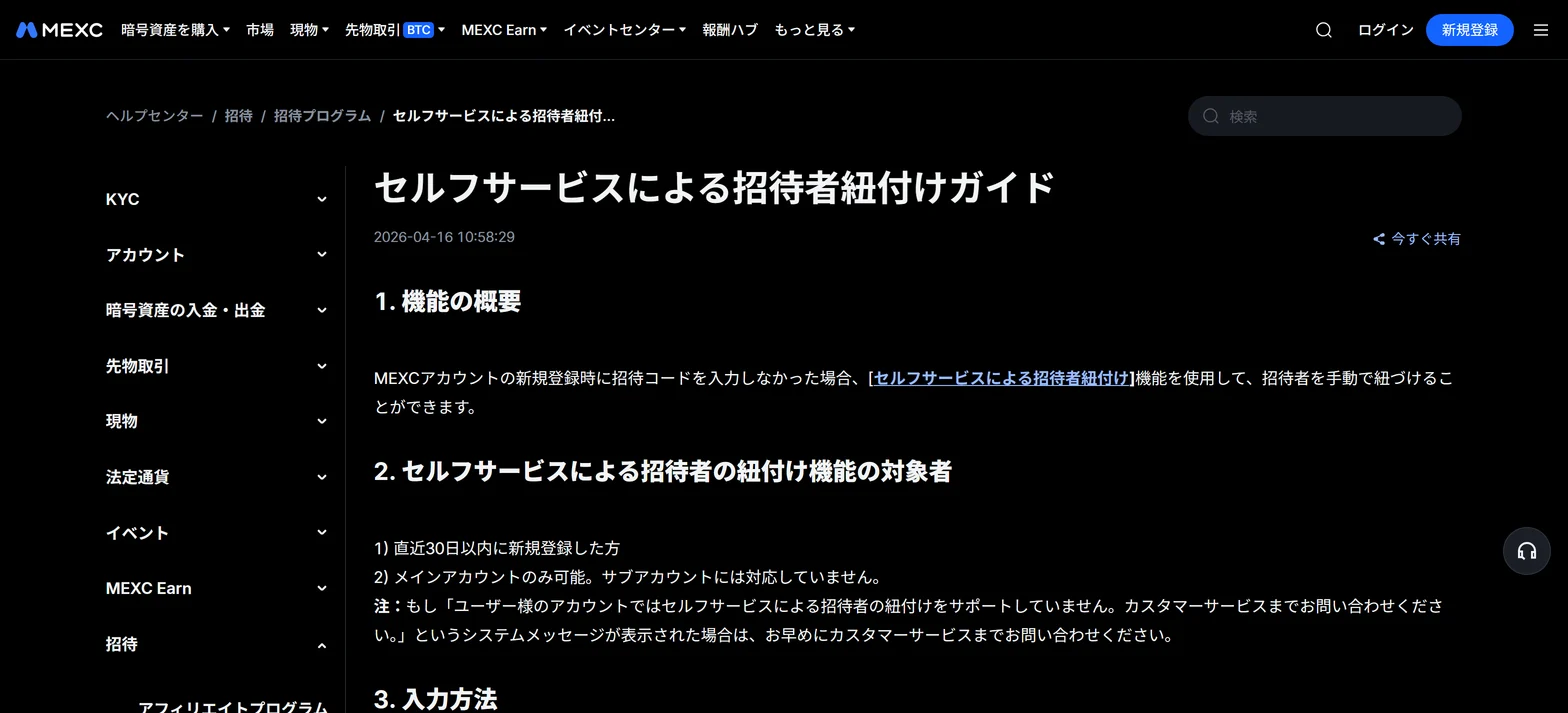
The help centre's self-service referrer linking lets a user who left the code blank link a referrer manually. It applies to a main account that signed up within the last 30 days.
| Item | Detail |
|---|---|
| Eligible | Signed up within the last 30 days |
| Account type | Main account only (sub-accounts are not supported) |
| What you enter | The referral code or the referrer's UID |
| When the referrer signed up | Valid only if the referrer signed up before you |
| Identity information | No referral if it matches the referrer's |
| Changes | Cannot be changed after linking |
- 01Open the linking page
In the help centre, open the self-service referrer linking page and go to the input screen.
- 02Enter the code or UID
Enter our 4AUvY or the referrer's UID. A code that does not exist shows a message that the referrer does not exist.
- 03Confirm the link
Press the confirm button and the link completes automatically. This cannot be undone.
- 04Check the result
Open My Invitations and then the referrer tab to see the referrer's information.
If the screen says self-service linking is not supported for your account, the official help tells you to contact customer service. The help does not say what happens after 30 days.
New-user offers you can check at MEXC sign-up: two events running on 4 November 2026
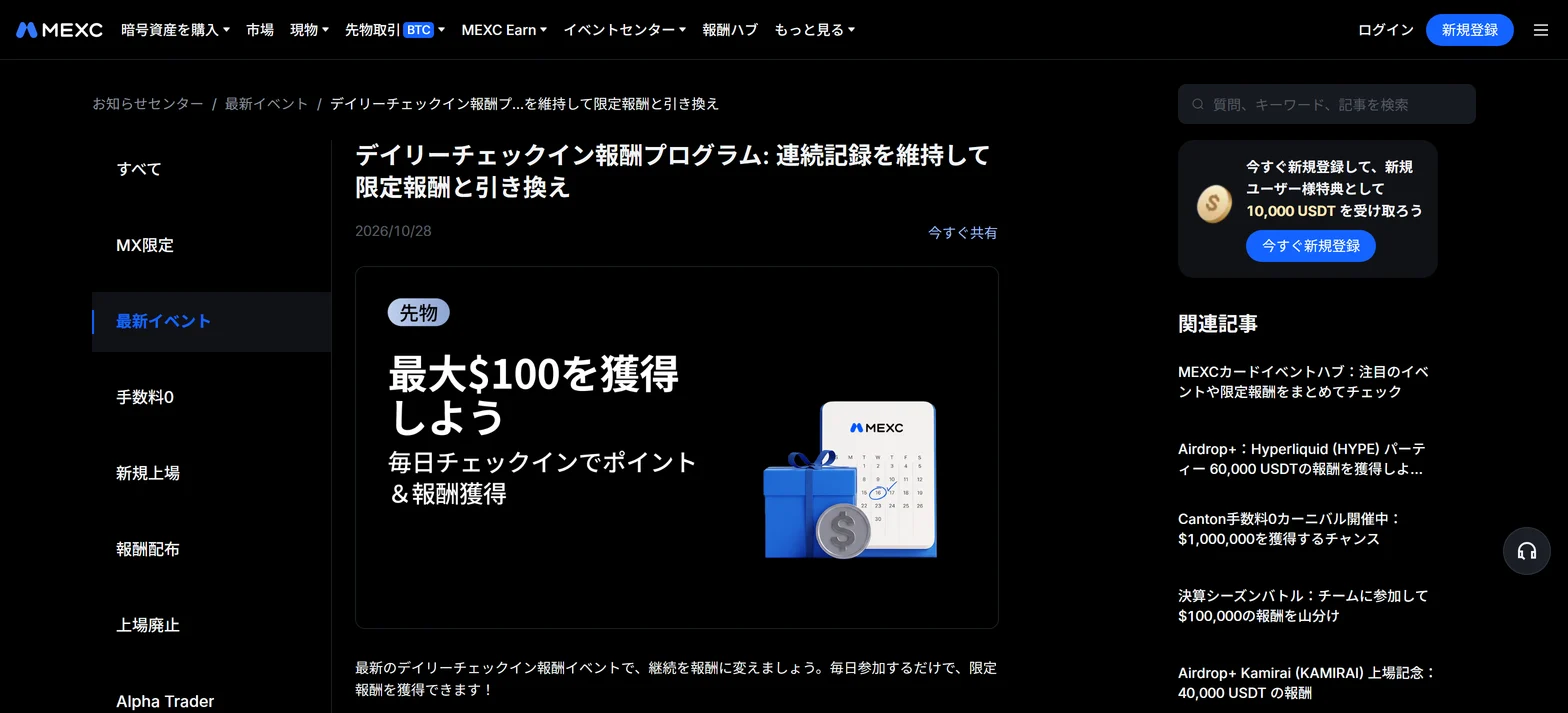
From this site's data and the official announcements, two events were running on 4 November. Both need event registration, and rewards are first-come or limited in number.
| Event | Period | For new users |
|---|---|---|
| Trading Carnival | 23 Oct 01:00 to 23 Nov 00:59 | $5 to $10 airdrop for a first spot trade of $100 or more (eligible spot pairs only); $0.5 for opening a stock account. Limited, first-come |
| Daily Check-in (phase 2) | 26 Oct 16:00 to 19 Jan 2027 19:00 | 100 points for a first deposit of $100 or more and 100 points for a first futures trade of $1,000 or more; 5 points a day, plus 400 for a 30-day streak |
※ The Trading Carnival counts prediction-market volume. Points are redeemed in the Rewards Hub for futures bonuses and USDT airdrops (first-come).
Official sign-up-related pages also advertise 10,000 USDT for new users. The conditions are not on the screen, and we could not confirm them.
Neither announcement says whether residents of Japan are eligible. Check the eligible regions and conditions on each event page before registering.
MEXC Trading Carnival: conditions and reward table →
MEXC Daily Check-in: points table →
Crypto exchange sign-up bonuses: types and withdrawal rules →
What to do after signing up: two-factor authentication, identity verification and deposits
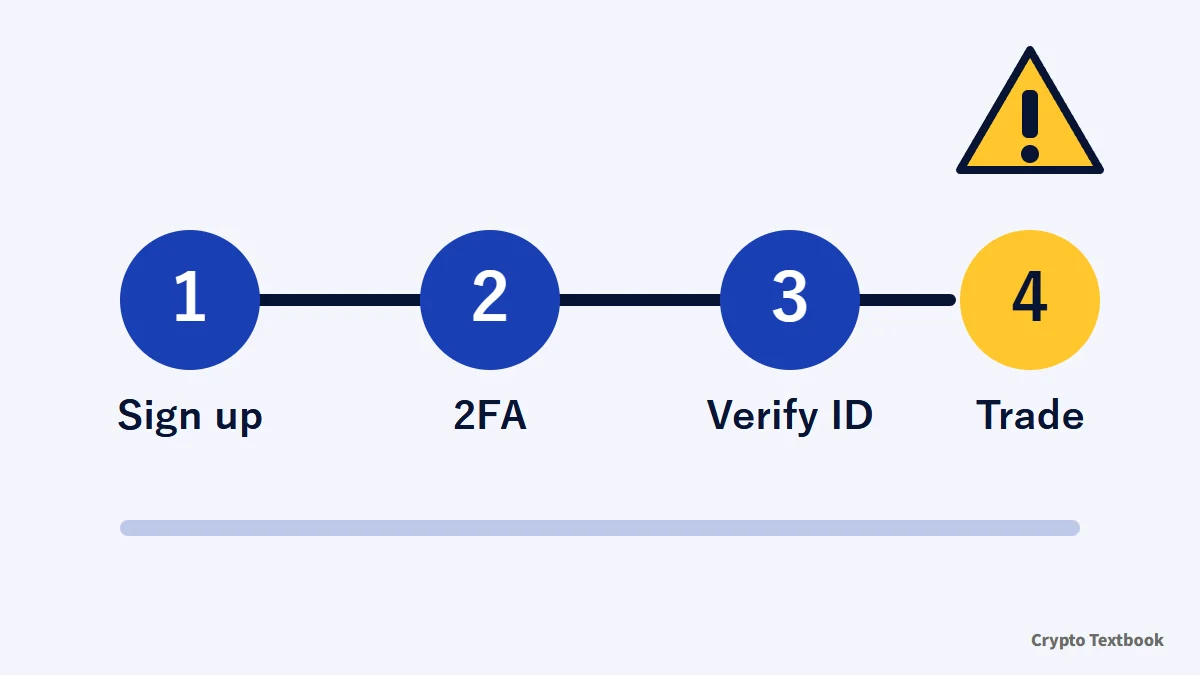
- Two-factor authentication: link at least two of phone number, email and Google Authenticator (see the previous section and the safety article)
- Identity verification (KYC): two levels, with different withdrawal limits
- Regions: Japan is not in the terms' prohibited jurisdictions (updated 13 October 2026); the list can change
- Fees: maker and taker rates differ between spot and futures
- Deposits: Japanese yen quick buy, P2P or on-chain; match the currency and network
MEXC reputation and safety (2FA, KYC, withdrawal limits) →
MEXC deposits and withdrawals (yen purchase, P2P, withdrawal times) →
MEXC fees for spot and futures, with the MX discount →
MEXC futures leverage and how forced liquidation works →
MEXC Card cashback and how to apply →
The terms name MEXC (Comoros) Ltd, registered in the Union of the Comoros, as the contracting party (13 October 2026 version).
Common mistakes and a pre-sign-up checklist
| Mistake | What happens | What to do |
|---|---|---|
| Signed up with the box empty | No referrer is linked | Link one within 30 days of signing up |
| Passed 30 days | The help does not say what then | Ask customer service |
| Linked the wrong referrer | A self-service link cannot be changed | Compare codes before you enter one |
| Referrer signed up after you | No referral takes effect | Use the code of someone who signed up earlier |
| Verification code not arriving | Sign-up does not finish | Check spam and resend |
If you enter a code, first check that 4AUvY is in the box on the sign-up screen. If you forgot, you can add it within 30 days through self-service linking.
If you want an offer, check the eligible regions and conditions on each event page before you register.
Frequently asked questions
Q. What is the MEXC referral code?
A. Our MEXC referral code is 4AUvY. Enter it in the optional referral code box on the sign-up screen. Opening our referral link starts the screen with the code filled in. Codes differ by referrer, so other sites list other codes.
Q. Can I sign up for MEXC without a referral code?
A. Yes. The sign-up screen marks the code as optional, and the official help says to enter it if you have one. Whether to use one is the sign-up user's choice.
Q. Can I add a MEXC referral code later if I forgot it?
A. Within 30 days of signing up, yes, through the help centre's self-service linking. It works for main accounts only. Enter the referral code or the referrer's UID and confirm the link.
Q. Can I change a MEXC referral code?
A. The official help says a link made through self-service cannot be changed later. It does not say whether a code entered at sign-up can be changed, so we could not confirm that.
Q. What do I get from a MEXC referral code?
A. The official referral guide confirms that the referrer receives 40% of the friend's fees. It does not state a fee discount for the person signing up. Running events are summarised in the offers section of this article.
Q. Can I open a MEXC account from Japan?
A. Japan is not in the prohibited jurisdictions listed in the terms (updated 13 October 2026). The list is not exhaustive and MEXC can change it at its discretion, so check the latest terms before signing up.
Q. What are the MEXC password requirements?
A. At least 10 characters, including upper- and lower-case letters, numbers and symbols. This applies when you sign up with email or phone. You enter no password if you continue with Google or Apple.
Q. What if the MEXC verification code does not arrive?
A. Check your inbox, spam folder and trash folder. If it is not there, resend it from the link for not receiving the code. The code is 6 digits; an email code is valid for 15 minutes. For SMS, press Get Code only once and wait at least 15 minutes before asking again.
Q. How many authentication methods does MEXC two-factor authentication need?
A. The official explanation describes linking at least two of phone number, email address and Google Authenticator. Official materials word it as both required and recommended, so check your security settings screen. Changing or removing a method limits withdrawals for 24 hours.
Sources
- MEXC | How to Sign Up for a MEXC Account (app, MEXC Learn, published 12 October 2026, checked 4 November 2026) →
- MEXC | MEXC Account Sign-Up Process (Web) (official help centre, 10 December 2025, checked 4 November 2026) →
- MEXC | Self-Service Referrer Linking Guide (official help centre, 16 April 2026, checked 4 November 2026) →
- MEXC | MEXC Referral Guide: Invite Friends to Trade and Earn 40% Commission (official help centre, checked 4 November 2026) →
- MEXC | Terms of Use (last updated 13 October 2026, checked 4 November 2026) →
- MEXC | Sign-up page (official, checked and captured 4 November 2026) →
- MEXC | MEXC Trading Carnival (official announcement, 23 October 2026, checked 4 November 2026) →
- MEXC | Daily Check-in Rewards Program (official announcement, starts 26 October 2026, checked 4 November 2026) →
- MEXC | Common Reasons for Not Receiving SMS Verification Codes (official help centre, checked 4 November 2026) →
- MEXC | Why You May Not Receive Emails from MEXC (MEXC Learn, published 12 October 2026, checked 4 November 2026) →
- MEXC | Account FAQ (MEXC Learn, published 12 October 2026, checked 4 November 2026) →
FX Textbook is an independent information site, not an exchange or a provider of personal investment advice. Crypto-asset trading involves risk: price volatility, liquidation of leveraged positions, transfer mistakes and the operational risk of exchanges and service providers can cause you to lose some or all of your invested capital. No result is guaranteed.
NEXT STEP
See MEXC details in one place
Product types, fees, leverage and deposits, as confirmed from official sources by this site.
Exchanges related to this column
Fees, leverage, funding options and current offers are on each exchange page.