
You keep seeing the word wallet while reading about crypto. How does it differ from an exchange account, and what happens if you lose a private key or recovery phrase?
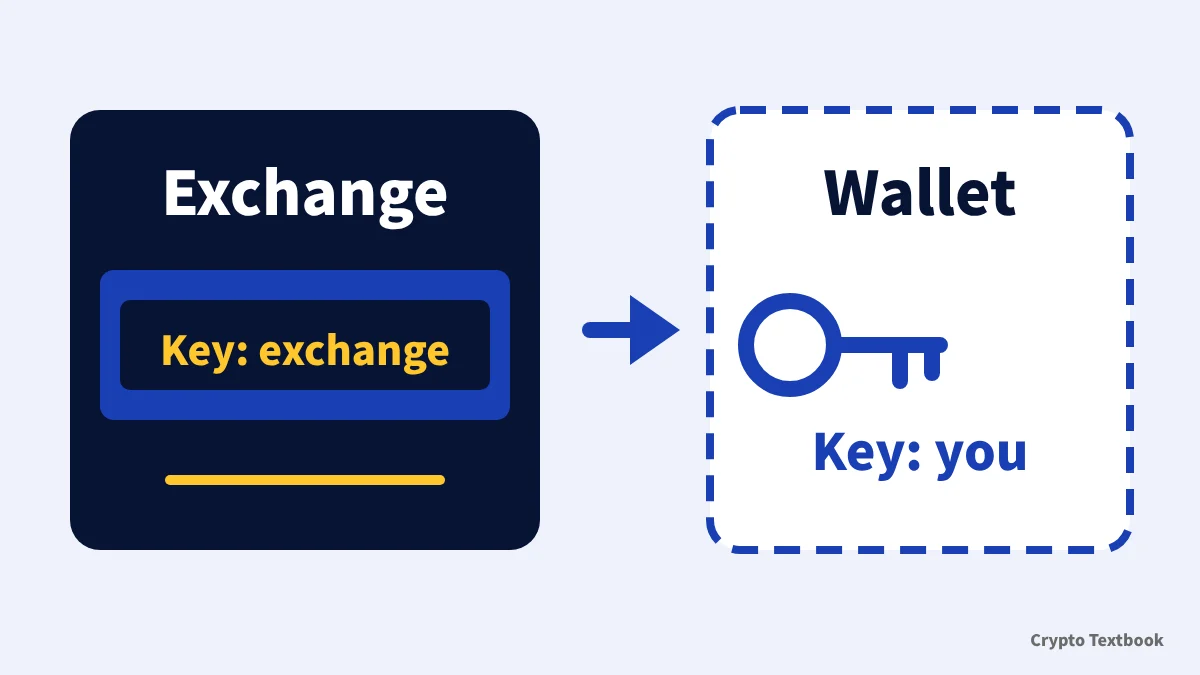
A wallet is an app or device that uses keys to view and send assets. On an exchange account the exchange holds the keys. In your own wallet you hold them.
This guide draws on the explanations at ethereum.org and bitcoin.org, the BIP-39 specification and the BingX and BYDFi help centres, checked on 17 November 2026. It shows how to split holdings and how to protect your keys.
Conclusion: a wallet manages keys, and the key holder differs from an exchange
- Role: a tool that uses keys to check balances, send assets and log in to apps
- Exchange account: the exchange manages the keys and you sign in with an ID and password
- Your own wallet: you protect the keys. The recovery phrase is 12 to 24 words
- If you lose access: an exchange can reset your password. A wallet cannot be restored without the phrase
- Division of use: trading and futures sit in the exchange account, and some people keep long-term holdings in their own wallet
The word wallet suggests a purse with assets inside. In practice it means the keys and tools used to view and send assets.
This guide focuses on who holds the keys. Choosing an exchange is covered in two other guides.
Inside a wallet: address, private key and recovery phrase
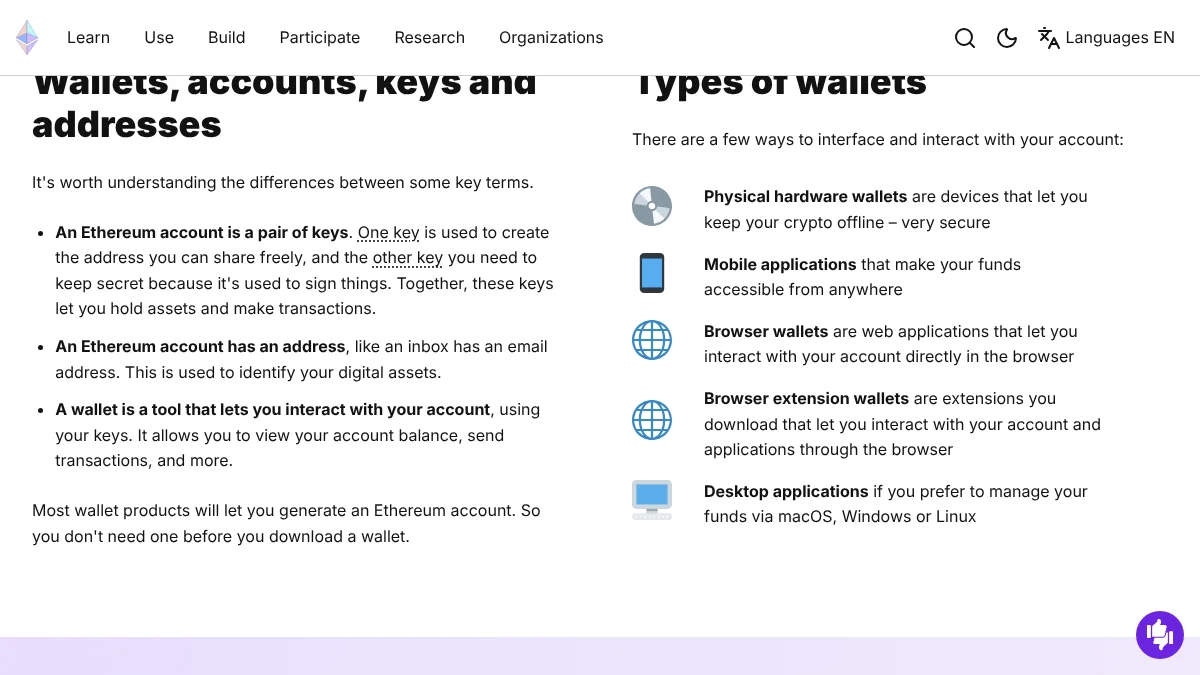
ethereum.org describes an Ethereum account as a pair of keys. One key creates the address you can share, and the other is used to sign, so it stays secret.
An address identifies where to send assets. ethereum.org compares it to an inbox having an email address, and says you can share it freely.
| Term | Role | Safe to show? |
|---|---|---|
| Address | Identifies the recipient, like an email address | Yes |
| Private key | The key that signs transactions | No |
| Recovery phrase | 12 to 24 words used to rebuild your keys (also called a seed phrase) | No |
| Wallet | An app or device that uses keys to check balances and send assets | Differs by app |
A wallet holds keys, not the assets themselves
ethereum.org says wallet providers do not hold your funds. They give you a window to see your balance and tools to send.
The MetaMask help page calls the recovery phrase the master key to the wallet. Anyone who knows it can move what is inside.
Exchange account vs your own wallet
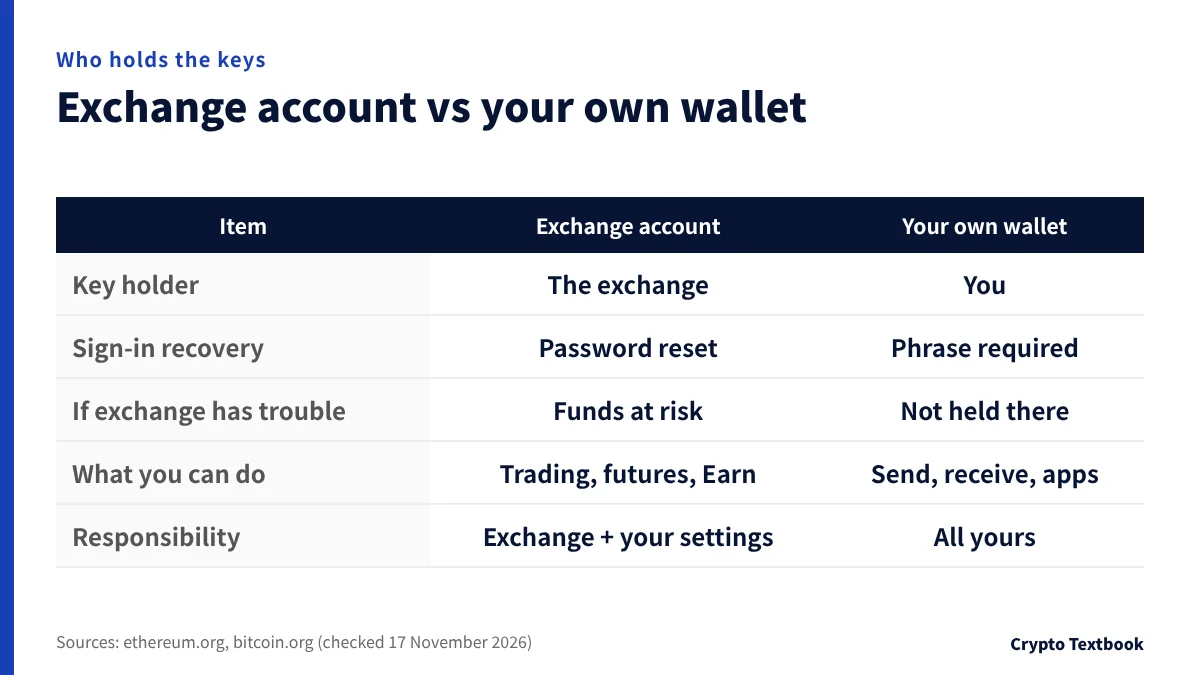
ethereum.org explains that an exchange links your wallet to a username and password that you can recover in the usual way. In return, the exchange has custody of your funds.
| Item | Exchange account | Your own wallet |
|---|---|---|
| Key holder | The exchange | You |
| Sign-in recovery | Password can be reset | Not restorable without the phrase |
| If the exchange has financial trouble | Funds would be at risk (ethereum.org) | Funds are not held there, so separate from the exchange's finances |
| What you can do | Trading, futures and Earn on that exchange | Send, receive, use apps and store |
| Responsibility | Exchange custody plus your settings | Key management is all yours |
ethereum.org says funds would be at risk if the exchange ran into financial trouble. bitcoin.org adds that when a third party controls your keys, you rely on its security and honesty.
Futures trading and copy trading happen inside the exchange account. Whether to move long-term holdings to your own wallet depends on how much you hold and how confident you are in managing keys.
Wallet types: by form and by internet connection
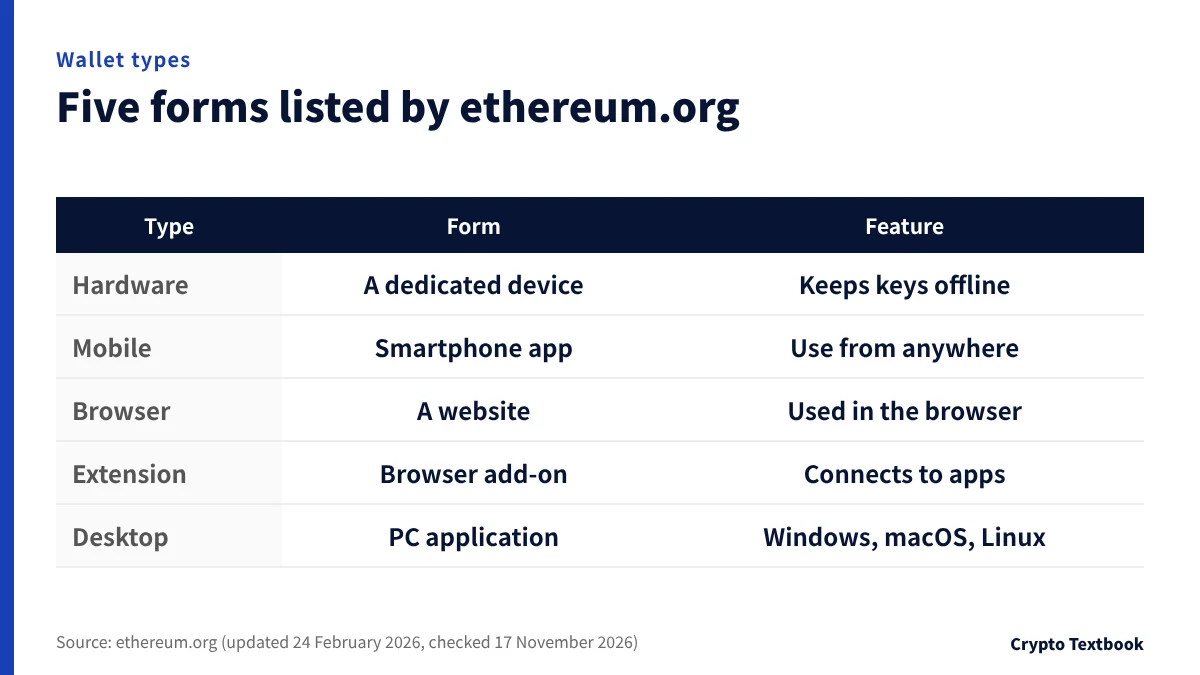
ethereum.org lists five forms of wallet. In general, one that is always online is called a hot wallet and an offline one a cold wallet.
| Type | Form | Description from the sources |
|---|---|---|
| Hardware | A dedicated device | Keeps crypto offline (ethereum.org). No software can be installed, which guards against computer vulnerabilities (bitcoin.org) |
| Mobile | A smartphone app | Makes funds accessible from anywhere |
| Browser | A site opened in the browser | A web application for using your account in the browser |
| Browser extension | A browser add-on | Connects to your account and apps through the browser |
| Desktop | A PC application | Manage funds on macOS, Windows or Linux |
bitcoin.org suggests treating a wallet like cash in your pocket. Keep small amounts for everyday use and the rest in a safer environment.
It describes an offline wallet as the highest level of security for savings. Among those, it says hardware wallets strike a good balance between security and ease of use.
Before you start: source, updates and backups
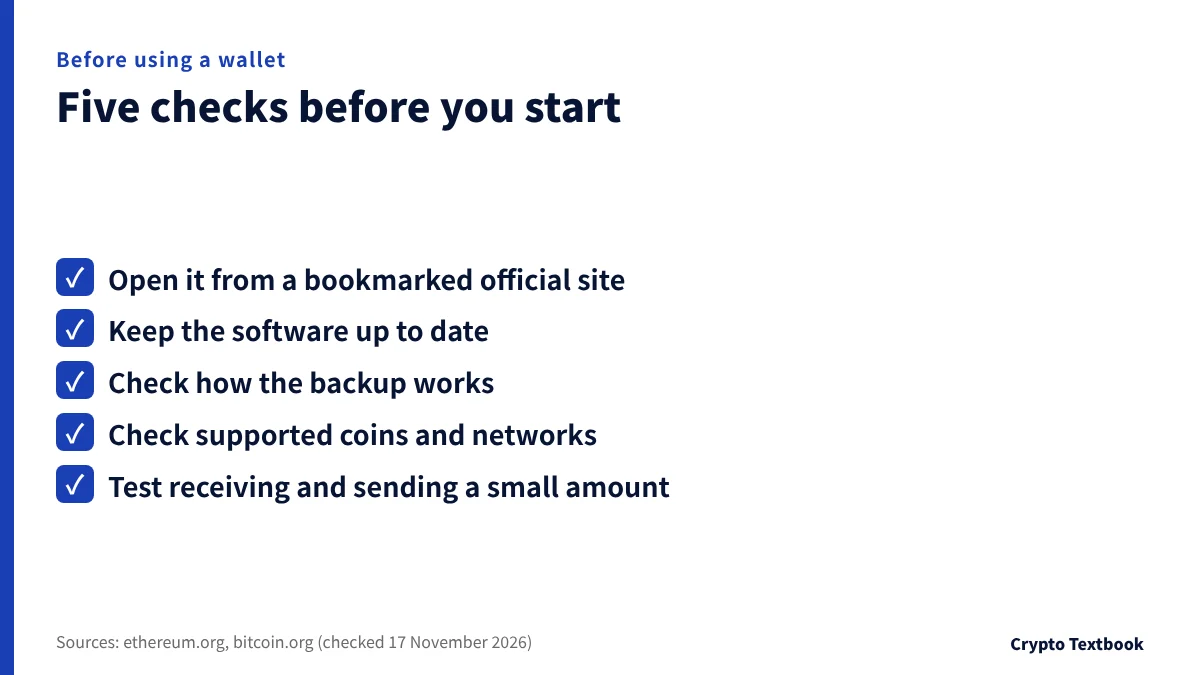
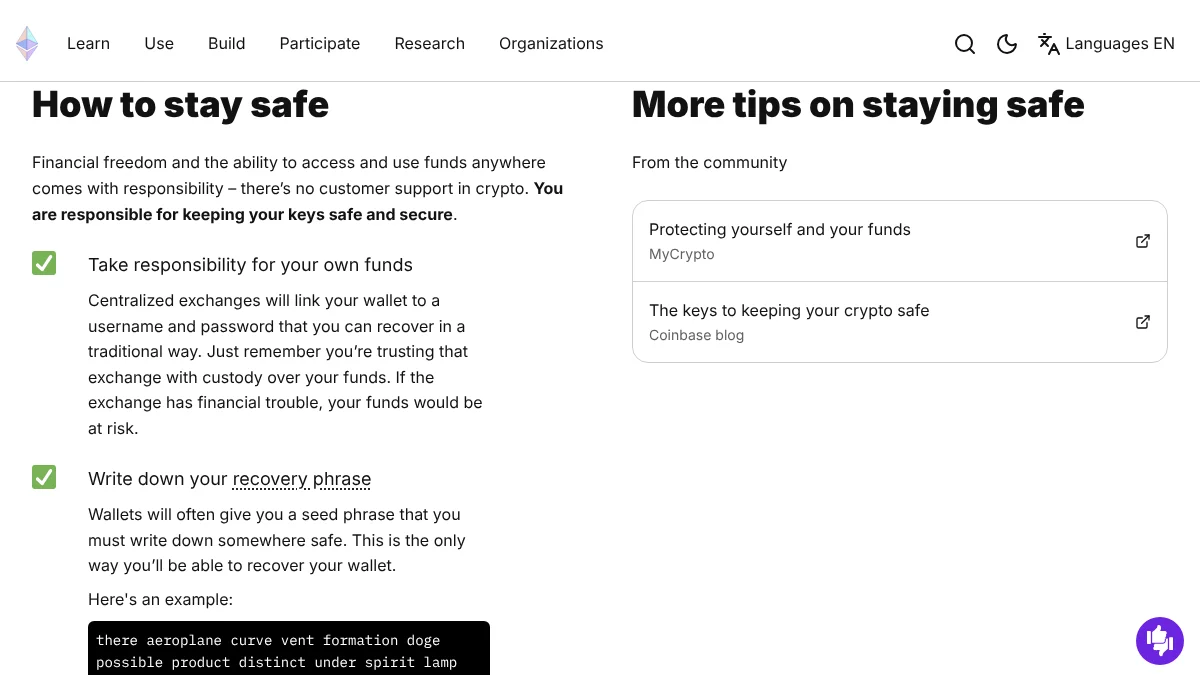
How you use a wallet matters more than its type. ethereum.org advises opening a web wallet from a bookmarked site, which helps you avoid typing into a fake one.
- Source: bookmark the official site and open it from there (ethereum.org)
- Updates: keep the software current, since updates carry stability and security fixes (bitcoin.org)
- Backup: most modern wallets restore past and future addresses from one phrase. Check how yours works (bitcoin.org)
- Support: check that the wallet handles the coin and network you want. ethereum.org says most wallets work with many chains
- Trial run: first receive and send a small amount end to end
A password does not replace the recovery phrase
The MetaMask help page says the password unlocks the wallet on that device. If you forget it, the phrase can restore access, but the password alone cannot recover the wallet.
bitcoin.org describes encrypting a wallet so a password is needed to withdraw. It advises a long, hard-to-guess password and warns that recovery options for a forgotten one are limited.
Recovery phrase: five rules for 12 to 24 words
The BIP-39 specification defines the recovery phrase. It takes 128 to 256 bits of randomness, adds a checksum, splits the result into 11-bit groups and maps each to a 2,048-word list, giving 12 to 24 words.
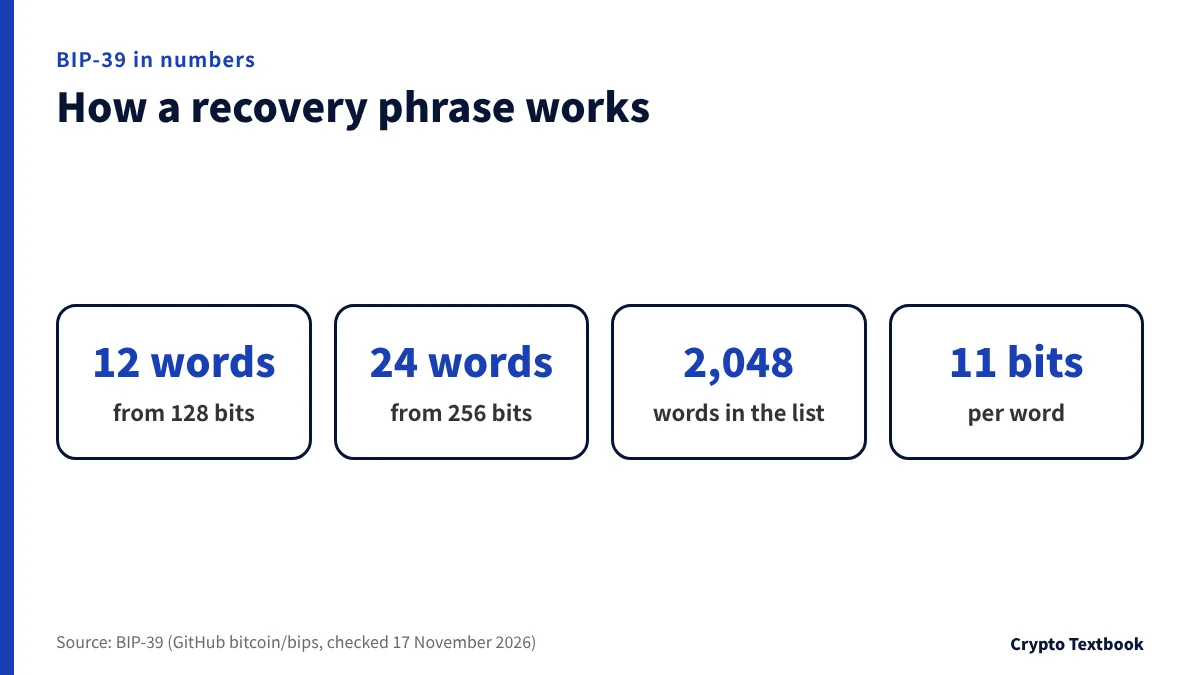
A new MetaMask wallet uses 12 words, and some other wallets use 18 or 24. Changing the word order breaks recovery.
- Write it by hand on paper. It cannot be stolen online (MetaMask)
- Do not keep it in a cloud document or an email titled recovery phrase
- Do not leave it where it is easy to find, such as a sticky note on your PC
- Do not give it to anyone, even someone claiming to be support
- Do not rely on one place. Keep copies in several locations on durable media (bitcoin.org)
ethereum.org says the recovery phrase is the only way to recover a wallet, and MetaMask states that lost phrases cannot be recovered. bitcoin.org also points to family planning, since funds are lost for good if no one knows where the wallet is kept.
Exchange-side protection: lock destinations with a withdrawal whitelist
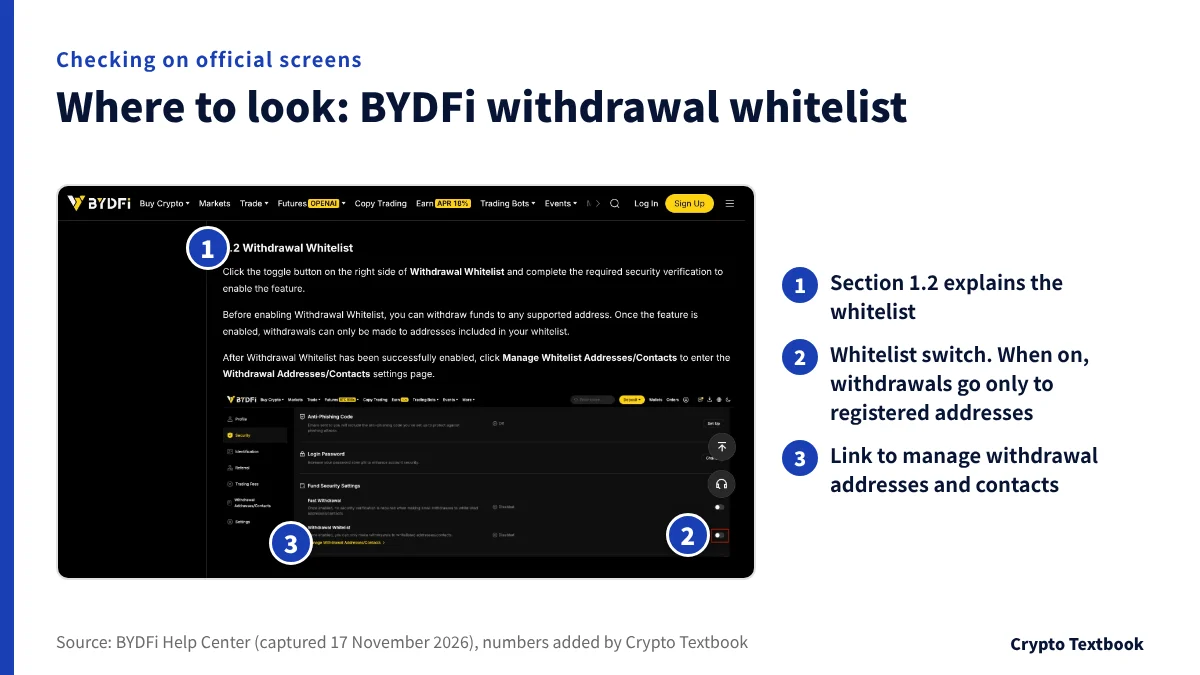
Even without your own wallet you can protect an exchange account. The BYDFi help page says Advanced Security offers a Withdrawal Whitelist and Fast Withdrawal.
With the whitelist on, withdrawals are possible only to registered addresses. Before it is on, you can withdraw to any supported address.
| Setting | What it does |
|---|---|
| Withdrawal Whitelist | When on, withdrawals go only to whitelisted addresses |
| Whitelist Security Restriction | When on, a newly added address has a 24-hour waiting period |
| If the restriction is turned off | The account waits 24 hours before it can withdraw again |
| Fast Withdrawal | Set a limit, and single withdrawals below it skip 2FA (the example is 500 USDT) |
The BingX Safety User Guide recommends enabling Withdraw via Address Book for the same purpose. Names and steps differ by exchange, so read each help page before you set it up.
Fast Withdrawal trades some protection for convenience by skipping 2FA. Choose the limit yourself.
Before you send from an exchange to your own wallet
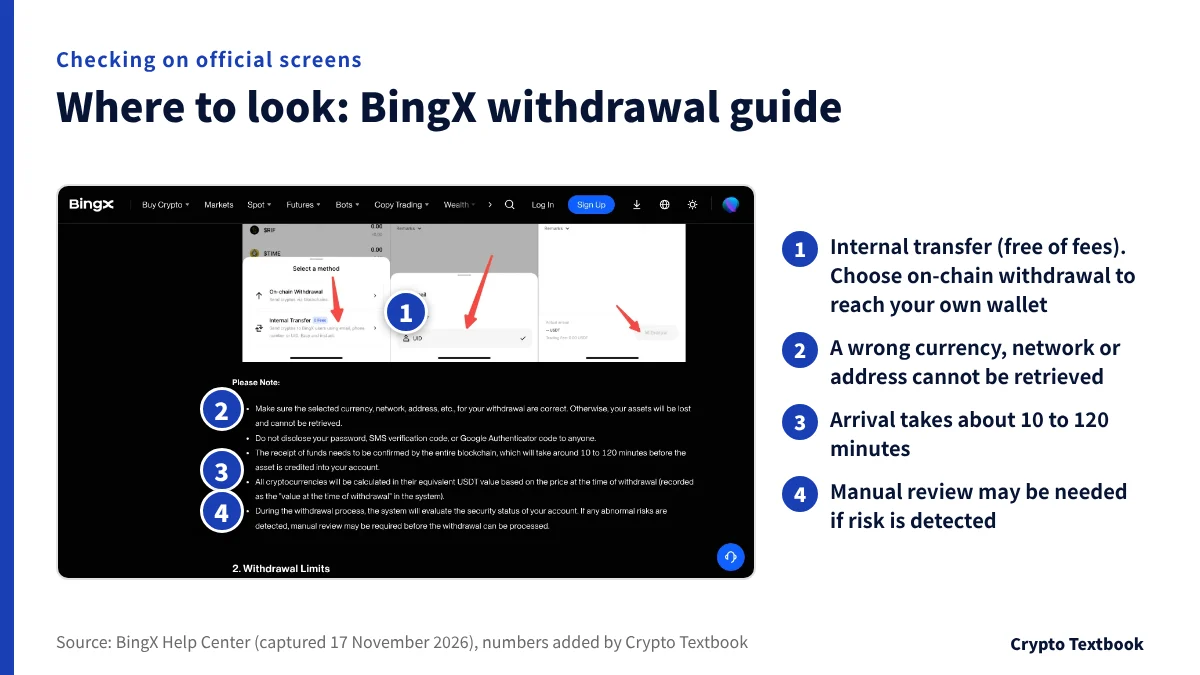
The BingX withdrawal guide lists two methods: on-chain withdrawal through the blockchain, and a fee-free internal transfer to another BingX user. Sending to your own wallet is an on-chain withdrawal.
The same guide warns that a wrong currency, network or address means the assets are lost and cannot be retrieved. It puts arrival at about 10 to 120 minutes.
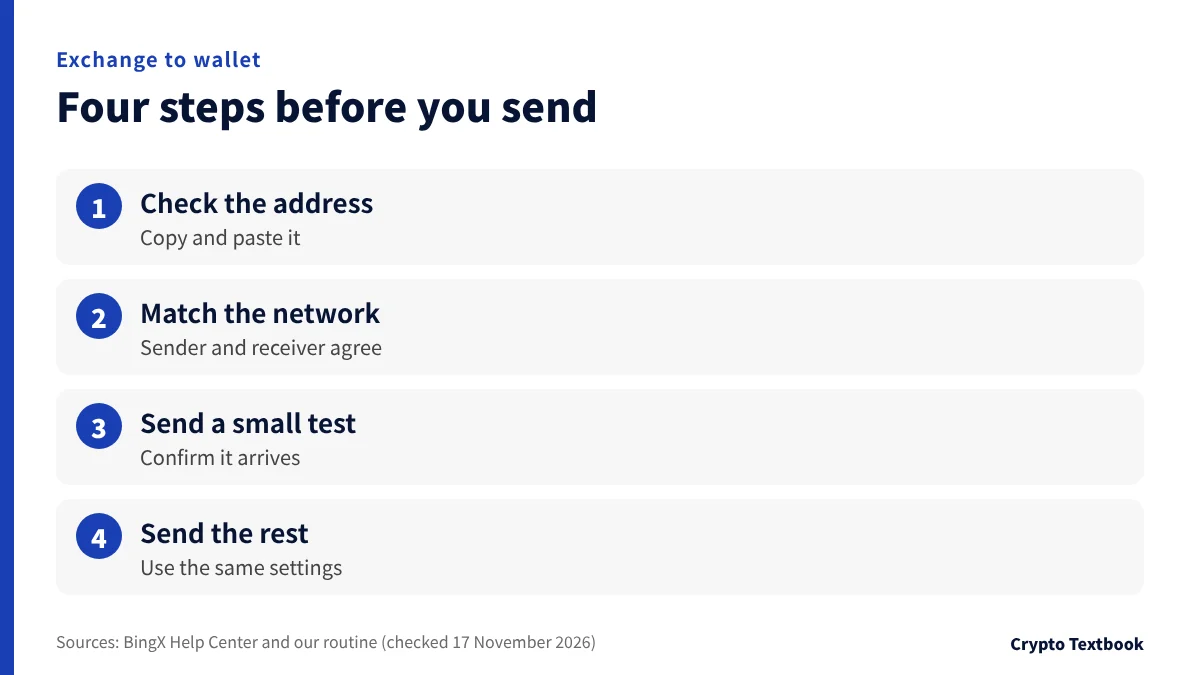
- 01Check the receiving address
Open the receive screen in your wallet app and copy the address. Paste it instead of typing to avoid mistakes.
- 02Match the network
The network on the withdrawal screen must match one your wallet can receive. The deposit and transfer guide explains the differences.
- 03Send a small amount first
Send a small amount and confirm it arrives. This is our suggested routine, not an exchange instruction.
- 04Send the rest
Once the test arrives, send the remainder with the same settings.
Deposits, transfers and choosing the right network
What is USDT? Tether vs USDC and networks
The examples of taxable events in NTA FAQ 1-1 to 1-3 are selling, buying goods and swapping one crypto asset for another. Moving assets to your own wallet is not among the examples. Ask the tax office or a tax accountant about your case.
Editorial conclusion: split by amount and key management
If you mainly trade or use futures, keep only what you need in the exchange account and set up 2FA and a withdrawal whitelist. If long-term holdings grow, move them to your own wallet and decide where to keep the recovery phrase first.
| Your situation | Way of thinking |
|---|---|
| Mainly trading or futures | Keep only what you need on the exchange. Set up 2FA and a withdrawal whitelist |
| Long-term holdings have grown | Move them to your own wallet. Decide where the 12 to 24 handwritten words are kept first |
| Not confident managing keys | An exchange account lets you reset the password. The risk of the exchange halting remains |
| Want to try with a small amount | Practise receiving and sending with a wallet, then raise the amount once you understand it |
Crypto prices move sharply and you can lose your investment. Losing the recovery phrase means the assets cannot be recovered. This guide explains how things work and is not a recommendation to trade or to store assets in a particular way.
Frequently asked questions
Q. What is a crypto wallet?
A. It is an app or device that uses keys to check crypto balances, send assets and log in to apps. ethereum.org says wallet providers do not hold your funds.
Q. How does a wallet differ from an exchange account?
A. The key holder differs. An exchange manages the keys for its accounts and lets you reset the password. With your own wallet you manage the keys, and it cannot be restored without the recovery phrase.
Q. Are a private key and a recovery phrase the same thing?
A. No. According to the MetaMask help page, each account's private key is derived from the recovery phrase. The phrase is the master key for the whole wallet, and neither should be shown to anyone.
Q. What happens if I lose my recovery phrase?
A. The wallet cannot be recovered. MetaMask states that funds cannot be recovered if the phrase is lost, and ethereum.org calls it the only way to recover a wallet.
Q. Can I share my wallet address?
A. Yes. ethereum.org describes the address as something you can share freely. Never give your private key or recovery phrase to anyone, including people claiming to be support.
Q. Do I need a hardware wallet?
A. It is not required. bitcoin.org says hardware wallets balance security and ease of use, and MetaMask suggests considering one for high-value holdings. Decide based on how much you hold and the effort you accept.
Q. Is moving assets from an exchange to my wallet taxed?
A. The examples of taxable events in NTA FAQ 1-1 to 1-3 are selling, buying goods and swapping crypto assets. Moving assets to your own wallet is not among them. Check your case with the tax office or a tax accountant.
Sources and conditions
- ethereum.org: Ethereum wallets explained (page updated 24 February 2026, checked 17 November 2026) →
- Bitcoin.org: Securing your wallet (checked 17 November 2026) →
- GitHub bitcoin/bips: BIP-39 Mnemonic code for generating deterministic keys →
- MetaMask Help Center: How to secure your Secret Recovery Phrase and password →
- BingX: BingX Tutorial, How to Withdraw Crypto (checked 17 November 2026) →
- BingX: Safety User Guide (checked 17 November 2026) →
- BYDFi: How to Set Withdrawal Settings on BYDFi (checked 17 November 2026) →
- National Tax Agency of Japan: FAQ on tax treatment of crypto assets, final revision December 2025 (Japanese PDF, checked 17 November 2026) →
FX Textbook is an independent information site, not an exchange or a provider of personal investment advice. Crypto-asset trading involves risk: price moves, liquidation of leveraged positions, transfer errors and exchange operating risk can result in the loss of some or all invested capital.
NEXT STEP
Decided who holds the keys? Compare the exchanges next.
Spot and futures fees, deposits and withdrawals, maximum leverage and customer support, organised exchange by exchange.
Listed exchanges