
You sent crypto to Bitunix and the balance has not moved, or you cannot tell what a withdrawal will cost. The official fee page and help centre answer both.
Bitunix charges no extra fee on on-chain deposits, but an amount below the minimum is not credited. Withdrawals carry a fixed fee per network, and the 24-hour limit depends on your KYC level.
This guide organises deposit methods, steps, fees, limits and troubleshooting from the official figures checked on 4 November 2026. By the end you can look up the minimum and the fee for your own network in the tables.
Conclusion: no extra deposit fee, a fixed withdrawal fee per network
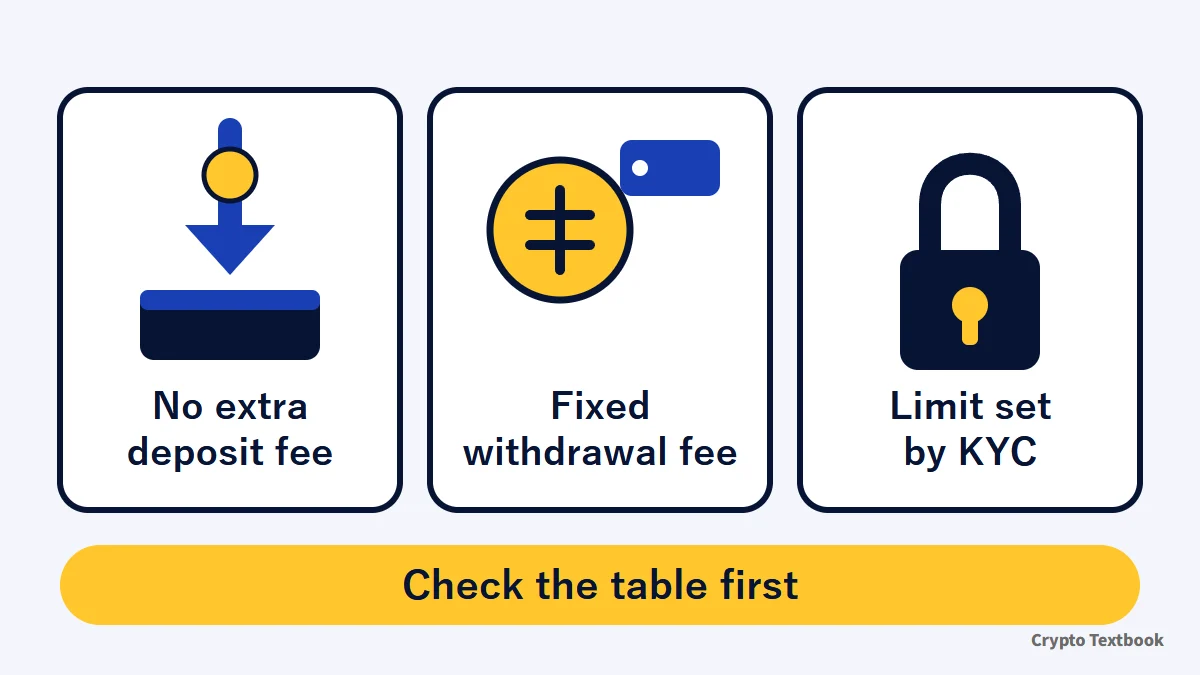
- The core deposit route is on-chain, and Bitunix charges no extra deposit fee (official)
- An amount below the minimum is not credited (0.1 USDT or more for USDT on TRC-20)
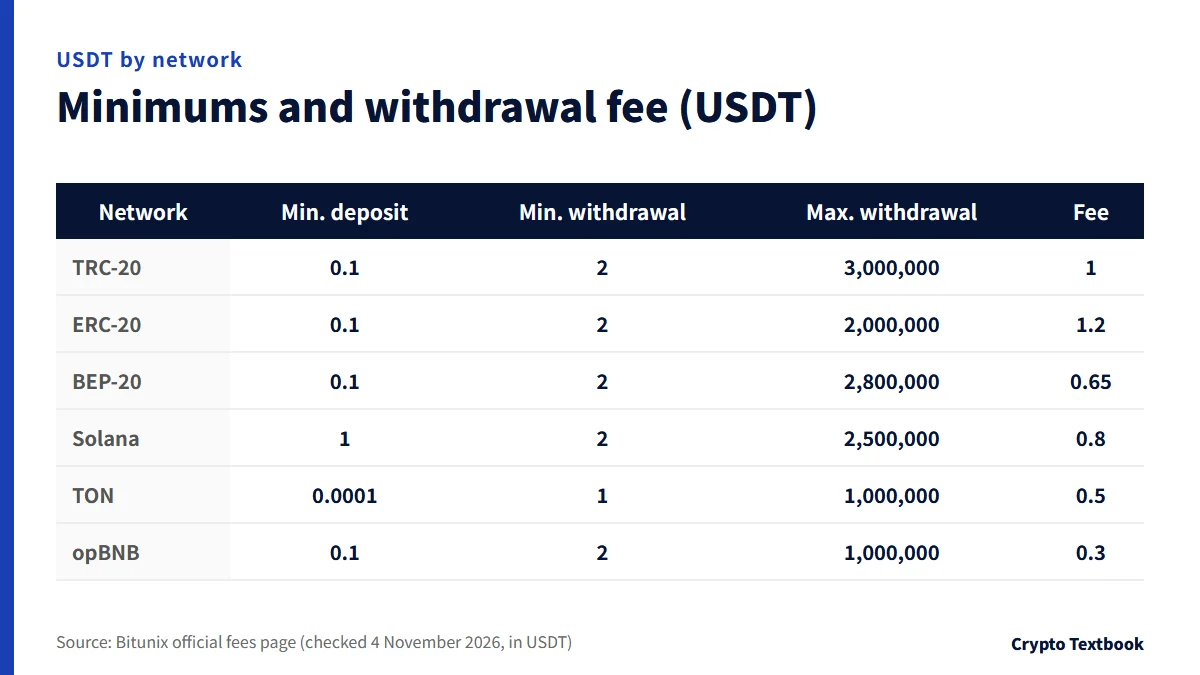
- The withdrawal fee is fixed per network (USDT: 1 on TRC-20, 1.2 on ERC-20, 0.65 on BEP-20)
- The 24-hour withdrawal limit is 500,000 USDT at KYC 1 and 5,000,000 USDT at KYC 2
- If funds do not show, check the TxID, network, address and MEMO in that order
| Item | Details | Source |
|---|---|---|
| Deposit arrival | After network confirmation, usually 3 to 30 minutes | Deposit help |
| Deposit fee | None added by Bitunix; the sender's network fee is separate | Deposit help |
| Withdrawal arrival | On-chain usually 3 to 20 minutes; internal transfer is instant | Withdrawal help |
| Withdrawal fee | Fixed per network (the screen is final) | Fees page |
| 24-hour withdrawal limit | 500,000 USDT at KYC 1; 5,000,000 USDT at KYC 2 | KYC help |
Crypto exchange services in Japan require registration with the Financial Services Agency. Bitunix is not on the registered-provider list (27 providers as of 30 September 2026).
It covers only what the official pages confirm. Futures and leveraged trading can lose more than you deposit, so decide the amount from money you can afford to lose.
Bitunix deposit methods: on-chain, card and P2P compared
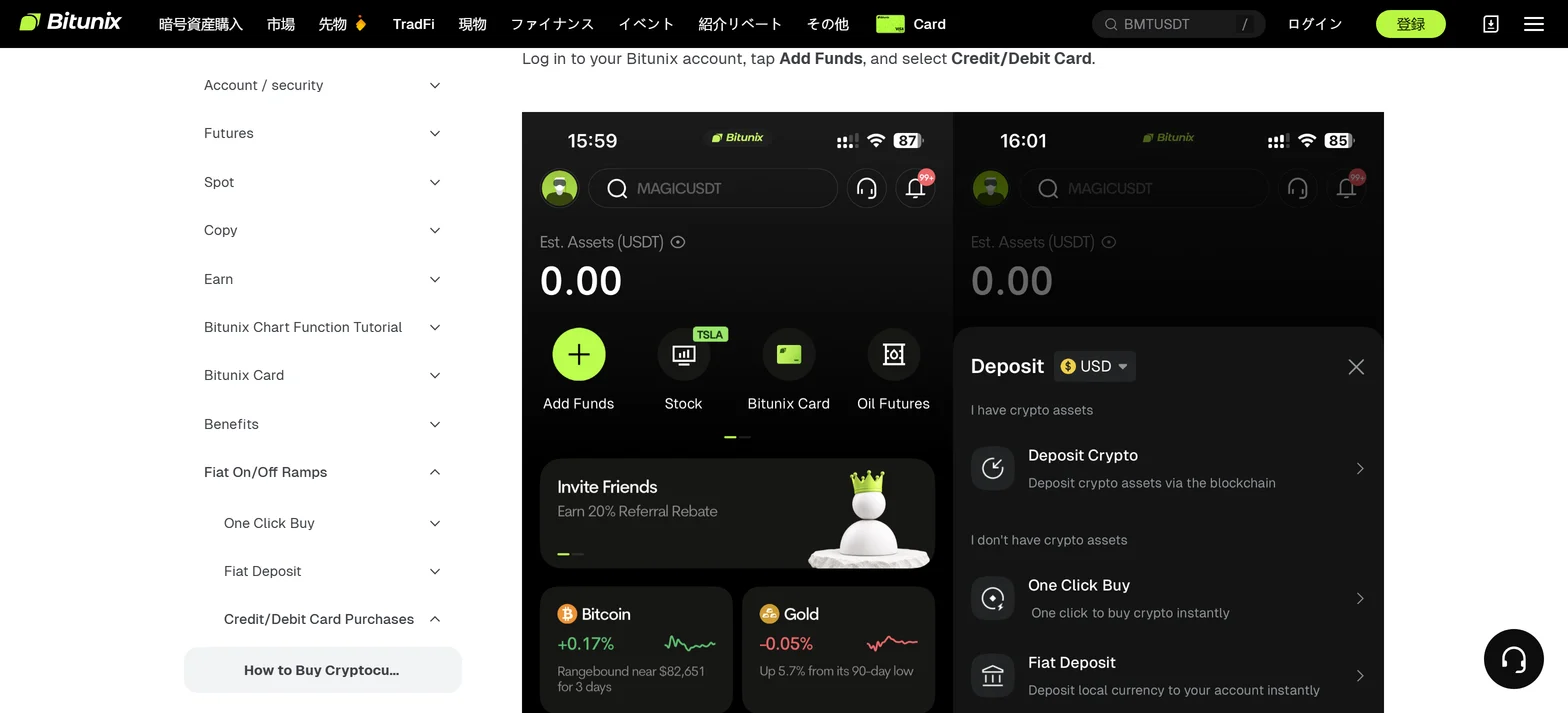
In the app, Add Funds shows Deposit Crypto for people who already hold crypto. People who do not see One Click Buy and Fiat Deposit.
| Route | What it is | Conditions and cost | Arrival |
|---|---|---|---|
| On-chain deposit | Send crypto from another exchange or wallet | No extra deposit fee; the sender's network fee is separate | Usually 3 to 30 minutes |
| Card purchase | Buy crypto with a Visa or Mastercard card | KYC required; 15 to 3,000 USD per order and 3,000 USD per day | Official FAQ says instant |
| Third-party payment | Buy through an outside payment provider | KYC 1 needed; provider fee plus network fee | About 2 to 10 minutes |
| P2P trading | Buy from other users with local payment methods | KYC required; no fee for buyer or seller | Released within 15 minutes of payment |
| Fiat deposit (SEPA) | Bank transfer in euros to buy crypto | Euro only; the bank account name must match KYC | Not stated by the official help |
※ Card limits and order counts are official guides and vary by region and card issuer.
The official pages checked here do not say that you can deposit yen directly by bank transfer. P2P help lists JPY as an example currency to choose (updated 22 July 2026).
The currencies and payment methods you can use are whatever the app purchase screen shows. They also change with your country, region and KYC status.
What to check before buying by card
- Use a card in your own name, and match the name to your Bitunix KYC
- Some banks treat crypto purchases as cash advances and add fees
- Debit cards are said to succeed more often than credit cards
- Japan is not on the restricted-country list (updated 18 May 2026); the list changes, so check the latest
Points to note on P2P trading
- Crypto bought on P2P cannot be withdrawn, transferred or sold for 24 hours (T+1)
- Pressing I have paid before you pay can lead to a temporary freeze for suspected malicious behaviour
- Cancelling 3 or more orders in a day suspends P2P for 24 hours
- Bitunix describes escrow protection, but also warns that trades are between individuals and carry no Bitunix guarantee
On-chain deposit steps and how to choose the network
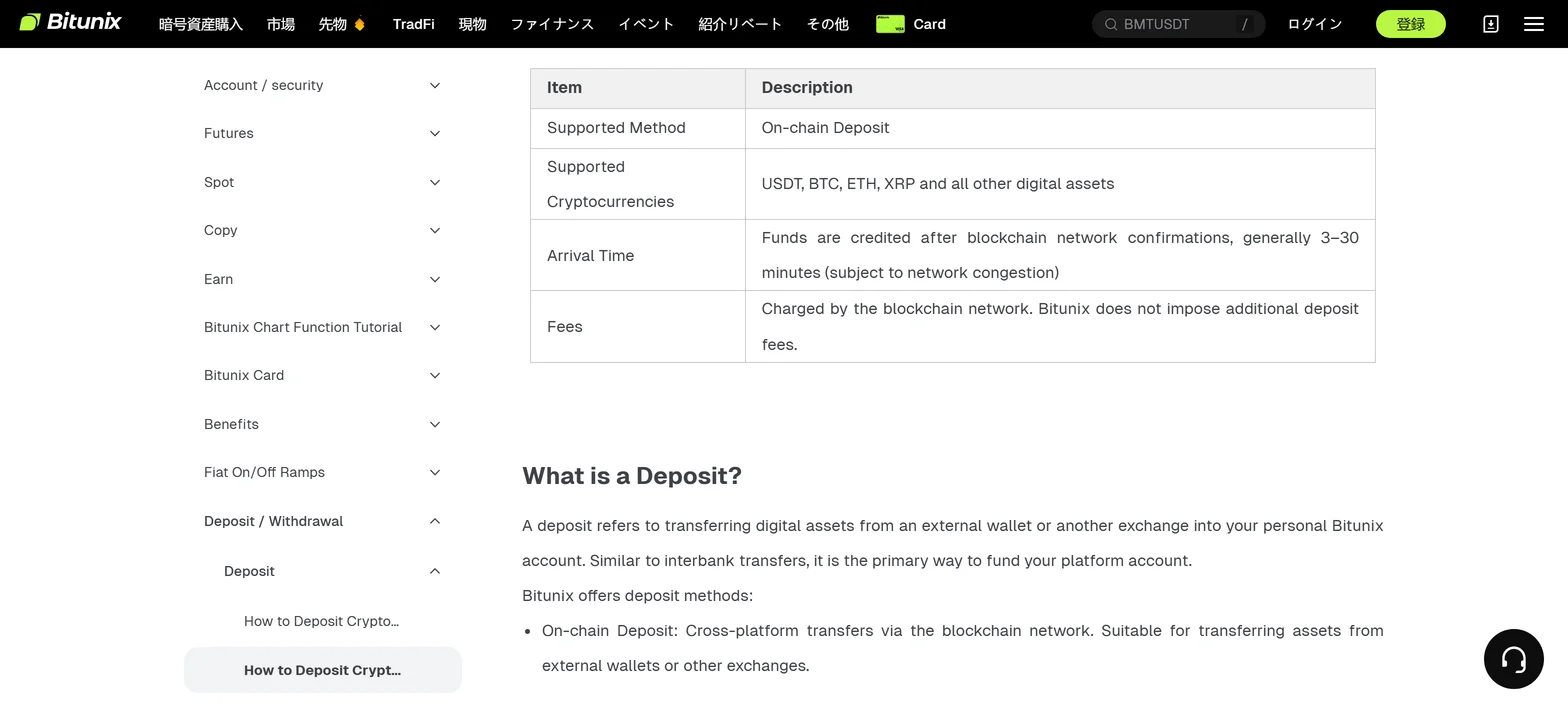
The official overview (updated 8 October 2026) lists USDT, BTC, ETH, XRP and others. Funds are credited after network confirmation, usually in 3 to 30 minutes.
- 01Open the deposit page
On the web, click the wallet icon at the top right and choose Deposit.
- 02Pick the coin and network
For USDT, choose a deposit network such as TRC-20.
- 03Copy the address
Copy the deposit address shown, or save the QR code.
- 04Withdraw from the sender
On the other exchange or wallet, choose the same coin and network, paste the address and send.
- 05Wait for the credit
Once the network confirms, the balance appears in your asset overview.
Rules for choosing the network
- Make the sender's withdrawal network and the Bitunix deposit network the same (for example both TRC-20)
- For XRP, EOS, ATOM and similar coins, enter the MEMO or Tag as well as the address
- Deposit addresses can be updated, so check the screen every time before sending
- Never send to a coin's contract address; use the deposit address
- Deposits inside Bitunix are credited instantly with no wait
USDT on ERC-20 and USDT on BEP-20 travel on different chains. Sending ERC-20 USDT to a BEP-20 address is not credited, and Bitunix warns that this mistake can lose the funds.
Minimum deposits and USDT fees by network
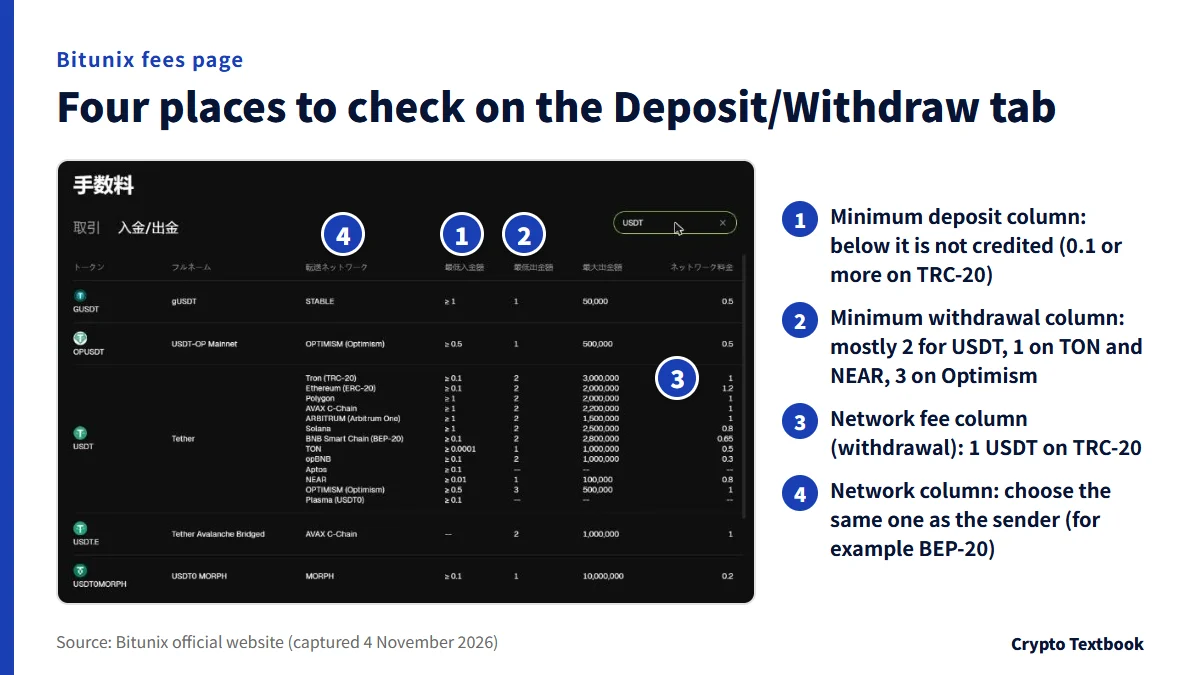
The Deposit/Withdraw tab of the fees page lists, per coin, the minimum deposit, minimum withdrawal, maximum withdrawal and network fee. On the deposit side you look at the minimum deposit.
A deposit below the minimum is not credited automatically, and Bitunix warns that it may not be recoverable.
| Network | Min. deposit | Min. withdrawal | Withdrawal fee |
|---|---|---|---|
| Tron (TRC-20) | 0.1 | 2 | 1 |
| Ethereum (ERC-20) | 0.1 | 2 | 1.2 |
| Polygon | 1 | 2 | 1 |
| AVAX C-Chain | 1 | 2 | 1 |
| Arbitrum One | 1 | 2 | 1 |
| Solana | 1 | 2 | 0.8 |
| BNB Smart Chain (BEP-20) | 0.1 | 2 | 0.65 |
| TON | 0.0001 | 1 | 0.5 |
| opBNB | 0.1 | 2 | 0.3 |
| NEAR | 0.01 | 1 | 0.8 |
| Optimism | 0.5 | 3 | 1 |
| Aptos | 0.1 | -- | -- |
| Plasma (USDT0) | 0.1 | -- | -- |
※ Aptos and Plasma (USDT0) show -- in the withdrawal columns, so no values are listed. All 13 networks are shown.
| Network | Min. deposit | Min. withdrawal | Withdrawal fee |
|---|---|---|---|
| Bitcoin (BTC) | 0.00005 | 0.00005 | 0.000021 |
| BNB Smart Chain (BEP-20) | 0.00001 | 0.00001 | 0.0000085 |
The help list of withdrawal fees (updated 13 August 2026) shows 2 USDT on ERC-20 and 0.5 USDT on BEP-20, which differs from the fees page. This article uses the fees page, as our fees article does. The withdrawal screen takes priority for the actual amount.
Withdrawal steps and fees: the share changes with the amount
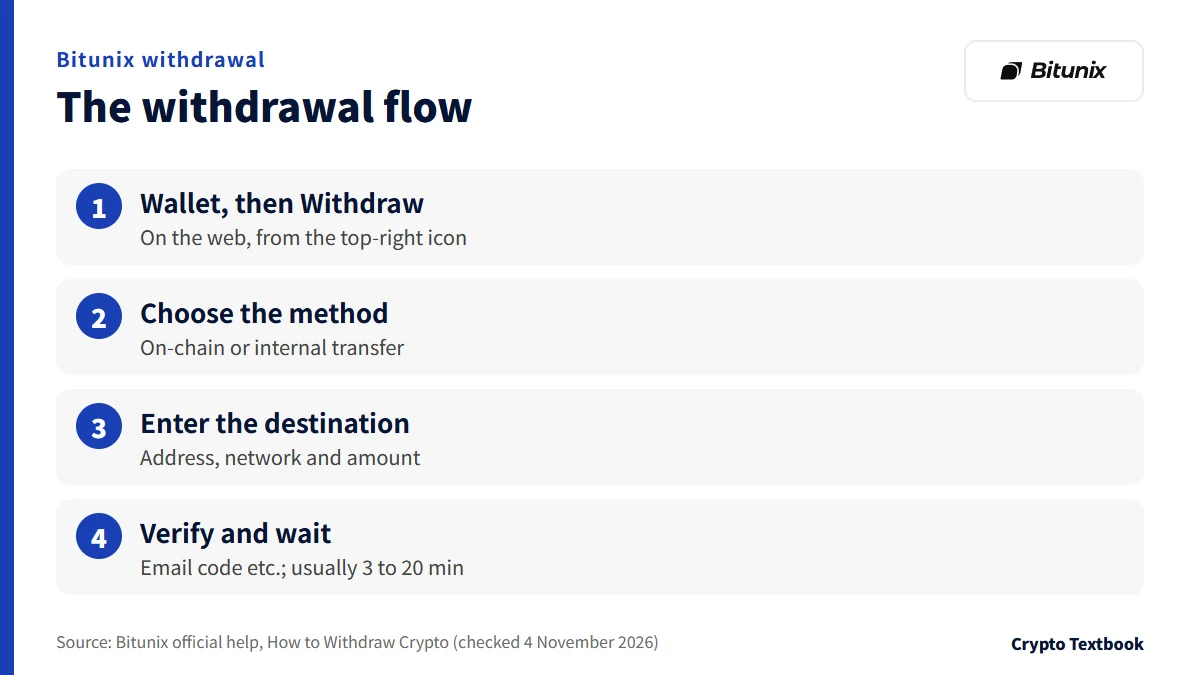
- 01Open the withdrawal page
On the web, click the wallet icon at the top right, then Withdraw on the assets screen.
- 02Choose the method and destination
Select On-Chain Withdrawal, then enter the coin, network, address and amount.
- 03Check and verify
Recheck the coin, network, address and amount, click Withdraw, and verify with an email code or Google Authenticator.
- 04Wait for confirmation
It arrives after network confirmation, usually in 3 to 20 minutes and longer when congested.
To another Bitunix account you can use an internal transfer. The destination is an email address, phone number or UID. It arrives instantly but cannot be reversed.
What share of the amount the withdrawal fee takes
The withdrawal fee is a fixed amount, so the share is larger for small amounts. This site calculated the shares from the official fees.
| Network (fee) | 10 USDT | 100 USDT | 1,000 USDT |
|---|---|---|---|
| Tron (TRC-20) (1 USDT) | 10% | 1% | 0.1% |
| Ethereum (ERC-20) (1.2 USDT) | 12% | 1.2% | 0.12% |
| BNB Smart Chain (BEP-20) (0.65 USDT) | 6.5% | 0.65% | 0.065% |
| TON (0.5 USDT) | 5% | 0.5% | 0.05% |
| opBNB (0.3 USDT) | 3% | 0.3% | 0.03% |
※ The official pages do not say whether the fee is taken from the amount or added on top. Check the arrival amount shown on the withdrawal screen.
What to check before withdrawing
- Check the destination address character by character; copy and paste causes fewer mistakes
- Never leave the MEMO or Tag blank for coins that need one
- For a new destination or a large amount, send a small test first (Bitunix recommends this)
- If the withdrawable amount is below your wallet balance, check whether open orders lock part of it
- Funds just deposited cannot be withdrawn until the network confirmations finish
- For a coin being delisted, withdraw within the announced grace period
If the address format is valid, the withdrawal shows Completed even when it goes to someone else's wallet. On-chain transfers cannot be reversed and Bitunix cannot retrieve the funds.
Withdrawal limits and KYC: unverified, KYC 1 and KYC 2
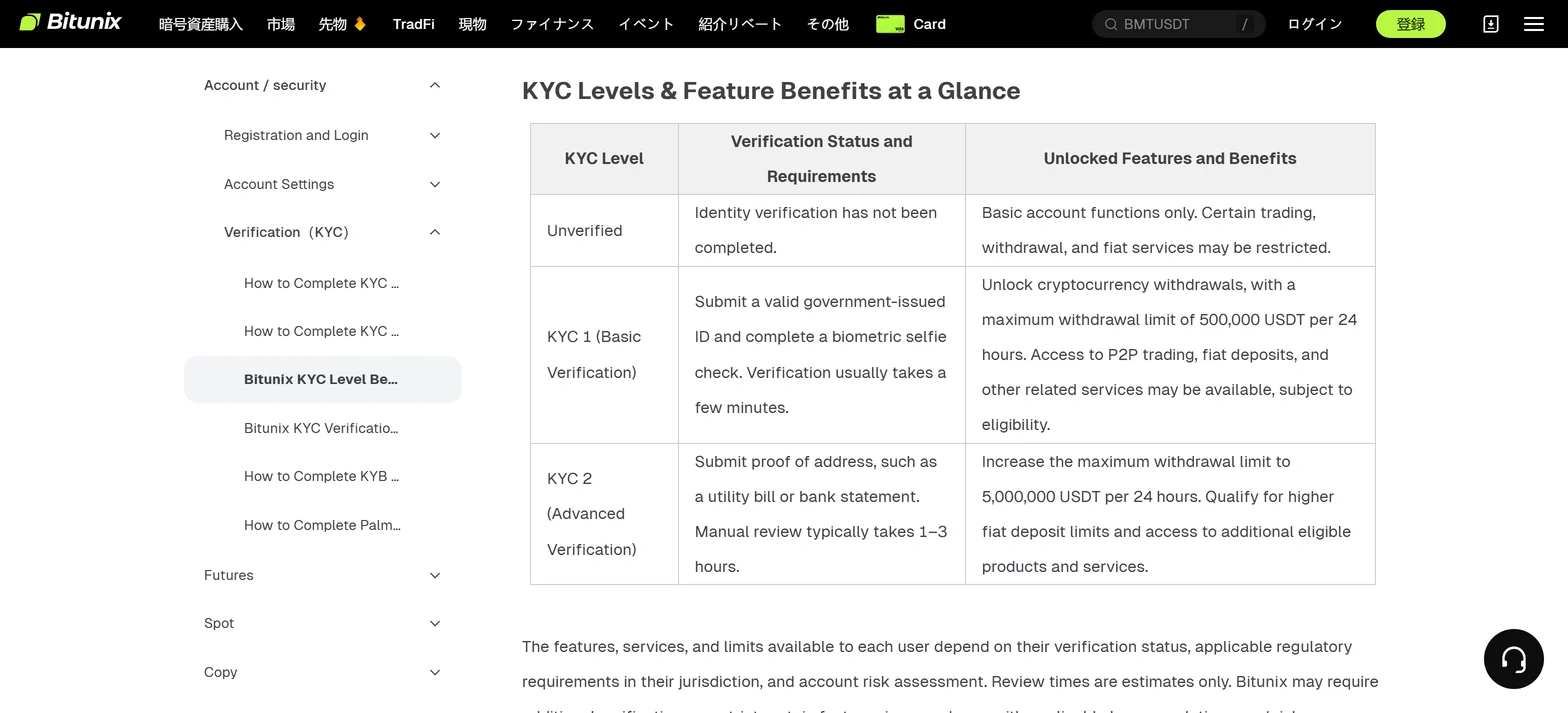
| Level | Verification | 24-hour withdrawal limit | What it unlocks |
|---|---|---|---|
| Unverified | Identity verification not completed | May be restricted | Basic functions only; trading, withdrawals and some fiat services can be restricted |
| KYC 1 (basic) | Government ID and a biometric selfie; usually a few minutes | 500,000 USDT | Unlocks crypto withdrawals; P2P and fiat deposits where eligible |
| KYC 2 (advanced) | Proof of address such as a utility bill or bank statement; manual review usually 1 to 3 hours | 5,000,000 USDT | Higher fiat deposit limits and more eligible products |
※ Review times are estimates. Bitunix says it may ask for more checks depending on local rules and risk assessment.
Another official help article, the withdrawal FAQ (updated 13 August 2026), gives a different basis. At the basic level, with one security method enabled, the daily limit is the equivalent of 10,000 USD. This tiering is by the number of security methods, a separate basis from KYC1 (basic verification) in the KYC help.
At the advanced level, with several verifications plus KYC, the limit is raised. The numbers differ from the KYC help, so check your own limit on the account page.
If your limit is still low after KYC
- You have few security methods enabled (email, phone, Google Authenticator)
- Local regulation sets a statutory daily withdrawal cap
- Risk assessment can adjust limits dynamically
The official pages checked here do not say whether KYC is needed for an on-chain deposit itself. Card purchases and P2P both require KYC.
What to check when a deposit is not credited or a withdrawal does not arrive
| Cause | What happens | What to check or do |
|---|---|---|
| Awaiting confirmation | The block is not confirmed yet; syncing can lag even after confirmation | Check the confirmations with the TxID and wait; ask the sender too |
| Wrong coin sent | A coin other than the designated one is not credited | Compare the coin name and contract, then contact support |
| Wrong network or address | For example ERC-20 sent to a BEP-20 address; it does not arrive | Submit a request; a handling fee may apply |
| Wrong MEMO or Tag | A wrong MEMO means it is not credited to the right account | Submit the coin, amount, correct MEMO, wrong MEMO and TxID |
| Sent to a contract address | It differs from the deposit address and cannot be recovered | Not recoverable; use the deposit address |
| Below the minimum | Below the minimum is not credited automatically and may not be refunded | Check the minimum on the screen before sending |
| Risk review or restricted region | If the source is judged high-risk, the deposit is held temporarily | Complete KYC to prove ownership; a refund to the original source is then arranged |
The order to check
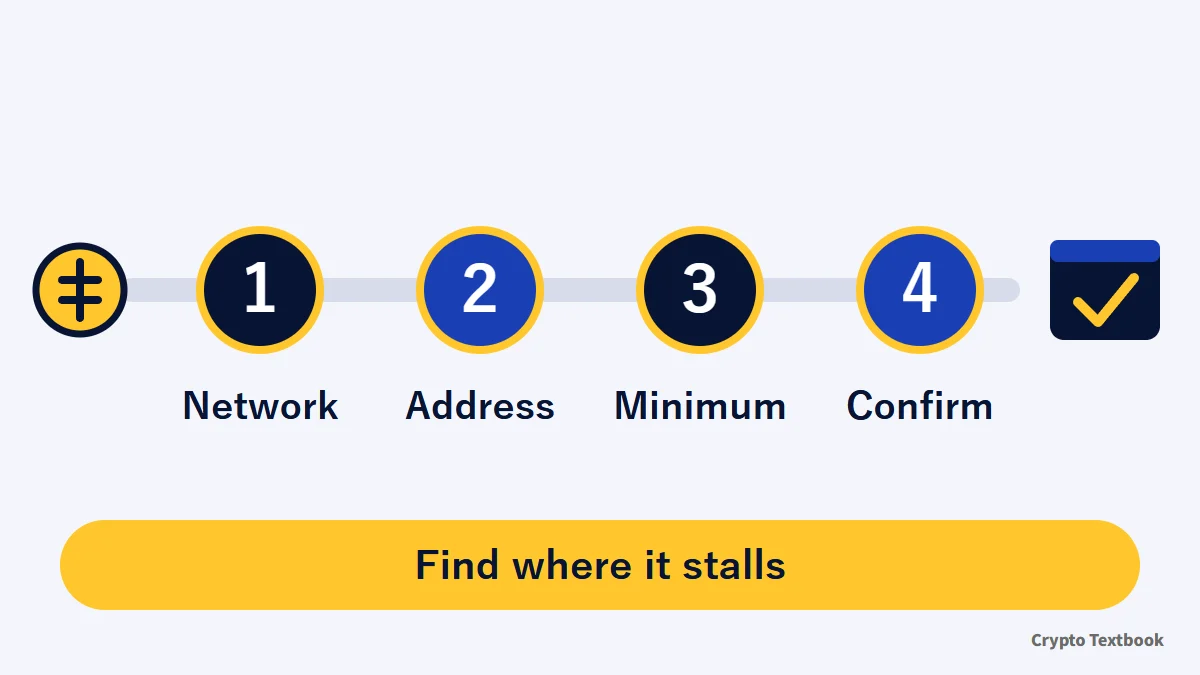
- 01Note the TxID
Find the TxID in the sender's history and check the number of confirmations in an explorer such as TronScan or Etherscan.
- 02Match four items
See whether the coin, network, address and MEMO match the Bitunix deposit screen.
- 03Check the minimum
See whether the amount you sent is at or above the minimum deposit for that network on the fees page.
- 04If it still does not show
Contact in-app customer support with your UID, coin, amount, TxID and deposit address.
Manual recovery of a wrong transfer can carry a handling fee, and recovering an unsupported token may add a service fee. Do not trust third parties who message you offering to recover assets; make requests only through official support tickets.
The three stages when a withdrawal does not arrive
- 1. If the history shows Completed, Bitunix has sent it to the blockchain; the receiver may not have credited it yet
- 2. The receiver waits for the confirmations the network requires; follow progress in an explorer
- 3. If it is confirmed but still missing, contact the receiving exchange or wallet
What to do after depositing, and our verdict
If you move small amounts often, choose a network whose withdrawal fee is a small share of the amount: 0.3 USDT on opBNB, 0.5 on TON and 0.65 on BEP-20 in the table. If you move large amounts, complete KYC 2 first to set the 24-hour limit at 5,000,000 USDT.
If you bought on P2P, plan around the 24-hour wait. If you send from a Japanese exchange, also confirm in advance whether the destination can be registered.
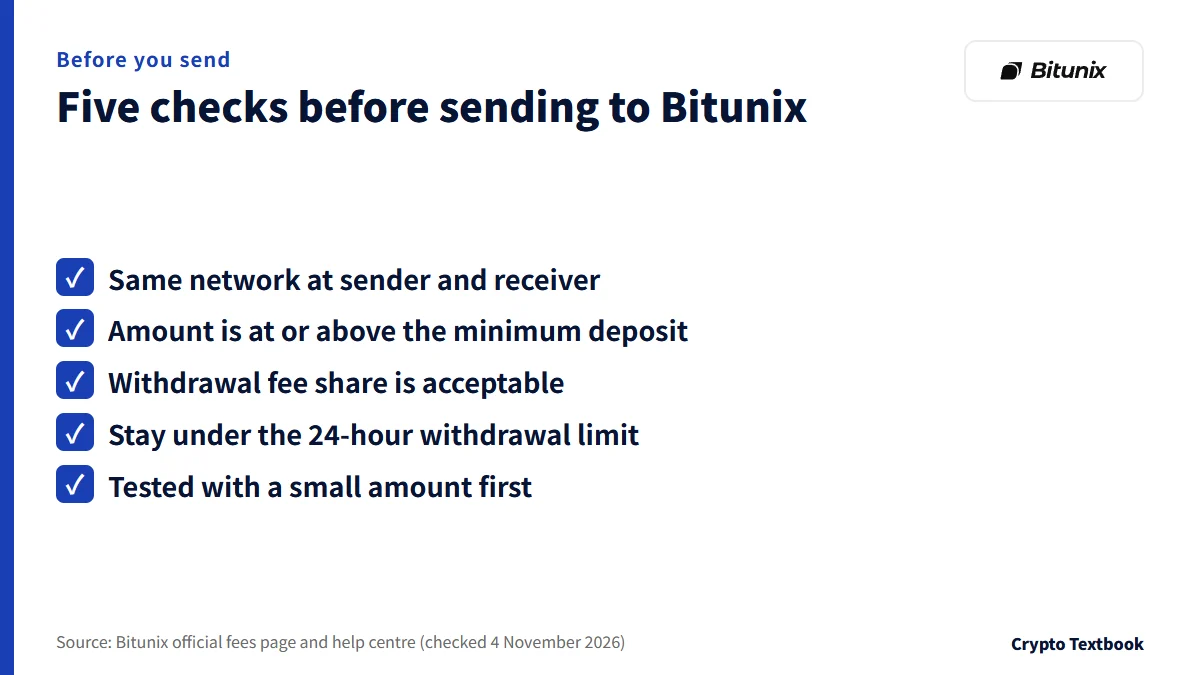
- Is the network the same at the sender and the receiver?
- Is the amount at or above the minimum deposit?
- Is the withdrawal fee share acceptable?
- Will you stay under the 24-hour withdrawal limit?
- Did you test with a small amount first?
Rewards to check around a deposit
- The new-user rewards are up to 10,000 USDT (as shown in the official rewards centre), with tasks such as sign-up, deposit and first trade
- The CFD account cushion bonus gives 50 to 1,000 USDT for a first deposit of 100 to 4,000 USDT, announced through 31 December 2026
- A bonus offsets losses and cannot be withdrawn; check the conditions on each page
Bitunix new-user rewards: conditions →
Bitunix CFD account cushion bonus →
Is Bitunix safe? Checked against official information →
Frequently asked questions
Q. How much is the Bitunix deposit fee?
A. The official help says Bitunix charges no extra deposit fee on on-chain deposits. The sender pays the network fee on its side. An amount below the minimum is not credited (checked 4 November 2026).
Q. What is the Bitunix minimum deposit?
A. It depends on the coin and network. For USDT it is 0.1 on TRC-20, ERC-20 and BEP-20, 1 on Polygon and 0.0001 on TON. For BTC on the Bitcoin network it is 0.00005 (fees page, checked 4 November 2026).
Q. How long until a Bitunix deposit is credited?
A. It is credited after network confirmation, and the official overview says usually 3 to 30 minutes. Congestion can extend it. The TxID in an explorer shows how far confirmation has gone.
Q. Can I deposit Japanese yen on Bitunix?
A. The official pages checked here do not say you can deposit yen directly by bank transfer (checked November 2026). P2P help lists JPY as an example currency. Check which currencies the app purchase screen offers.
Q. How much is the Bitunix withdrawal fee?
A. It is a fixed amount per network. For USDT it is 1 on TRC-20, 1.2 on ERC-20 and 0.65 USDT on BEP-20 (fees page, checked 4 November 2026). The help list shows different values, so the withdrawal screen is final.
Q. What is the Bitunix withdrawal limit?
A. The KYC help (updated 16 October 2026) sets the 24-hour limit at 500,000 USDT for KYC 1 and 5,000,000 USDT for KYC 2. The withdrawal FAQ (updated 13 August 2026) puts a basic level with one security method at the equivalent of 10,000 USD per day. Check your own limit on the account page.
Q. What if my Bitunix withdrawal does not arrive?
A. If the history shows Completed, Bitunix has already sent it. Check confirmations in an explorer, and if it is confirmed but missing, contact the receiving side. If the address was wrong, Bitunix cannot retrieve the funds.
Q. What are the Bitunix card purchase limits?
A. A single order is 15 to 3,000 USD equivalent and the daily limit is 3,000 USD equivalent. You can have up to 5 orders in payable or processing status. KYC is required and the card must be in your own name (official help, updated 23 October 2026).
Sources
- Bitunix | Fees page, Deposit/Withdraw tab (official, checked 4 November 2026) →
- Bitunix Help | How to Deposit Crypto on Bitunix (Web, updated 8 October 2026, checked 4 November 2026) →
- Bitunix Help | Crypto Deposit FAQ (updated 16 September 2026, checked 4 November 2026) →
- Bitunix Help | What to Do If Your Deposit Is Not Credited (updated 17 September 2026, checked 4 November 2026) →
- Bitunix Help | How to Withdraw Crypto (Web, updated 21 August 2026, checked 4 November 2026) →
- Bitunix Help | Crypto Withdrawal FAQ (updated 13 August 2026, checked 4 November 2026) →
- Bitunix Help | Withdrawal Fees & Limits (updated 13 August 2026, checked 4 November 2026) →
- Bitunix Help | KYC Level Benefits (updated 16 October 2026, checked 4 November 2026) →
- Bitunix Help | Credit/Debit Card Purchases, FAQ and restricted countries (updated 23 October and 18 May 2026, checked 4 November 2026) →
- Bitunix Help | P2P Trading and FAQ (updated 22 July and 18 May 2026, checked 4 November 2026) →
- Financial Services Agency of Japan | List of registered crypto-asset exchange service providers (as of 30 September 2026, PDF) →
- Bitunix exchange profile (this site, official fee page checked 16 October 2026) →
FX Textbook is an independent information site, not an exchange or a provider of personal investment advice. Crypto-asset trading involves risk: price volatility, liquidation of leveraged positions, transfer mistakes and the operational risk of exchanges and service providers can cause you to lose some or all of your invested capital. No result is guaranteed.
NEXT STEP
See the Bitunix exchange profile in one place
Trading types, fees, leverage and deposits and withdrawals as confirmed from official sources.
Exchanges related to this column
Fees, leverage, funding options and current offers are on each exchange page.