
You sent crypto to BYDFi and the balance has not moved, or you cannot tell what a withdrawal will cost. The official fee page and help centre answer both.
Crypto deposits are free, and withdrawals carry a fixed fee per network. For USDT on TRC20 the minimum is 2 and the fee is 1 USDT. At VIP0 the 24-hour limit is 50,000 USDT unverified and 500,000 USDT at Advanced KYC.
This guide organises deposit and withdrawal steps, costs and troubleshooting from the official information as of 8 November 2026. The fee for the network you use is one row in the tables.
Conclusion: deposits are free, withdrawals are a fixed fee per network
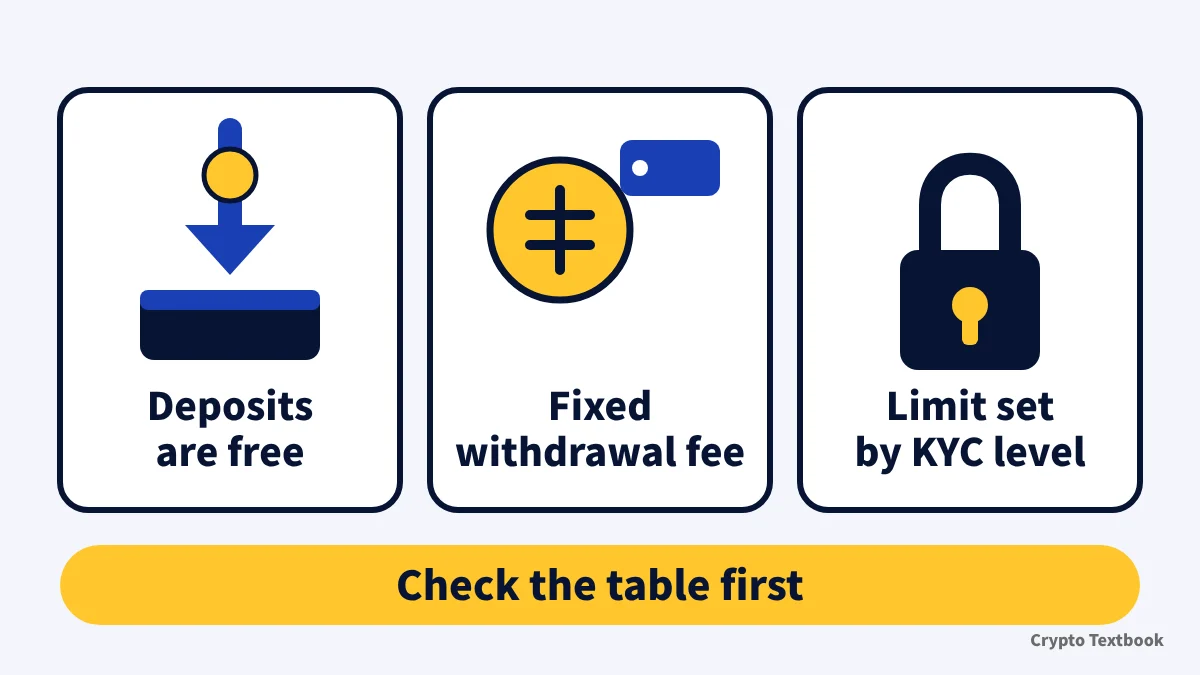
- Crypto deposits are free (official help, updated 30 September 2026)
- The withdrawal fee is fixed per network: for USDT, 1 on TRC20, 0.5 on ERC20 and 0.01 on BEP20
- The minimum withdrawal for USDT is 2 on TRC20 and BEP20 and 3 on ERC20
- The 24-hour withdrawal limit at VIP0 is 50,000 USDT unverified, 200,000 at Primary KYC and 500,000 at Advanced KYC
- If funds do not show, check the TxID, network, Memo and confirmations in that order
| Item | Details | Source |
|---|---|---|
| Deposit fee | Free | Fee page and help |
| Deposit arrival | After the required confirmations; two stages, pre-credit and completed | Deposit help |
| Withdrawal processing | A TxID is usually generated 1 to 60 minutes after the request | Withdrawal help |
| Withdrawal fee | Fixed per network; it can change, and the withdrawal screen is the latest | Fee page and help |
| Transfer within BYDFi | Free and instant | Transfer help |
| Buying with fiat | Handled by third-party payment providers; KYC at BYDFi and at the provider | Buy Crypto FAQ |
It covers only what the official pages confirm. What you can withdraw depends on your verification status. Crypto prices move, and futures and leveraged trading can produce large losses, so decide the amount from money you can afford to lose.
How to deposit crypto to BYDFi and choose the network
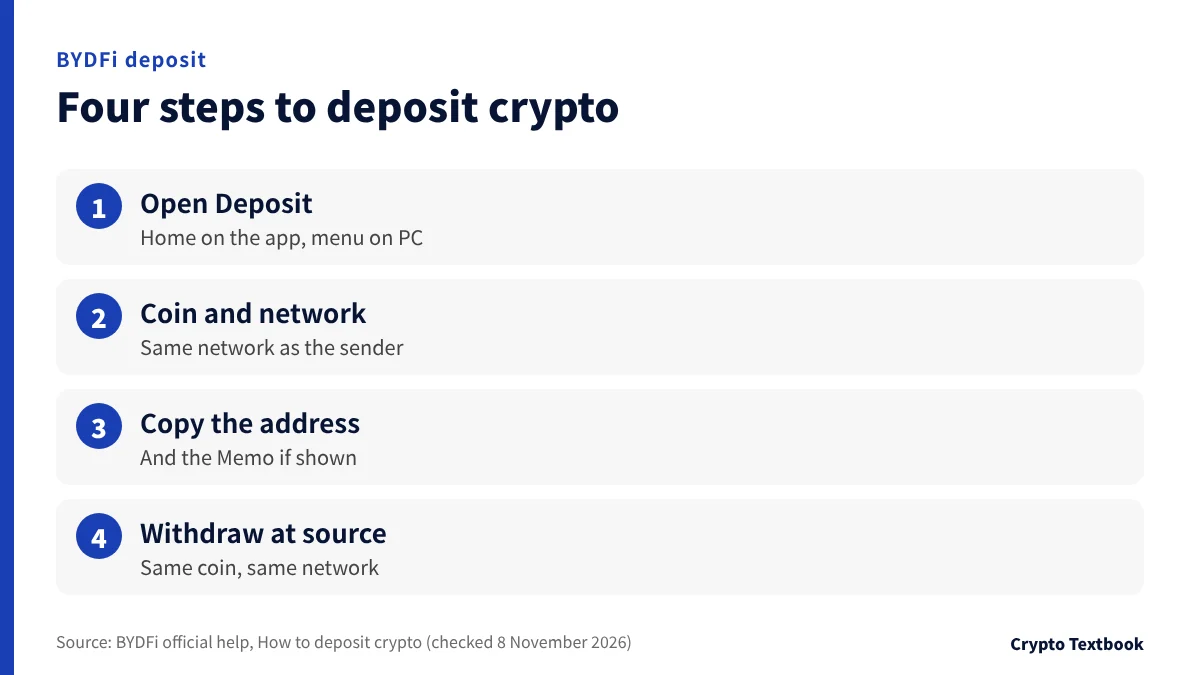
Open the deposit page from Deposit on the app home screen, or from Deposit in the PC main menu (official help, updated 2 to 3 November 2026).
- 01Open the deposit page
Choose Deposit on the app home screen or in the PC main menu.
- 02Choose the coin
Pick BTC, ETH, USDT or another coin from the list or the search box.
- 03Choose the network
Select the same network as the withdrawal network at the sending side.
- 04Copy the address
Read the warnings and requirements on screen, then copy the address or scan the QR code.
- 05Withdraw from the source
Send the same coin on the same network to the pasted address. If a Memo is shown for the coin, enter it too.
A network that does not match the sender can cost you the funds. For ETH deposits, BYDFi supports only four networks: ETH, ARB, BSC and BASE (troubleshooting guide, updated 6 November 2026).
| Item | What to confirm | If it goes wrong |
|---|---|---|
| Network | The sender's withdrawal network and the deposit network chosen at BYDFi are the same | Funds can be permanently lost |
| Contract address | The token's contract matches the value BYDFi supports | The deposit may not be credited or may be lost |
| Minimum deposit | Set for some coins; check on the deposit screen | An amount below it is not credited and cannot be refunded |
| Memo / Tag | For XRP, XLM, ATOM, BAND and others, enter the Memo shown on screen | The deposit may not be credited |
| Receiving account | Spot or futures; it follows your default setting, and assets that cannot go to futures land in spot | Funds arrive in an unintended account |
Crediting has two stages. At the pre-credit count you can trade and make internal transfers, and at the full-credit count you can also withdraw. The required count differs by coin.
Travel Rule and precautions when sending from a Japanese exchange overseas
How to choose a deposit network (beginner guide)
Check the bonus page for the amount and conditions.
When a deposit is not credited: the order to check and the return request
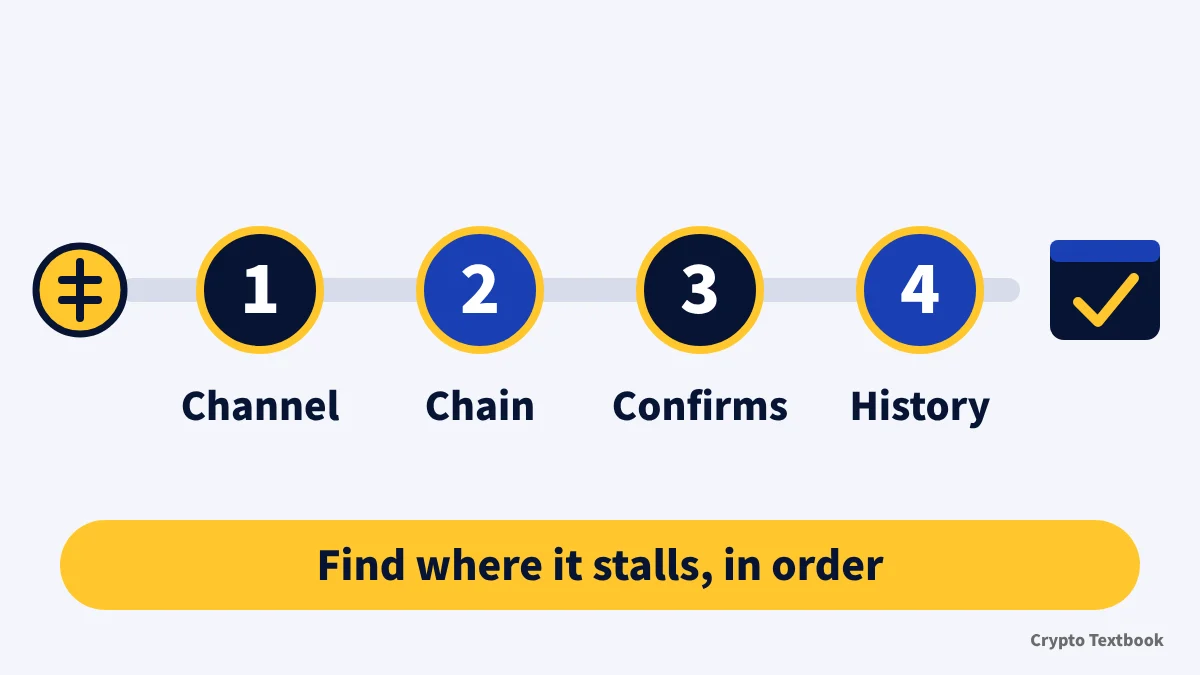
The troubleshooting guide (updated 6 November 2026) sets out four checks, in this order.
- 01Check the deposit channel
While a channel is suspended or under maintenance, crediting is delayed. Wait for it to reopen.
- 02Check the blockchain status
If it shows deposit failed, ask the sending platform why. If it shows success, move on.
- 03Check the confirmations
Go to Wallets, Funding History, Deposit, click the TxID and read the confirmation count in the explorer. Wait if it is short.
- 04Check the deposit history
If no record appears in your account, you can submit an uncredited deposit return request.
| Cause | What happens | Official guidance |
|---|---|---|
| Unsupported token | The contract does not match and the deposit is not credited | Submit a return request |
| Wrong network | For example ETH sent on BEP20 is not credited | Submit a return request as soon as possible |
| Unsupported network | For ETH, networks other than ETH, ARB, BSC and BASE are unsupported | Not credited |
| Missing or wrong Memo/Tag | Not credited for XRP, XLM and similar coins | Submit a return request (review usually takes 1 to 2 business days). A separate support route also exists (end of this chapter) |
| Unsupported smart-contract transfer | Not credited automatically; handled manually | Submit a return request |
| Delisted token | Not credited | Contact customer service; a return request is also possible |
| Several transfers in one TxID | The full amount may not be credited | Submit a return request |
| Problem | Fee | Handling | Processing time |
|---|---|---|---|
| Deposit to a hot wallet | 20 USDT | Return to the original address only | 21 days |
| Missing or wrong Memo | 20 USDT | Return to the original address only | 21 days |
| Unsupported token or network | 20 USDT | Refund | 21 days |
| Prohibited token or network | Varies with on-chain gas fees | Return to the original address only | 7 days |
| Supported token and network, not yet credited | Free | Credit the deposit | 3 days |
※ The fee is frozen automatically from your spot balance, and the request cannot be completed without enough balance.
The form asks for the coin, network, amount, your BYDFi deposit address and the TxID. Paste the hash itself, not a URL. Review usually takes 1 to 2 days.
After review, pressing the refund confirmation means you accept that the address is correct. BYDFi is not responsible if the funds cannot be received at that address.
For a forgotten Memo there is also a separate support route (Memo how-to page, updated 23 September 2026): you send support your UID (KYC needed), the correct Memo, the TxID and a video of the whole withdrawal history.
Screen recordings are not accepted for the video, and recovery can take 10 days or more. The return-request fee table (updated 4 November 2026) also has a row for a missing or wrong Memo: 20 USDT and 21 days. Neither page says when to use which, so ask support before acting.
Buying with fiat or a card: conditions (Banxa, Transak and others)
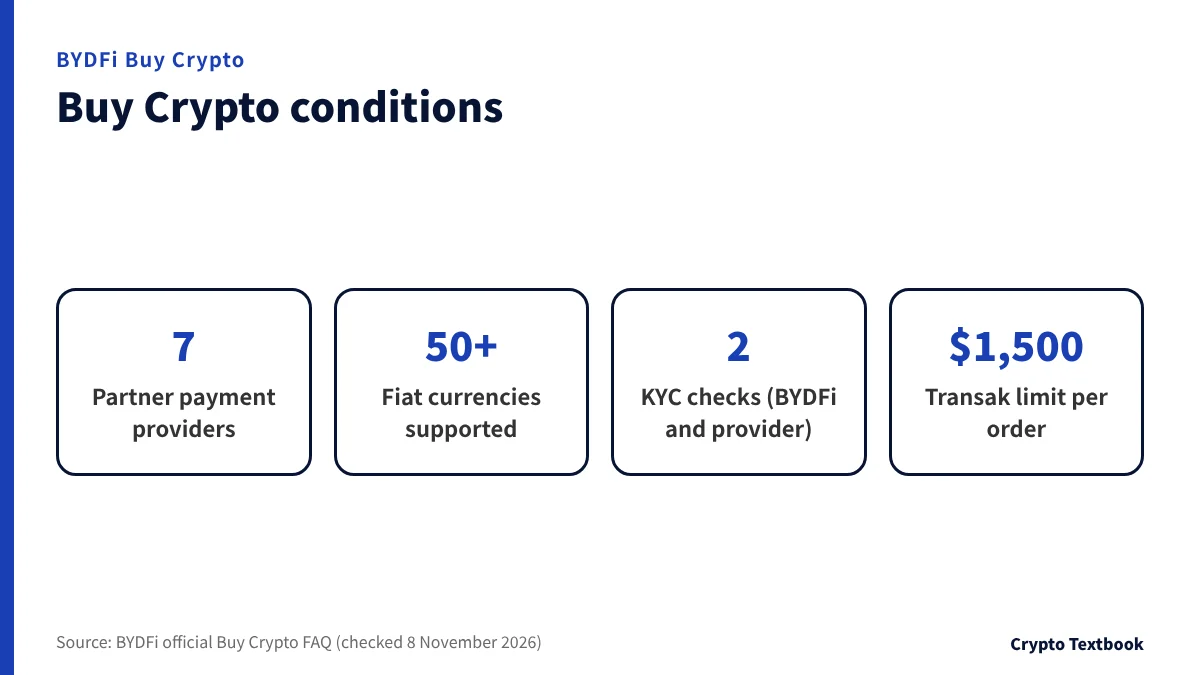
For people without crypto, BYDFi offers Buy Crypto. The payment is handled not by BYDFi but by partner payment providers.
| Item | Details |
|---|---|
| Processed by | Banxa, Transak, Mercuryo, Coinify, Pix, Paybis and Legend Trading |
| Fiat currencies | More than 50, including USD, EUR, AUD, CAD and CHF |
| Verification | KYC is required at both BYDFi and the provider |
| Payment methods | E-payments, Visa and Mastercard cards, and cash in some regions |
| Fees | Shown on each provider's payment page; BYDFi says it does not profit from them |
| Arrival | The overview says within 2 to 3 hours, another item says usually 2 to 10 minutes, and up to 24 hours for new users |
| Transak limits | 1,500 USD per order, 5,000 per day, 28,000 per month, 100,000 per year |
| History | My Assets, then Fiat History |
※ The FAQ gives different arrival times in different places, so both are shown.
The FAQ has no currency list, so whether you can buy with Japanese yen could not be confirmed. Choose a currency and enter an amount, and the screen shows the minimum and maximum you can buy.
The same FAQ gives two benchmarks for a purchase that does not arrive. The overview says to follow the provider's email if funds have not appeared after 24 hours. The troubleshooting item says to contact the provider directly if nothing is visible within 2 hours.
The provider contacts below follow the official contact-methods help (updated 23 September 2026). The FAQ itself lists Banxa live chat on its payment page, and the official support portals for Paybis and Legend Trading, which differs. To ask BYDFi for help, you need the TXID obtained from the provider.
- Banxa: send a ticket through its official support portal
- Transak, Mercuryo, Coinify and Paybis: the live chat at the bottom right of each site
- Legend Trading: the Contact button on its official site
- Pix: contact BYDFi support if the deposit does not arrive
How to withdraw (app and PC) and transfer within BYDFi
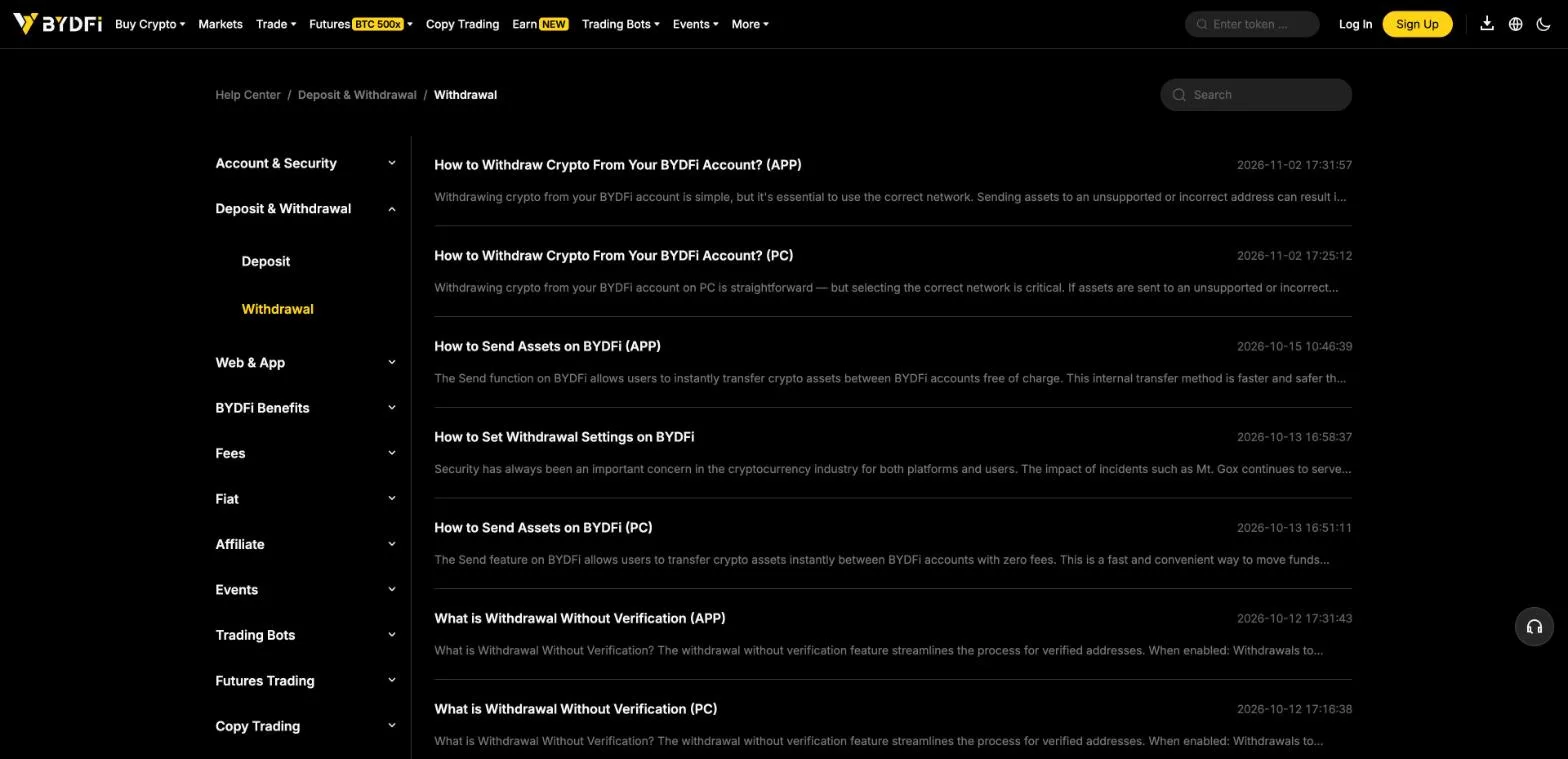
The Withdrawal category of the official help lists the step-by-step articles (updated 2 November 2026). The menu names differ slightly between the app and the PC.
- 01Open the withdrawal screen
On the app: Wallet at the bottom of the home screen, then Withdraw. On PC: Wallets in the top menu, then Withdraw.
- 02Choose the coin
Select or search for the crypto you want to withdraw.
- 03Choose the method and network
On the app, choose On-chain Withdrawal. Select the same network as the receiving side.
- 04Enter the destination
Enter the receiving address. For coins that need a Memo, copy it from the receiving side.
- 05Enter the amount and check
After you enter the amount, the network fee and the amount received are shown. Check them and press Confirm.
- 06Verify and submit
Enter the email verification code and the Google authentication code, then submit the withdrawal.
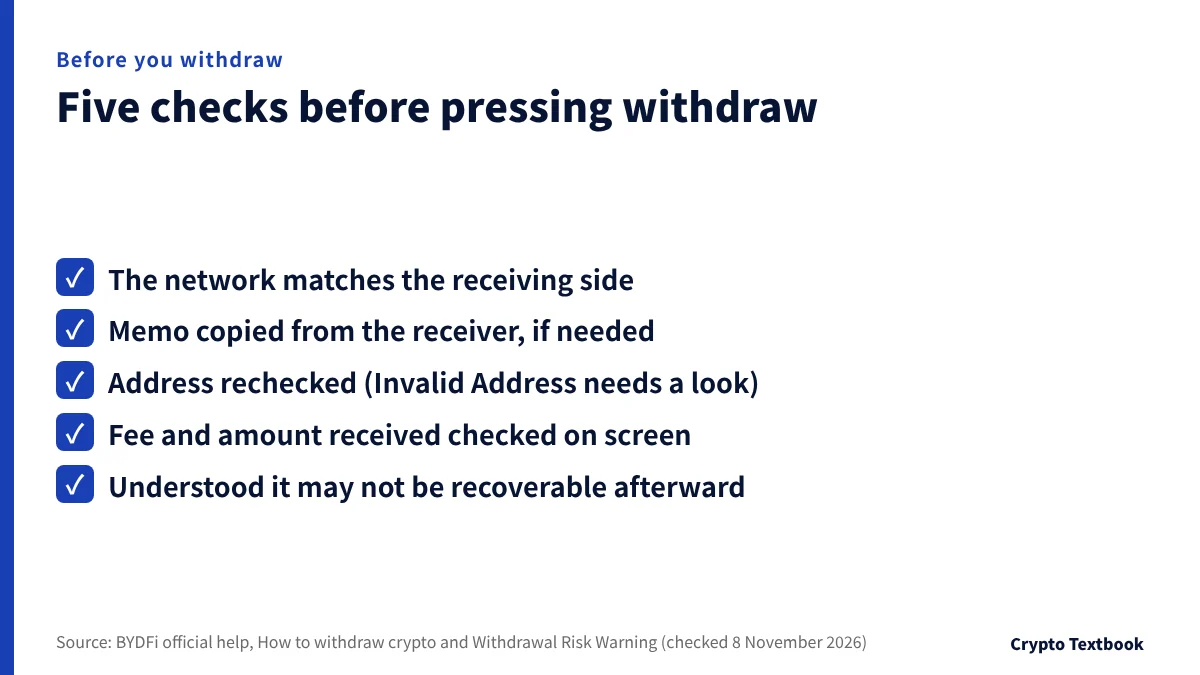
BYDFi may not be able to help recover assets once they are withdrawn, and the same applies to a wrong address (withdrawal risk warning, updated 4 September 2026).
Some networks need a native token at the receiving address. If it is not activated, a notice appears during the withdrawal process (updated 18 September 2026).
| Method | Destination | Fee | Arrival |
|---|---|---|---|
| On-chain withdrawal | An external wallet or another exchange | Fixed per network | TxID 1 to 60 minutes after the request; arrives after blockchain confirmation |
| Transfer within BYDFi | Another BYDFi account (by email, mobile number or UID) | Free | Instant |
※ Transfer limits differ by coin. Recheck the recipient's UID or email before confirming.
Withdrawal fees and minimums: a table by network with examples
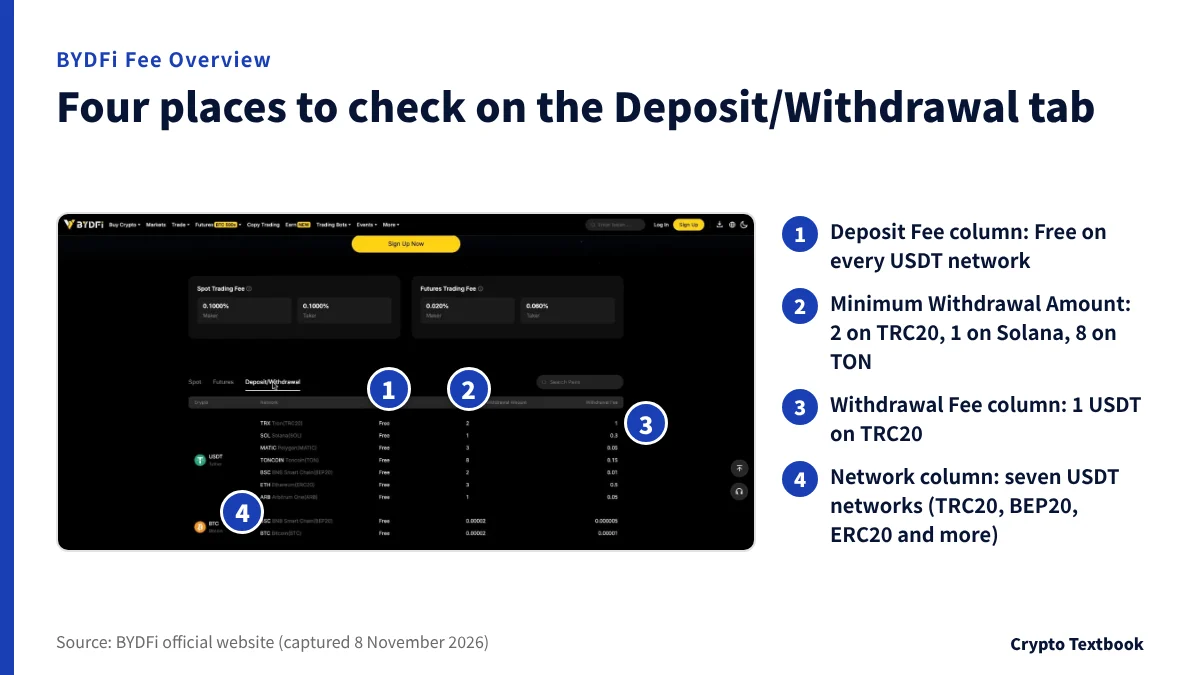
Fees appear on the Deposit/Withdrawal tab of the Fee Overview page. USDT is offered on seven networks, and the deposit fee is free on all of them.
| Network | Deposit fee | Minimum withdrawal | Withdrawal fee |
|---|---|---|---|
| Tron (TRC20) | Free | 2 | 1 |
| Solana (SOL) | Free | 1 | 0.3 |
| Polygon (MATIC) | Free | 3 | 0.05 |
| Toncoin (TON) | Free | 8 | 0.15 |
| BNB Smart Chain (BEP20) | Free | 2 | 0.01 |
| Ethereum (ERC20) | Free | 3 | 0.5 |
| Arbitrum One | Free | 1 | 0.05 |
| Coin and network | Minimum withdrawal | Withdrawal fee |
|---|---|---|
| BTC, BEP20 | 0.00002 | 0.000005 |
| BTC, Bitcoin | 0.00002 | 0.00001 |
| ETH, Solana | 0.001 | 0.0004 |
| ETH, ERC20 | 0.0001 | 0.00004 |
| ETH, BASE | 0.0001 | 0.000005 |
| ETH, Arbitrum One | 0.0001 | 0.0000035 |
| ETH, BEP20 | 0.0005 | 0.0002 |
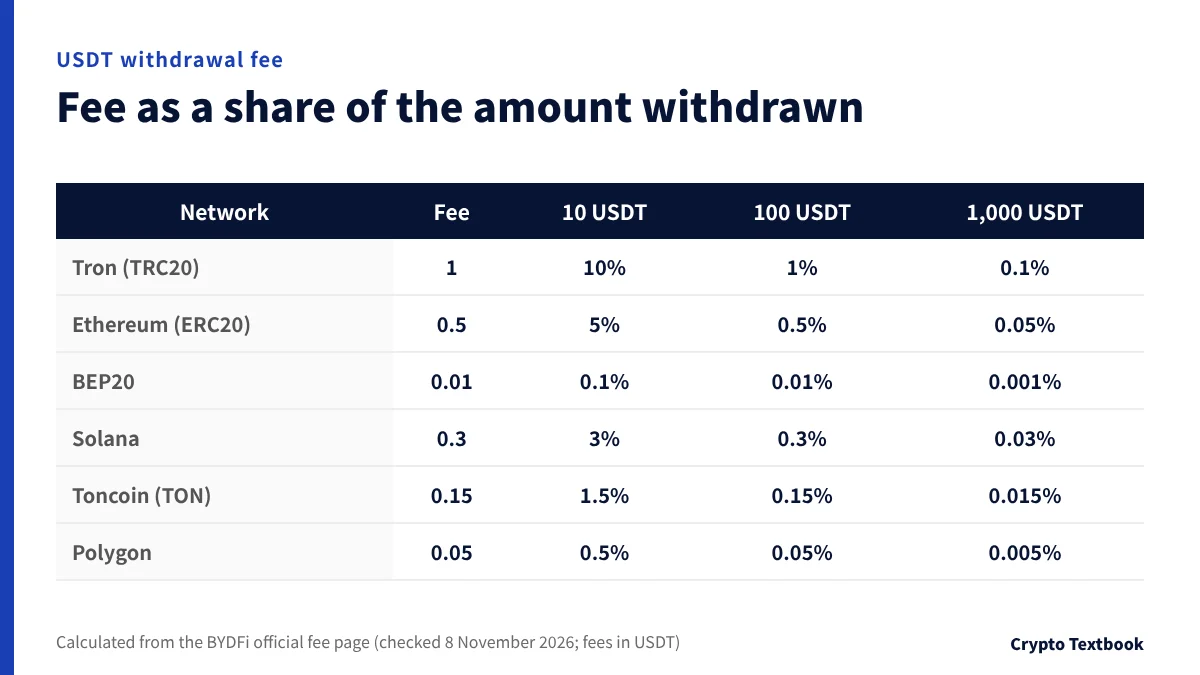
Because the fee is fixed, a smaller withdrawal feels it more. On a 10 USDT withdrawal, 1 USDT on TRC20 is 10%, 0.5 on ERC20 is 5% and 0.01 on BEP20 is 0.1%.
On 1,000 USDT the same three are 0.1%, 0.05% and 0.001%. Check first that the receiving side supports the network.
Withdrawal fees can change with network congestion, and the withdrawal page shows the current amount (fees help, updated 30 September 2026). The tables above show the Fee Overview page on 8 November 2026.
Trading fees and futures funding rates are laid out by VIP level in our BYDFi fees article
The 24-hour withdrawal limit and withdrawal settings (whitelist)
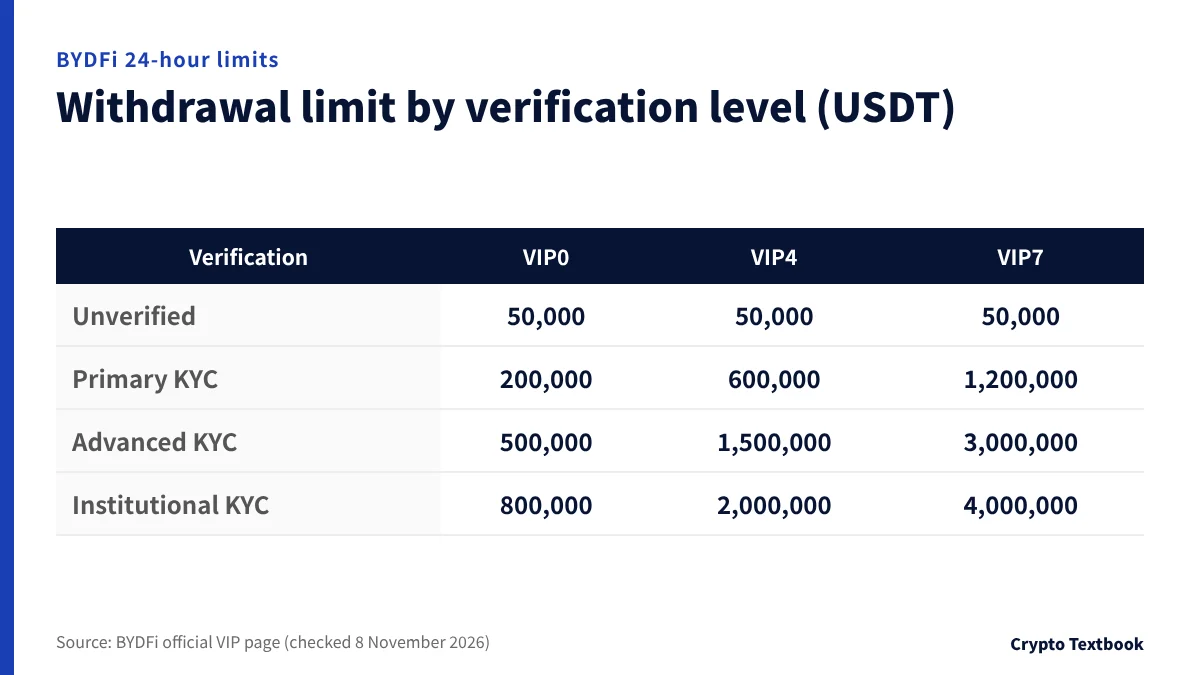
The 24-hour withdrawal limit depends on your verification level and VIP level. VIP is set by 30-day spot and futures volume and holdings, and refreshes daily at 11:00 Japan time.
| Verification level | VIP0 | VIP4 | VIP7 |
|---|---|---|---|
| Unverified | 50,000 | 50,000 | 50,000 |
| Primary KYC | 200,000 | 600,000 | 1,200,000 |
| Advanced KYC | 500,000 | 1,500,000 | 3,000,000 |
| Institutional KYC | 800,000 | 2,000,000 | 4,000,000 |
The withdrawal help also gives 50,000 USDT a day if verification is incomplete and 500,000 USDT if it is complete. This matches the VIP0 unverified and Advanced KYC values.
Even though the table lists an unverified tier, whether you can trade or withdraw unverified depends on your region (official KYC FAQ). The official pages did not confirm that residents of Japan can use it unverified.
How exchange KYC and withdrawal limits work (beginner guide)
| Setting | What it does |
|---|---|
| Quick Withdrawal | A single withdrawal below the amount you set (for example under 500 USDT) is processed without two-factor authentication |
| Withdrawal Whitelist | When on, you can withdraw only to registered addresses |
| Whitelist Security Restriction | Withdrawals to a newly added address wait 24 hours; after you turn it off, you wait 24 hours before withdrawing again |
| Withdrawal without verification | Withdrawals to verified addresses need no extra verification; unverified addresses still do |
※ On the web: the user icon at the top right, Security, Advanced Security, Fund Security Settings. On the app: More on the home screen, Security Center, Asset Security Settings.
When a BYDFi withdrawal does not arrive: checks by status
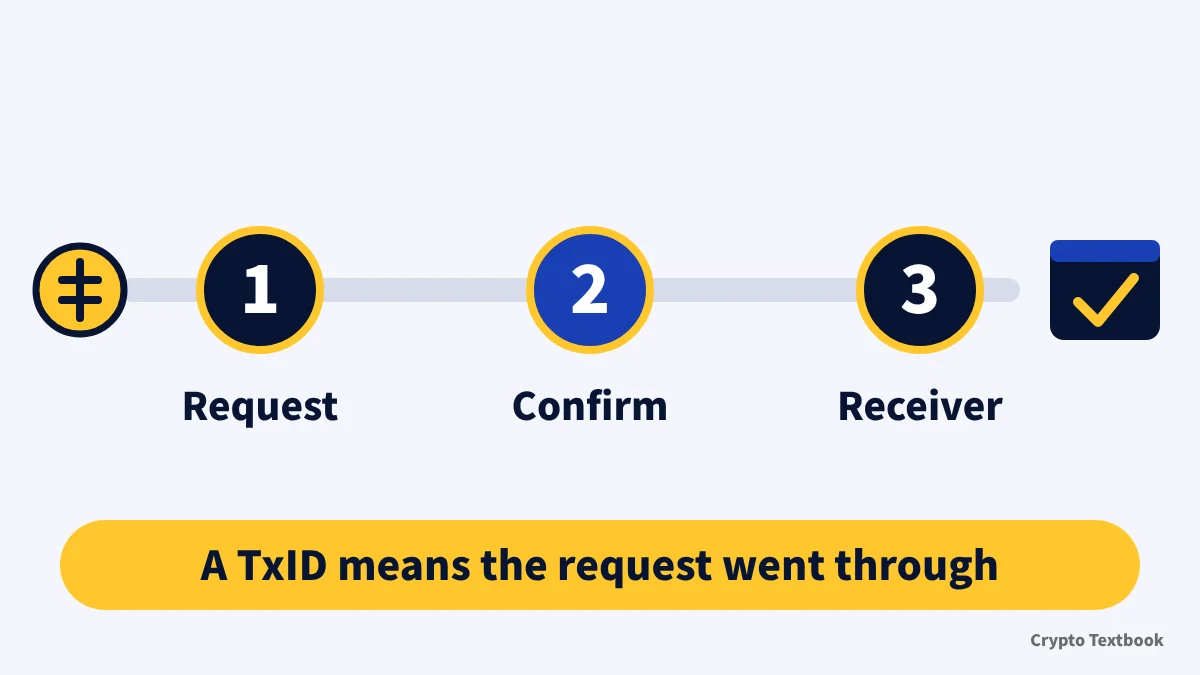
An on-chain withdrawal goes through three stages: request, blockchain confirmation and crediting by the receiver. A TxID usually appears 1 to 60 minutes after the request (official help, updated 5 November 2026).
Once a TxID appears, BYDFi has finished its part. Use the chain icon next to the TxID to see the confirmation status in the explorer.
| Status | Meaning | Official guidance |
|---|---|---|
| Pending Verification | Waiting for secondary verification | Open the link sent by email or SMS and confirm the last 4 characters of the destination address. It expires in 15 minutes; if it does, cancel and submit again |
| Under Review | Under manual review | Processing usually takes 5 to 60 minutes |
| Pending Processing | Waiting for system processing | If the channel is suspended, wait for it to reopen. If it is available, the request may not have gone through; contact support |
| Processing | Being processed | Wait for completion. To cancel at this stage, contact support |
| Pending Blockchain Confirmation | Waiting for confirmation | Already sent; wait for blockchain confirmation |
| Pending Block Confirmation | Waiting to be included in a block | Wait for inclusion |
| Cancelled | Request cancelled | You can submit again. If you did not cancel it or the assets are frozen, contact support immediately |
| Withdrawal Successful | Withdrawal completed | Sent from BYDFi. If it has not arrived, take the TxID to the receiving platform |
※ Address confirmation is case-sensitive. Check the last 4 characters of the public address, not of the Memo or Tag.
- 01No TxID within 1 hour
Open Wallets, Funding History, Withdrawal, find the record and contact customer service with a screenshot.
- 02Completed but not received
Copy the TxID and ask the receiving platform.
- 03Returned to BYDFi after completion
In the uncredited deposit return request, choose Withdrawal from BYDFi to another platform was returned. Review takes 1 to 2 business days.
The withdrawal risk warning (updated 4 September 2026) says offers that promise high returns if you withdraw to another site carry a high risk of losing the assets. Impersonation of BYDFi can be checked on the official verification page.
If you move small amounts often and the receiving side supports it, BEP20 is a candidate because its fee is the smallest share (0.01 USDT, minimum 2). If you move large amounts, complete Advanced KYC first to reach the 500,000 USDT limit. When funds do not arrive, whether a TxID has appeared tells you where it stopped.
Frequently asked questions
Q. How much is the BYDFi deposit fee?
A. BYDFi charges no fee on crypto deposits, and the fee page shows Free for every network (checked 8 November 2026). The sending side may charge its own withdrawal fee separately.
Q. How much is the BYDFi withdrawal fee?
A. It is a fixed amount per network. For USDT it is 1 on TRC20, 0.5 on ERC20, 0.01 on BEP20 and 0.3 on Solana (fee page, 8 November 2026). It can change, so confirm on the withdrawal screen.
Q. What is the BYDFi minimum withdrawal?
A. It depends on the coin and network. For USDT it is 2 on TRC20 and BEP20, 3 on ERC20 and Polygon, 1 on Solana and 8 on TON. For BTC it is 0.00002 (fee page, 8 November 2026).
Q. What is the BYDFi withdrawal limit?
A. At VIP0 the 24-hour limit is 50,000 USDT unverified, 200,000 at Primary KYC and 500,000 at Advanced KYC, and it rises with the VIP level. Whether you can use it unverified depends on your region.
Q. Why has my BYDFi deposit not been credited?
A. Common causes are a network mismatch, a missing Memo, too few confirmations or an amount below the minimum. Check the channel, chain status, confirmations and history in that order, and submit a return request if no record appears (official, updated 6 November 2026).
Q. What if my BYDFi withdrawal fails or does not arrive?
A. Look at the status in the withdrawal history. If a TxID is shown, BYDFi has sent it, so check confirmations in an explorer and ask the receiving side. If no TxID appears after 1 hour, contact support with a screenshot.
Q. Can I deposit Japanese yen to BYDFi?
A. The official FAQ has no currency list, so yen support could not be confirmed. Fiat is handled by partner payment providers and requires KYC at both BYDFi and the provider. Choosing a currency shows the minimum and maximum.
Q. Is there a fee for transfers between BYDFi users?
A. No. Transfers between BYDFi accounts are free and instant (updated 15 October 2026). You specify the recipient by email, mobile number or UID, and should recheck the recipient before sending.
Sources
- BYDFi | Fee Overview, Deposit/Withdrawal tab (official, checked 8 November 2026) →
- BYDFi | VIP (requirements, benefits and 24-hour withdrawal limits, checked 8 November 2026) →
- BYDFi Help | Deposit & Withdrawal Fees (updated 30 September 2026, checked 8 November 2026) →
- BYDFi Help | What Is a Crypto Deposit? (updated 17 September 2026, checked 8 November 2026) →
- BYDFi Help | How to deposit crypto, app (updated 3 November 2026) and PC (2 November 2026) →
- BYDFi Help | Troubleshooting Guide for deposits not credited (updated 6 November 2026, checked 8 November 2026) →
- BYDFi Help | How to Fill Out the Uncredited Crypto Deposit Form (updated 4 November 2026, checked 8 November 2026) →
- BYDFi Help | What are Memos/Tags and how to fill them in (updated 7 and 23 September 2026) →
- BYDFi Help | How to withdraw crypto, app and PC (updated 2 November 2026, checked 8 November 2026) →
- BYDFi Help | Withdrawal Not Received (checked 8 November 2026) →
- BYDFi Help | Withdrawal settings and withdrawal without verification (updated 12 and 13 October 2026) →
- BYDFi Help | Sending assets between BYDFi accounts (updated 13 and 15 October 2026) →
- BYDFi Help | Withdrawal risk warning and token activation (updated 4 and 18 September 2026) →
- BYDFi | Official Verification page (checked 8 November 2026) →
- BYDFi Help | Buy Crypto FAQ and provider support contacts (updated 5 November and 23 September 2026) →
FX Textbook is an independent information site, not an exchange or a provider of personal investment advice. Crypto-asset trading involves risk: price volatility, liquidation of leveraged positions, transfer mistakes and the operational risk of exchanges and service providers can cause you to lose some or all of your invested capital. No result is guaranteed.
NEXT STEP
See the BYDFi exchange profile in one place
Trading types, fees, leverage and deposits and withdrawals as confirmed from official sources.
Exchanges related to this column
Fees, leverage, funding options and current offers are on each exchange page.