
Bitunix has a cushion bonus for its CFD account. When a trade loses, whose money is used first, and can the bonus be withdrawn?
Bitunix's help pages (checked 9 November 2026) say losses come out of your own funds first, and the bonus covers only what is left after that. The bonus itself cannot be withdrawn, but profits from trading can. The amounts and deadlines are based on information provided by Bitunix.
Below: how to open a CFD account, the liquidation level, the costs, and the cases where the bonus is taken back.
Short answer: the cushion bonus covers losses after your own funds run out
- It works in the CFD account only, not in futures or spot
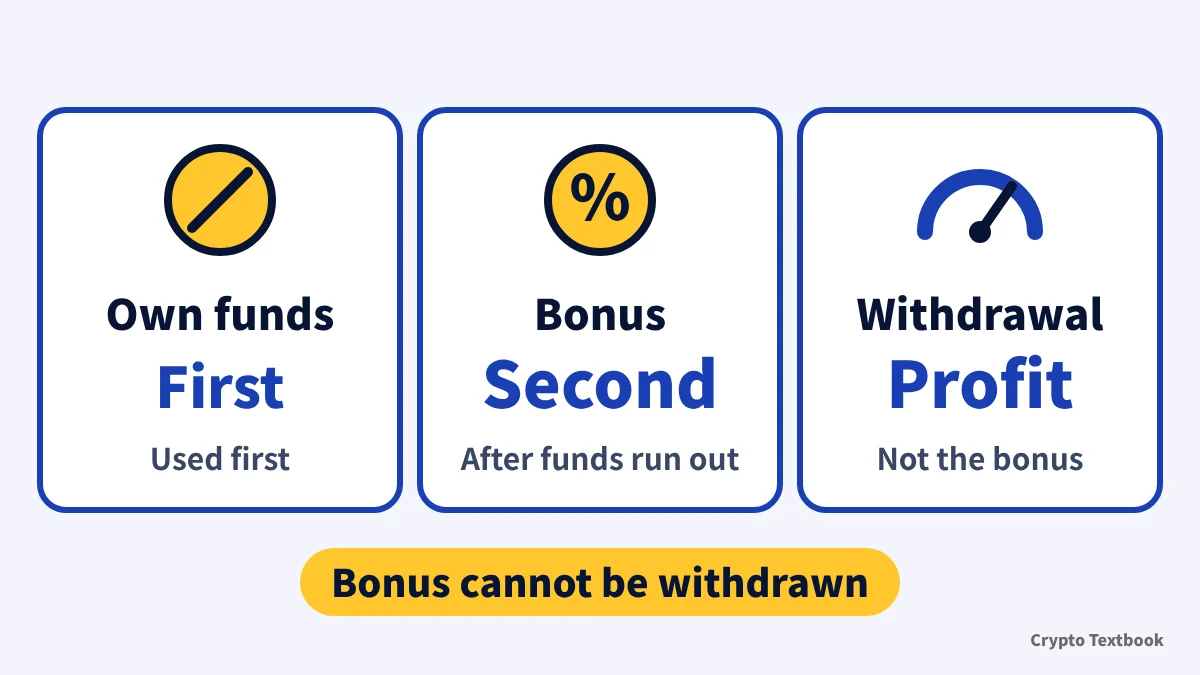
- Your own funds are used first. The bonus covers losses after that, with no fixed ratio
- The bonus cannot be withdrawn or transferred. Profits from trading can be withdrawn
- Moving your own funds out of the CFD account recovers the bonus in use in full
- At expiry the bonus is reclaimed automatically, after positions are closed if any are open
- Amounts and the claim deadline are based on information provided by Bitunix. No announcement page has been found on Bitunix's official site (as of 19 October 2026)
The bonus covers only the eligible part of settled losses and costs. Costs that are not settled yet, such as the spread, are excluded. Losses still happen with the bonus, and profit is not promised.
This article keeps two kinds of source apart. How the bonus works comes from Bitunix's help pages and CFD Service Agreement. Amounts and deadlines are based on information provided by Bitunix.
Bitunix CFD cushion bonus: amounts, deadlines and FAQ (bonus page) →
Opening a CFD account, and checking whether you can use it from Japan
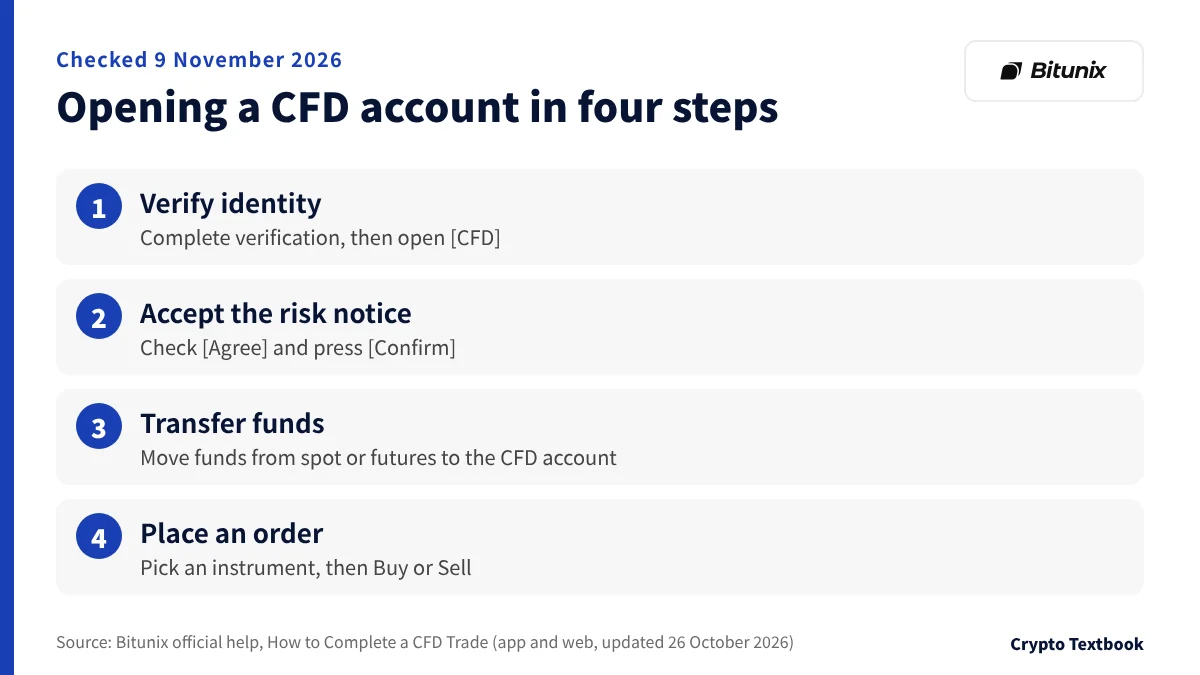
CFD sits inside the futures screen. In the app, tap [Futures] at the bottom and then [CFD] at the top. On the web, click [CFD] in the header (official help, updated 26 October 2026).
The CFD account is separate from the spot account and starts at a balance of 0. You deposit into the spot account first, then transfer funds to the CFD account.
- 01Complete identity verification
If you are not verified, you must verify before trading CFDs. In the app go through [Open] then [Verify Now]. On the web, [Enable Account] then [Verify Now].
- 02Accept the risk disclosure
After verification, tap [CFD] again. A risk disclosure appears. Check [Agree] and press [Confirm].
- 03Transfer funds to the CFD account
Under [Transfer], choose to move funds from the spot or futures account to [CFD Account]. Enter the currency and amount, then confirm.
- 04Pick an instrument and place an order
Choose an instrument such as S&P 500, Gold or Brent crude. Pick [Buy] or [Sell], market or limit, quantity, take-profit and stop-loss, then submit.
Bitunix identity verification (KYC) steps and withdrawal limits (column) →
How to deposit and withdraw on Bitunix (column) →
Access is decided by the IP address you log in from and the country on your KYC. In a restricted region you may be unable to open new positions and can only close existing ones (official help).
The list headed "Countries and regions where CFD is available" on the same help page includes Japan (checked 9 November 2026). Japan is not named in the prohibited regions of CFD Service Agreement 18.1.
India also appears on the same list, yet Agreement 18.1 names India as a prohibited region. The help page does not say whether the list covers every available country. Whether you can use CFD from Japan should be confirmed on your account screen and with Bitunix support.
The Bitunix entity that provides CFD depends on where you live and on regulatory requirements (CFD Service Agreement). Check the entity name in the agreement you accept when you enable the account.
Instruments and settlement currency: leverage is fixed per instrument

The help pages list forex, precious metals, commodities, stock indices, US stocks and ETFs. A few bond instruments are included. Examples are EUR/USD, USD/JPY, gold (XAU/USD), the S&P 500, Apple and Tesla.
Settlement is in USDx. Deposited funds are converted into margin calculation units at a rate Bitunix announces, and exchange-rate losses are yours (Agreement 5.2). The help does not state a USDT conversion ratio.
You cannot change leverage yourself. Agreement 7.2 gives these reference maximums: 1:500 for major forex pairs, 1:200 for minor or exotic pairs and for gold and silver, 1:100 for crude oil, natural gas and stock indices, 1:20 for single stocks, and 1:50 for digital assets (reference values, updated 7 July 2026). The setting for each instrument takes priority.
The maximum is set by the tier-1 margin requirement. A 1% requirement means 100x. As positions grow, the tier rises and so does the required margin rate (rules page).
Initial margin is entry price x contract size x lots / leverage. The agreement's example is 1 lot (100,000 units) of EUR/USD at 100x and an entry of 1.1000: (1.1000 x 100,000 x 1) / 100 = 1,100 USD.
Stock Perps are futures that track US stock prices, use USDT as margin and trade 24 hours a day (official help, updated 19 August 2026). Settlement currency and trading hours differ from CFD.
CFD versus futures: trading hours, holding costs and leverage
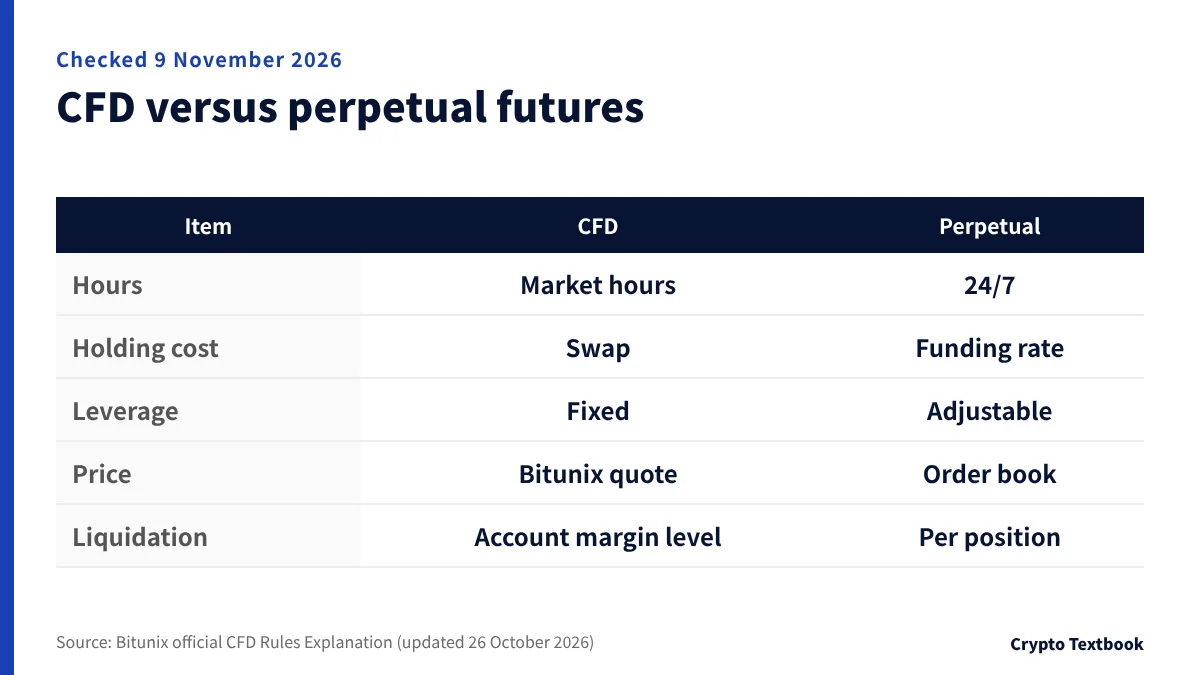
They sit side by side under [Futures] in the app, but they work differently. Five rows come from the comparison table on the official rules page, and the settlement currency comes from the trade guide.
On a perpetual futures screen you choose leverage and margin mode yourself. BTC/USDT and ETH/USDT perpetuals go up to 200x (official blog).
| Item | CFD | Perpetual futures |
|---|---|---|
| Trading hours | Market hours. No opening or closing while closed | 24 hours, 365 days |
| Holding cost | Swap (triple on Wednesdays) | Funding rate (BTC/USDT usually every 8 hours) |
| Leverage | Fixed per instrument. Cannot be changed | Adjustable within a range |
| Price | Bitunix quote. May differ from other venues | Public order book |
| Liquidation basis | Margin level of the whole account | Maintenance margin and mark price per position |
| Settlement currency | USDx (trade guide) | As the pair name says (USDT for BTC/USDT) |
The bonuses differ too. A futures bonus covers a fixed share of losses or fees set by the voucher, and when that share is above 0% the bonus is used first. The cushion bonus has no fixed share, and your own funds come first (comparison table in the help).
Liquidation at a 30% margin level or lower: checking the official levels with numbers
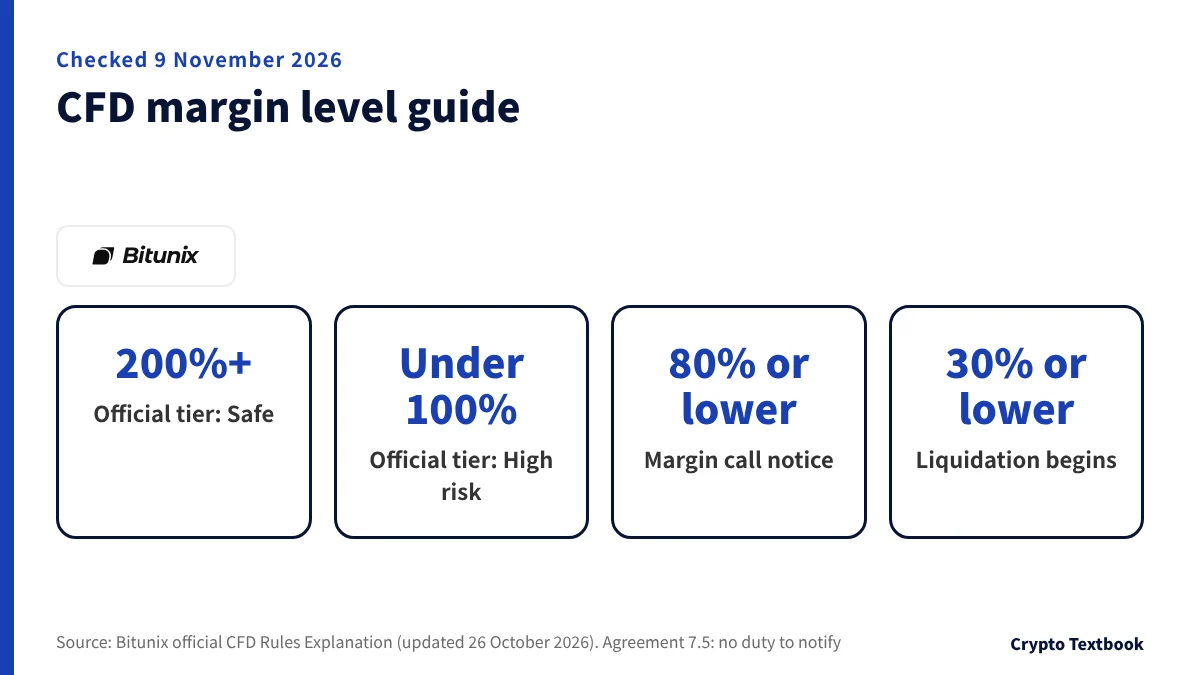
CFD liquidation is decided by the margin level of the whole account. The formula is net value / used margin x 100%, where net value is balance plus floating profit or loss (Agreement 7.4). Individual positions are not judged one by one.
| Margin level | Status | Official guidance |
|---|---|---|
| 200% or more | Safe | Normal trading |
| 100% to 200% | Warning | Avoid new positions and manage exposure |
| Under 100% | High risk | Add margin or reduce positions |
| 80% or lower | Margin call | Notice by app push, inbox, SMS and email |
| 30% or lower | Forced liquidation | Positions are closed in part or in full |
"Safe" is the official label, not a level at which losses cannot occur. Here is a hypothetical run. Own funds are 1,000 USDx and used margin stays at 500 USDx. The help does not say whether the bonus counts in the margin level, so the bonus is left out. As the floating loss grows, the margin level falls like this.
| Floating P/L | Net value | Margin level | Status |
|---|---|---|---|
| 0 | 1,000 | 200% | Lower edge of safe |
| -500 | 500 | 100% | Lower edge of warning |
| -600 | 400 | 80% | Notice |
| -850 | 150 | 30% | Liquidation begins |
Liquidation reduces positions step by step and re-measures the margin level each time. It stops once the level is back at a safe value. If risk cannot be reduced that way, liquidity providers take over the rest at the prevailing price (rules page).
On negative balances, the rules page says the platform resets a negative balance to zero, while Agreement 7.6 reserves the right to recover a shortfall after liquidation. On alerts, Agreement 7.5 says there is no duty to issue margin calls, while the rules page says a notice goes out at 80%. The help does not say which applies.
Trading costs: spread, swap and dividend adjustments
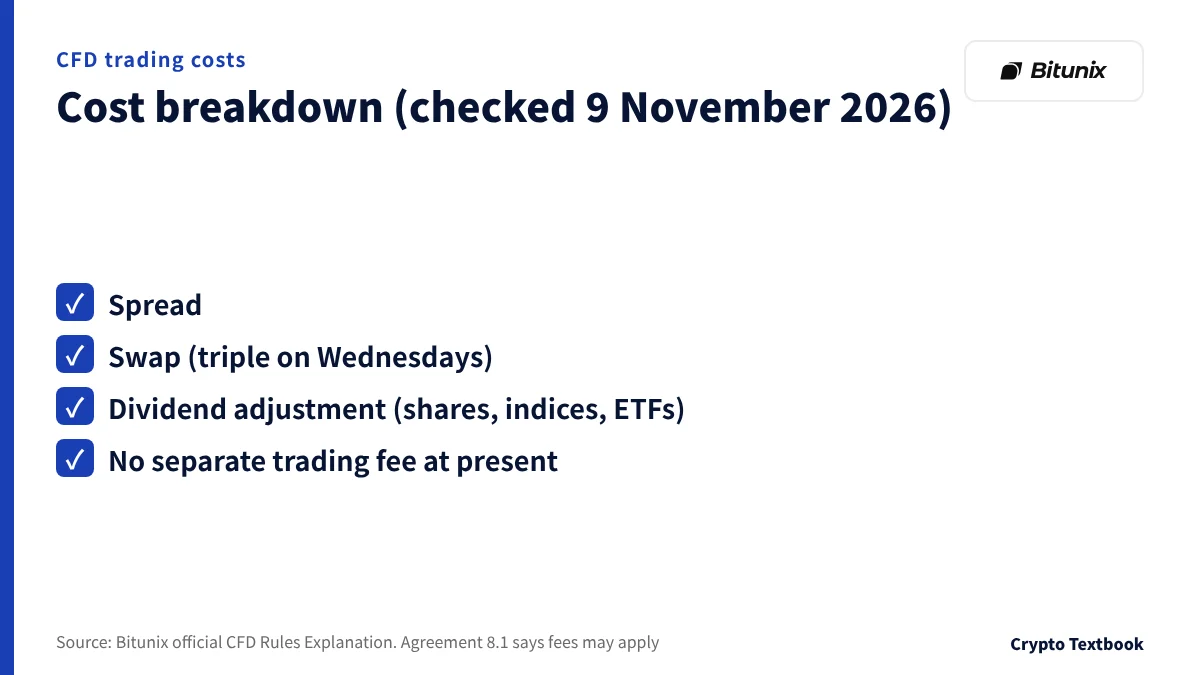
CFD costs are the spread, the swap and dividend adjustments. The rules page says no separate trading fee is charged at present (Phase 1). Agreement 8.1 says trading fees may apply.
The spread is the difference between the buy and sell price. It is built into the quote and not paid separately, and live values are on the instrument page.
Swap is charged for holding overnight. Long and short rates differ, and one side may receive interest. It is settled around local midnight and is triple on Wednesdays. Charges for a public holiday are collected on the previous trading day.
Dividend adjustments apply to shares, indices and ETFs only. On the ex-dividend date longs are credited and shorts are debited. If you plan to hold overnight, look up the swap type and the long and short rates on the instrument page first.
Itemized records are under [Transaction History] on the assets screen. You can filter by type, such as swap, dividend or realized P/L, and by instrument.
How the cushion bonus works: your funds first, then the bonus
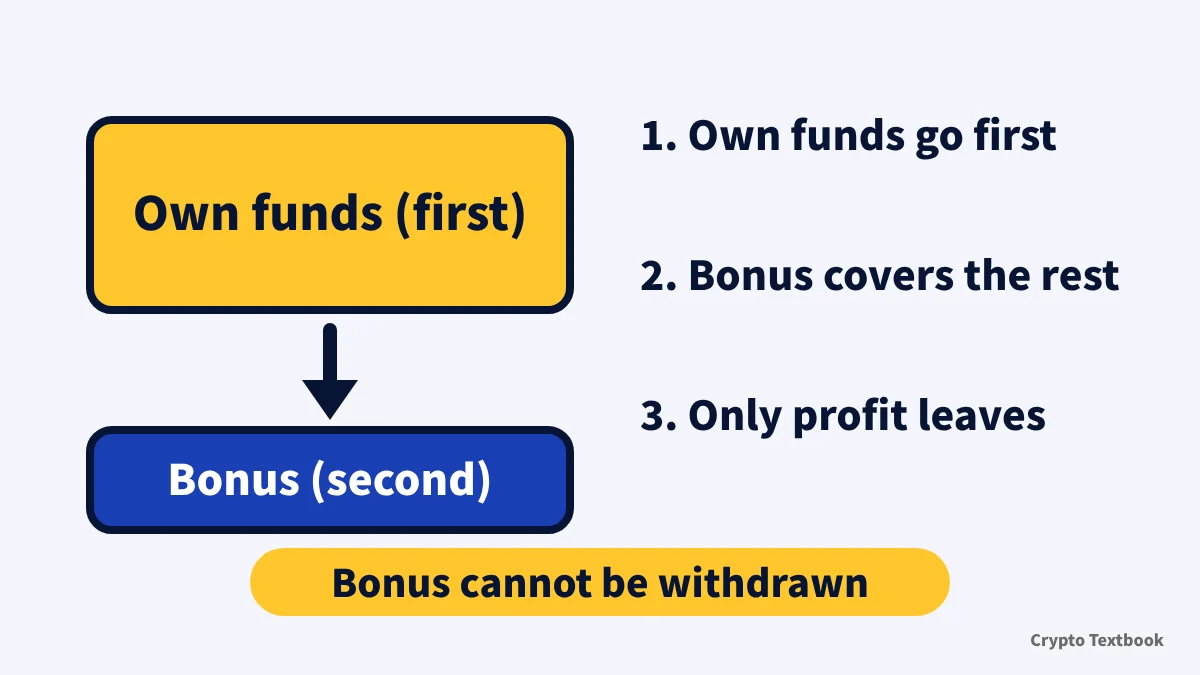
The cushion bonus is a reward Bitunix grants through campaigns, reward tasks or manual distribution. It is added to the available margin of the CFD account next to your own funds (official help, updated 24 September 2026).
It works in CFD only, not in futures or spot. Losses come out of your own funds first, and once those run out the bonus covers the remaining settled losses, with no fixed ratio. Covered items are settled trading losses, liquidation losses, overnight fees, dividend adjustments and similar settled charges. Floating costs such as the spread are not covered (official help, updated 24 September 2026).
Here is the order with hypothetical figures. Own funds are 100 USDx and the bonus is 50 USDx, and settled losses build up.
| Cumulative settled loss | Own funds left | Bonus left |
|---|---|---|
| 60 | 40 | 50 |
| 100 | 0 | 50 |
| 120 | 0 | 30 |
| 150 | 0 | 0 |
If a loss stays within your own funds, the bonus is untouched. Only the part above your own funds reduces the bonus. The help does not say what happens to a loss larger than the bonus.
Profits made while trading with the bonus go into the CFD account and can be used for more trading or withdrawn. The help says they can be withdrawn normally and lists no withdrawal condition such as trading volume.
The bonus counts toward available margin. The help does not say whether it enters the margin level calculation or how it interacts with liquidation.
Amounts and terms: 50 to 1,000 USDT on first deposit, up to 500 USDT on volume
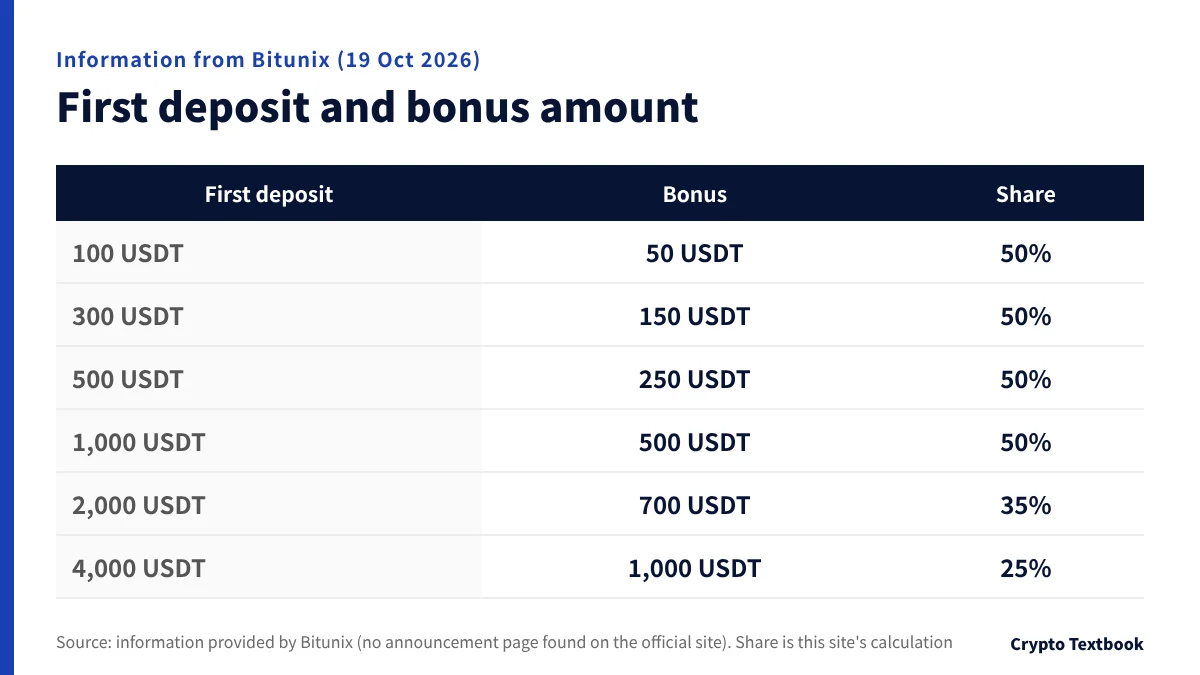
Amounts and deadlines in this section are based on information provided by Bitunix. No announcement page has been found on Bitunix's official site (as of 19 October 2026). The information says the bonus runs to the end of the year, and this site lists it as running to 31 December 2026. The closing time is unconfirmed.
| First deposit | Bonus | Share of deposit |
|---|---|---|
| 100 USDT | 50 USDT | 50% |
| 300 USDT | 150 USDT | 50% |
| 500 USDT | 250 USDT | 50% |
| 1,000 USDT | 500 USDT | 50% |
| 2,000 USDT | 700 USDT | 35% |
| 4,000 USDT | 1,000 USDT | 25% |
The share is 50% up to 1,000 USDT, then 35% at 2,000 USDT and 25% at 4,000 USDT. It applies to people making their first deposit into the CFD account.
| Trading volume | Bonus |
|---|---|
| USD 3 million | 30 USDT |
| USD 7.5 million | 75 USDT |
| USD 15 million | 150 USDT |
| USD 25 million | 250 USDT |
| USD 50 million | 500 USDT |
At each step in the table the volume bonus works out to 1 USDT per USD 100,000 (this site's calculation). If you are excluded from the first-deposit bonus, you are excluded from the volume bonus too. The information does not say how volume is counted.
Claiming requires an activated CFD account and an activation threshold (official help). The help does not give the threshold. The help gives three reasons a claim can fail to register: the account is not activated, own funds are below the threshold, or the required volume is not reached.
- 01Register through this site's link
Finish identity verification and enable the CFD account. This site's listed terms assume registration through this site's link.
- 02Make your first deposit into the CFD account
Transfer funds from the spot account to the CFD account. A first deposit of 100 USDT or more qualifies, and the amount sets the bonus.
- 03Wait for the grant
The bonus is granted within 5 business days after you meet the conditions (information provided by Bitunix).
- 04Claim it within 7 days
Open [My Rewards] from your profile and press [Redeem] on the voucher. A bonus not claimed within 7 days of the grant becomes void (information provided by Bitunix).
Open the Bitunix sign-up page (with this site's referral code) →
CFD cushion bonus terms and FAQ (bonus page) →
Bitunix new user rewards (a separate promotion, the rewards hub) →
The bonus grows with the deposit, but it is not money you can withdraw. Set the deposit by what you can afford to lose, not by the bonus amount.
From claiming to recovery: four ways the bonus disappears
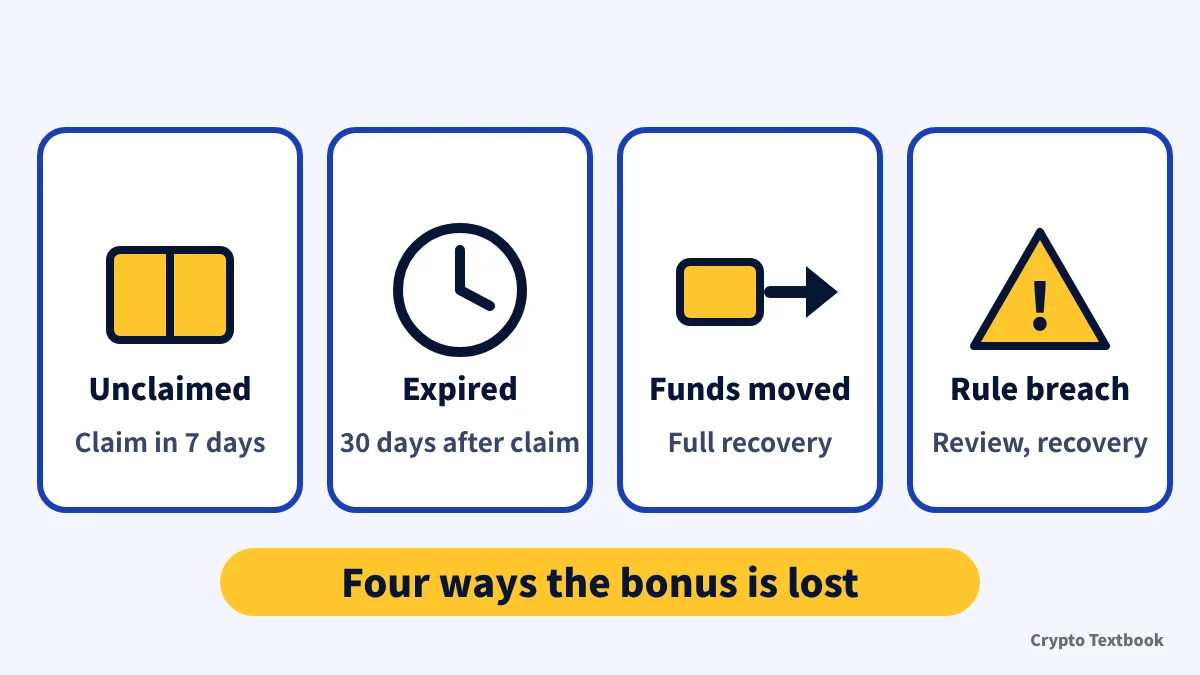
The bonus can be used only between claiming it and its expiry. Official help says it is reclaimed automatically at expiry, and after positions are closed if any are open.
| Case | What happens | Source |
|---|---|---|
| Not claimed within 7 days of the grant | Becomes void | Information from Bitunix |
| 30 days pass after claiming | Reclaimed. After closing if positions are open | Information from Bitunix and official help |
| Own funds moved out of the CFD account | The bonus in use is recovered in full | Official help |
| Conduct that breaks the rules | Review, loss of eligibility, recovery of what was granted | Official help |
Read the confirmation screen before you move funds. Official help also tells you to read it carefully before a transfer.
As examples of violations, the help lists bulk account registration, wash trading or hedging, and improper monetization of the bonus. The CFD rules page, on the other hand, allows holding long and short positions in one instrument. The help does not reconcile the two. Whether hedging while a bonus is attached can lead to cancellation belongs on your list of things to confirm.
The help does not say whether moving only the profit part of your own funds triggers recovery. A bonus after claiming appears under [My Rewards] then [In Use], and its balance is shown on the trading and assets screens.
Risks, and four things to decide before you start
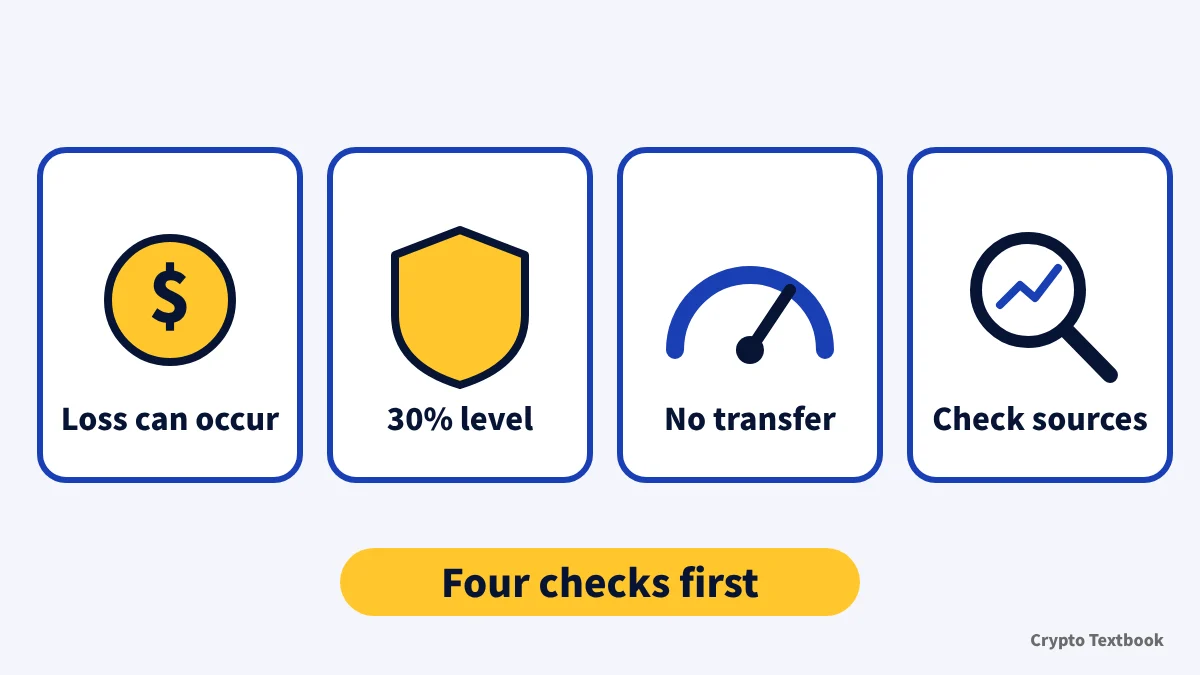
The CFD Service Agreement says leverage magnifies profit and loss alike. A small adverse move can wipe out all margin, and losses beyond the initial margin may follow (9.2). The rules page says a negative balance is reset to zero, and the two do not agree, as noted in the liquidation section.
Prices are set by Bitunix and can differ from other venues. Bitunix or its designated counterparty may be the other side of your trade (Agreement 3.2). Funds in the CFD account earn no interest and are not covered by deposit insurance (Agreement 4.5).
Forex, metals and index CFDs go up to 100x to 500x on some instruments, so a small move can cost a large part of your margin. The bonus does not guarantee smaller losses. Use money you can afford to lose and set a stop-loss level before you trade.
The cushion bonus is margin that covers settled losses after your own funds run out. It cannot be withdrawn or transferred, and it does not guarantee smaller losses.
- If you see it as cover for losses beyond your own funds, check that it covers settled losses only and not the spread
- If you may move funds while the bonus is in use, check that moving them recovers it in full
- If you are unsure about access from Japan, read both the help list and Agreement 18.1, and confirm on your account screen
- If you want to confirm amounts and deadlines, rely on the bonus card shown to you, since no official announcement was found
Six points could not be confirmed from the official help and agreement: what the available-countries list represents, whether the bonus counts in the margin level, recovery when only profit is moved, how volume is counted, the claim threshold, and an official announcement of the tiers and deadline. Nothing unwritten has been filled in by guesswork.
Bitunix exchange page (fees, leverage and product types) →
Bitunix reputation and safety (proof of reserves, terms, risk disclosure) (column) →
Frequently asked questions
Q. What is the Bitunix CFD cushion bonus?
A. It is a bonus for the CFD account only. Losses come out of your own funds first, and the bonus covers settled losses after that. The bonus itself cannot be withdrawn or transferred.
Q. How much is the Bitunix CFD cushion bonus?
A. Bitunix's information gives 50 to 1,000 USDT for a first CFD deposit of 100 to 4,000 USDT. A volume bonus of 30 to 500 USDT applies to forex and precious metals CFD volume of USD 3 million to 50 million. No announcement page has been found on Bitunix's official site (as of 19 October 2026).
Q. Can the Bitunix CFD cushion bonus be withdrawn?
A. The bonus itself cannot. The official help says profits made by trading with it can be withdrawn normally.
Q. What is the claim deadline for the Bitunix CFD cushion bonus?
A. Bitunix's information says to claim within 7 days of the grant in [My Rewards], and the bonus is reclaimed 30 days after claiming. The official help says the deadline is shown on the voucher. This site lists the promotion to 31 December 2026.
Q. What happens to the bonus if I move funds out of the CFD account?
A. Moving your own funds out of the CFD account recovers the bonus in use in full (official help). Read the confirmation screen shown before the transfer.
Q. Can I use Bitunix CFD from Japan?
A. Japan appears on the CFD available-countries list in the official help (checked 9 November 2026). The same list also shows India, which the agreement names as prohibited. Confirm on your account screen.
Q. At what margin level does Bitunix CFD liquidate positions?
A. At a margin level of 30% or lower, positions are closed automatically in part or in full. The rules page says a margin call notice goes out at 80% or lower (Agreement 7.5 says there is no duty to send one).
Q. How does Bitunix CFD differ from futures?
A. CFD follows market hours, has fixed leverage per instrument and charges swap for holding. Perpetual futures trade 24 hours a day, let you adjust leverage, and charge a funding rate.
Sources
- Bitunix | How to use CFD Cushion Bonus (official help, updated 24 September 2026, checked 9 November 2026) →
- Bitunix | CFD Rules Explanation (TradFi Trading Complete Guide) (official help, margin level, liquidation and costs, updated 26 October 2026, checked 9 November 2026) →
- Bitunix | How to Complete a CFD Trade on Bitunix (App) (official help, updated 26 October 2026, checked 9 November 2026) →
- Bitunix | How to Complete a CFD Trade on Bitunix (Web) (official help, updated 26 October 2026, checked 9 November 2026) →
- Bitunix | Contract for Difference (CFD) Service Agreement (official help, terms, updated 7 July 2026, checked 9 November 2026) →
- Bitunix | Introduction to Stock Perpetuals (official help, USDT margin, 24/7, updated 19 August 2026, checked 9 November 2026) →
- Bitunix | Bitunix Restricted Regions and User Eligibility Notice (official help, updated 5 August 2026, checked 8 November 2026) →
- Bitunix | Bitunix Leverage Explained (official blog, up to 200x on BTC/USDT and ETH/USDT perpetuals, updated 21 August 2026) →
FX Textbook is an independent information site, not an exchange or a provider of personal investment advice. Crypto-asset trading involves risk: price volatility, liquidation of leveraged positions, transfer mistakes and the operational risk of exchanges and service providers can cause you to lose some or all of your invested capital. No result is guaranteed.
NEXT STEP
Check amounts, deadlines and FAQ for the CFD cushion bonus on the bonus page.
Information from Bitunix and the official help are kept apart.
Exchanges related to this column
Fees, leverage, funding options and current offers are on each exchange page.