
The Bitunix sign-up page has a box labelled referral code (optional). It is not clear from the screen whether skipping it costs you anything, or whether a forgotten code can be fixed later.
On the official sign-up page the box is optional. The official FAQ, however, says the code is linked at registration and cannot be changed afterwards.
Our code is fUys. We checked the official help on 8 November 2026 and set out where to enter it, what happens if you forget, and the conditions of the new-user rewards.
Short answer: the code is optional, and sign-up is the moment to enter it (ours is fUys)
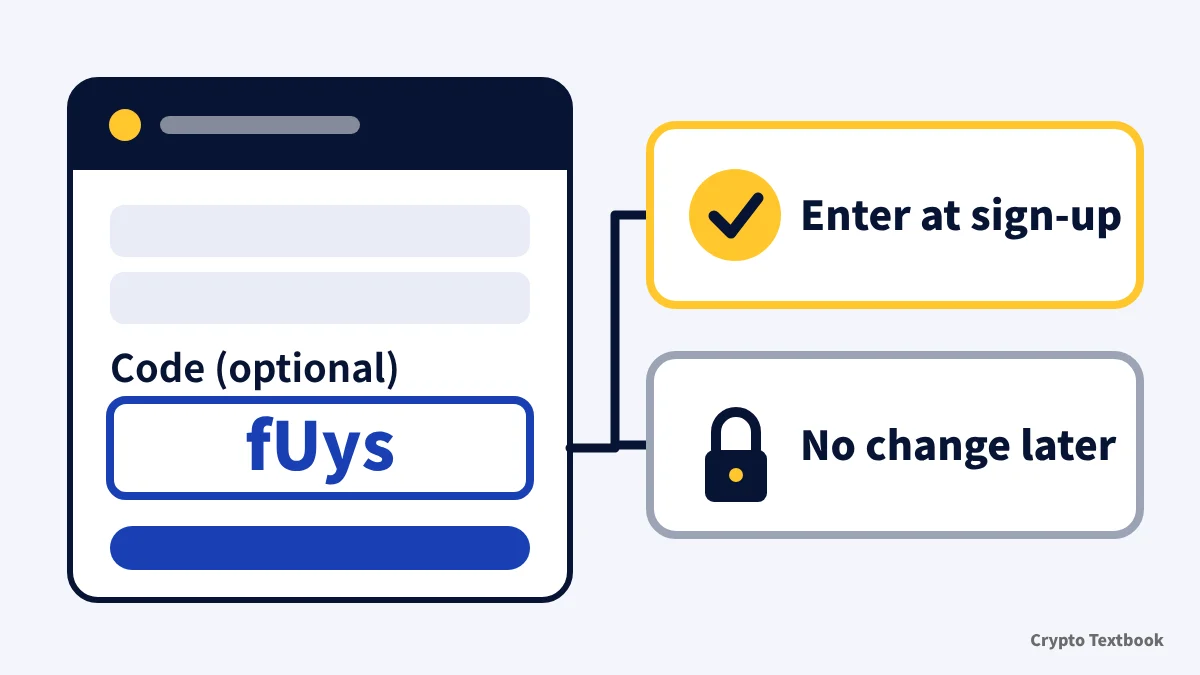
- The referral code box is marked optional; you can sign up with it empty (official sign-up page)
- Our code is fUys. Signing up through the referral link links it automatically (official FAQ)
- A linked code cannot be changed after registration (official FAQ)
- We found no official steps for adding a code after signing up with the box empty
- New-user rewards show up to 10,000 USDT; the amount of each task appears only after login
Bitunix futures use leverage, so a price move can trigger forced liquidation and you can lose all or part of the funds you deposited. Avoid raising your trading volume to match the size of a reward.
What is a Bitunix referral code? What the official help says, and what we could not confirm
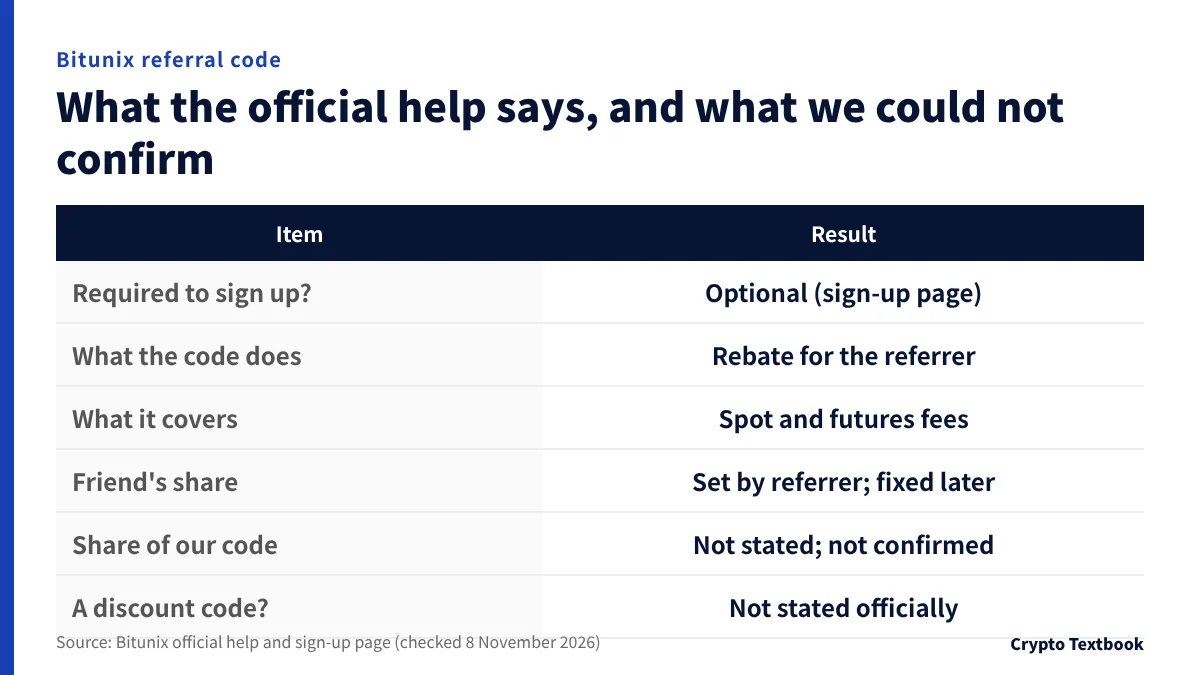
A referral code is a code that a Bitunix user shares to bring in a friend. The official help calls the programme Referral Rebates.
When a friend signs up with the link or code and trades, the referrer receives part of the friend's trading fees as a rebate. It covers spot and futures; deposits and withdrawals earn nothing.
The referrer can pass part of the rebate on to the friend. The referrer sets the share per link, within the allowed range.
| Item | Result |
|---|---|
| Required to sign up? | No. The sign-up page labels it optional |
| What the code does | The referrer receives part of the friend's fees as a rebate |
| What it covers | Spot and futures trading fees. Not deposits or withdrawals |
| The friend's share | Set by the referrer; cannot be changed after sign-up |
| Share of our code | Not stated in the official help; not confirmed |
| Discount or coupon code? | The official help does not describe one |
| Validity | Rebates are valid for one year (start point not stated) |
If you invite friends with your own code
- In the app, tap the profile icon, open Referrals and press Invite Now to share a link and code
- You can create up to 20 links and set the friend's share for each
- Rebates arrive the next morning in your Spot account. There is no minimum withdrawal
- Current payout rules cover direct referrals. In the official example, A earns from B but not from C, whom B referred
Referral codes differ by referrer. A search returns many codes, and which one you enter is your choice. Because a linked code cannot be changed after registration, compare them before you type.
How to sign up for Bitunix (app and web follow the same flow)
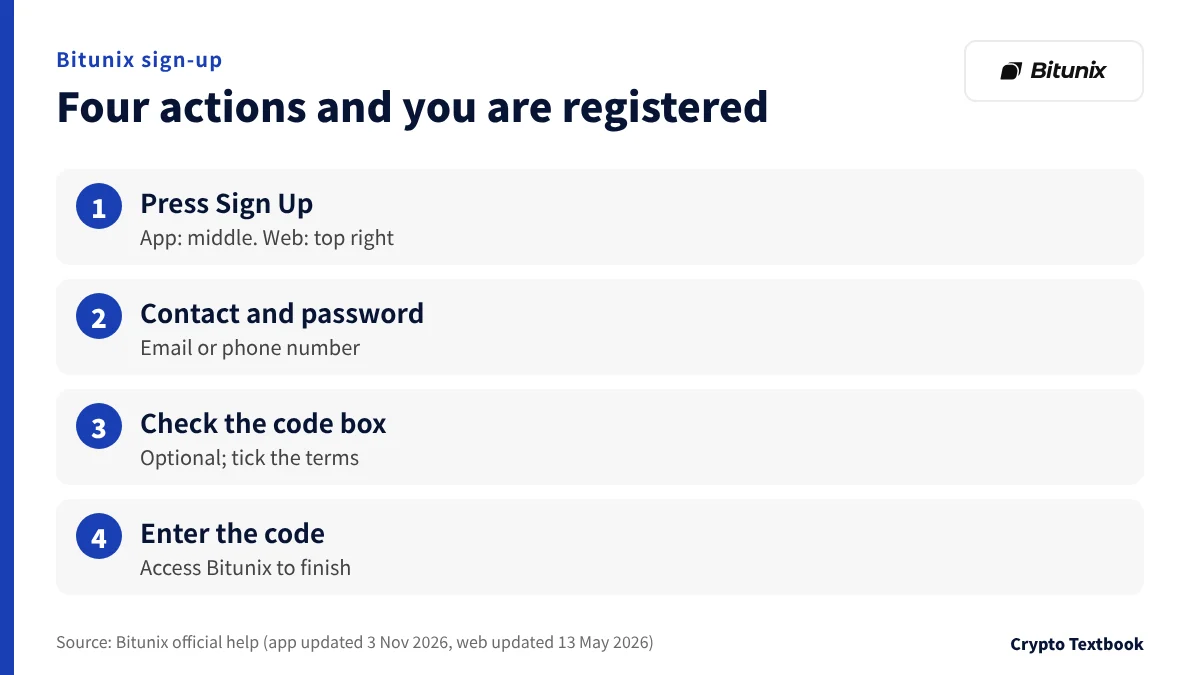
The official help describes sign-up by email or phone number. The app guide was updated on 3 November 2026 and the web guide on 13 May 2026.
- 01Press Sign Up
In the app, press Sign Up in the middle of the page. On the web, press Sign Up at the top right of the site.
- 02Enter contact details and a password
Enter your email address and a password. To sign up by phone number, choose the area code first.
- 03Check the referral code box and the terms
Look at the referral code (optional) box, tick the User Agreement and Privacy Policy box, and press Sign Up.
- 04Enter the verification code
Enter the code sent by email or SMS and press Access Bitunix. Registration is then complete.
The sign-up page also offers Google and Apple. The official help has no steps for these, and we could not confirm them.
- You must be at least 18 (or any higher age your local law requires) and able to accept the User Agreement (User Agreement 1.1)
- Japan is not on the official list of prohibited jurisdictions (notice updated 5 August 2026, checked 8 November 2026; the notice says the list is not limited to those named, and it can change)
- If sign-up fails, check for typos, your connection, and an email or phone number that is already registered (official help)
Where to enter the code, and what happens if you forget
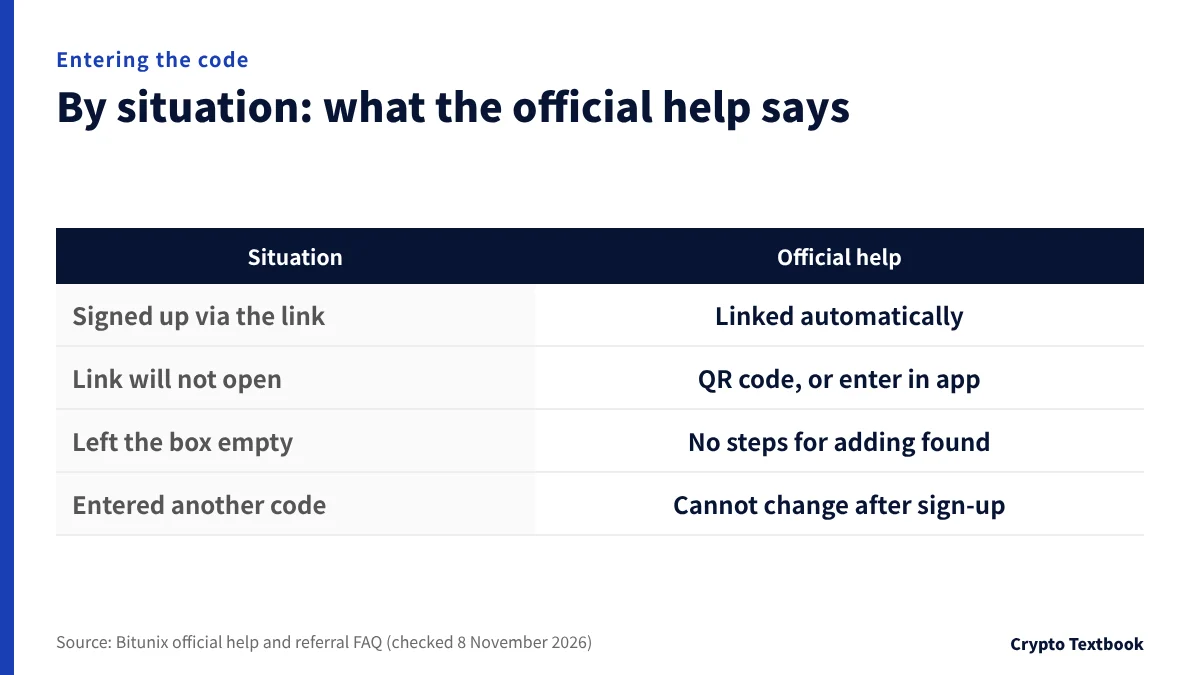
The box sits inside the sign-up page. On the Japanese page of 8 November 2026 it appeared after the phone number or email field, labelled referral code (optional).
The official FAQ says the code is linked automatically when you register through a referral link. If the link will not open, scan the friend's QR code, or register in the app and enter the code.
Our code is fUys. If you register in the app without the link, type fUys into that box (as in the official help). On the web sign-up page the box was hidden in the initial HTML, so we did not confirm that you can type into it.
If you forgot
The official FAQ answers that a code cannot be changed after registration. We found no steps in the official help for adding a code after signing up with the box empty (8 November 2026).
Ask Bitunix support whether it can be added. The official FAQ also describes starting over with a new account, but it does not say what that does to rewards or rebates.
The new-user rewards rules treat operating multiple accounts as abusive and allow stopped payouts and frozen accounts. Do not open another account just for the code; ask support first.
In the initial HTML of the official page (before scripts run), the code box was hidden and disabled. We could not confirm whether the box is filled in automatically when you open a referral link.
New-user rewards: the amounts we could confirm and the ones we could not
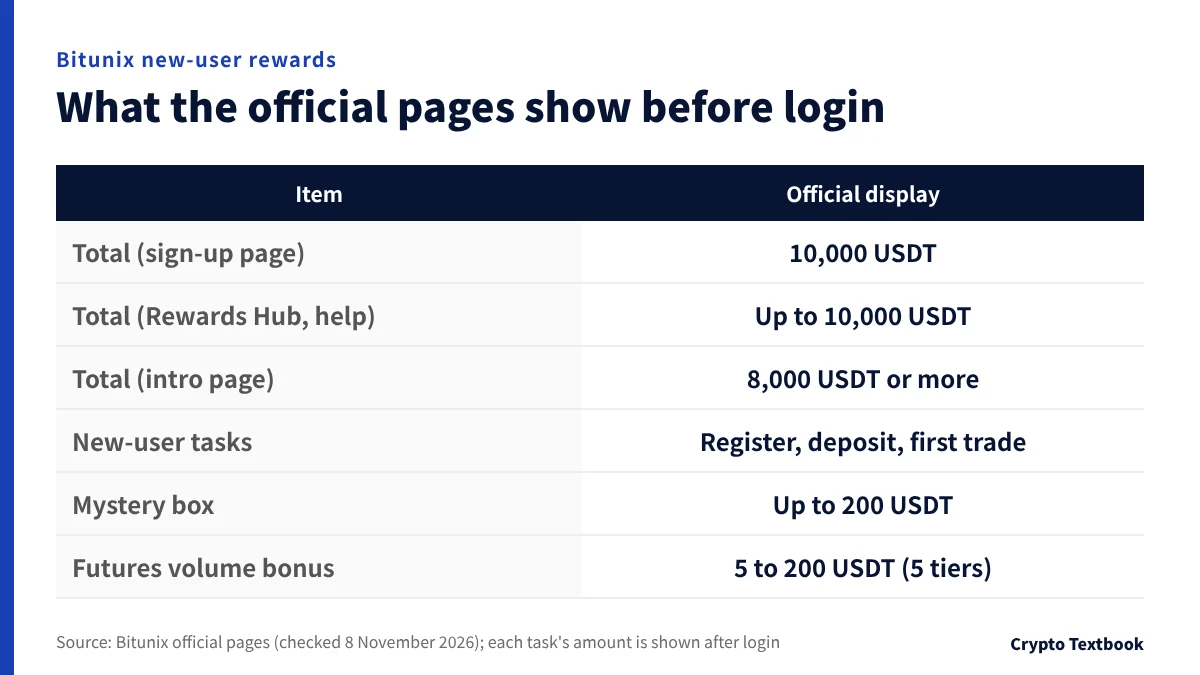
The sign-up page shows 10,000 USDT of new-user rewards, and the Rewards Hub and official help say up to 10,000 USDT. Another official page, the new-user rewards introduction, says 8,000 USDT or more, so the amounts differ.
No page gives a breakdown. The amount and conditions of each task are shown in the task centre after login.
| Item | Official display | Source |
|---|---|---|
| Total | Sign-up page: 10,000 USDT. Rewards Hub and help: up to 10,000 USDT. Intro page: 8,000 USDT or more | Sign-up page, Rewards Hub, help, intro page |
| New-user tasks | 1. Register, 2. Deposit, 3. First trade | Rewards Hub (30 Oct capture) |
| Mystery box | Four entries: register, deposit, KYC and trade. Draw for up to 200 USDT | Intro page |
| Futures volume bonus | 5 USDT at 100,000 volume up to 200 USDT at 10,000,000 (5 tiers) | Intro page |
| Amount and deadline of each task | Shown after login; not confirmable here | Official help (Rules) |
The official pages do not state the unit or the counting period for the futures volume bonus. The table copies the wording of the page.
Rules for a futures bonus once you receive it
- A futures bonus is not a real asset. It can be used for margin, fees and losses, but cannot be withdrawn or moved to spot
- Profit made while using it can be withdrawn within the validity period
- Only one can be active at a time. Redeeming a new one while one is active recalls the old one
- Moving funds out of the futures account expires the unused part of the bonus
- It must not be used to hold opposite positions for hedging, and it cannot be used in copy trading
- You redeem and check it under My Rewards, from the profile icon
Under the official rules, some rewards cannot be claimed repeatedly, and some tasks are limited to certain regions or new registrants. Operating multiple accounts or automated registration can lead to stopped payouts, clawback and frozen accounts.
Bitunix new-user rewards: conditions and how to claim →
Bitunix futures leverage and liquidation: what to know before using a bonus →
The official help (updated 28 May 2026) also lists a Newbie Bootcamp (up to 500 USDT) and up to 20 USDT for a 100 USDT deposit. The conditions sit behind login, so we do not cover them.
CFD cushion bonus until 31 December (based on information provided by Bitunix)
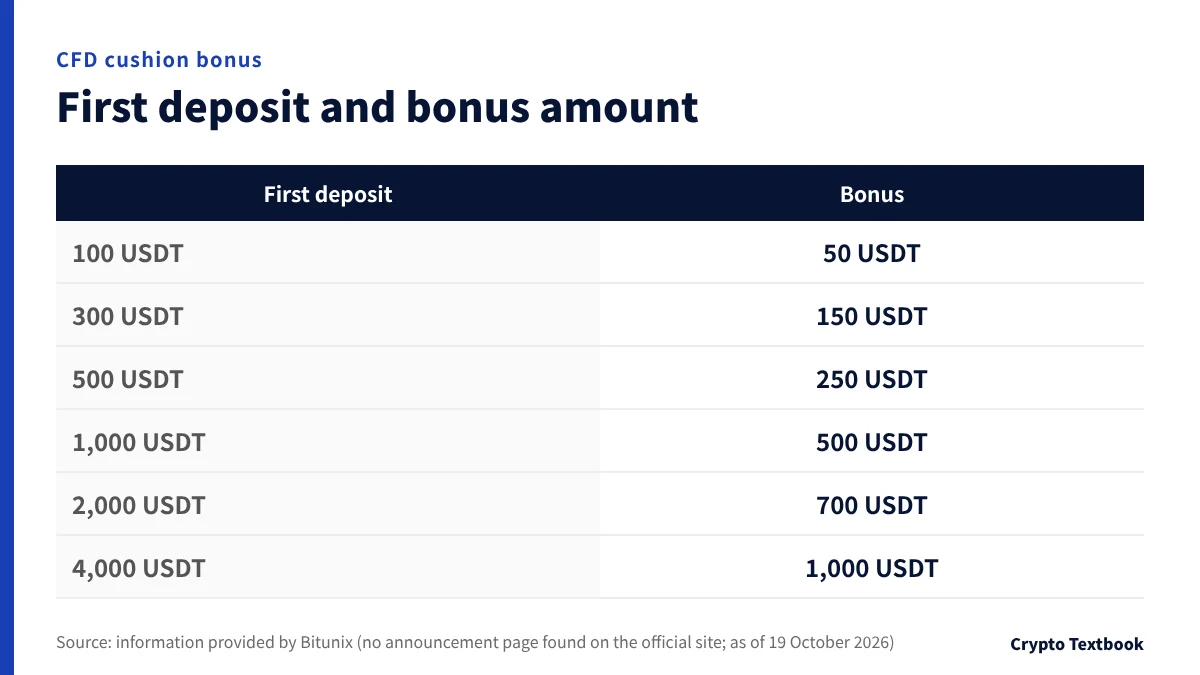
Bitunix's CFD account has a cushion bonus based on your first deposit. The tier table and deadline are based on information provided by Bitunix. No announcement page has been found on Bitunix's official site (as of 19 October 2026).
We checked how it works in the official help (updated 24 September 2026). Your own funds are used first, and the bonus covers losses only after they run out.
| Item | Details |
|---|---|
| First deposit and bonus | 100, 300, 500, 1,000, 2,000, 4,000 USDT earn 50, 150, 250, 500, 700, 1,000 USDT |
| Volume bonus | 30 to 500 USDT for forex and precious-metal CFD volume of 3 million to 50 million dollars |
| Deadline | Until 31 December 2026 (end time not confirmed) |
| Withdrawal | The bonus cannot be withdrawn or transferred. Profits from trading can be withdrawn |
| If you move funds | Moving your own funds out of the CFD account recovers the whole bonus |
| Costs not covered | Unsettled costs such as spreads |
| Using CFDs | Identity verification comes first. The account starts at 0, so transfer funds from spot |
| Japan | Japan is on the official list of CFD countries (updated 26 October 2026) |
Bitunix CFD cushion bonus: conditions and claim deadlines →
How the Bitunix CFD cushion bonus works: covering losses after your own funds run out →
CFDs are leveraged trades, and you can lose all or part of the funds you deposit. The bonus is used up against losses after your own funds run out, and it cannot be withdrawn.
After sign-up: identity verification, deposits and trading
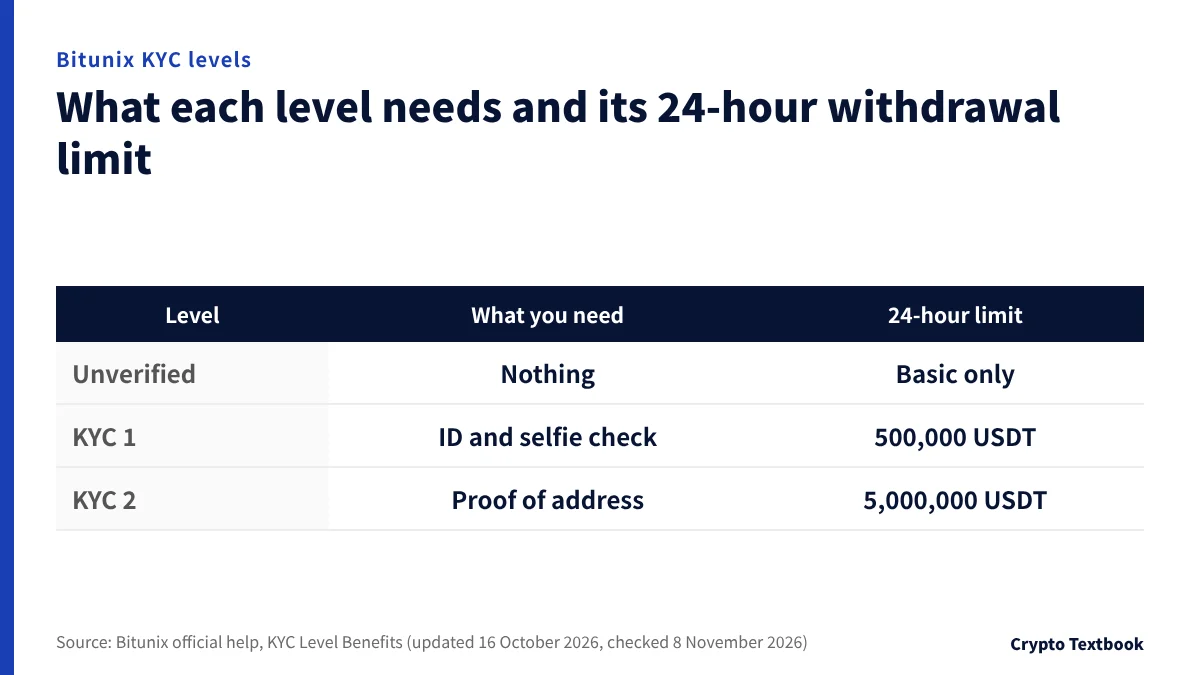
Without verification, some trading, withdrawal and fiat services are limited. Withdrawals unlock once KYC 1 is complete (official help, updated 16 October 2026).
| Level | What you need | 24-hour withdrawal limit |
|---|---|---|
| Unverified | Nothing | Basic functions only; some limited |
| KYC 1 | Government ID and a selfie check. Usually a few minutes | 500,000 USDT |
| KYC 2 | Proof of address. Manual review usually takes 1 to 3 hours | 5,000,000 USDT |
Your actual limit also depends on how many security methods you enable, regional rules and the account's risk assessment (official FAQ). Go by the limit shown on your own screen.
Bitunix identity verification (KYC): documents and review times for KYC 1 and KYC 2 →
Bitunix deposits and withdrawals: minimums, fees and KYC limits →
Bitunix fees for spot and futures, VIP levels and funding rates →
Is Bitunix safe? Checked against official information →
Unlike a domestic exchange, it gives no user protection under Japanese rules. How we checked its registration status is set out in the reputation and safety column above.
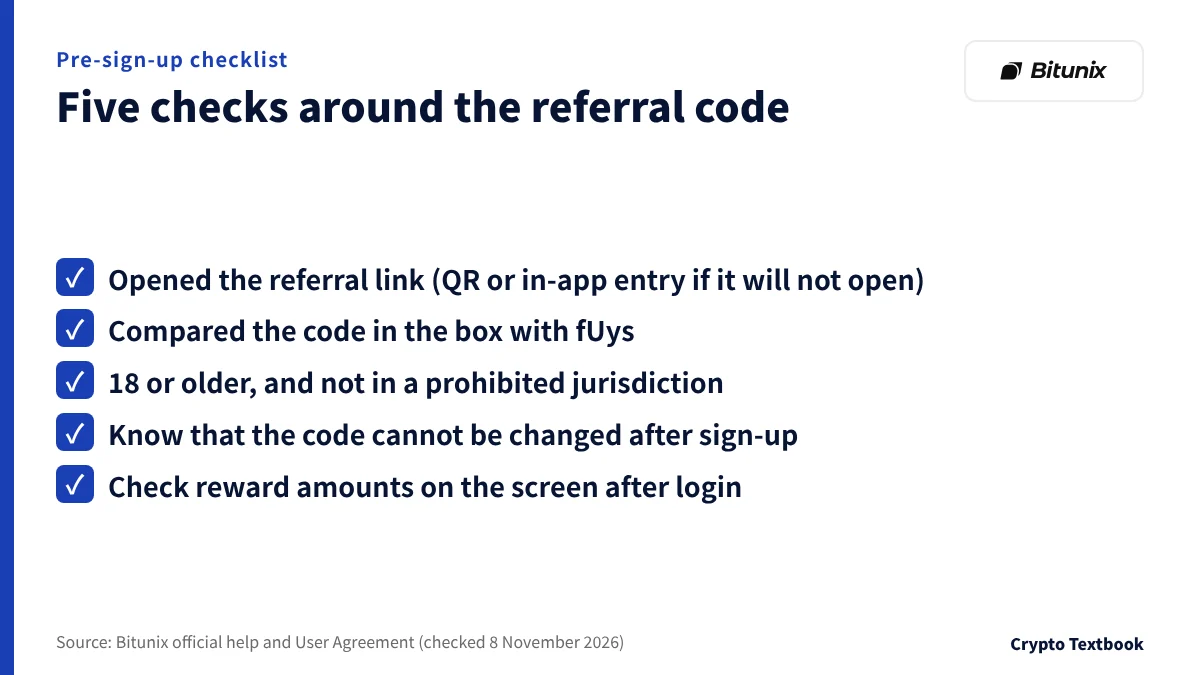
Checklist before you sign up, and common slip-ups
| Slip-up | Cause | Official help |
|---|---|---|
| Signed up with the box empty | The box is optional, so you can proceed | No steps for adding it found |
| Entered a different code | The code links at registration | Cannot be changed afterwards |
| The referral link will not open | A problem with the link | Use the QR code, or enter it in the app |
| Reward amount does not match | The sign-up page and intro page differ | Check amounts after login |
If you can open the referral link, register through it and compare the box. If you cannot, register in the app and type fUys into the box. If rewards are your aim, know first that the sign-up page and the introduction page show different totals.
Frequently asked questions
Q. What is the Bitunix referral code?
A. Our referral code is fUys. It links when you register through the referral link; if you register in the app without the link, type it into the referral code (optional) box. Referral codes differ by referrer, so other sites list other codes.
Q. Can I sign up for Bitunix without a referral code?
A. Yes. The official sign-up page labels the referral code box optional, and registration proceeds with it empty.
Q. Can I add a Bitunix referral code after signing up?
A. We found no steps in the official help for adding a code after signing up with the box empty (8 November 2026). The official FAQ says a code cannot be changed after registration. Ask Bitunix support whether it can be added.
Q. Will a referral code always get me a reward?
A. The official help does not say so. The code works as a rebate for the referrer and a share for the friend. The amount and conditions of new-user rewards are shown in the task centre after login.
Q. What is the maximum Bitunix new-user reward?
A. The sign-up page shows 10,000 USDT, the Rewards Hub and official help say up to 10,000 USDT, and another official page, the rewards introduction, says 8,000 USDT or more. The official pages alone do not settle which is right. Check each task's amount after login.
Q. Can a Bitunix futures bonus be withdrawn?
A. The bonus itself cannot be withdrawn or transferred. Profit made while using it can be withdrawn. Moving funds out of the futures account expires the unused part of the bonus (official help).
Q. Can I register with Bitunix from Japan?
A. Japan is not listed in the official notice on restricted regions (updated 5 August 2026). The notice says the list is not limited to those named, and it can change, so check the latest notice and the User Agreement before you register.
Q. Until when is the Bitunix CFD cushion bonus available?
A. Until 31 December 2026. The source is information provided by Bitunix, and no announcement page has been found on Bitunix's official site (as of 19 October 2026). The end time is not confirmed. According to the information, the bonus must be redeemed in My Rewards within 7 days of being granted.
Sources
- Bitunix | How to Register an Account on Bitunix (App) (official help centre, updated 3 November 2026, checked 8 November 2026) →
- Bitunix | How to Register an Account on Bitunix (Web) (official help centre, updated 13 May 2026, checked 8 November 2026) →
- Bitunix | Sign-up page (official, logged-out view, checked 8 November 2026) →
- Bitunix | Bitunix Referral Rebates introduce (official help centre, updated 28 May 2026, checked 8 November 2026) →
- Bitunix | Bitunix New User Rewards Giveaway (official help centre, updated 28 May 2026, checked 8 November 2026) →
- Bitunix | New-user rewards introduction page (official, logged-out view, checked 8 November 2026) →
- Bitunix | Rewards Hub (official, logged-out view, captured 30 October 2026) →
- Bitunix | FAQ about Futures Bonus (official help centre, updated 28 May 2026, checked 8 November 2026) →
- Bitunix | What is Bitunix Futures Bonus? (official help centre, updated 28 May 2026, checked 8 November 2026) →
- Bitunix | How to use CFD Cushion Bonus (official help centre, updated 24 September 2026, checked 8 November 2026) →
- Bitunix | How to Complete a CFD Trade on Bitunix (App) (official help centre, updated 26 October 2026, checked 8 November 2026) →
- Bitunix | Bitunix KYC Level Benefits (official help centre, updated 16 October 2026, checked 8 November 2026) →
- Bitunix | Restricted Regions and User Eligibility Notice (updated 5 August 2026, checked 8 November 2026) →
- Bitunix | Bitunix User Agreement (checked 8 November 2026) →
FX Textbook is an independent information site, not an exchange or a provider of personal investment advice. Crypto-asset trading involves risk: price volatility, liquidation of leveraged positions, transfer mistakes and the operational risk of exchanges and service providers can cause you to lose some or all of your invested capital. No result is guaranteed.
NEXT STEP
See Bitunix details in one place
Product types, fees, leverage and deposits, as confirmed from official sources by this site.
Exchanges related to this column
Fees, leverage, funding options and current offers are on each exchange page.