
You want to buy Kaito (KAITO), but it does not show up in any Japanese exchange app. We checked primary sources to find out where and in what order to buy it.
KAITO is not on the Japanese registered exchange lists. As of 8 November 2026, spot trading is available at MEXC, BingX and Bitunix, whose official APIs we checked. KAIA, a similar name, is listed in Japan but is a different coin.
This article walks through buying KAITO without mixing it up with KAIA, converting back to yen and how Japanese tax applies.
Answer: KAITO is not on Japan's lists but trades at three overseas exchanges
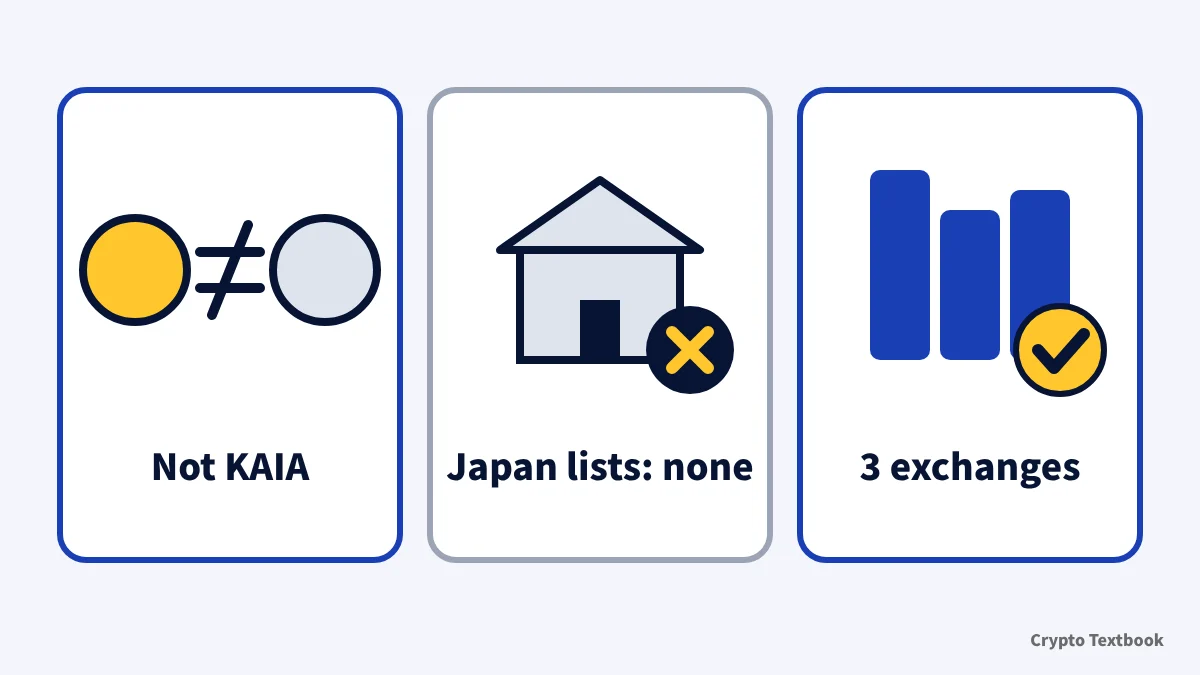
- KAITO is the token of Kaito, a service that uses AI to search crypto information (InfoFi)
- KAITO is not on the FSA registry (27 providers) or the JVCEA list (113 assets)
- MEXC offers KAITO/USDT and KAITO/USDC; BingX and Bitunix offer KAITO/USDT
- None of the three is registered with Japan's FSA. Japanese investor protection does not apply, and KAITO has not passed a JVCEA review
- The coin Japan does list is KAIA, a similar name. It is a different coin from KAITO
- Swapping USDT for KAITO is itself a taxable event in Japan
We do not give price outlooks or timing advice. We do not present earning points or rewards by posting as a way to make money. KAITO moves sharply. Only use money you can afford to lose.
What is Kaito (KAITO)? The token of an AI information service
Kaito builds services that search and analyze crypto information with AI. Its documentation describes InfoFi, which links information, attention and capital flows through AI.
It has three products. Kaito Pro is an AI search engine for crypto, Capital Launchpad decides allocations for supporters, and Studio connects brands with creators.
| Item | Details |
|---|---|
| Ticker | KAITO |
| Official description | $KAITO, the native token of the InfoFi network |
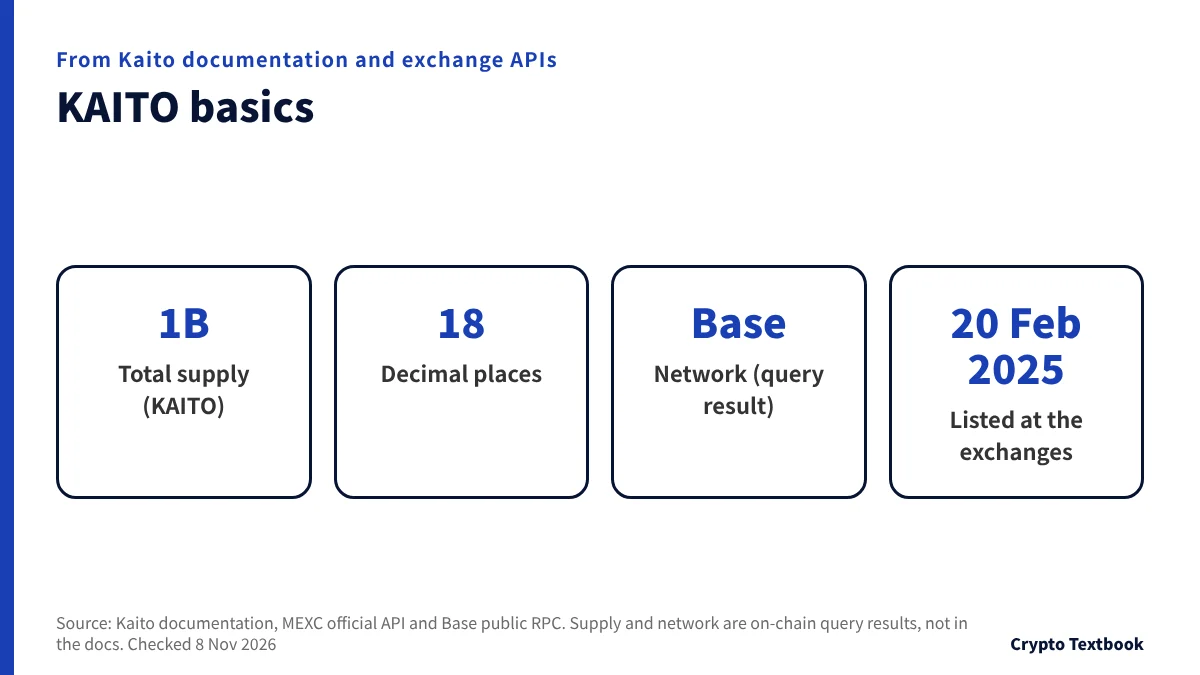
| Total supply | 1,000,000,000 (1 billion) |
| Decimal places | 18 |
| Network | Base |
| Listed at exchanges | 20 February 2025 in the records of all three APIs |
※ The supply, decimals and network are not in the documentation. They come from querying the contract shown by MEXC's API on a Base public RPC. The contract address is in the risk section later in this article.
The documentation lists three roles for KAITO.
- Holders influence how attention is distributed (they help steer the system)
- It is the currency used inside the Kaito network
- It is used for governance: proposing and voting on changes
We could not find the issuer's legal name on the official website or in the documentation. The terms of use for the Yaps points platform name OpenKaito Digital Ltd. as its operator.
The documentation describes Yaps as a measure of attention and says it was one factor in the first community distribution (10% of the total). We do not present it as a way to earn money by posting.
KAITO, KAIA and KAIO are different coins
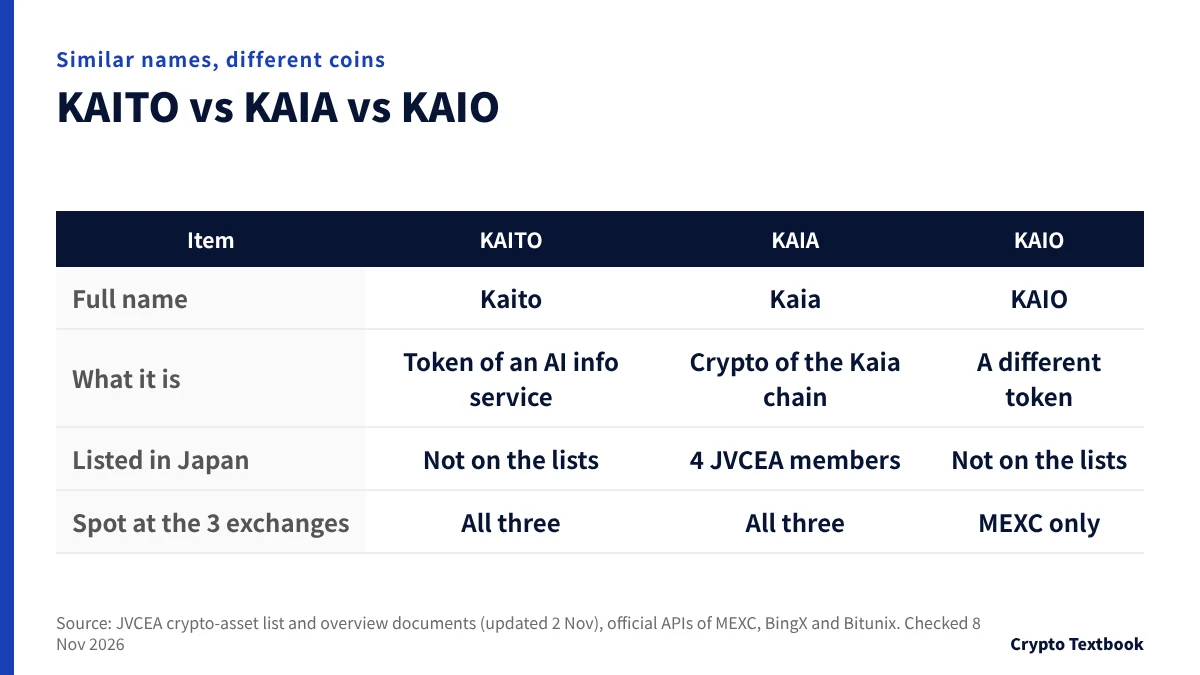
The Japanese names Kaito and Kaia differ by one letter and sound alike. The coin on Japanese exchanges is KAIA, not KAITO.
| Item | KAITO | KAIA | KAIO |
|---|---|---|---|
| Full name | Kaito | Kaia | KAIO (name in MEXC's API) |
| What it is | Token of Kaito, an AI information service | Crypto-asset of the Kaia blockchain | A different token |
| Listed in Japan | Not on the lists | Handled by 4 JVCEA members | Not on the lists |
| Spot at the 3 exchanges | All three | All three | MEXC only (BingX suspended, Bitunix none) |
MEXC's official API lists KAIAUSDT and KAIOUSDT next to KAITOUSDT. The first letters are the same, so they are easy to mix up.
- Check that the name is Kaito and the ticker is KAITO
- KAIAUSDT and KAIOUSDT are different coins. Read the pair name aloud before you order
- Compare the contract address on the withdrawal screen with the one in the second half of this article
KAIA and KAITO belong to different projects and run on different networks. If you buy KAIA in Japan and send it overseas, you cannot receive it as KAITO.
Can you buy KAITO in Japan? What we found on Japanese exchanges
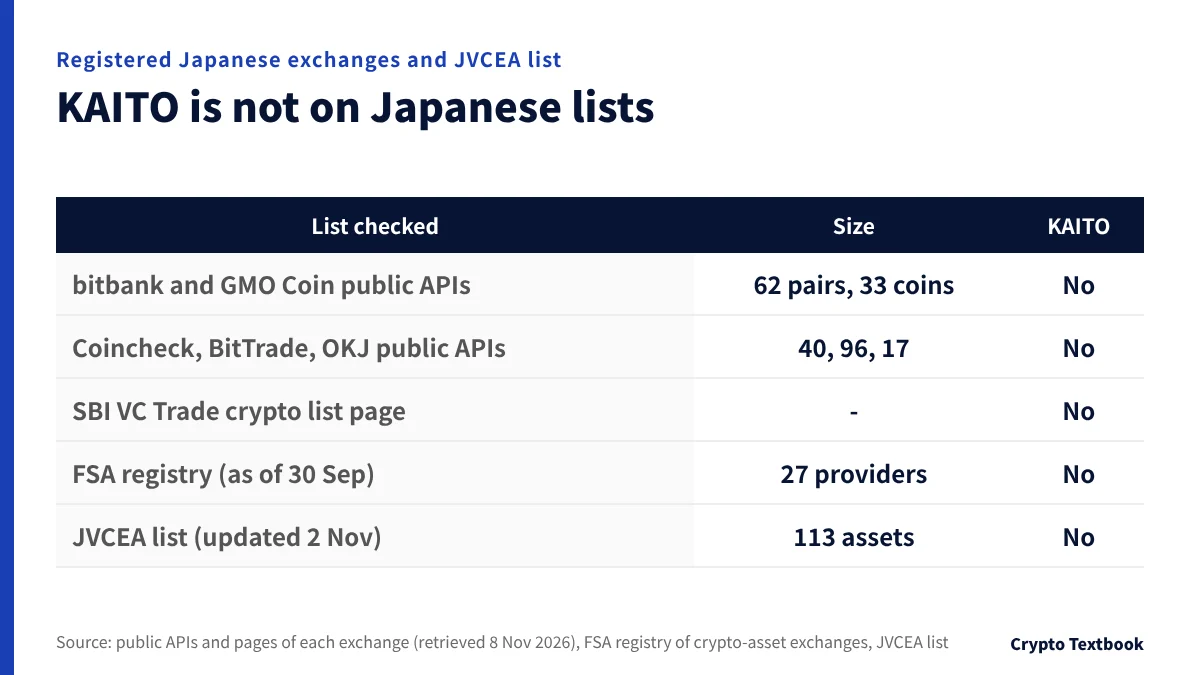
On 8 November 2026 we searched Japanese registered exchanges and the JVCEA list for KAITO. We used public APIs where five exchanges offer them and official lists for the rest. KAITO is on none of them.
| List checked | Size | KAITO |
|---|---|---|
| bitbank (public API) | 62 pairs | No |
| GMO Coin (public API) | 33 coins | No |
| Coincheck (public API) | 40 coins incl. its broker service | No |
| BitTrade (public API) | 96 pairs | No |
| OKJ (public API) | 17 pairs | No |
| SBI VC Trade (crypto list page) | - | No |
| FSA registry (as of 30 September 2026) | 27 providers | No |
| JVCEA list (updated 2 November) | 113 assets | No |
※ The FSA list reflects 30 September. Any exchange that started handling a coin afterwards would appear in the JVCEA notices of newly handled coins.
Not being handled in Japan has three consequences.
- You would buy at an overseas exchange that is not registered with the FSA
- Japanese investor protection, such as segregation of assets and trust under the Payment Services Act, does not apply
- The coin has not passed the JVCEA review that Japanese exchanges go through before listing it
Running a crypto-asset exchange business in Japan requires registration under the Payment Services Act. Japanese exchanges have new coins reviewed by the JVCEA before handling them.
The penalties in the Payment Services Act target those who run the business without registration. We did not find a provision that punishes users in the parts we read. Even so, Japanese protections do not apply when something goes wrong.
Can Japanese residents use BingX? Registration, protection and where to check →
Where can you buy KAITO? MEXC, BingX and Bitunix compared
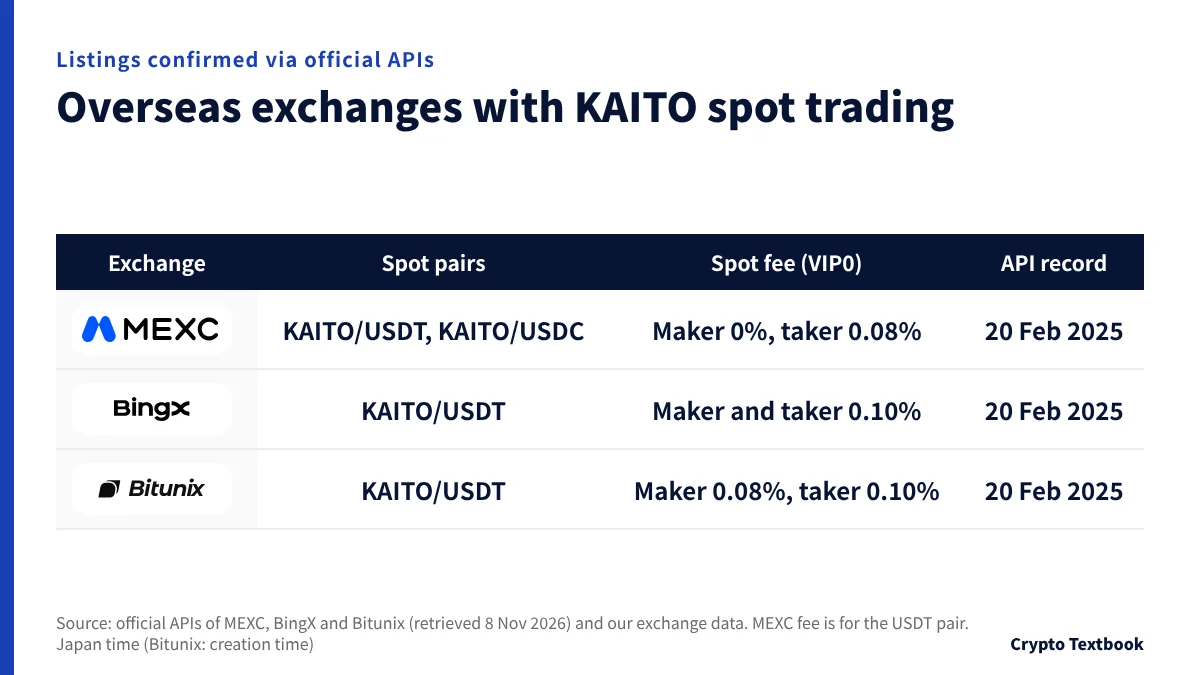
Of the overseas exchanges we feature, three showed KAITO spot trading in their official APIs. BYDFi has no public API and its screens could not be retrieved, so this article does not cover it.
| Exchange | KAITO spot pairs | Spot fee (VIP0) | API record |
|---|---|---|---|
| MEXC | KAITO/USDT, KAITO/USDC | USDT pair: maker 0%, taker 0.08% | Trading opened 20 February 2025 |
| BingX | KAITO/USDT | Maker and taker both 0.10% | Trading opened 20 February 2025 |
| Bitunix | KAITO/USDT | Maker 0.08%, taker 0.10% | Registered 20 February 2025 |
※ MEXC's KAITO/USDC shows 0 for both maker and taker in the API. Dates are Japan time, and Bitunix's is the API creation time (ctime). BingX's API shows only its API buy and sell flags (apiStateBuy and apiStateSell) as false. In the same API the trading status is active (status 1), the public order book and recent trades are moving, and BingX's own buy page lists the KAITO/USDT spot market. Check the spot screen after you open an account to see whether you can place orders in the app.
The maker fee is 0% at MEXC. The taker fee is 0.08% at MEXC and 0.10% at BingX and Bitunix. Only MEXC has a USDC pair. Withdrawal limits depend on the identity verification (KYC) level.
| Exchange | Verification level | Withdrawal limit |
|---|---|---|
| MEXC | Basic KYC, Advanced KYC | 80 BTC and 200 BTC per day (checked 26 September) |
| BingX | Unverified, Advanced verification | 20,000 and 5,000,000 USDT per 24 hours (unverified: deposits and trading unavailable per the official table, checked 8 Nov 2026) |
| Bitunix | KYC1, KYC2 | 500,000 and 5,000,000 USDT per 24 hours (checked 4 November) |
- MEXC: two pairs, USDT and USDC. The USDC pair has 0% maker and taker fees
- BingX: one pair, KAITO/USDT. Unverified: deposits and trading unavailable per the official table (checked 8 Nov 2026)
- Bitunix: one pair, KAITO/USDT. No deposit fee; credit takes about 3 to 30 minutes
Open the MEXC sign-up page (our referral link) →
How to buy KAITO: four steps from sign-up to a spot order
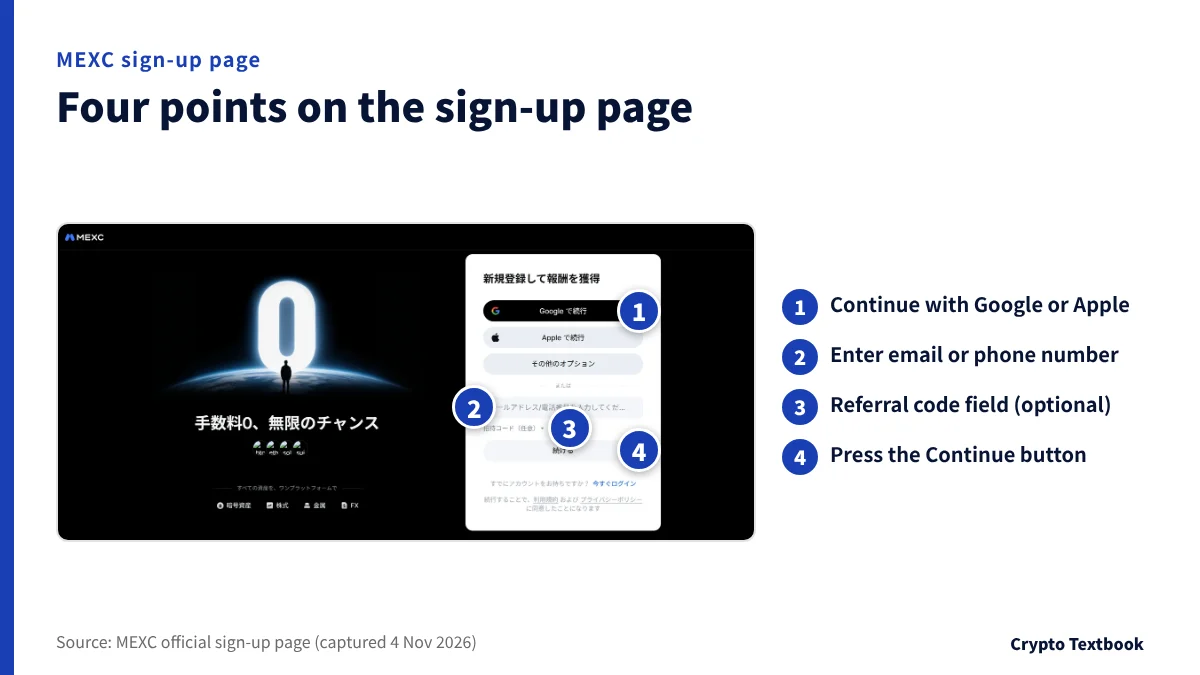
The flow is the same at all three exchanges. Screen names below come only from each exchange's official help pages and buy guides.
- 01Sign up with an email address or phone number
MEXC's sign-up screen has a field for an email address or phone number and a Referral code (optional) field. You can also continue with a Google or Apple account.
- 02Complete identity verification (KYC)
BingX does not allow deposits or trading until you verify. MEXC and Bitunix also have verification levels, and the withdrawal limit changes with the level. Choose your country of residence as shown on your ID.
- 03Deposit USDT or another crypto-asset
On the deposit screen, choose the coin and network, then send to the deposit address shown. BingX charges no deposit fee. Bitunix credits in about 3 to 30 minutes.
- 04Place a spot order for KAITO/USDT
BingX's buy guide moves funds to the spot account and buys on the KAITO/USDT spot market, with market and limit orders. MEXC and Bitunix use the same pair name, KAITO/USDT.
- BingX's official page recommends setting up Google 2FA (two-factor authentication)
- It also recommends setting up a passkey and an anti-phishing code
- Never share the verification codes sent to your email
BingX's official page also describes buying USDT by card, Apple Pay or P2P and then swapping it for KAITO. Check the buy screen in the app for the payment methods available from Japan.
BingX identity verification (KYC): documents and withdrawal limits →
Sending crypto from a Japanese exchange and the screens to check
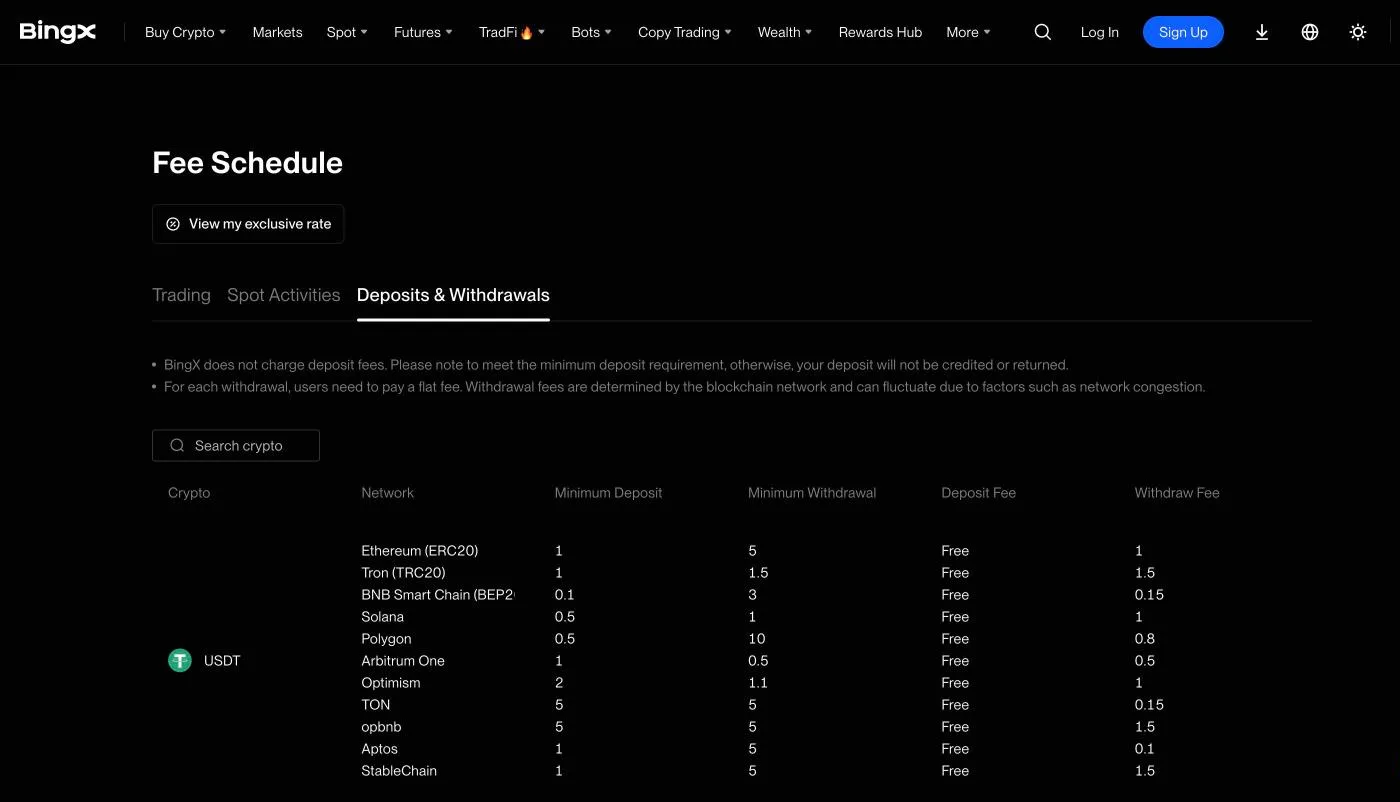
KAITO is not listed in Japan, so you send crypto bought at a Japanese exchange to an overseas exchange. There you swap it into USDT and use the USDT to buy KAITO.
- Buy the crypto you will send with yen at a Japanese exchange
- On the overseas exchange's deposit screen, choose the same coin and network
- Copy the deposit address and paste it into the Japanese exchange's withdrawal screen
- Send a small amount first, and send the rest after it arrives
BingX's fee schedule warns that deposits below the minimum are not credited. BingX Academy tells you to choose the same network as the sending side.
| What goes wrong | How to avoid it |
|---|---|
| Choosing the wrong network | Choose the same network name on the sending and receiving sides |
| Pasting the wrong address | After pasting, compare the first and last few characters |
| Below the minimum deposit | Check the minimum on the deposit screen. The shortfall may not be credited |
| A slow arrival | Look up the TxID (transaction ID) on a blockchain explorer |
When sending from a Japanese exchange overseas, you are asked for details about the destination exchange and yourself. Some destinations may not be accepted.
The Travel Rule when sending from Japan to overseas exchanges →
MEXC deposits and withdrawals: quick buy in yen and the withdrawal flow →
Moving KAITO to a wallet and back: check the contract
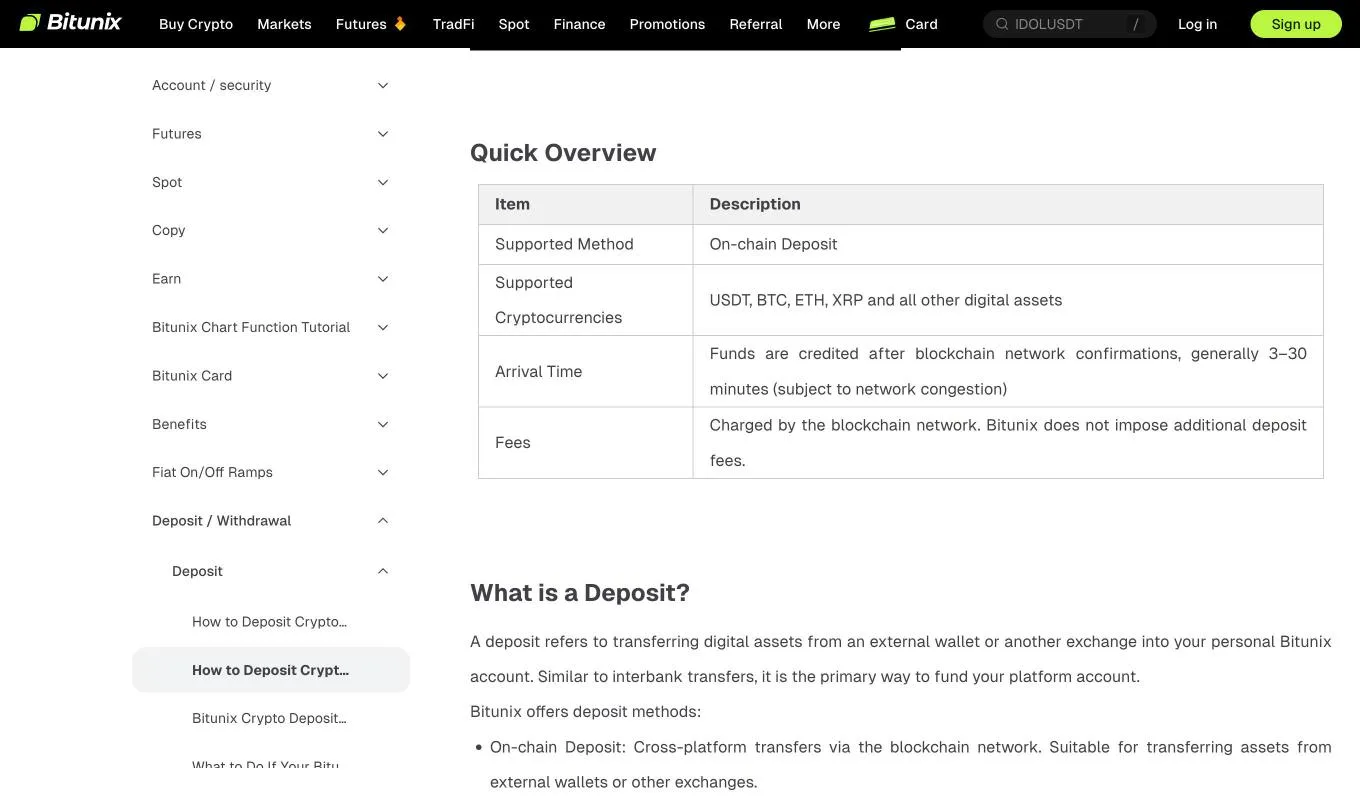
On-chain, the KAITO contract was on Base. When you withdraw to your own wallet or send back to an exchange, check the network name and the contract on the withdrawal or deposit screen.
| Cause | What the help page says |
|---|---|
| Sent to a contract address | It is not the deposit address. Assets sent to a smart contract cannot be recovered |
| Below the minimum deposit | The minimum differs by coin and network. The shortfall is neither credited nor refunded |
| Wrong network or memo | Blockchain transfers cannot be reversed, and you can lose the assets |
| Held for review | If you show who owns the funds in verification, a refund to the original sender is offered |
The contract address later in this article is for checking that a token is genuine. The address you type as the destination is the deposit address shown on the exchange's deposit screen.
Kaito's terms of use (Yaps) also warn that several contracts can share the same name or ticker. They say to check the contract, not the name or logo.
The official website also links to staking and swapping. Operations through a wallet leave key management and destination checks to you, so we do not recommend that beginners buy through a wallet.
From selling KAITO to getting yen back
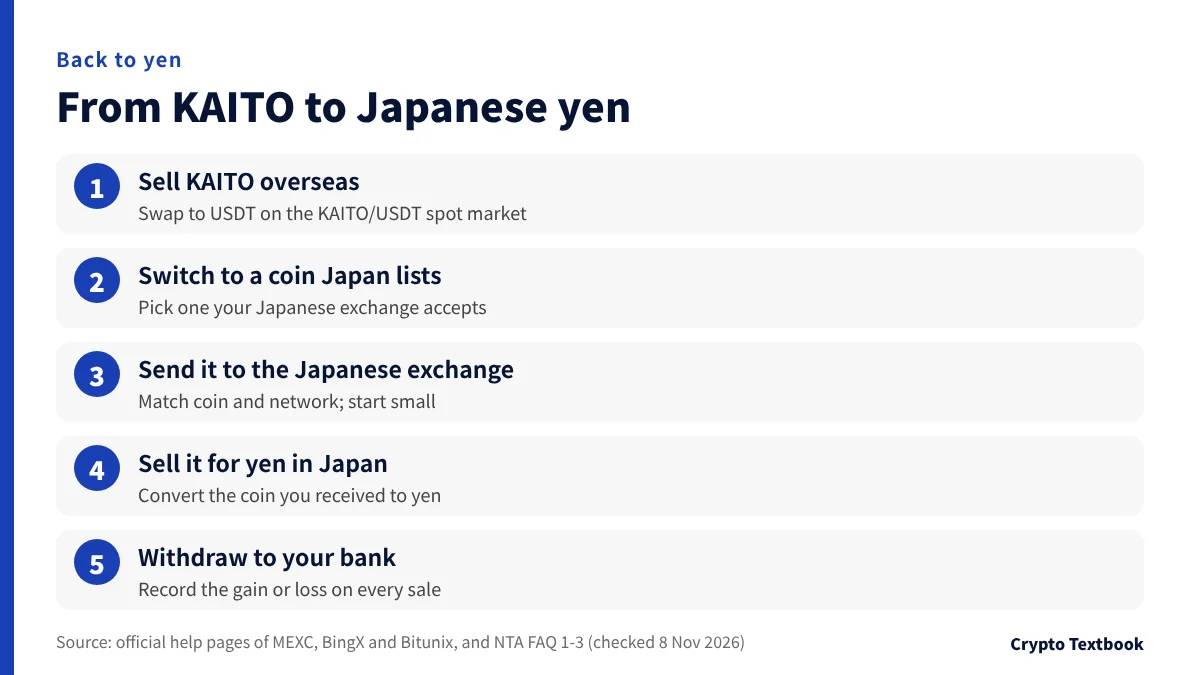
To get yen back, you retrace the purchase. You sell at the overseas exchange into USDT, switch to a crypto-asset your Japanese exchange accepts and send it.
- 01Sell KAITO on the KAITO/USDT spot market
The proceeds arrive as USDT in your spot account.
- 02Switch to a coin Japan lists
Choose a coin your Japanese exchange handles and can receive on the same network.
- 03Send it to the Japanese exchange and sell for yen
Confirm that it has arrived before you sell. Test with a small amount first.
- 04Withdraw yen to your bank account
Check the withdrawal fee and arrival time in the Japanese exchange's notice.
You realize a gain or loss when you swap KAITO to USDT and again when you swap USDT to another crypto-asset. Record the date, amount and yen value of every sale.
| Step | Cost |
|---|---|
| Selling KAITO for USDT | Spot trading fee (taker: MEXC 0.08%, BingX 0.10%, Bitunix 0.10%) |
| Switching USDT to another coin | The same spot trading fee |
| Sending to a Japanese exchange | The overseas exchange's withdrawal fee (a fixed amount per coin and network) |
| Selling for yen and withdrawing in Japan | The Japanese exchange's trading fee and bank withdrawal fee |
Bitunix deposits and withdrawals: fees, networks and limits →
KAITO and tax: swaps with USDT count too
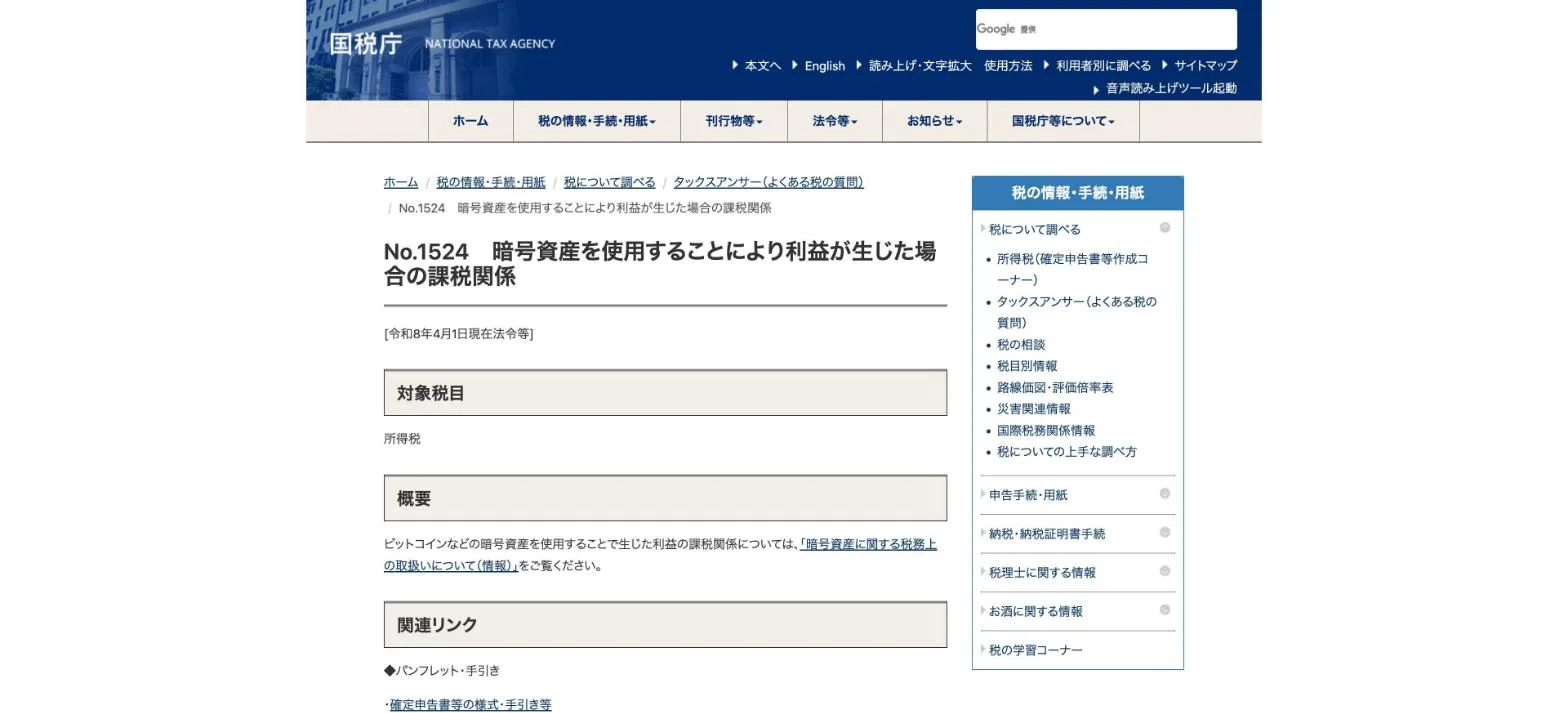
Gains from buying and selling KAITO at overseas exchanges are subject to Japanese income tax. In the NTA's FAQ, gains from crypto-asset trading are in principle miscellaneous income.
| Situation | How the NTA FAQ treats it |
|---|---|
| Buying KAITO with USDT | An exchange of crypto-assets. Calculate the gain or loss on the USDT you gave up (FAQ 1-3) |
| Selling KAITO for USDT | Calculate the gain or loss on the KAITO you gave up |
| Income category | In principle miscellaneous income. Above 3 million yen in revenue, the category depends on bookkeeping (FAQ 2-2) |
| Selling for yen in Japan | Calculate the gain or loss on the crypto-asset you sent and gave up (FAQ 1-1) |
※ The method is either the total average method or the moving average method, and if an individual does not choose, the total average method applies (note to FAQ 1-3).
Download your overseas exchange's trade history yourself at least once a year. If the exchange becomes unavailable, you may not be able to get the history later.
- Date and time of each trade, and the type of crypto-asset bought or sold
- Quantity, and the yen value at that time
- Trading fees and withdrawal fees paid
- Records of transfers between Japanese and overseas exchanges (TxID)
Crypto tax basics in Japan: miscellaneous income and filing →
KAITO allocation and the unlock schedule
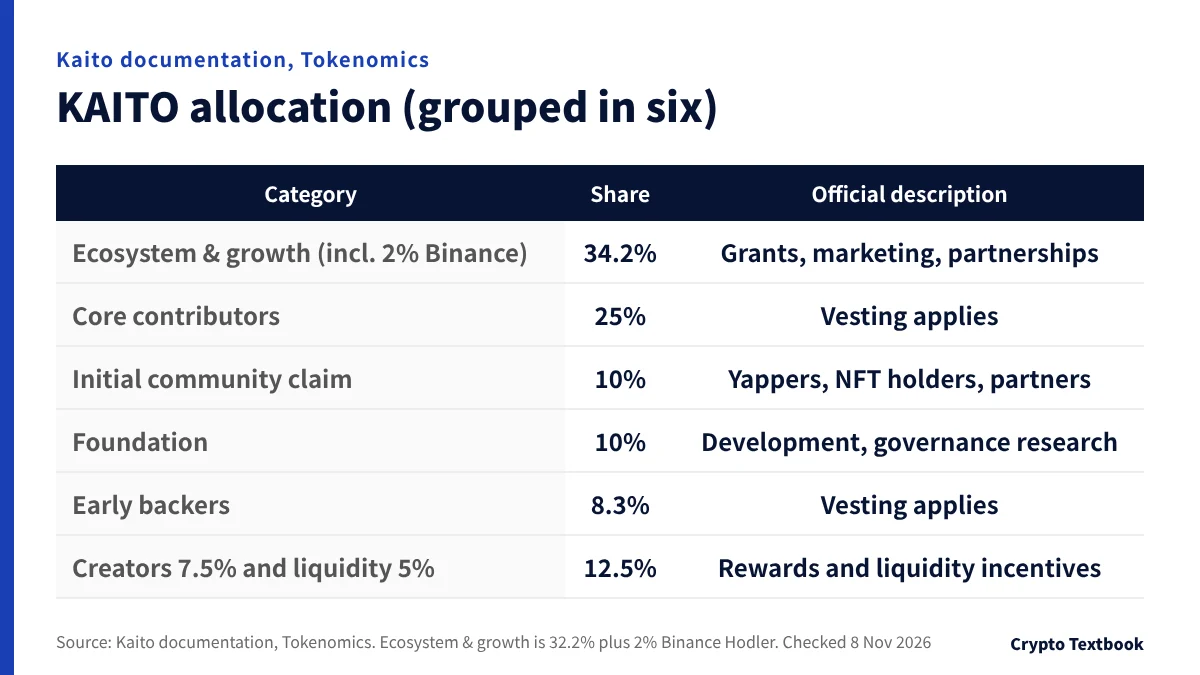
The documentation shows the KAITO allocation in eight items. It says 56.67% is for the community and ecosystem. The five items add up to 56.7%, a rounding difference.
| Category | Share | Official description |
|---|---|---|
| Ecosystem & Network Growth | 32.2% | Grants, marketing, incentives and other uses that drive adoption |
| Binance Hodler | 2% | Strengthening ties between the Binance and Kaito communities |
| Initial Community & Ecosystem Claim | 10% | Early Yapper community, Genesis NFT holders and partners |
| Long-term Creator Incentives | 7.5% | Long-term rewards, first on X and later on other platforms |
| Liquidity Incentives | 5% | Rewards for staking and liquidity provision |
| Foundation | 10% | Core development, governance research and strategy |
| Core Contributors | 25% | For core contributors, with vesting (staged unlocking) |
| Early Backers | 8.3% | For seed and Series A investors, with vesting |
※ The official descriptions are summarized in our own words.
The unlock schedule appears in the documentation as an image chart. The horizontal axis runs from February 2025 to January 2029, and the vertical axis goes up to 1 billion.
In the chart, the core contributors' and early backers' allocations start unlocking around February 2026. As of November 2026, unlocks continue until January 2029.
As unlocks proceed, more tokens can circulate. We cannot predict the effect on prices. Read the official schedule as a way to understand who holds the tokens.
Risks before you buy: mix-ups, fake tokens, unlocks and regulation
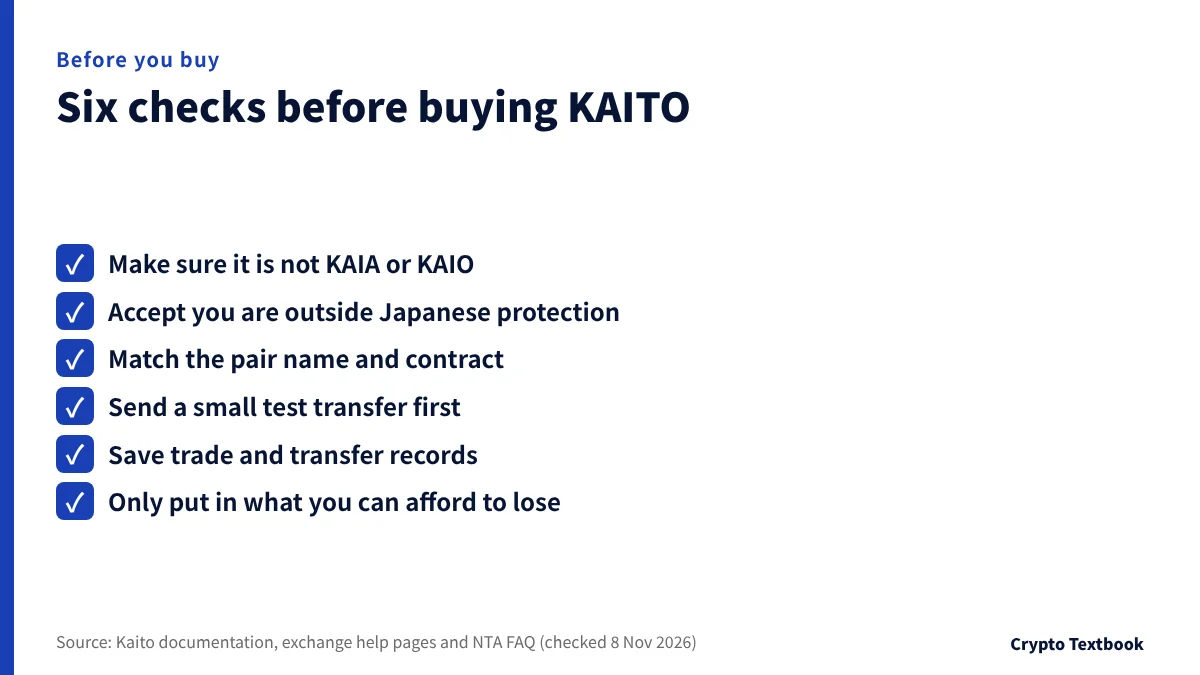
Start from the premise that prices swing widely and that you are buying outside Japan's system. Then check name mix-ups, fakes and growing supply against official information.
| Risk | How to check |
|---|---|
| Price swings | Prices move sharply and can fall below what you paid. Use only money you can afford to lose |
| Outside Japanese protection and JVCEA review | If an overseas exchange fails or a dispute arises, Japanese rules such as segregation and trust do not protect you |
| Mix-ups with KAIA and KAIO, and same-name tokens | Match the name, ticker and contract |
| Fake sites and fake airdrops | Open sites only from the official documentation's external links (kaito.ai, pro.kaito.ai, X @kaitoai) |
| Future unlocks | Core contributors, early backers, the foundation and others unlock in stages until January 2029 under the schedule |
| Dependence on outside platforms | The documentation says creator allocation starts on X. If that platform changes its policy, the premise could change |
| Little information on the issuer | We found no legal name for the issuer on the official website or in the documentation |
| Delisting and regulatory change | Read each exchange's notices and terms. At BingX, KAIO-USDT is suspended (status 0) |
The documentation has no contract address, so we show the value from MEXC's official API: "0x98d0baa52b2D063E780DE12F615f963Fe8537553". On a Base public RPC it returned the name KAITO, 18 decimals and a total supply of 1 billion.
On the withdrawal screen, check that the first and last characters of the address match. If a different value appears, it may be another token.
If a site promising a free distribution (airdrop) asks you to connect a wallet or give an approval, check that you opened it from an official external link. An approval hands over the authority to move your assets.
Our verdict: where the line falls on buying KAITO
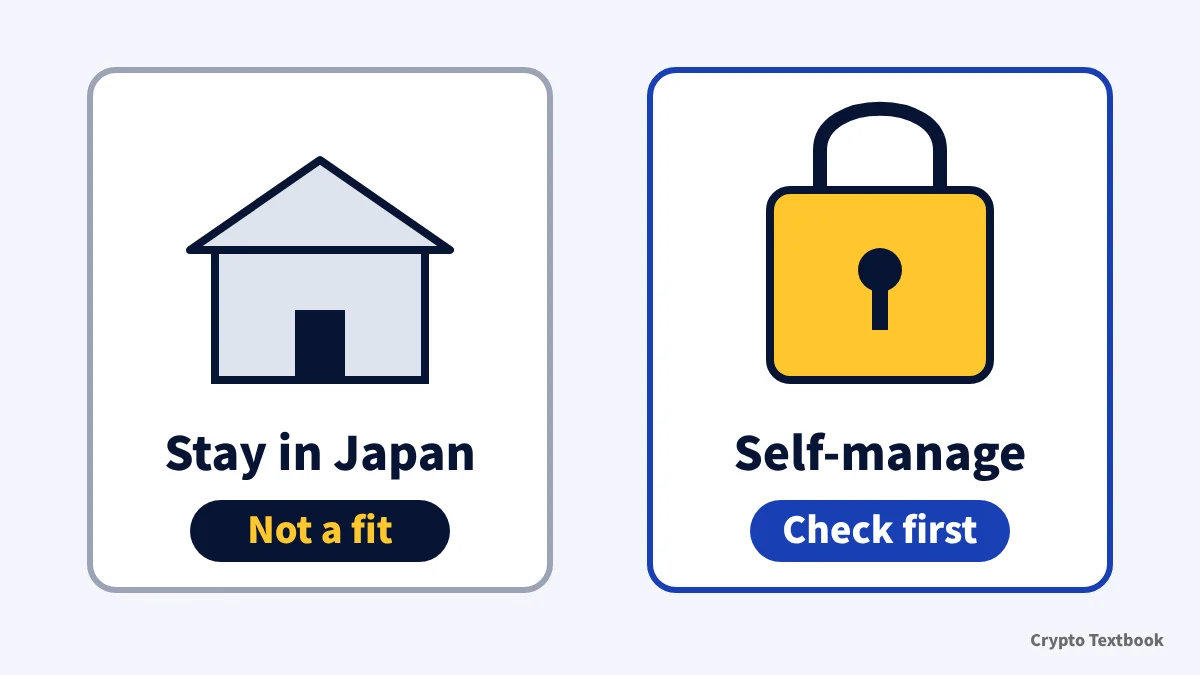
If you want to stay inside Japanese registered exchanges and yen, KAITO is unlikely to fit. If you can manage an overseas account, transfers and tax records yourself, test the flow with a small transfer before you decide.
- If you are looking for KAIA, which is listed in Japan, this article is not about that coin
- If you want low fees, compare MEXC's spot market, where the maker fee is 0%
- At any exchange, try one deposit and one withdrawal with a small amount first
This is a summary of facts confirmed from primary sources on 8 November 2026. It does not recommend buying KAITO. Our advertising relationships are described on the advertising and risk disclosure page.
Frequently asked questions
Q. Where can I buy KAITO?
A. You can buy it on the spot markets of MEXC, BingX and Bitunix. The pairs are KAITO/USDT and KAITO/USDC at MEXC, and KAITO/USDT at BingX and Bitunix. We checked the official APIs on 8 November 2026. You cannot buy with yen; you buy with USDT or another crypto-asset.
Q. Can I buy KAITO at a Japanese exchange?
A. Within what we checked on 8 November 2026, we found no Japanese exchange that offers it. KAITO is not on the FSA list (27 providers as of 30 September) or the JVCEA list (113 assets, updated 2 November). If handling starts, the JVCEA notices will show it.
Q. Are KAITO and KAIA the same?
A. No. KAITO is the token of Kaito, an AI information service. KAIA is the crypto-asset of the Kaia blockchain. Four JVCEA members handle KAIA in Japan.
Q. Can I buy KAITO with a credit card?
A. BingX's official page describes buying USDT with Visa or Mastercard. You then swap the USDT for KAITO on the KAITO/USDT spot market. Check the buy screen in the app for the payment methods available from Japan.
Q. What is the KAITO contract address?
A. We could not find it in the official documentation. MEXC's official API shows "0x98d0baa52b2D063E780DE12F615f963Fe8537553" (checked 8 November 2026). A Base public RPC also returned it as KAITO. It is for checking that a token is genuine, not a destination for transfers.
Q. What is the total supply of KAITO?
A. The official documentation does not state a total supply. Querying the contract shown by MEXC's API on a Base public RPC gave 1,000,000,000 (1 billion) KAITO on 8 November 2026. The allocation is in eight items in the Tokenomics page of the documentation.
Q. How do I cash out KAITO to yen?
A. Swap KAITO to USDT at the overseas exchange, switch to a crypto-asset a Japanese exchange handles, send it and sell it for yen there. Before sending, check which coins and networks the Japanese exchange accepts.
Q. Is tax due on KAITO profits?
A. Yes. The NTA classifies profits from crypto-asset trading in principle as miscellaneous income. Buying KAITO with USDT is an exchange and also counts for calculating gains and losses (FAQ 1-3).
Sources
- Kaito official documentation | What is Kaito, Why InfoFi, Kaito Pro, Capital Launchpad, Studio and Introducing $KAITO (checked 8 November 2026) →
- Kaito official documentation | Tokenomics and Token Release Schedule (checked 8 November 2026) →
- Kaito official documentation | Terms of Use (Yaps by Kaito, operator and the clause on same-name tokens, checked 8 November 2026) →
- Kaito official website (kaito.ai, checked 8 November 2026) →
- Base public RPC (mainnet.base.org) | Query of the KAITO contract (total supply and decimals, 8 November 2026) →
- MEXC official API | defaultSymbols and exchangeInfo (KAITOUSDT, KAITOUSDC, KAIAUSDT, KAIOUSDT, retrieved 8 November 2026 07:43 JST) →
- BingX official API | Spot symbols, 24-hour ticker and recent trades (KAITO-USDT, KAIA-USDT and KAIO-USDT, retrieved 8 November 2026) →
- Bitunix official API | Spot pair list (kaitousdt and kaiausdt, retrieved 8 November 2026) →
- BingX | How to buy KAITO (official page, checked 8 November 2026) →
- BingX | Fee schedule (deposits and withdrawals, checked 3 November 2026) →
- BingX Academy | How to Deposit Crypto with BingX (deposit steps, checked 3 November 2026) →
- BingX | KYC Benefits and Advantages at Different Levels (help centre, published 7 June 2024, checked 7 November 2026) →
- Bitunix | What to Do If Your Bitunix Deposit Is Not Credited (help centre, updated 17 September 2026, checked 4 November 2026) →
- Bitunix | How to Deposit Crypto on Bitunix (help centre, checked 4 November 2026) →
- Financial Services Agency of Japan | Registered crypto-asset exchange service providers (as of 30 September 2026, 27 providers, checked 7 November 2026) →
- e-Gov Law Search | Payment Services Act (Articles 63-2 and 63-11, checked 7 November 2026) →
- Japan Virtual and Crypto assets Exchange Association (JVCEA) | Crypto-assets handled by members and overview documents (updated 2 November 2026, 113 assets, including the KAIA document, checked 8 November 2026) →
- Public APIs of registered Japanese exchanges (bitbank, GMO Coin, Coincheck, BitTrade, OKJ) and SBI VC Trade crypto list (retrieved 8 November 2026) →
- National Tax Agency of Japan | Tax treatment of crypto-assets (FAQ) 1-1, 1-3 and 2-2 (26 December 2025, checked 7 November 2026) →
- National Tax Agency of Japan | Tax Answer No.1524 Taxation of profits from using crypto-assets (checked 7 November 2026) →
FX Textbook is an independent information site, not an exchange or a provider of personal investment advice. Crypto-asset trading involves risk: price volatility, liquidation of leveraged positions, transfer mistakes and the operational risk of exchanges and service providers can cause you to lose some or all of your invested capital. No result is guaranteed.
NEXT STEP
Check MEXC, BingX and Bitunix fees and transfers on our exchange pages.
We list the official information we have confirmed. Compare fees and operator details before you sign up.
Exchanges related to this column
Fees, leverage, funding options and current offers are on each exchange page.